Windows/ubuntu海康威视工业相机vs+opencv+c++
基本思想:vs开发环境下通过opencv调用海康威视工业相机SDK,做图像采集。
1、配置VS环境
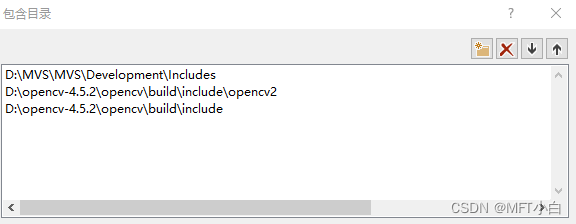
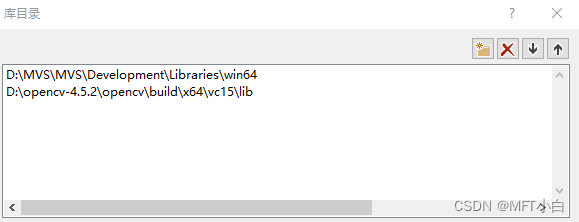
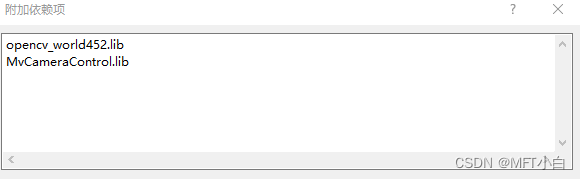
2、修改的地方:
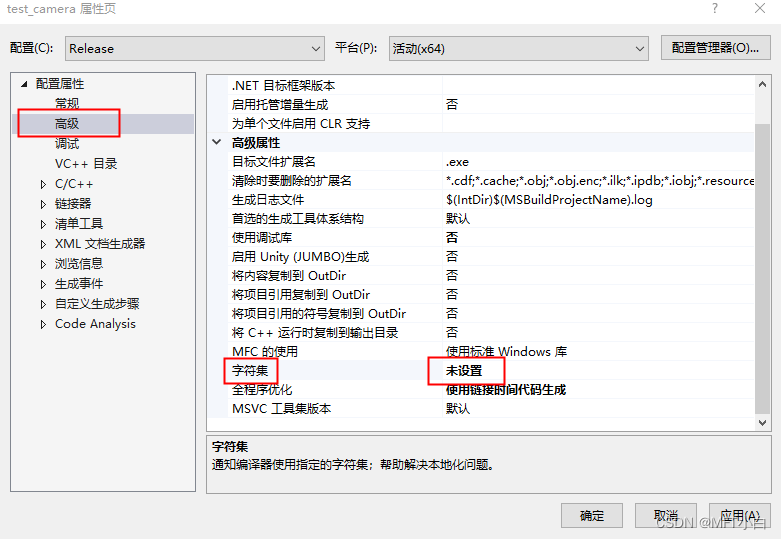
一开始官方例程中会报错"const char"类型的实参与"LPCWSTR"类型的形参不兼容和不能将"const char"类型的值分配到"LPCWSTR"类型的实体,解决办法如下:
项目——项目属性——常规——项目默认值——字符集,把字符集设为未设置,确定。
VS2022: 项目——项目属性——高级——字符集,把字符集设为未设置,确定。
3、编码
#include
#include
#include
#include "windows.h"
#include "MvCameraControl.h"HWND g_hwnd = NULL;
bool g_bExit = false;
unsigned int g_nPayloadSize = 0;// ch:等待按键输入 | en:Wait for key press
void WaitForKeyPress(void)
{while (!_kbhit()){Sleep(10);}_getch();
}bool PrintDeviceInfo(MV_CC_DEVICE_INFO* pstMVDevInfo)
{if (NULL == pstMVDevInfo){printf("The Pointer of pstMVDevInfo is NULL!\n");return false;}if (pstMVDevInfo->nTLayerType == MV_GIGE_DEVICE){int nIp1 = ((pstMVDevInfo->SpecialInfo.stGigEInfo.nCurrentIp & 0xff000000) >> 24);int nIp2 = ((pstMVDevInfo->SpecialInfo.stGigEInfo.nCurrentIp & 0x00ff0000) >> 16);int nIp3 = ((pstMVDevInfo->SpecialInfo.stGigEInfo.nCurrentIp & 0x0000ff00) >> 8);int nIp4 = (pstMVDevInfo->SpecialInfo.stGigEInfo.nCurrentIp & 0x000000ff);// ch:打印当前相机ip和用户自定义名字 | en:print current ip and user defined nameprintf("CurrentIp: %d.%d.%d.%d\n", nIp1, nIp2, nIp3, nIp4);printf("UserDefinedName: %s\n\n", pstMVDevInfo->SpecialInfo.stGigEInfo.chUserDefinedName);}else if (pstMVDevInfo->nTLayerType == MV_USB_DEVICE){printf("UserDefinedName: %s\n", pstMVDevInfo->SpecialInfo.stUsb3VInfo.chUserDefinedName);printf("Serial Number: %s\n", pstMVDevInfo->SpecialInfo.stUsb3VInfo.chSerialNumber);printf("Device Number: %d\n\n", pstMVDevInfo->SpecialInfo.stUsb3VInfo.nDeviceNumber);}else{printf("Not support.\n");}return true;
}LRESULT CALLBACK WndProc(HWND hWnd, UINT msg, WPARAM wParam, LPARAM lParam)
{switch (msg){case WM_DESTROY:PostQuitMessage(0);g_hwnd = NULL;break;}return DefWindowProc(hWnd, msg, wParam, lParam);
}static  unsigned int __stdcall CreateRenderWindow(void* pUser)
{HINSTANCE hInstance = ::GetModuleHandle(NULL);              //获取应用程序的模块句柄WNDCLASSEX wc;wc.cbSize = sizeof(wc);wc.style = CS_HREDRAW | CS_VREDRAW;              //窗口的风格wc.cbClsExtra = 0;wc.cbWndExtra = 0;wc.hInstance = hInstance;wc.hIcon = ::LoadIcon(NULL, IDI_APPLICATION);    //图标风格wc.hIconSm = ::LoadIcon(NULL, IDI_APPLICATION);wc.hbrBackground = (HBRUSH)(COLOR_WINDOW + 1);          //背景色wc.hCursor = ::LoadCursor(NULL, IDC_ARROW);        //鼠标风格wc.lpfnWndProc = WndProc;                              //自定义消息处理函数wc.lpszMenuName = NULL;wc.lpszClassName = "RenderWindow";                       //该窗口类的名称if (!RegisterClassEx(&wc)){return 0;}DWORD style = WS_OVERLAPPEDWINDOW;DWORD styleEx = WS_EX_APPWINDOW | WS_EX_WINDOWEDGE;RECT rect = { 0, 0, 640, 480 };AdjustWindowRectEx(&rect, style, false, styleEx);HWND hWnd = CreateWindowEx(styleEx, "RenderWindow", "Display", style, 0, 0,rect.right - rect.left, rect.bottom - rect.top, NULL, NULL, hInstance, NULL);if (hWnd == NULL){return 0;}::UpdateWindow(hWnd);::ShowWindow(hWnd, SW_SHOW);g_hwnd = hWnd;MSG msg = { 0 };while (msg.message != WM_QUIT){if (PeekMessage(&msg, 0, 0, 0, PM_REMOVE)){TranslateMessage(&msg);DispatchMessage(&msg);}}return 0;
}static  unsigned int __stdcall WorkThread(void* pUser)
{int nRet = MV_OK;MV_FRAME_OUT_INFO_EX stImageInfo = { 0 };MV_DISPLAY_FRAME_INFO stDisplayInfo = { 0 };unsigned char* pData = (unsigned char*)malloc(sizeof(unsigned char) * (g_nPayloadSize));if (pData == NULL){return 0;}unsigned int nDataSize = g_nPayloadSize;while (1){nRet = MV_CC_GetOneFrameTimeout(pUser, pData, nDataSize, &stImageInfo, 1000);if (nRet == MV_OK){printf("Get One Frame: Width[%d], Height[%d], nFrameNum[%d]\n",stImageInfo.nWidth, stImageInfo.nHeight, stImageInfo.nFrameNum);if (g_hwnd){stDisplayInfo.hWnd = g_hwnd;stDisplayInfo.pData = pData;stDisplayInfo.nDataLen = stImageInfo.nFrameLen;stDisplayInfo.nWidth = stImageInfo.nWidth;stDisplayInfo.nHeight = stImageInfo.nHeight;stDisplayInfo.enPixelType = stImageInfo.enPixelType;MV_CC_DisplayOneFrame(pUser, &stDisplayInfo);}}else{printf("No data[0x%x]\n", nRet);}if (g_bExit){break;}}free(pData);return 0;
}int main()
{int nRet = MV_OK;void* handle = NULL;do{// ch:枚举设备 | en:Enum deviceMV_CC_DEVICE_INFO_LIST stDeviceList = { 0 };nRet = MV_CC_EnumDevices(MV_GIGE_DEVICE | MV_USB_DEVICE, &stDeviceList);if (MV_OK != nRet){printf("Enum Devices fail! nRet [0x%x]\n", nRet);break;}if (stDeviceList.nDeviceNum > 0){for (unsigned int i = 0; i < stDeviceList.nDeviceNum; i++){printf("[device %d]:\n", i);MV_CC_DEVICE_INFO* pDeviceInfo = stDeviceList.pDeviceInfo[i];if (NULL == pDeviceInfo){break;}PrintDeviceInfo(pDeviceInfo);}}else{printf("Find No Devices!\n");break;}printf("Please Input camera index:");unsigned int nIndex = 0;scanf_s("%d", &nIndex);if (nIndex >= stDeviceList.nDeviceNum){printf("Input error!\n");break;}// ch:选择设备并创建句柄 | en:Select device and create handlenRet = MV_CC_CreateHandle(&handle, stDeviceList.pDeviceInfo[nIndex]);if (MV_OK != nRet){printf("Create Handle fail! nRet [0x%x]\n", nRet);break;}// ch:打开设备 | en:Open devicenRet = MV_CC_OpenDevice(handle);if (MV_OK != nRet){printf("Open Device fail! nRet [0x%x]\n", nRet);break;}// ch:探测网络最佳包大小(只对GigE相机有效) | en:Detection network optimal package size(It only works for the GigE camera)if (stDeviceList.pDeviceInfo[nIndex]->nTLayerType == MV_GIGE_DEVICE){int nPacketSize = MV_CC_GetOptimalPacketSize(handle);if (nPacketSize > 0){nRet = MV_CC_SetIntValue(handle, "GevSCPSPacketSize", nPacketSize);if (nRet != MV_OK){printf("Warning: Set Packet Size fail nRet [0x%x]!", nRet);}}else{printf("Warning: Get Packet Size fail nRet [0x%x]!", nPacketSize);}}// ch:设置触发模式为off | en:Set trigger mode as offnRet = MV_CC_SetEnumValue(handle, "TriggerMode", 0);if (MV_OK != nRet){printf("Set Trigger Mode fail! nRet [0x%x]\n", nRet);break;}// ch:获取数据包大小 | en:Get payload sizeMVCC_INTVALUE stParam = { 0 };nRet = MV_CC_GetIntValue(handle, "PayloadSize", &stParam);if (MV_OK != nRet){printf("Get PayloadSize fail! nRet [0x%x]\n", nRet);break;}g_nPayloadSize = stParam.nCurValue;unsigned int nThreadID = 0;void* hCreateWindow = (void*)_beginthreadex(NULL, 0, CreateRenderWindow, handle, 0, &nThreadID);if (NULL == hCreateWindow){break;}// ch:开始取流 | en:Start grab imagenRet = MV_CC_StartGrabbing(handle);if (MV_OK != nRet){printf("Start Grabbing fail! nRet [0x%x]\n", nRet);break;}nThreadID = 0;void* hThreadHandle = (void*)_beginthreadex(NULL, 0, WorkThread, handle, 0, &nThreadID);if (NULL == hThreadHandle){break;}printf("Press a key to stop grabbing.\n");WaitForKeyPress();g_bExit = true;WaitForSingleObject(hThreadHandle, INFINITE);CloseHandle(hThreadHandle);// ch:停止取流 | en:Stop grab imagenRet = MV_CC_StopGrabbing(handle);if (MV_OK != nRet){printf("Stop Grabbing fail! nRet [0x%x]\n", nRet);break;}// ch:关闭设备 | Close devicenRet = MV_CC_CloseDevice(handle);if (MV_OK != nRet){printf("ClosDevice fail! nRet [0x%x]\n", nRet);break;}// ch:销毁句柄 | Destroy handlenRet = MV_CC_DestroyHandle(handle);if (MV_OK != nRet){printf("Destroy Handle fail! nRet [0x%x]\n", nRet);break;}} while (0);if (nRet != MV_OK){if (handle != NULL){MV_CC_DestroyHandle(handle);handle = NULL;}}printf("Press a key to exit.\n");WaitForKeyPress();return 0;
}
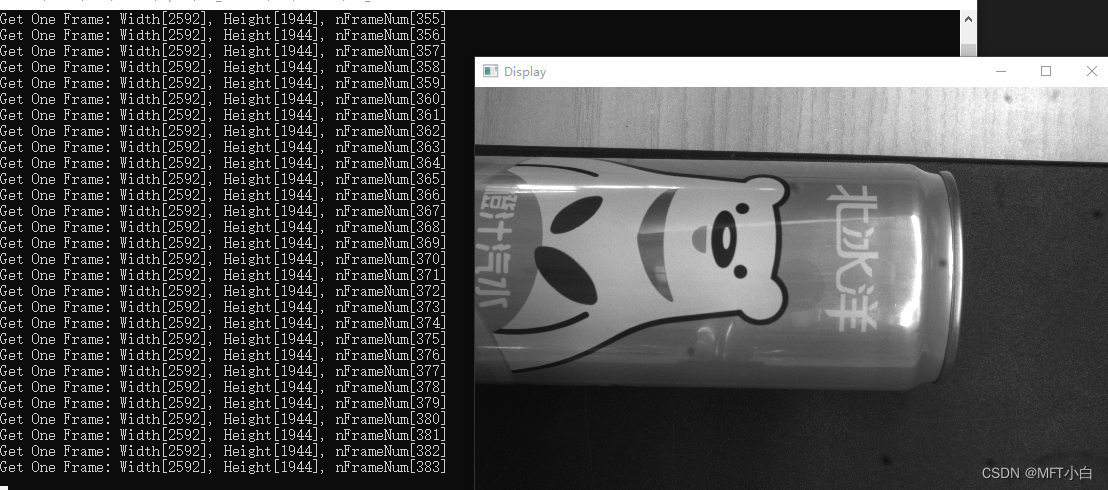
————————————————分割线————————————————————
以上代码适用于windows系统,再加一个ubuntu系统。
MVS在ubuntu安装完毕,默认是在/opt/MVS/bin目录下,这里笔者将该目录下include头文件和lib动态库复制到项目下。
CMakeLists.txt
cmake_minimum_required(VERSION 3.16)
project(test_cam)set(CMAKE_CXX_STANDARD 14)find_package(OpenCV REQUIRED)
include_directories(${OpenCV_INCLUDE_DIRS})
# 添加头文件路径
include_directories(${CMAKE_SOURCE_DIR})
include_directories(${CMAKE_SOURCE_DIR}/include)add_executable(test_cam main.cpp)add_library(libmvs SHARED IMPORTED)set_target_properties(libmvs PROPERTIES IMPORTED_LOCATION ${CMAKE_SOURCE_DIR}/lib/libMvCameraControl.so)target_link_libraries(test_cam ${OpenCV_LIBS} libmvs)
#include
#include
#include
#include #include "MvCameraControl.h"
#include "opencv2/opencv.hpp"bool printDeviceInfo(MV_CC_DEVICE_INFO* hk_device);
bool hk2cv(MV_FRAME_OUT_INFO_EX* hk_imginfo, unsigned char* data, cv::Mat& src_img);using namespace std;
int main(int argv, char** argc) {//1.获取SDK版本信息unsigned int sdk_V = MV_CC_GetSDKVersion();printf("SDK version is [0x%x]\n", sdk_V);//2.查找目标设备int ret = MV_OK;void* handle = NULL;MV_CC_DEVICE_INFO_LIST hk_devices;memset(&hk_devices, 0, sizeof(MV_CC_DEVICE_INFO_LIST));ret = MV_CC_EnumDevices(MV_GIGE_DEVICE | MV_USB_DEVICE, &hk_devices);if (ret != MV_OK) {std::cout << "enum devices faild!" << std::endl;return -1;}std::cout << "共检测到相机的个数为:" << hk_devices.nDeviceNum << std::endl;//3.判断设备是否可访问if (hk_devices.nDeviceNum > 0){for (unsigned int i = 0; i < hk_devices.nDeviceNum; i++){printf("[device %d]:\n", i);MV_CC_DEVICE_INFO* pDeviceInfo = hk_devices.pDeviceInfo[i];bool access = MV_CC_IsDeviceAccessible(pDeviceInfo, 1);if (!access) {printf("[device %d]:could not access... nRet:[0x%x]\n", i, ret);}else {printf("[device %d]:is OK... nRet:[0x%x]\n", i, ret);}}}else{printf("Find No Devices!\n");return -1;}if (hk_devices.nDeviceNum > 0) {MV_CC_DEVICE_INFO* hk_camera = hk_devices.pDeviceInfo[0];if (printDeviceInfo(hk_camera) == false) {return -1;}}else {std::cout << "no device found" << std::endl;return -1;}//4.创建相机句柄ret = MV_CC_CreateHandle(&handle, hk_devices.pDeviceInfo[0]);if (ret != MV_OK) {return -1;}//5.打开设备ret = MV_CC_OpenDevice(handle);if (ret != MV_OK) {cout << "设备未打开" << endl;return -1;}else {std::cout << "设备已经打开" << std::endl;}//6.设置触发模式为offret = MV_CC_SetEnumValue(handle, "TriggerMode", 0);if (ret != MV_OK) {return -1;}//7.获取数据包的大小MVCC_INTVALUE hk_param;memset(&hk_param, 0, sizeof(MVCC_INTVALUE));ret = MV_CC_GetIntValue(handle, "PayloadSize", &hk_param);if (ret != MV_OK) {return -1;}unsigned int payload_size = hk_param.nCurValue;// load config//ret = MV_CC_FeatureLoad(handle, "FeatureFile.ini");//if (ret != MV_OK) {// cout << "loading config file faild" << endl;// return -1;//}// save config//ret = MV_CC_FeatureSave(handle, "FeatureFile.ini");//if (ret != MV_OK) {// return -1;//}//8.开始截流ret = MV_CC_StartGrabbing(handle);if (ret != MV_OK) {cout << "grab image failed!" << endl;return -1;}MV_FRAME_OUT_INFO_EX hk_imginfo;memset(&hk_imginfo, 0, sizeof(MV_FRAME_OUT_INFO_EX));unsigned char* data = (unsigned char*)malloc(sizeof(unsigned char) * (payload_size));if (data == NULL) {return -1;}cv::Mat src_img;// windows// while (!(_kbhit() && _getch() == 0x1b)) {// ubuntuwhile (true) {ret = MV_CC_GetOneFrameTimeout(handle, data, payload_size, &hk_imginfo, 1000);if (ret != MV_OK) {free(data);data = NULL;return -1;}if (hk2cv(&hk_imginfo, data, src_img) == false) {continue;}cv::imshow("test", src_img);cv::waitKey(30);}//9.停止截流ret = MV_CC_StopGrabbing(handle);if (ret != MV_OK) {return -1;}//10.关闭设备ret = MV_CC_CloseDevice(handle);if (ret != MV_OK) {return -1;}//11.销毁相机句柄ret = MV_CC_DestroyHandle(handle);if (ret != MV_OK) {return -1;}system("pause");return 0;
}bool printDeviceInfo(MV_CC_DEVICE_INFO* hk_device) {if (NULL == hk_device){printf("The Pointer of hk_device is NULL!\n");return false;}if (hk_device->nTLayerType == MV_GIGE_DEVICE){int nIp1 = ((hk_device->SpecialInfo.stGigEInfo.nCurrentIp & 0xff000000) >> 24);int nIp2 = ((hk_device->SpecialInfo.stGigEInfo.nCurrentIp & 0x00ff0000) >> 16);int nIp3 = ((hk_device->SpecialInfo.stGigEInfo.nCurrentIp & 0x0000ff00) >> 8);int nIp4 = (hk_device->SpecialInfo.stGigEInfo.nCurrentIp & 0x000000ff);// print current ip and user defined nameprintf("CurrentIp: %d.%d.%d.%d\n", nIp1, nIp2, nIp3, nIp4);printf("UserDefinedName: %s\n\n", hk_device->SpecialInfo.stGigEInfo.chUserDefinedName);}else if (hk_device->nTLayerType == MV_USB_DEVICE){printf("UserDefinedName: %s\n", hk_device->SpecialInfo.stUsb3VInfo.chUserDefinedName);printf("Serial Number: %s\n", hk_device->SpecialInfo.stUsb3VInfo.chSerialNumber);printf("Device Number: %d\n\n", hk_device->SpecialInfo.stUsb3VInfo.nDeviceNumber);}else{printf("Not support.\n");}return true;
}bool hk2cv(MV_FRAME_OUT_INFO_EX* hk_imginfo, unsigned char* data, cv::Mat& src_img) {cv::Mat cv_img;if (hk_imginfo->enPixelType == PixelType_Gvsp_Mono8) {cv_img = cv::Mat(hk_imginfo->nHeight, hk_imginfo->nWidth, CV_8UC1, data);}else if (hk_imginfo->enPixelType == PixelType_Gvsp_RGB8_Packed) {for (unsigned int j = 0; j < hk_imginfo->nHeight; j++) {for (unsigned int i = 0; i < hk_imginfo->nWidth; i++) {unsigned char red = data[j * (hk_imginfo->nWidth * 3) + i * 3];data[j * (hk_imginfo->nWidth * 3) + i * 3] = data[j * (hk_imginfo->nWidth * 3) + i * 3 + 2];data[j * (hk_imginfo->nWidth * 3) + i * 3 + 2] = red;}}cv_img = cv::Mat(hk_imginfo->nHeight, hk_imginfo->nWidth, CV_8UC3, data);}else {printf("unsupported pixel format\n");return false;}if (cv_img.data == NULL) {return false;}cv_img.copyTo(src_img);return true;
} 修改的地方:
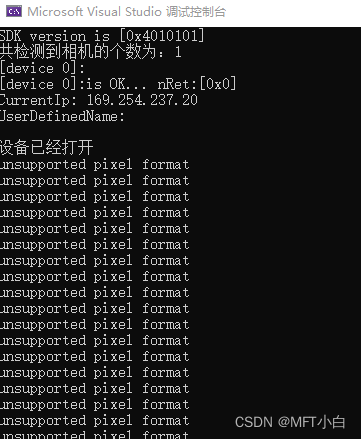
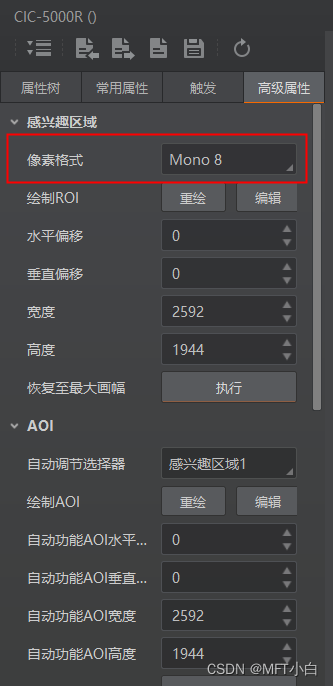
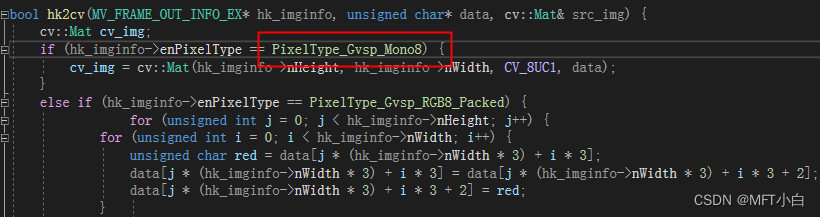
如果出现以下不支持的像素报错,需要在MVS中查看一下相机的像素格式,在代码中对应位置修改一下即可。
测试结果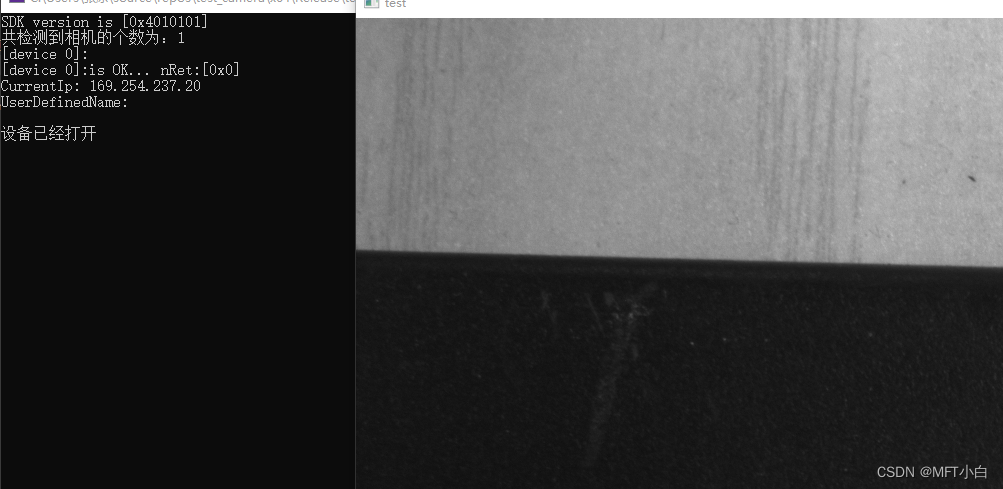
参考文章:
1. 海康威视工业相机SDK二次开发(VS+Opencv+QT+海康SDK+C++)(一)
2. C++下OPENCV驱动调用海康GigE工业相机
本文来自互联网用户投稿,文章观点仅代表作者本人,不代表本站立场,不承担相关法律责任。如若转载,请注明出处。 如若内容造成侵权/违法违规/事实不符,请点击【内容举报】进行投诉反馈!