SpringBoot中使用Thymeleaf进行页面的跳转和值传递
SpringBoot中引入Thymleaf技术
1、pom.xml中导入依赖
<dependency><groupId>net.sourceforge.nekohtmlgroupId><artifactId>nekohtmlartifactId><version>1.9.22version>dependency><dependency><groupId>org.springframework.bootgroupId><artifactId>spring-boot-starter-thymeleafartifactId>dependency>2、application.yml
server:port: 9999
spring:thymeleaf:# 默认的页面返回路径public static final String DEFAULT_PREFIX = "classpath:/templates/";# public static final String DEFAULT_SUFFIX = ".html";# 具体路径根据实际情况而定prefix: classpath:/templates/suffix: .htmlcache: falsemode: LEGACYHTML5application:name: springboot-thymeleaf
#thymeleaf end
具体 thymeleaf 能设置的属性 可以查看 类ThymeleafProperties
3、测试接口
package com.test.controller;import org.springframework.stereotype.Controller;
import org.springframework.ui.Model;
import org.springframework.util.StringUtils;
import org.springframework.web.bind.annotation.PostMapping;
import org.springframework.web.bind.annotation.RequestMapping;
import org.springframework.web.servlet.ModelAndView;import java.util.ArrayList;
import java.util.List;@Controller
@RequestMapping("login")
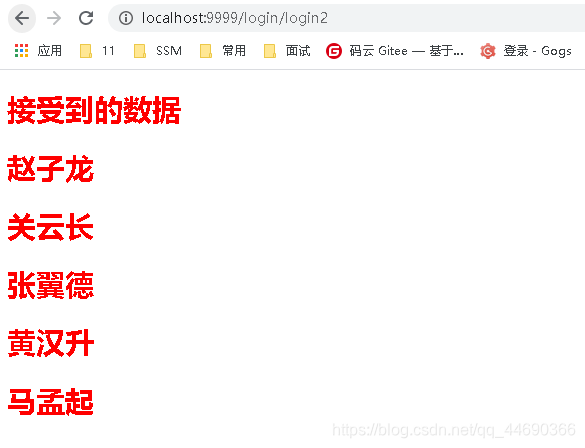
public class LoginController {//使用Model@PostMapping("login1")public String login(Model model,String username , String password){List<String> list = new ArrayList<>();list.add("赵云");list.add("关羽");list.add("张飞");list.add("黄忠");list.add("马超");model.addAttribute("msg",list);return "index";}//使用ModelAndView@PostMapping("login2")@PostMapping("login2")public ModelAndView login(String username , String password){ModelAndView mav = new ModelAndView("index");if(StringUtils.isEmpty(username)){mav.addObject("msg", "用户名不能为空");return mav;}if(StringUtils.isEmpty(password)){mav.addObject("msg","密码不能为空");return mav;}if("admin".equals(username) && "admin".equals(password)){List<String> list = new ArrayList<>();list.add("赵子龙");list.add("关云长");list.add("张翼德");list.add("黄汉升");list.add("马孟起");mav.addObject("msg",list);return mav;}else{mav.addObject("msg","用户名或者密码错误");return mav;}}
}
4、login页面
需要引入thymeleaf的命名空间
如果引入的js,css文件不起作用,需要使用以下方式
<link th:href="@{/css/bootstrap.min.css}" rel="stylesheet" type="text/css" />
<script type="text/javascript" th:src="@{/js/jquery.js}">script>
<html lang="en" xmlns:th="https://www.thymeleaf.org">
<head><meta charset="UTF-8"><title>登录title>
head>
<body>
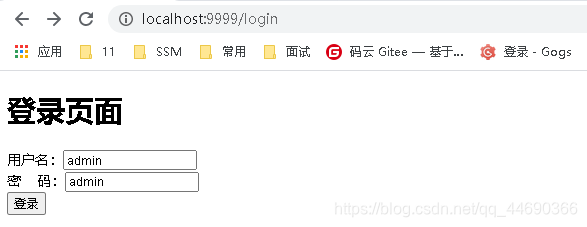
<h1>登录页面h1>
<form action="/login/login" method="post">用户名:<br>密    码:<br><button type="submit">登录button>
form>
body>
html>
5、跳转的index页面
<html lang="en" xmlns:th="https://www.thymeleaf.org">
<head><meta charset="UTF-8"><title>测试title><link rel="stylesheet" href="/css/bootstrap/style.css"/>
head>
<body>
<h1>测试页面h1>
<div th:each="item : ${msg}"><h1 th:text="${{item}}">h1>
div>
body>
html>
6、前端部分目录结构

登录页面
跳转页面
本文来自互联网用户投稿,文章观点仅代表作者本人,不代表本站立场,不承担相关法律责任。如若转载,请注明出处。 如若内容造成侵权/违法违规/事实不符,请点击【内容举报】进行投诉反馈!