【SpringBoot应用篇】接入微信支付
接入微信支付
- 微信支付介绍
- 微信扫码支付申请
- 开发文档
- 微信支付SDK
- 微信支付开发
- 依赖
- 添加配置
- 工具类
- 显示二维码
- 支付查询
- 微信退款
学习尚医通项目做的笔记

微信支付介绍
微信扫码支付申请
微信扫码支付是商户系统按微信支付协议生成支付二维码,用户再用微信“扫一扫”完成支付的模式。该模式适用于PC网站支付、实体店单品或订单支付、媒体广告支付等场景。
申请步骤:
- 注册公众号(类型须为:服务号)
- 认证公众号
- 提交资料申请微信支付
- 开户成功,登录商户平台进行验证
- 在线签署协议
开发文档
微信支付接口调用的整体思路:按API要求组装参数,以XML方式发送(POST)给微信支付接口(URL),微信支付接口也是以XML方式给予响应。程序根据返回的结果(其中包括支付URL)生成二维码或判断订单状态。
在线微信支付开发文档:
https://pay.weixin.qq.com/wiki/doc/api/index.html

- appid:微信公众账号或开放平台APP的唯一标识
- mch_id:商户号 (配置文件中的partner)
- partnerkey:商户密钥
- sign:数字签名, 根据微信官方提供的密钥和一套算法生成的一个加密信息, 就是为了保证交易的安全性
微信支付SDK

添加依赖
<dependency><groupId>com.github.wxpaygroupId><artifactId>wxpay-sdkartifactId><version>0.0.3version>
dependency>
我们主要会用到微信支付SDK的以下功能:
1.获取随机字符串
WXPayUtil.generateNonceStr()
2.MAP转换为XML字符串(自动添加签名)
WXPayUtil.generateSignedXml(param, partnerkey)
3.XML字符串转换为MAP
WXPayUtil.xmlToMap(result)
微信支付开发
开发模式:
模式一:商户在后台给你生成二维码,用户打开扫一扫
模式二:商户后台系统调用微信支付【统一下单API】生成预付交易,将接口返回的链接生成二维码,用户扫码后输入密码完成支付交易。注意:该模式的预付单有效期为2小时,过期后无法支付。
依赖
<dependency><groupId>org.springframework.bootgroupId><artifactId>spring-boot-starter-webartifactId>
dependency>

<dependency><groupId>com.github.wxpaygroupId><artifactId>wxpay-sdkartifactId><version>0.0.3version>
dependency>

<dependency><groupId>org.apache.httpcomponentsgroupId><artifactId>httpclientartifactId>
dependency>

<dependency><groupId>org.springframework.bootgroupId><artifactId>spring-boot-starter-thymeleafartifactId>
dependency>
添加配置
在application.properties中添加商户信息
#rabbitmq地址
spring.rabbitmq.host=192.168.158.128
spring.rabbitmq.port=5672
spring.rabbitmq.username=user
spring.rabbitmq.password=passwordspring.redis.host=192.168.158.128
spring.redis.port=6379
spring.redis.database= 0
spring.redis.timeout=1800000
spring.redis.lettuce.pool.max-active=20
spring.redis.lettuce.pool.max-wait=-1
#最大阻塞等待时间(负数表示没限制)
spring.redis.lettuce.pool.max-idle=5
spring.redis.lettuce.pool.min-idle=0#关联的公众号appid
weixin.appid=xxxxxxx
#商户号
weixin.partner=xxxxxxxx
#商户key
weixin.partnerkey=xxxxxxxxx
工具类
@Component
public class ConstantPropertiesUtils implements InitializingBean {@Value("${weixin.appid}")private String appid;@Value("${weixin.partner}")private String partner;@Value("${weixin.partnerkey}")private String partnerkey;public static String APPID;public static String PARTNER;public static String PARTNERKEY;@Overridepublic void afterPropertiesSet() throws Exception {APPID = appid;PARTNER = partner;PARTNERKEY = partnerkey;}
}
http请求客户端,需要调用微信接口。返回结果

import org.apache.http.Consts;
import org.apache.http.HttpEntity;
import org.apache.http.NameValuePair;
import org.apache.http.client.ClientProtocolException;
import org.apache.http.client.entity.UrlEncodedFormEntity;
import org.apache.http.client.methods.*;
import org.apache.http.conn.ssl.SSLConnectionSocketFactory;
import org.apache.http.conn.ssl.SSLContextBuilder;
import org.apache.http.conn.ssl.TrustStrategy;
import org.apache.http.entity.StringEntity;
import org.apache.http.impl.client.CloseableHttpClient;
import org.apache.http.impl.client.HttpClients;
import org.apache.http.message.BasicNameValuePair;
import org.apache.http.ssl.SSLContexts;
import org.apache.http.util.EntityUtils;import javax.net.ssl.SSLContext;
import java.io.File;
import java.io.FileInputStream;
import java.io.IOException;
import java.security.KeyStore;
import java.security.cert.CertificateException;
import java.security.cert.X509Certificate;
import java.text.ParseException;
import java.util.HashMap;
import java.util.LinkedList;
import java.util.List;
import java.util.Map;/*** http请求客户端** @author qy**/
public class HttpClient {private String url;private Map<String, String> param;private int statusCode;private String content;private String xmlParam;private boolean isHttps;private boolean isCert = false;//证书密码 微信商户号(mch_id)private String certPassword;public boolean isHttps() {return isHttps;}public void setHttps(boolean isHttps) {this.isHttps = isHttps;}public boolean isCert() {return isCert;}public void setCert(boolean cert) {isCert = cert;}public String getXmlParam() {return xmlParam;}public void setXmlParam(String xmlParam) {this.xmlParam = xmlParam;}public HttpClient(String url, Map<String, String> param) {this.url = url;this.param = param;}public HttpClient(String url) {this.url = url;}public String getCertPassword() {return certPassword;}public void setCertPassword(String certPassword) {this.certPassword = certPassword;}public void setParameter(Map<String, String> map) {param = map;}public void addParameter(String key, String value) {if (param == null)param = new HashMap<String, String>();param.put(key, value);}public void post() throws ClientProtocolException, IOException {HttpPost http = new HttpPost(url);setEntity(http);execute(http);}public void put() throws ClientProtocolException, IOException {HttpPut http = new HttpPut(url);setEntity(http);execute(http);}public void get() throws ClientProtocolException, IOException {if (param != null) {StringBuilder url = new StringBuilder(this.url);boolean isFirst = true;for (String key : param.keySet()) {if (isFirst)url.append("?");elseurl.append("&");url.append(key).append("=").append(param.get(key));}this.url = url.toString();}HttpGet http = new HttpGet(url);execute(http);}/*** set http post,put param*/private void setEntity(HttpEntityEnclosingRequestBase http) {if (param != null) {List<NameValuePair> nvps = new LinkedList<NameValuePair>();for (String key : param.keySet())nvps.add(new BasicNameValuePair(key, param.get(key))); // 参数http.setEntity(new UrlEncodedFormEntity(nvps, Consts.UTF_8)); // 设置参数}if (xmlParam != null) {http.setEntity(new StringEntity(xmlParam, Consts.UTF_8));}}private void execute(HttpUriRequest http) throws ClientProtocolException,IOException {CloseableHttpClient httpClient = null;try {if (isHttps) {if(isCert) {//TODO 需要完善FileInputStream inputStream = new FileInputStream(new File(ConstantPropertiesUtils.CERT));KeyStore keystore = KeyStore.getInstance("PKCS12");char[] partnerId2charArray = certPassword.toCharArray();keystore.load(inputStream, partnerId2charArray);SSLContext sslContext = SSLContexts.custom().loadKeyMaterial(keystore, partnerId2charArray).build();SSLConnectionSocketFactory sslsf =new SSLConnectionSocketFactory(sslContext,new String[] { "TLSv1" },null,SSLConnectionSocketFactory.BROWSER_COMPATIBLE_HOSTNAME_VERIFIER);httpClient = HttpClients.custom().setSSLSocketFactory(sslsf).build();} else {SSLContext sslContext = new SSLContextBuilder().loadTrustMaterial(null, new TrustStrategy() {// 信任所有public boolean isTrusted(X509Certificate[] chain,String authType)throws CertificateException {return true;}}).build();SSLConnectionSocketFactory sslsf = new SSLConnectionSocketFactory(sslContext);httpClient = HttpClients.custom().setSSLSocketFactory(sslsf).build();}} else {httpClient = HttpClients.createDefault();}CloseableHttpResponse response = httpClient.execute(http);try {if (response != null) {if (response.getStatusLine() != null)statusCode = response.getStatusLine().getStatusCode();HttpEntity entity = response.getEntity();// 响应内容content = EntityUtils.toString(entity, Consts.UTF_8);}} finally {response.close();}} catch (Exception e) {e.printStackTrace();} finally {httpClient.close();}}public int getStatusCode() {return statusCode;}public String getContent() throws ParseException, IOException {return content;}
}
显示二维码
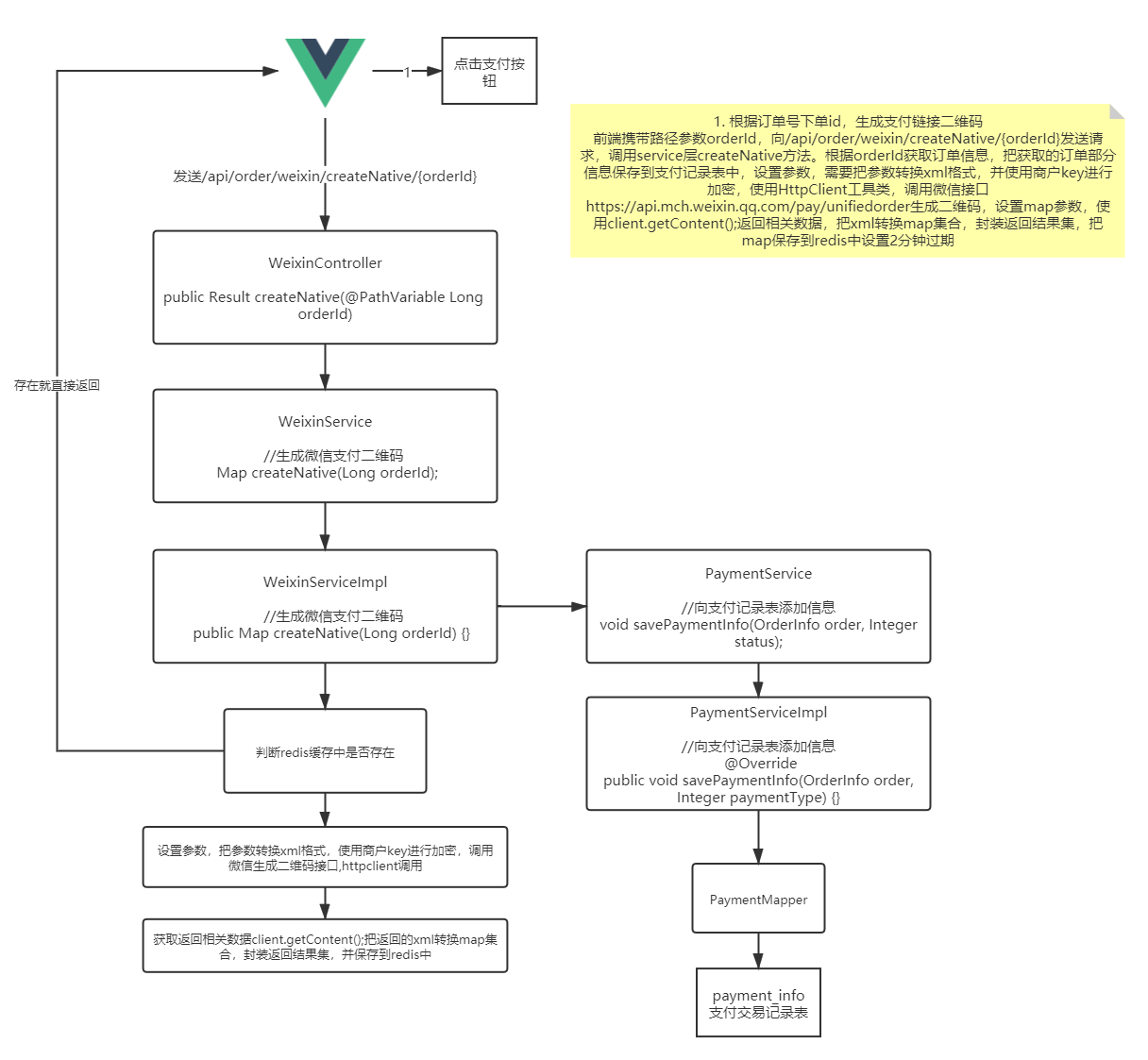
核心代码
//生成微信支付二维码
@Controller
@RequestMapping("/api/wx")
public class WxController {/*** 生成订单号* @return*/public static String getOrderNo() {SimpleDateFormat sdf = new SimpleDateFormat("yyyyMMddHHmmss");String newDate = sdf.format(new Date());String result = "";Random random = new Random();for (int i = 0; i < 3; i++) {result += random.nextInt(10);}return newDate + result;}/*** 元转换成分* @param amount* @return*/public static String getMoney(String amount) {if(amount==null){return "";}// 金额转化为分为单位// 处理包含, ¥ 或者$的金额String currency =  amount.replaceAll("\\$|\\¥|\\,", "");int index = currency.indexOf(".");int length = currency.length();Long amLong = 0l;if(index == -1){amLong = Long.valueOf(currency+"00");}else if(length - index >= 3){amLong = Long.valueOf((currency.substring(0, index+3)).replace(".", ""));}else if(length - index == 2){amLong = Long.valueOf((currency.substring(0, index+2)).replace(".", "")+0);}else{amLong = Long.valueOf((currency.substring(0, index+1)).replace(".", "")+"00");}return amLong.toString();}@GetMapping("/pay")public String createNative(Model model) {try {String orderNo = getOrderNo();String price = "1";//3设置参数,//把参数转换xml格式,使用商户key进行加密Map paramMap = new HashMap();paramMap.put("appid", ConstantPropertiesUtils.APPID);paramMap.put("mch_id", ConstantPropertiesUtils.PARTNER);paramMap.put("nonce_str", WXPayUtil.generateNonceStr());paramMap.put("body", "微信支付测试");//主体信息paramMap.put("out_trade_no",orderNo);//paramMap.put("total_fee", order.getAmount().multiply(new BigDecimal("100")).longValue()+"");paramMap.put("total_fee", price); //为了测试,统一写成这个值paramMap.put("spbill_create_ip", "127.0.0.1");//项目的域名paramMap.put("notify_url", "http://guli.shop/api/order/weixinPay/weixinNotify");//回调地址paramMap.put("trade_type", "NATIVE");//生成二维码的类型//4 调用微信生成二维码接口,httpclient调用HttpClient client = new HttpClient("https://api.mch.weixin.qq.com/pay/unifiedorder");//设置map参数//设置xml格式的参数//把xml格式的数据加密client.setXmlParam(WXPayUtil.generateSignedXml(paramMap,ConstantPropertiesUtils.PARTNERKEY));client.setHttps(true);client.post();//5.得到发送请求返回结果//返回内容,是使用xml格式返回String xml = client.getContent();//转换map集合Map<String, String> resultMap = WXPayUtil.xmlToMap(xml);System.out.println("resultMap:"+resultMap);//6 封装返回结果集Map map = new HashMap<>();map.put("orderId", orderNo);map.put("totalFee", price);map.put("resultCode", resultMap.get("result_code"));map.put("codeUrl", resultMap.get("code_url")); //二维码地址ObjectMapper objectMapper = new ObjectMapper();String sMap = objectMapper.writeValueAsString(map);model.addAttribute("map",sMap);return "pay";} catch (Exception e) {e.printStackTrace();return null;}}
}

页面显示
DOCTYPE html>
<html xmlns="http://www.w3.org/1999/xhtml" xmlns:th="http://www.thymeleaf.org">
<head><meta charset="UTF-8"><title>支付页面title><script th:src="@{https://cdn.bootcdn.net/ajax/libs/qrcodejs/1.0.0/qrcode.js}">script><script th:src="@{https://cdn.bootcdn.net/ajax/libs/jquery/3.6.0/jquery.js}">script>
head><body><center><div id="qrcode">div>center>
body>
<script th:inline="javascript">var results = [[${map}]];var parse = JSON.parse(results);new QRCode(document.getElementById("qrcode"), parse.codeUrl);  // 设置要生成二维码的链接// 使用定时器每三秒查询一次是否支付成功let timer =self.setInterval("querystatus()",3000);function querystatus() {$.get(`/api/wx/queryOrder/${parse.orderId}`,function(data,status){if (data==="支付中"){console.log("支付中");} else {clearInterval(int)window.location.href="/api/wx/success"}})}
script>
html>
支付查询
核心代码
@GetMapping("queryOrder/{orderNo}")@ResponseBodypublic String queryPayStatus(@PathVariable String orderNo) throws Exception{//1 封装提交参数Map paramMap = new HashMap();//公众账号IDparamMap.put("appid", ConstantPropertiesUtils.APPID);//商户号paramMap.put("mch_id", ConstantPropertiesUtils.PARTNER);//商户订单号paramMap.put("out_trade_no", orderNo);//随机字符串paramMap.put("nonce_str", WXPayUtil.generateNonceStr());//2 设置请求内容HttpClient client = new HttpClient("https://api.mch.weixin.qq.com/pay/orderquery");client.setXmlParam(WXPayUtil.generateSignedXml(paramMap,ConstantPropertiesUtils.PARTNERKEY));client.setHttps(true);client.post();//3 得到微信接口返回数据String xml = client.getContent();Map<String, String> resultMap = WXPayUtil.xmlToMap(xml);System.out.println("支付状态resultMap:"+resultMap);//5 把接口数据返回//4.判断是否支付成功if("SUCCESS".equals(resultMap.get("trade_state"))) {//支付成功//更新订单状态/*改变数据库中的数据等操作*/return "支付成功";}return "支付中";}
使用定时器每三秒查询一次是否支付成功

let timer =self.setInterval("querystatus()",3000);function querystatus() {$.get(`/api/wx/queryOrder/${parse.orderId}`,function(data,status){if (data==="支付中"){console.log("支付中");} else {clearInterval(int)window.location.href="/api/wx/success"}})}

微信退款
@Overridepublic Boolean refund(Long orderId) {try {//获取支付记录信息PaymentInfo paymentInfo = paymentService.getPaymentInfo(orderId, PaymentTypeEnum.WEIXIN.getStatus());//添加信息到退款记录表RefundInfo refundInfo = refundInfoService.saveRefundInfo(paymentInfo);//判断当前订单数据是否已经退款if(refundInfo.getRefundStatus().intValue() == RefundStatusEnum.REFUND.getStatus().intValue()) {return true;}//调用微信接口实现退款//封装需要参数Map<String,String> paramMap = new HashMap<>();paramMap.put("appid",ConstantPropertiesUtils.APPID);       //公众账号IDparamMap.put("mch_id",ConstantPropertiesUtils.PARTNER);   //商户编号paramMap.put("nonce_str",WXPayUtil.generateNonceStr());paramMap.put("transaction_id",paymentInfo.getTradeNo()); //微信订单号paramMap.put("out_trade_no",paymentInfo.getOutTradeNo()); //商户订单编号paramMap.put("out_refund_no","tk"+paymentInfo.getOutTradeNo()); //商户退款单号
//       paramMap.put("total_fee",paymentInfoQuery.getTotalAmount().multiply(new BigDecimal("100")).longValue()+"");
//       paramMap.put("refund_fee",paymentInfoQuery.getTotalAmount().multiply(new BigDecimal("100")).longValue()+"");paramMap.put("total_fee","1");paramMap.put("refund_fee","1");String paramXml = WXPayUtil.generateSignedXml(paramMap,ConstantPropertiesUtils.PARTNERKEY);//设置调用接口内容HttpClient client = new HttpClient("https://api.mch.weixin.qq.com/secapi/pay/refund");client.setXmlParam(paramXml);client.setHttps(true);//设置证书信息client.setCert(true);client.setCertPassword(ConstantPropertiesUtils.PARTNER);client.post();//接收返回数据String xml = client.getContent();Map<String, String> resultMap = WXPayUtil.xmlToMap(xml);if (null != resultMap && WXPayConstants.SUCCESS.equalsIgnoreCase(resultMap.get("result_code"))) {refundInfo.setCallbackTime(new Date());refundInfo.setTradeNo(resultMap.get("refund_id"));refundInfo.setRefundStatus(RefundStatusEnum.REFUND.getStatus());refundInfo.setCallbackContent(JSONObject.toJSONString(resultMap));refundInfoService.updateById(refundInfo);return true;}return false;} catch (Exception e) {e.printStackTrace();return null;}}
本文来自互联网用户投稿,文章观点仅代表作者本人,不代表本站立场,不承担相关法律责任。如若转载,请注明出处。 如若内容造成侵权/违法违规/事实不符,请点击【内容举报】进行投诉反馈!