POI-TL入门
最近开发过程中接触一些有关word的操作,于是开始学习了POI-TL,翻了翻网上有关POI-TL的介绍还是不少的。
多学多记嘛,毕竟是9年义务教出的好学生 嘛

目录
- 一、什么是POI-TL?
- 二、POI-TL的使用
- 2.1 添加依赖
- 2.2 入门示例
- 2.2.1 添加模板
- 2.2.2 代码
- 2.3 标签
- 2.3.1 文本
- 2.3.1.1 超链接文本
- 2.3.1.2 带样式文本
- 2.3.2 图片
- 2.3.2.1 插入图片
- 2.3.3 表格
- 2.3.4 列表
- 2.3.5 动态表格
一、什么是POI-TL?
POI-TL(poi template language):
java word 的模板引擎 ,对docx格式的文档增加模板语法,简化式处理,支持对段落、页眉、页脚、表格等模板替换
二、POI-TL的使用
2.1 添加依赖
<dependency><groupId>com.deepoove</groupId><artifactId>poi-tl</artifactId><version>1.7.3</version>
</dependency>
2.2 入门示例
在上面2.1添加依赖的基础上,我们还需要执行以下几个步骤:
2.2.1 添加模板
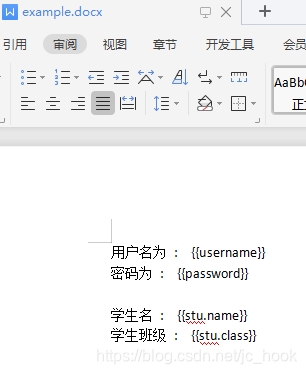
其实就是创建一个word文档用来作为操作的模板,例如:
创建了文档example.docx,内容如下:
2.2.2 代码
以Map类型数据写入,键名需与文档中的标签名一致。(数据也可以是对象)
/*** @author jc_hook* createTime : 2021-05-13*/
public class polTLTest {public static void main(String[] args) throws IOException {//要写入模板的数据Map<String,Object> exampleData = new HashMap<>();exampleData.put("username","admin");exampleData.put("password","123456");//存放Student对象数据Student stu = new Student();stu.setName("jchook");stu.setAge(18);exampleData.put("stu",stu);XWPFTemplate template = XWPFTemplate.compile("E:/example.docx").render(exampleData);//文件输出流FileOutputStream out = new FileOutputStream("E:/example.docx");template.write(out);out.flush();out.close();template.close();}
}
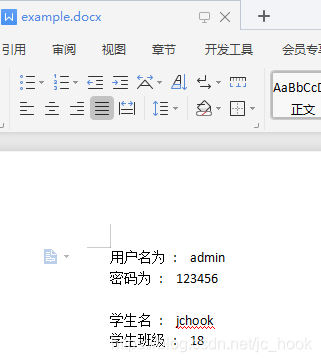
执行效果如下:
2.3 标签
在上面的入门实例中,根据以下这种映射关系将数据写入模板,
| 模板 | 代码 |
|---|---|
| 用户名 : {{username}} | example.put(“username”,“admin”) |
文档中的这种格式就是POI-TL的标签
- 在POI-TL中没有复杂的控制结构和变量赋值,只有标签;
- 标签前后由两个大括号组成
- 标签的内容为:符号+标签名称(符号代表对应的标签类型)
符号与标签类型关系如下:
| 符号 | 标签类型 |
|---|---|
| (无符号,默认) | 文本 |
| @ | 图片 |
| # | 表格 |
| * | 列表 |
下面我再逐一介绍各类型标签的相关使用。

2.3.1 文本
在2.2中已经展示了一般文本的使用,这里就不再赘述。
主要说另外两个文本类型:
超链接文本和有样式的文本
2.3.1.1 超链接文本
/**2. @text : 超链接文本显示的内容3. @url : 链接地址
**/
HyperLinkTextRenderData(String text,String url);
示例:
public static void main(String[] args) throws IOException {//写入模板的数据Map<String,Object> exampleData = new HashMap<>();HyperLinkTextRenderData hyperLinkTextRenderData = new HyperLinkTextRenderData("百度一下","http://baidu.com");exampleData.put("baidu",hyperLinkTextRenderData);XWPFTemplate template = XWPFTemplate.compile("E:/example.docx").render(exampleData);//文件输出流FileOutputStream out = new FileOutputStream("E:/example.docx");template.write(out);out.flush();out.close();template.close();
}
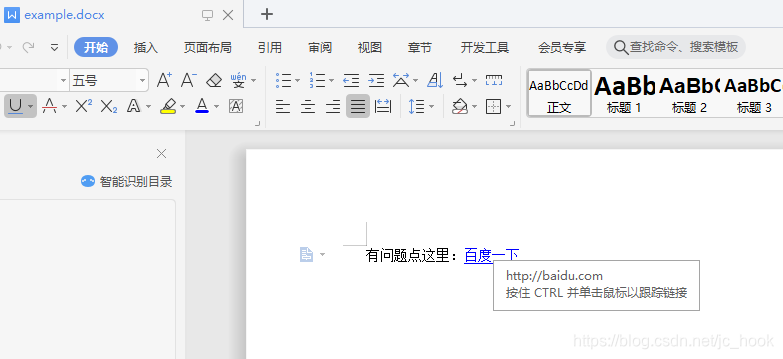
效果:
2.3.1.2 带样式文本
顾名思义,就是带样式的文本。
/**
* @style : 样式
* @text : 文本内容
**/
TextRenderData(com.deepoove.poi.data.style.Style style,String text)//样式
public Class Style{//颜色private String color;//字体private String fontFamily;//字号private int fontSize;//粗体private Boolean isBold;//斜体private Boolean isItalic;//删除线private Boolean isStrike;//下划线private Boolean isUnderLine;//背景色高亮private Enum highlightColor;//字间距private int characterSpacing;
}
示例:
//写入模板的数据
public static void main(String[] args) throws IOException {//写入模板的数据Map<String,Object> exampleData = new HashMap<>();TextRenderData textRenderData = new TextRenderData();//设置样式Style style = new Style();style.setColor("00FFFF");style.setFontSize(18);style.setItalic(true);textRenderData.setStyle(style);//设置文本内容textRenderData.setText("有样式的内容");exampleData.put("text",textRenderData);XWPFTemplate template = XWPFTemplate.compile("E:/example.docx").render(exampleData);//文件输出流FileOutputStream out = new FileOutputStream("E:/example.docx");template.write(out);out.flush();out.close();template.close();}
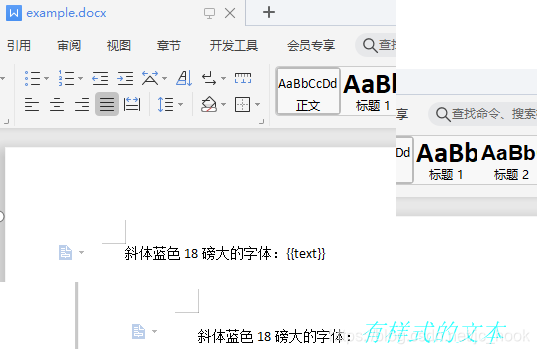
效果:
2.3.2 图片
2.3.2.1 插入图片
选择图片插入模板
/**
* @width : 宽
* @height : 高
* @path : 路径
**/
PictureRenderData(int width, int height, String path)
示例:
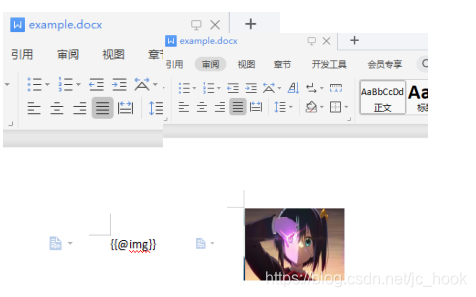
public static void main(String[] args) throws IOException {//写入模板的数据Map<String,Object> exampleData = new HashMap<>();//插入图片exampleData.put("img",new PictureRenderData(140,100,"E:/六花.jpg"));XWPFTemplate template = XWPFTemplate.compile("E:/example.docx").render(exampleData);//文件输出流FileOutputStream out = new FileOutputStream("E:/example.docx");template.write(out);out.flush();out.close();template.close();}
效果
2.3.3 表格
POI-TL默认创建N行N列的表格,支持设置当表格数据为空时的描述内容。
- 行数据
/**
* 行数据
* @cellData:列内容
* */
RowRenderData.build(TextRenderData... cellData);
/**
* 行数据
* @cellStr:列内容
* */
RowRenderData build(String... cellStr);
- 表数据:
/**
* @headers : 表格列标题
* @datas : 表格数据
* */
MiniTableRenderData(RowRenderData headers, List<RowRenderData> datas)
/**
* @datas : 表格数据
* */
MiniTableRenderData(List<RowRenderData> datas)
/**
* 设置无数据时的描述
* @noDatadesc : 无数据时的描述内容
* */
new MiniTableRenderData().setNoDatadesc(String noDatadesc)
- 表格样式
/**
* 设置表格样式
* @style : 样式
* */
new MiniTanleRenderData().setStyle(TableStyle style);public class TableStyle{//背景颜色private String backgroundColor;//表格对齐private Enum align;
}
示例:
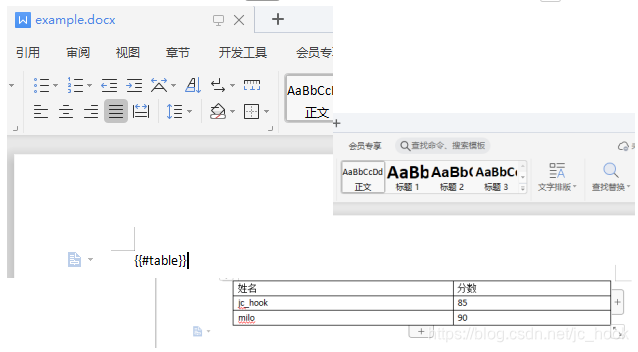
public static void main(String[] args) throws IOException {//写入模板的数据Map<String,Object> exampleData = new HashMap<>();//表格标题RowRenderData rowRenderData = RowRenderData.build(new TextRenderData("000000","姓名"),new TextRenderData("000000","分数"));//表格数据RowRenderData row1 = RowRenderData.build("jc_hook","85");RowRenderData row2 = RowRenderData.build("milo","90");MiniTableRenderData miniTableRenderData = new MiniTableRenderData(rowRenderData, Arrays.asList(row1,row2));//设置无数据时描述miniTableRenderData.setNoDatadesc("当前无数据");exampleData.put("table",miniTableRenderData);XWPFTemplate template = XWPFTemplate.compile("E:/example.docx").render(exampleData);//文件输出流FileOutputStream out = new FileOutputStream("E:/example.docx");template.write(out);out.flush();out.close();template.close();}
}
效果:
2.3.4 列表
/**
* @numbers : 列表数据
* */
NumbericRenderData(List<? extends RenderData> numbers)
示例:
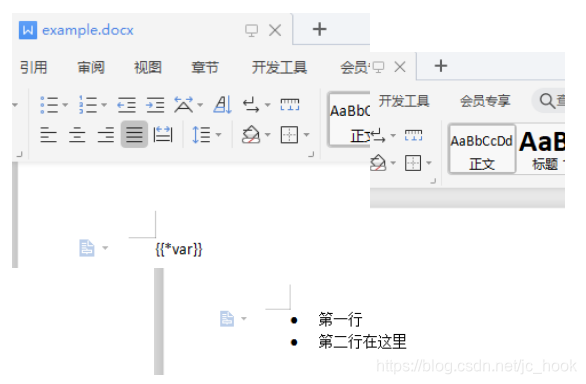
public static void main(String[] args) throws IOException {//写入模板的数据Map<String,Object> exampleData = new HashMap<>();exampleData.put("var",new NumbericRenderData(new ArrayList<TextRenderData>(){{add(new TextRenderData("第一行"));add(new TextRenderData("第二行在这里"));}}));XWPFTemplate template = XWPFTemplate.compile("E:/example.docx").render(exampleData);//文件输出流FileOutputStream out = new FileOutputStream("E:/example.docx");template.write(out);out.flush();out.close();template.close();}
效果:
2.3.5 动态表格
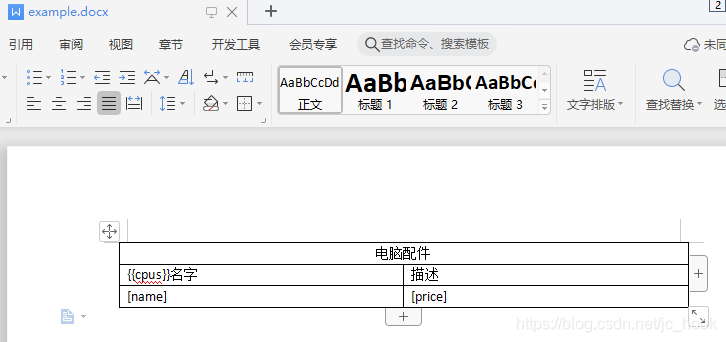
入对象集合时,因为集合的数量是动态变化的,即对应表格的行数是根据集合中的对象数量动态增加的。
使用{{}}标记对象,[]标记对象属性;
示例:
- 模板:
代码:
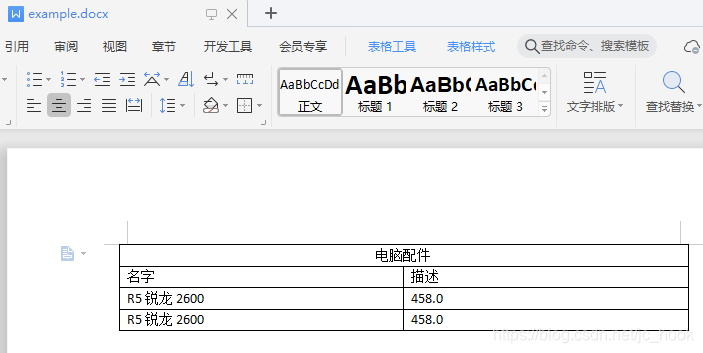
public static void main(String[] args) throws IOException {//写入模板的数据HashMap<String,Object> example = new HashMap<>();List<CPU> cpus = new ArrayList<>();CPU cpu = new CPU();cpu.setName("R5锐龙2600");cpu.setPrice(458);cpus.add(cpu);cpus.add(cpu);example.put("cpus",cpus);HackLoopTableRenderPolicy policy = new HackLoopTableRenderPolicy();Configure configure = Configure.newBuilder().bind("cpus",policy).build();XWPFTemplate template = XWPFTemplate.compile("E:/example.docx",configure).render(example);//文件输出流FileOutputStream out = new FileOutputStream("E:/example.docx");template.write(out);out.flush();out.close();template.close();
}
效果:
本文来自互联网用户投稿,文章观点仅代表作者本人,不代表本站立场,不承担相关法律责任。如若转载,请注明出处。 如若内容造成侵权/违法违规/事实不符,请点击【内容举报】进行投诉反馈!