ionic3自定义组件以及组件间的双向通信
1、在一个项目下创建一个页面Test1Page:ionic g page test1
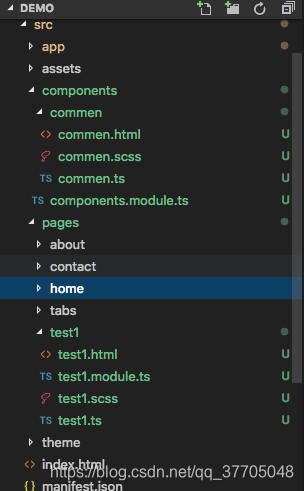
2、创建一个组件commen:ionic g component commen,我们在Test1Page页面中引入组件commen,创建完成后目录如图:
3、在commen.html中,代码如下:
commen.scss中代码:
commen {$overColor: #EF93AD;.checkbox{width: 20px;height: 20px;border: 1px solid #ccc;position: relative;.is-checked{position: absolute;top: 5px;left: 5px;width: 10px;height: 10px;background: #000;border-radius: 50%;}}.is-over{border-color: $overColor;background: $overColor;}
}
commen.ts中:
import { Component, Input, Output, EventEmitter } from '@angular/core';/*** Generated class for the CommenComponent component.** See https://angular.io/api/core/Component for more info on Angular* Components.*/
@Component({selector: 'commen',templateUrl: 'commen.html'
})
export class CommenComponent {@Input() inpData: any; //父组件传入的值@Output() outEvent: EventEmitter = new EventEmitter; //子组件对父组件的通信的值isChecked: boolean;constructor() {console.log('Hello CommenComponent Component');}checkCli(){this.isChecked = !this.isChecked;this.outEvent.emit(this.isChecked);}
}
在app.module.ts中引入组件木块:
import { NgModule, ErrorHandler } from '@angular/core';
import { BrowserModule } from '@angular/platform-browser';
import { IonicApp, IonicModule, IonicErrorHandler } from 'ionic-angular';
import { MyApp } from './app.component';import { AboutPage } from '../pages/about/about';
import { ContactPage } from '../pages/contact/contact';
import { HomePage } from '../pages/home/home';
import { TabsPage } from '../pages/tabs/tabs';import { Test1Page } from '../pages/test1/test1';import { StatusBar } from '@ionic-native/status-bar';
import { SplashScreen } from '@ionic-native/splash-screen';import { ComponentsModule } from '../components/components.module';   //组件模块在这里@NgModule({declarations: [MyApp,AboutPage,ContactPage,HomePage,TabsPage,Test1Page,],imports: [ComponentsModule,  //组件模块在这里BrowserModule,IonicModule.forRoot(MyApp)],bootstrap: [IonicApp],entryComponents: [MyApp,AboutPage,ContactPage,HomePage,TabsPage,Test1Page,],providers: [StatusBar,SplashScreen,{provide: ErrorHandler, useClass: IonicErrorHandler}]
})
export class AppModule {}
在使用的页面Test1Page,test1.html中:
test1 test1.ts中:
import { Component } from '@angular/core';
import { IonicPage, NavController, NavParams } from 'ionic-angular';/*** Generated class for the Test1Page page.** See https://ionicframework.com/docs/components/#navigation for more info on* Ionic pages and navigation.*/@IonicPage()
@Component({selector: 'page-test1',templateUrl: 'test1.html',
})
export class Test1Page {val: any;constructor(public navCtrl: NavController, public navParams: NavParams) {this.val = false;}ionViewDidLoad() {console.log('ionViewDidLoad Test1Page');}test1Event(e){console.log('子组件的点击事件传过来的值',e);}toChildValue(){this.val = !this.val;console.log('当前页面的点击事件改变子组件的值');}
}
test1.module.ts中:
import { NgModule } from '@angular/core';
import { IonicPageModule } from 'ionic-angular';
import { Test1Page } from './test1';
import { ComponentsModule } from '../../components/components.module';@NgModule({declarations: [Test1Page,],imports: [ComponentsModule,IonicPageModule.forChild(Test1Page),],
})
export class Test1PageModule {}
4、当写完这些代码后,我们重启ionic服务,会发现报错,报错如下:
compiler.js:486 Uncaught Error: Template parse errors:
Can't bind to 'ngClass' since it isn't a known property of 'div'. ("
][ngClass]="{'checkbox': true, 'is-over': inpData}" (click)='checkCli()'>]*ngIf='isChecked'>
"): ng:///ComponentsModule/CommenComponent.html@3:28
Property binding ngIf not used by any directive on an embedded template. Make sure that the property name is spelled correctly and all directives are listed in the "@NgModule.declarations". ("
[ERROR ->]
"): ng:///ComponentsModule/CommenComponent.html@3:4at syntaxError (compiler.js:486)at TemplateParser.parse (compiler.js:24674)at JitCompiler._parseTemplate (compiler.js:34629)at JitCompiler._compileTemplate (compiler.js:34604)at compiler.js:34505at Set.forEach ()at JitCompiler._compileComponents (compiler.js:34505)at compiler.js:34375at Object.then (compiler.js:475)at JitCompiler._compileModuleAndComponents (compiler.js:34374)
这是因为我们在组件中使用了*ngIf等指令,当使用这个的时候需要在Module.ts中引入CommonModule
components.module.ts文件代码如下:
import { NgModule } from '@angular/core';
import { CommenComponent } from './commen/commen';
import { CommonModule } from '@angular/common'; //引入angular模块CommonModule
@NgModule({declarations: [CommenComponent],imports: [CommonModule], //引入angular模块CommonModuleexports: [CommenComponent]
})
export class ComponentsModule {}
最后我们重启ionic serve,发现封装的组件可以正常使用了,如图:
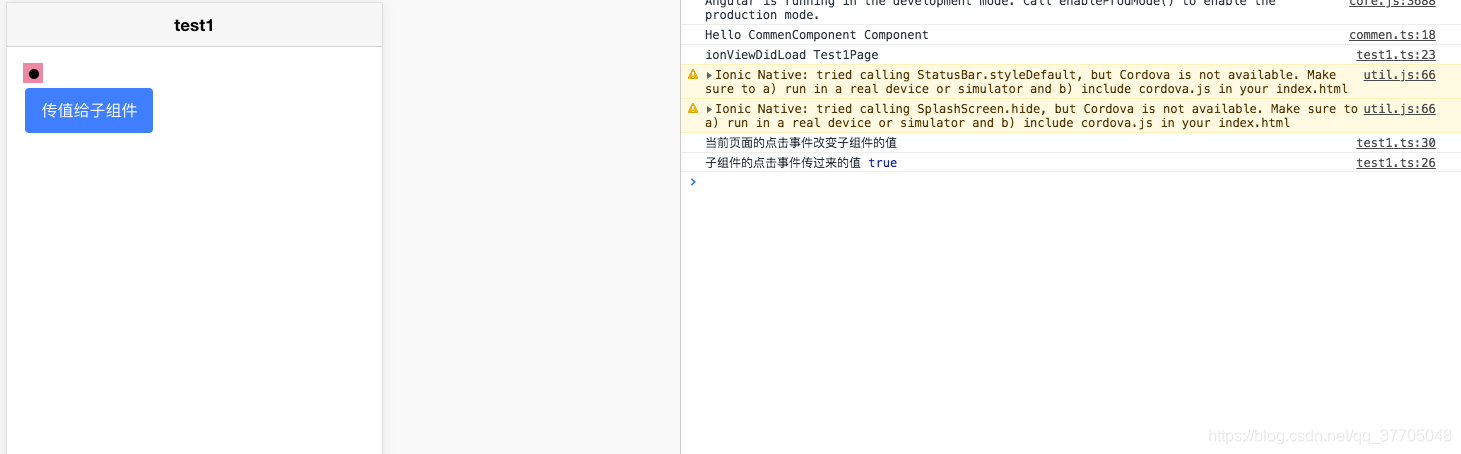
当点击的时候组件之间的通信也能正常通信。
源码demo在码云,链接: https://gitee.com/weijunw/ionic3Demo/tree/master/demo
本文来自互联网用户投稿,文章观点仅代表作者本人,不代表本站立场,不承担相关法律责任。如若转载,请注明出处。 如若内容造成侵权/违法违规/事实不符,请点击【内容举报】进行投诉反馈!