python字符串格式化教你正确打印 : D
文章目录
- 用格式字符%
- 字符串
- 整数
- 浮点数
- format格式化
- print需要注意的地方
- 转义字符
用格式字符%
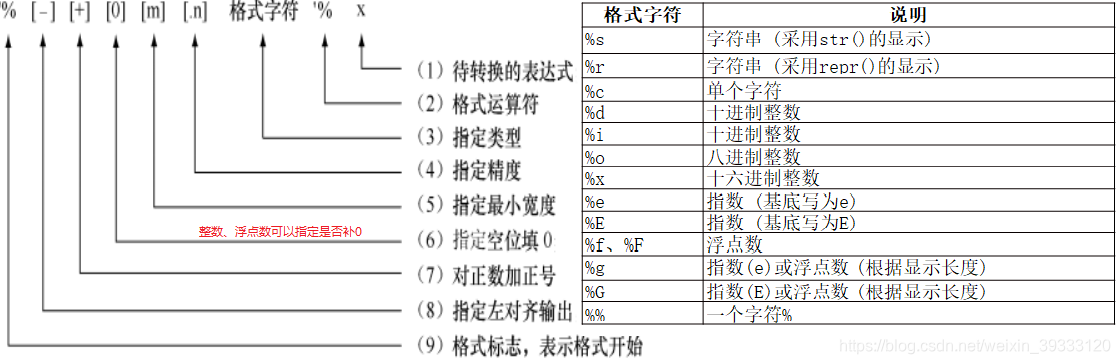
%运算符用来格式化字符串。在字符串内部,%s表示用字符串替换,%d表示用整数替换,有几个%?占位符,后面就跟几个变量或者值,顺序要一一对应。如果只有一个%?,括号可以省略。用%%来表示一个%
举栗子
>>> print('%s'%'hello world')
hello world
>>> print('%s%s'%('hello','hi'))
hellohi
>>> print('%s,%s'%('hello','hi'))
hello,hi
分数据类型说明
字符串
%s直接输出字符串
%20s右对齐,取20位,不够则补位
%-20s左对齐,取20位,不够则补位
%.2s截取2位字符串
%20.2s20位占位符,截取2位字符串
>>> print('%s' % 'hello world')
hello world
>>> print('%20s' % 'hello world')hello world
>>> print('%-20s' % 'hello world')
hello world
>>> print('%020s' % 'hello world')hello world
>>> print('%.2s' % 'hello world')
he
>>> print('%20.2s' % 'hello world')he
>>> print('%-20.2s' % 'hello world')
he
>>>
整数
%o八进制
%d十进制
%x十六进制
%10d右对齐,取10位,不够则补位
%-10d左对齐,取10位,不够则补位
%010d右对齐,取10位,不够则补0
%-010d左对齐,取10位,不够则补0(0不显示)
%+010d右对齐,显示正号,取10位,不够则补0
%-+010d左对齐,显示正号,取10位,不够则补0(0不显示)
>>> print('%d'% 1234)
1234
>>> print('%o'% 1234)
2322
>>> print('%x'% 1234)
4d2
>>> print('%10d'% 1234)1234
>>> print('%-10d'% 1234)
1234
>>> print('%010d'% 1234)
0000001234
>>> print('%-010d'% 1234)
1234
>>> print('%-+010d'% 1234)
+1234
>>> print('%+010d'% 1234)
+000001234
>>> print('%-+010.5d'% 1234)
+01234
>>> print('%-+010.6d'% 1234)
+001234
>>> print('%+010.6d'% 1234)
+000001234
浮点数
%f保留小数点后面六位有效数字
%.3f保留3位小数位
%e保留小数点后面六位有效数字,指数形式输出
%.3e保留3位小数位,使用科学计数法
%g在保证六位有效数字的前提下,使用小数方式,否则使用科学计数法
%.3g保留3位有效数字,使用小数或科学计数法
>>> print('%f' % 1.11)          # 默认保留6位小数
1.110000
>>> print('%.1f' % 1.11)        # 取1位小数
1.1
>>> print('%e' % 1.11)          # 默认6位小数,用科学计数法
1.110000e+00
>>> print('%.3e' % 1.11)        # 取3位小数,用科学计数法
1.110e+00
>>> print('%g' % 1111.1111)     # 默认6位有效数字
1111.11
>>> print('%.7g' % 1111.1111)   # 取7位有效数字
1111.111
>>> print('%.2g' % 1111.1111)   # 取2位有效数字,自动转换为科学计数法
1.1e+03
format格式化
format方法所做的事情就是将参数值替换至格式所在的位置
print('{} was {} years old when he wrote this book'.format(name, age))
- 不带编号,{}
- 带数字编号,可调换顺序{1},{2}
- 带关键字,{a},{b}
>>> print('{} was {} years old when he wrote this book'.format('name', 'age'))
name was age years old when he wrote this book
>>> print('{0} was {1} years old when he wrote this book'.format('name', 'age'))
name was age years old when he wrote this book
>>> print('{1} was {0} years old when he wrote this book'.format('name', 'age'))
age was name years old when he wrote this book
这之中还可以有更详细的格式
# 对于浮点数 '0.333' 保留小数点(.)后三位
print('{0:.3f}'.format(1.0/3))
# 使用下划线填充文本,并保持文字处于中间位置
# 使用 (^) 定义 '___hello___'字符串长度为 11
print('{0:_^11}'.format('hello'))
# 基于关键词输出 'Swaroop wrote A Byte of Python'
print('{name} wrote {book}'.format(name='Swaroop', book='A Byte of Python'))

模板字符串的槽除了包括参数序号,还可以包括格式控制信息 {<参数序号>: <格式控制标记>}
格式控制标记包括:<填充><对齐><宽度>,<.精度><类型>6个字段。

<宽度>指当前槽的设定输出宽度。
如果实际format()参数实际宽度比设定<宽度>大,使用参数实际长度
如果参数实际宽度比设定<宽度>小,则多余的位数默认以空格填充,也可以设置填充符号
>>> print("{0:*>30}".format('hello'))   # 30个字符,右对齐,左边补空格
*************************hello
>>> print("{0:*^30}".format('hello'))   # 30个字符,居中对齐,两边补*
************hello*************
>>> print("{0:*<30}".format('hello'))   # 30个字符,左对齐,右边补*
hello*************************
>>> print("{0:3}".format('hello'))      # 长度小于实际字符数,按实际输出
hello
>>>
<.精度>表示两个含义
对于浮点数,精度表示小数部分输出部分的有效位数
对于字符串,表示输出的最大长度
>>> print("{0:.2f}".format(12345.67890))      # 保留2位小数
12345.68
>>> print("{0:*^20.2f}".format(12345.67890))  # 20个字符长度,居中对齐,两边补*,保留两位小数
******12345.68******
>>> print("{0:.4}".format("hello"))           # 输出4个字符
hell
浮点数类型
e小写字母e的指数形式
E大写字母E的指数形式
f标准形式
%浮点数的百分数形式
>>> print("{0:e},{0:E},{0:f},{0:%}".format(123.456))
1.234560e+02,1.234560E+02,123.456000,12345.600000%
>>> print("{0:.2e},{0:.2E},{0:.2f},{0:.2%}".format(123.456))
1.23e+02,1.23E+02,123.46,12345.60%
print需要注意的地方
print总是会以一个不可见的“新一行”字符(\n)结尾,因此重复调用 print将会在相互独立的一行中分别打印。为防止打印过程中出现这一换行符,你可以通过end指定其应以空白结尾:
print('a', end='')
print('b', end='')
输出
ab
转义字符
反斜杠字符\是一个特殊字符,在字符串中表示转义,即该字符与后面相邻的一个字符组成了新的含义。
\n表示换行,\\表示反斜杠,\’表示单引号
\”表示双引号,\t表示制表符Tab

>>> print("hello\nworld\t世界你好")
hello
world	世界你好
本文来自互联网用户投稿,文章观点仅代表作者本人,不代表本站立场,不承担相关法律责任。如若转载,请注明出处。 如若内容造成侵权/违法违规/事实不符,请点击【内容举报】进行投诉反馈!