Maven配置阿里云仓库支持https
2022年开始,阿里云对以前的maven仓库地址进行升级,由原来的http换成https,所以maven配置和IntelliJ IDEA需要进行对应的一些调整
原来链接:
http://maven.aliyun.com/repository/public
现在链接:
https://maven.aliyun.com/repository/public
maven settings.xml配置
maven settings.xml配置,先加上
<mirrors> <mirror><id>aliyunmavenid><mirrorOf>*mirrorOf><name>阿里云公共仓库name><url>https://maven.aliyun.com/repository/publicurl>mirror> mirrors>
加上profile配置,在IDEA里才能进行profile的选择
<profiles><profile><id>aliyunid><repositories><repository><id>aliyunid><url>https://maven.aliyun.com/repository/publicurl><releases><enabled>trueenabled>releases><snapshots><enabled>trueenabled>snapshots>repository>repositories><pluginRepositories><pluginRepository><id>aliyunid><url>https://maven.aliyun.com/repository/publicurl><releases><enabled>trueenabled>releases><snapshots><enabled>trueenabled>snapshots>pluginRepository>pluginRepositories>profile>profiles><activeProfiles><activeProfile>aliyunactiveProfile> activeProfiles>IDEA配置支持https
在上面的maven settings.xml配置好之后,为了使下载依赖更顺畅,需要在IDEA里,进行设置,选择File->Settings,如图所示,加上配置
-Dmaven.wagon.http.ssl.insecure=true -Dmaven.wagon.http.ssl.allowall=true

继续点击Maven–Runner ,在VM options 中加入配置
-Dmaven.wagon.http.ssl.insecure=true -Dmaven.wagon.http.ssl.allowall=true -Dmaven.wagon.http.ssl.ignore.validity.dates=true
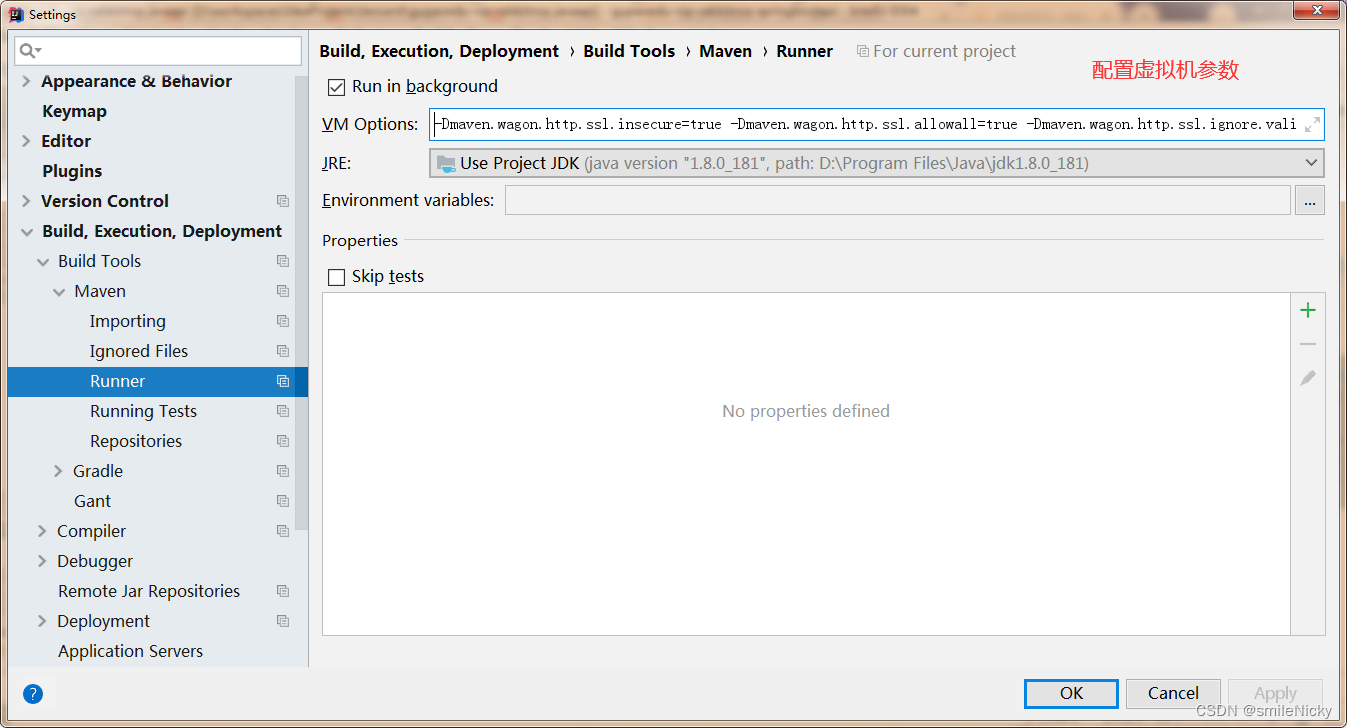
点击Apply,保存配置
本文来自互联网用户投稿,文章观点仅代表作者本人,不代表本站立场,不承担相关法律责任。如若转载,请注明出处。 如若内容造成侵权/违法违规/事实不符,请点击【内容举报】进行投诉反馈!