Linux忘记MySQL密码后修改密码
1、关闭mysql服务
service mysqld stop
2、找到my.cnf配置文件
whereis my.cnf
3、在[mysqld]标签下添加:skip-grant-tables
vim /etc/my.cnf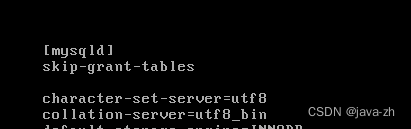
4、启动mysql服务
service mysqld start
5、不用密码登录mysql,执行下面命令以后直接回车
mysql -u root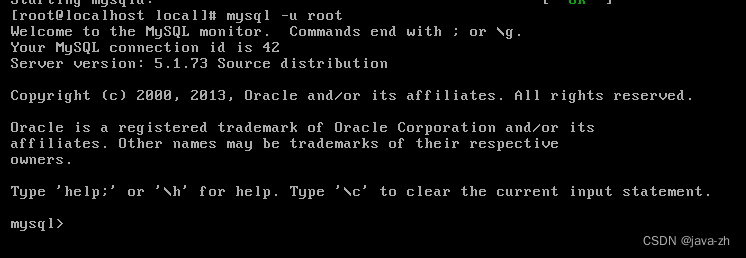
6、使用数据库中的mysql库
use mysql;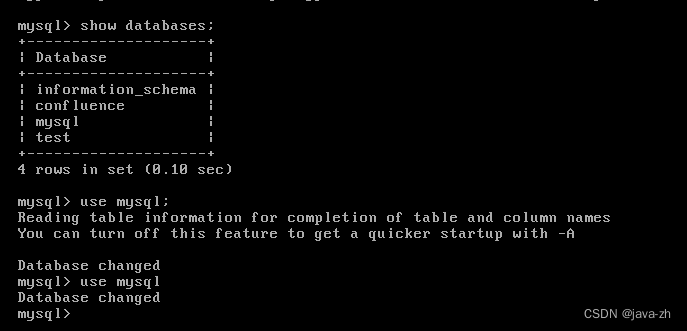
7、执行sql更新密码
update user set password=password('你的新密码') where user='root'; 
注意点:如果上面执行报了没有password字段

那么执行这个,将password替换成authentication_string
update user set authentication_string=password('123456') where user='root';8、刷新
flush privileges;9、修改成功以后退出
exit
9、停止mysql服务
service mysqld stop10、去掉my.cnf里面的skip-grant-tables内容
vim /etc/my.cnf11、启动mysql服务
service mysqld start12、进行登录
mysql -u root -p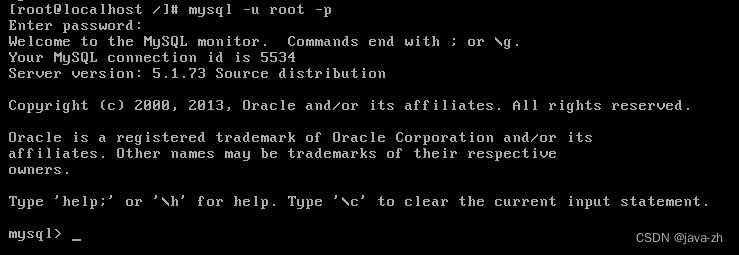
本文来自互联网用户投稿,文章观点仅代表作者本人,不代表本站立场,不承担相关法律责任。如若转载,请注明出处。 如若内容造成侵权/违法违规/事实不符,请点击【内容举报】进行投诉反馈!