使用Navicat连接后数据库密码忘了,密码找回【亲测有效】
在使用Navicat 是都是习惯性的保存了密码,久而久之后 就会忘记数据库密码, 这就很不舒服了
文章目录
- 方式1 php
- 方式2 JAVA方式(下载源码,需要用到java环境java8)
方式1 php
但是,这有个技巧,可以查看navicat 已连接保存的密码
首先去 导出连接
导出连接获取到 connections.ncx 文件
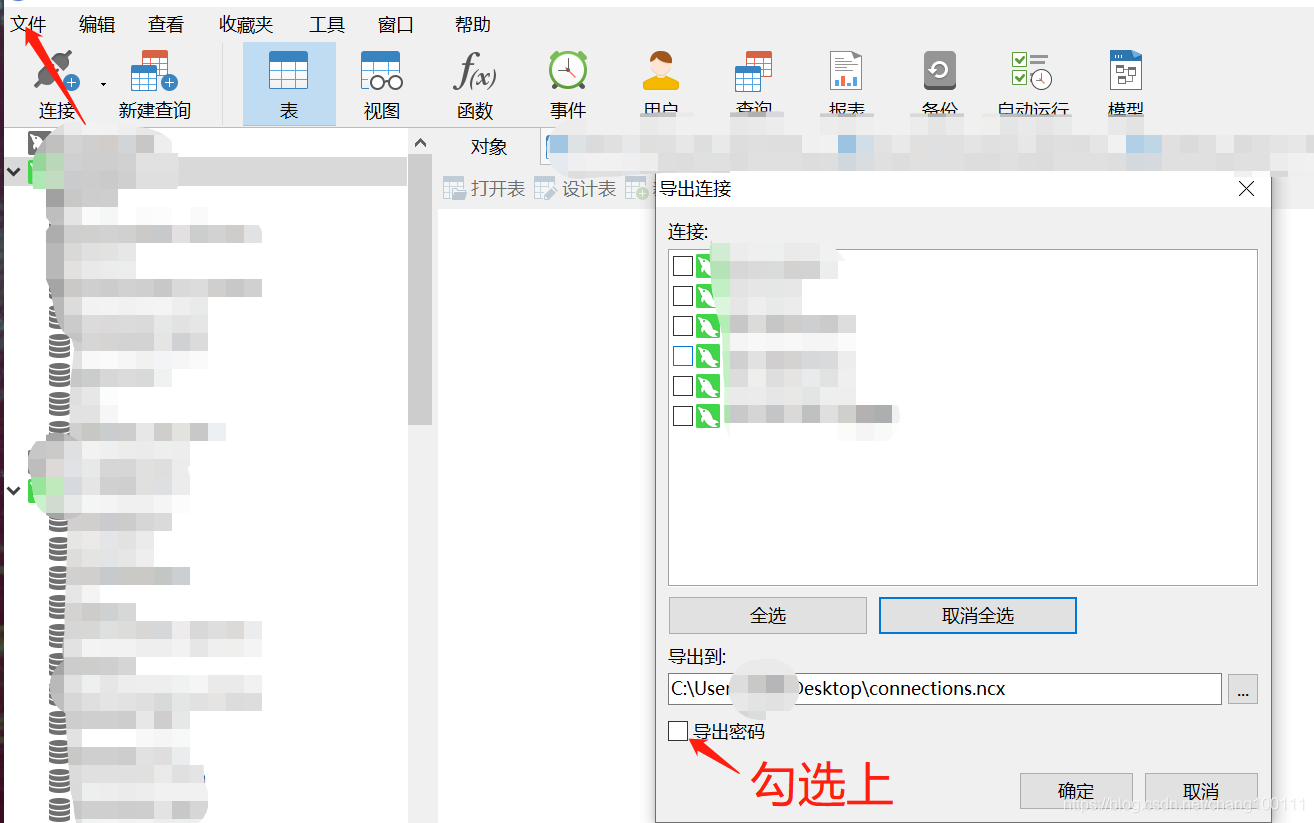

多亏一位Github上的大佬写了个程序;可以直接破解这个加密密码 大佬的git地址https://github.com/tianhe1986/FatSmallTools
程序是php的;如果本地没装php也没关系 , 直接找个在线运行的工具 https://tool.lu/coderunner/
把代码粘上去就行了
然后把刚复制的 加密密码 替换倒数第二行 里的值 , 然后运行就行了
$decode = $navicatPassword->decrypt('999239DEBFA1960BCCB12566F1F417A6');
需要写入的代码
namespace FatSmallTools;class NavicatPassword
{protected $version = 0;protected $aesKey = 'libcckeylibcckey';protected $aesIv = 'libcciv libcciv ';protected $blowString = '3DC5CA39';protected $blowKey = null;protected $blowIv = null;public function __construct($version = 12){$this->version = $version;$this->blowKey = sha1('3DC5CA39', true);$this->blowIv = hex2bin('d9c7c3c8870d64bd');}public function encrypt($string){$result = FALSE;switch ($this->version) {case 11:$result = $this->encryptEleven($string);break;case 12:$result = $this->encryptTwelve($string);break;default:break;}return $result;}protected function encryptEleven($string){$round = intval(floor(strlen($string) / 8));$leftLength = strlen($string) % 8;$result = '';$currentVector = $this->blowIv;for ($i = 0; $i < $round; $i++) {$temp = $this->encryptBlock($this->xorBytes(substr($string, 8 * $i, 8), $currentVector));$currentVector = $this->xorBytes($currentVector, $temp);$result .= $temp;}if ($leftLength) {$currentVector = $this->encryptBlock($currentVector);$result .= $this->xorBytes(substr($string, 8 * $i, $leftLength), $currentVector);}return strtoupper(bin2hex($result));}protected function encryptBlock($block){return openssl_encrypt($block, 'BF-ECB', $this->blowKey, OPENSSL_RAW_DATA|OPENSSL_NO_PADDING); }protected function decryptBlock($block){return openssl_decrypt($block, 'BF-ECB', $this->blowKey, OPENSSL_RAW_DATA|OPENSSL_NO_PADDING); }protected function xorBytes($str1, $str2){$result = '';for ($i = 0; $i < strlen($str1); $i++) {$result .= chr(ord($str1[$i]) ^ ord($str2[$i]));}return $result;}protected function encryptTwelve($string){$result = openssl_encrypt($string, 'AES-128-CBC', $this->aesKey, OPENSSL_RAW_DATA, $this->aesIv);return strtoupper(bin2hex($result));}public function decrypt($string){$result = FALSE;switch ($this->version) {case 11:$result = $this->decryptEleven($string);break;case 12:$result = $this->decryptTwelve($string);break;default:break;}return $result;}protected function decryptEleven($upperString){$string = hex2bin(strtolower($upperString));$round = intval(floor(strlen($string) / 8));$leftLength = strlen($string) % 8;$result = '';$currentVector = $this->blowIv;for ($i = 0; $i < $round; $i++) {$encryptedBlock = substr($string, 8 * $i, 8);$temp = $this->xorBytes($this->decryptBlock($encryptedBlock), $currentVector);$currentVector = $this->xorBytes($currentVector, $encryptedBlock);$result .= $temp;}if ($leftLength) {$currentVector = $this->encryptBlock($currentVector);$result .= $this->xorBytes(substr($string, 8 * $i, $leftLength), $currentVector);}return $result;}protected function decryptTwelve($upperString){$string = hex2bin(strtolower($upperString));return openssl_decrypt($string, 'AES-128-CBC', $this->aesKey, OPENSSL_RAW_DATA, $this->aesIv);}
}use FatSmallTools\NavicatPassword;//需要指定版本,11或12
$navicatPassword = new NavicatPassword(12);
//$navicatPassword = new NavicatPassword(11);//解密
//$decode = $navicatPassword->decrypt('15057D7BA390');
$decode = $navicatPassword->decrypt('你的密码');
echo $decode."\n";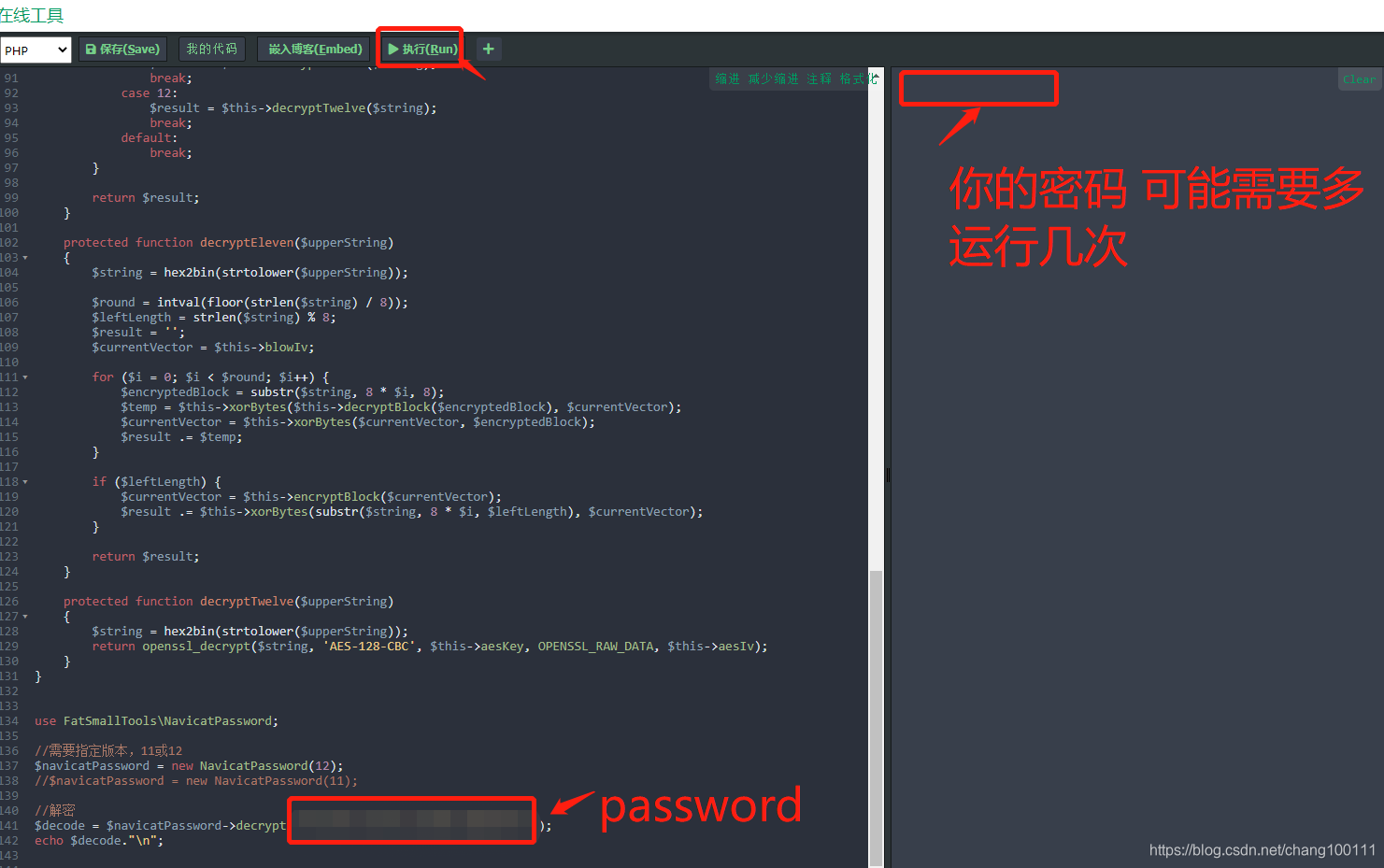
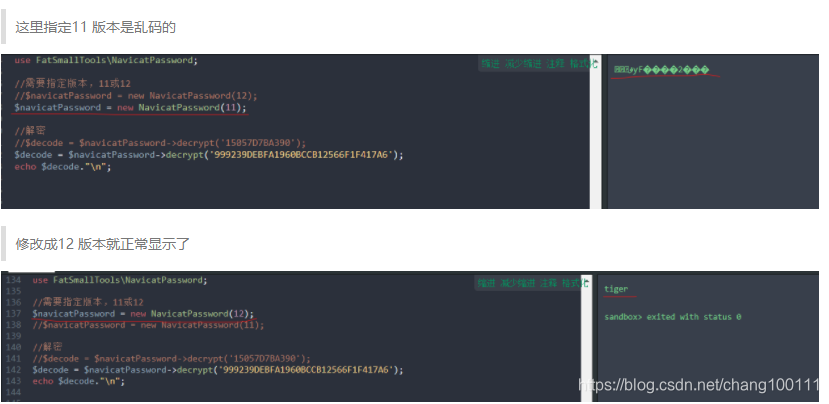
注意乱码问题:
可能解码的时候遇到乱码,这时只需要修改一下指定的版本就行了
方式2 JAVA方式(下载源码,需要用到java环境java8)
- 首先还是先打开Navicat,然后选择文件 => 导出连接 选择你需要导出的库,生成一个xxxx.ncx文件,打开文件,
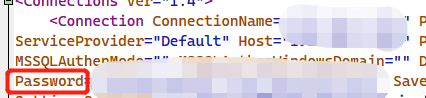
- 复制后面的字符串
- github下载源代码并运行
https://github.com/Zhuoyuan1/navicat_password_decrypt 下载源码
使用IDEA打开项目
第一种 利用工具类直接解析
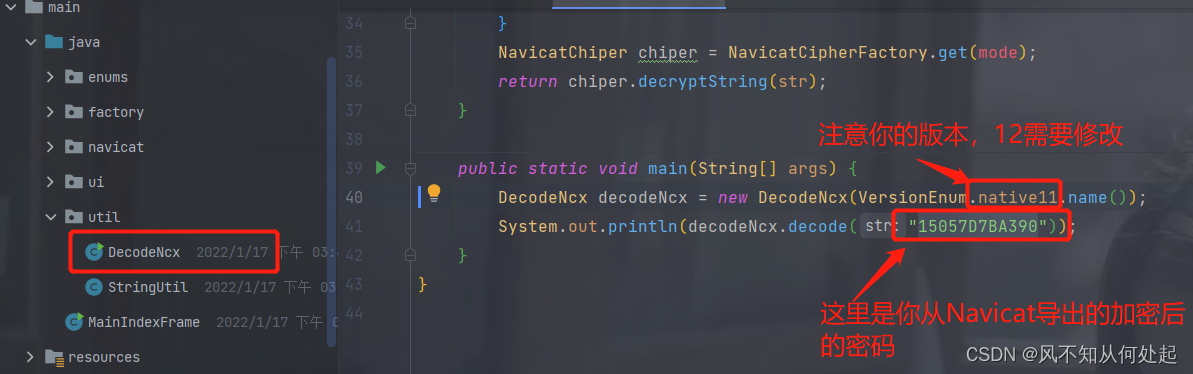
run一下就会显示出密码。
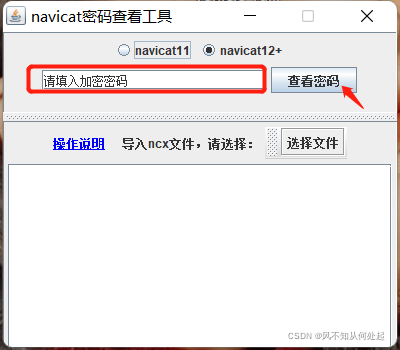
第二种:启动项目显示在界面进行解析
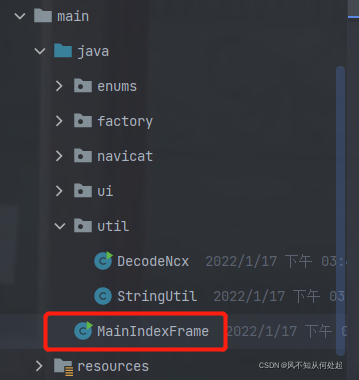
运行一下上文圈红的MainIndexFrame启动项目(同样的注意版本问题)
感谢:https://github.com/tianhe1986/FatSmallTools
和 https://blog.csdn.net/kkk123445/article/details/122514124?spm=1001.2014.3001.5502
方式一 转载自https://www.cnblogs.com/deepalley/p/14423656.html 原文链接
方式二 感谢工具作者 https://github.com/Zhuoyuan1/navicat_password_decrypt
点击跳转github下载页面
如果github打不开 蓝奏云下载https://wwt.lanzouj.com/iEXNlywfqgd
本文来自互联网用户投稿,文章观点仅代表作者本人,不代表本站立场,不承担相关法律责任。如若转载,请注明出处。 如若内容造成侵权/违法违规/事实不符,请点击【内容举报】进行投诉反馈!