echarts——实现自动轮播展示tooltips——技能提升
echarts——实现自动轮播展示tooltips
- 场景
- 1.轮播展示`tooltips`的方法
- 2.封装的渲染图表的方法
- 3.汇总:上面方法中的重点内容如下:
场景
最近在做
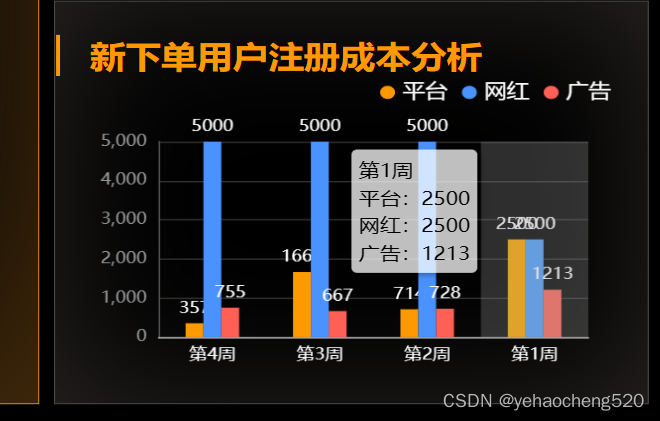
echarts看板的时候,经常会遇到下面的这种情况,给出的数值比较相近,所以在页面的展示上会出现重叠的情况。但是又无法保证数值能够有很大程度的分开。(如何数值有很大的分离,必须10以下,200以上这种的,就不会有这种问题出现)。
如果遇到这种数值相近的情况,则可以通过轮播展示tooltips的方式来处理:
1.轮播展示tooltips的方法
 //轮播tootip
function lunboEcharts(echartsId, dataOption) {var currentIndex = -1;setInterval(() => {var dataLen = dataOption.series[0].data.length;echartsId.dispatchAction({type: 'downplay',seriesIndex: 0,dataIndex: currentIndex});currentIndex = (currentIndex + 1) % dataLen;echartsId.dispatchAction({type: 'highlight',seriesIndex: 0,dataIndex: currentIndex,});echartsId.dispatchAction({type: 'showTip',seriesIndex: 0,dataIndex: currentIndex});}, 3000)
}
2.封装的渲染图表的方法
//柱状图2
function GradientColumn2(id, xaxisData, yaxisData,flash=false) {var id = echarts.init(document.getElementById(id));let option = {legend: {x2: '20px',y: "0",itemWidth: 10,itemHeight: 10,icon: "circle",textStyle: { //图例文字的样式color: 'white',fontSize: 15},},tooltip: {trigger: "axis",axisPointer: {type: "shadow",},backgroundColor: "rgba(255,255,255,0.75)",extraCssText: "box-shadow: 2px 2px 4px 0px rgba(0,0,0,0.3);",textStyle: {fontSize: 14,color: "#000",},formatter: (params) => {var html = params[0].axisValue+'
';params.forEach((item,index)=>{html += ''+item.seriesName+':'+item.value+'
';})return html;},},color: ["#4992FF", "#58D9F9", "#7CFFB2", "#f90"],grid: {x: 30,y: 50,x2: 40,y2: 30,containLabel: true,},xAxis: [{type: "category",axisLabel: {interval: 0,color: "#fff",fontSize: 12,},axisLine: {lineStyle: {//y轴网格线设置color: "#ccc",width: 1,},},axisTick: {show: false,},data: xaxisData,},],yAxis: [{name: '',type: "value",nameTextStyle: {color: "#fff",fontWeight: 400,fontSize: 14,},axisTick: {show: false,},axisLine: {show: true,lineStyle: {color: "#555",width: 1,},},splitLine: {show: true,lineStyle: {color: "#333",width: 1,},},axisLabel: {show: true,color: "#999",fontSize: 12},},],series: yaxisData,};id.setOption(option);if (flash) lunboEcharts(id, option)
}
3.汇总:上面方法中的重点内容如下:
下面是自动轮播时,展示的内容结构:
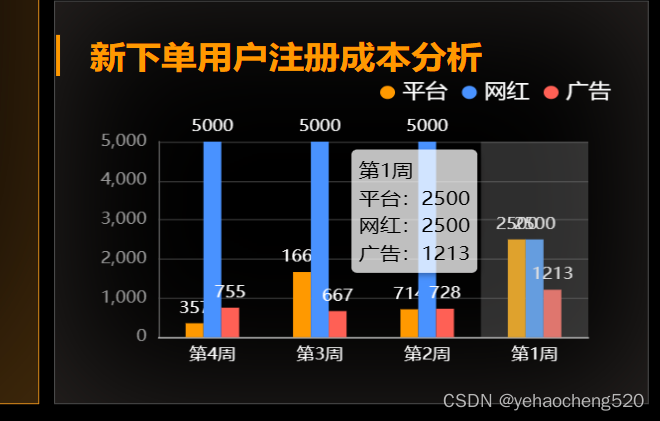
tooltip: {trigger: "axis",axisPointer: {type: "shadow",},backgroundColor: "rgba(255,255,255,0.75)",extraCssText: "box-shadow: 2px 2px 4px 0px rgba(0,0,0,0.3);",textStyle: {fontSize: 14,color: "#000",},formatter: (params) => {var html = params[0].axisValue+'
';params.forEach((item,index)=>{html += ''+item.seriesName+':'+item.value+'
';})return html;},
},
本文来自互联网用户投稿,文章观点仅代表作者本人,不代表本站立场,不承担相关法律责任。如若转载,请注明出处。 如若内容造成侵权/违法违规/事实不符,请点击【内容举报】进行投诉反馈!