taro实现小程序地图打点,地图拖拽中心点固定,解决regionChange频繁触发
地图打点
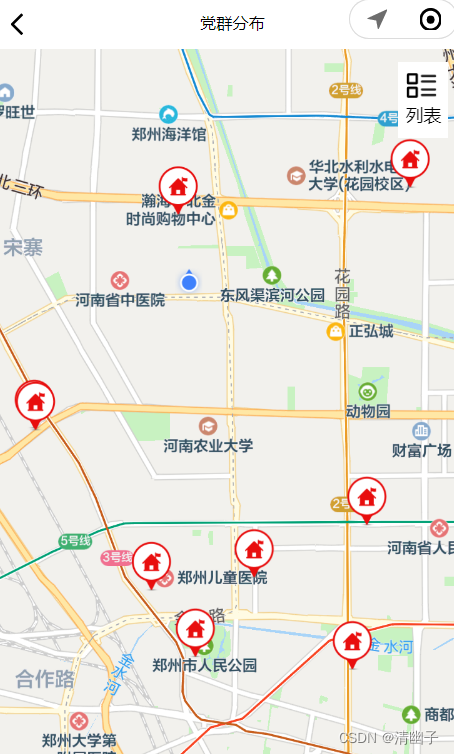
使用taro的map标签,往markers里放入点位:
show-location:是否展示自己定位的经纬度
首先判断用户是否允许授权,
然后通过Taro.getLocation获取自己的经纬度,最后从接口里拿到点位,遍历放到markerList里面
然后点击点位触发的方法是markertap
 // 地理位置,确认授权
const markerList = ref<any>([])
function getUserLocationSetting() {Taro.getSetting({success: (res) => {if (res.authSetting['scope.userLocation'] != undefined && res.authSetting['scope.userLocation'] != true) {Toast.showAlertModel('需要获取您的地理位置,请确认授权','请求授权当前位置',(result:any)=>{if (result.cancel == true){Toast.error('拒绝授权 暂时无法使用本功能')return}Taro.openSetting({success: (res) => {if (res.authSetting["scope.userLocation"] == true) {getUserLocation()}else {Toast.error('拒绝授权 暂时无法使用本功能')}}})})}else if (res.authSetting['scope.userLocation'] == undefined) {//用户首次进入页面,调用wx.getLocation的APIgetUserLocation()} else {console.log('授权成功')//调用wx.getLocation的APIgetUserLocation()}}})
}
//得到当前点位function getUserLocation () {Taro.getLocation({type: 'wgs84',success(res) {position = resuserPosition.x = position.longitudeuserPosition.y = position.latitudeconsole.log('userPosition',position)markerList.value = []markerList.value.push({iconPath: "",id: 0,longitude: userPosition.x,latitude: userPosition.y,width: 22,height: 22})points.push({latitude: position.latitude,longitude:  position.longitude,})initMarker()},fail(res) {console.log(res)}})
}//初始化地图请求接口,遍历获取地图marker,地图打点
function initMarker() {mapLoading.value = falselet addMap = 0partyApi.partyMassMap({}).then(resp =>{mapLoading.value = trueif(resp.success) {if(resp.value && resp.value.length > 0) {resp.value.forEach(item=>{if(item.wgs84X && item.wgs84Y) {console.log(item)markerList.value.push({iconPath: '',id:++addMap,longitude:parseFloat(item.wgs84X),latitude: parseFloat(item.wgs84Y),width: item.level==1?40:30,height:item.level==1?40:30})points.push({latitude: parseFloat(item.wgs84Y),longitude:  parseFloat(item.wgs84X),})console.log(markerList.value)Object.assign(partyMassData,resp.value)}})}}})
}
地图拖拽,中心点固定
然后是地图拖拽,中心点固定。
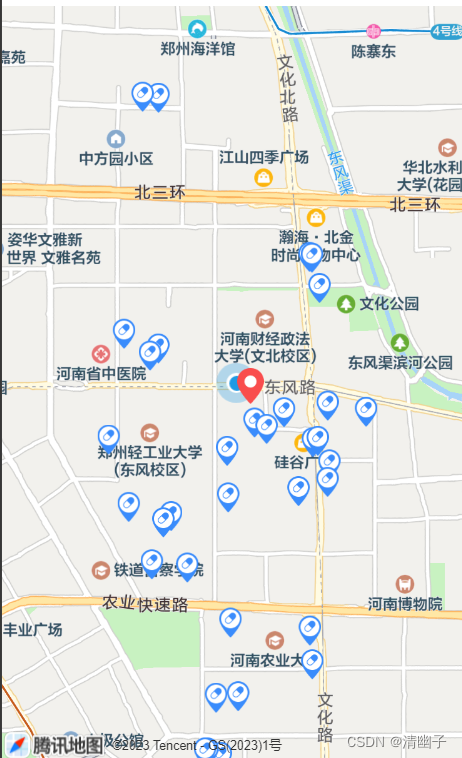
地图拖拽,如果数据较多,需要一次只请求方圆1公里以内的数据,用regionChange监听拖拽事件,动态获取中心点,获取经纬度,请求接口。
但会存在regionChange频繁触发事件,可使用防抖来得到最后一个触发事件。
效果图:
//防抖
const debounce = function(func, wait) {let timer;return function(...args) {if (timer !== null) {clearTimeout(timer);}timer = setTimeout(() => {func.apply(this, args);timer = null;}, wait);};}
//removePositionX,removePositionY移动的点位的经纬度,默认等于用户自身的点位经纬度
//kmGap:计算拖拽移动的km数
let kmGap,removePositionX=userPosition.x,removePositionY=userPosition.y;
const regionChange = debounce((e) => {if (e.causedBy == "scale" || e.causedBy == "drag") {kmGap = GetDistance(removePositionY,removePositionX,e.detail.centerLocation.latitude,e.detail.centerLocation.longitude)if(kmGap>1.5){//动态获取中心点, e.detail.centerLocationmarkerList.value[0].longitude = e.detail.centerLocation.longitude  markerList.value[0].latitude = e.detail.centerLocation.latituderemovePositionX = e.detail.centerLocation.longituderemovePositionY = e.detail.centerLocation.latitudeparams.gcj02X = e.detail.centerLocation.longitudeparams.gcj02Y = e.detail.centerLocation.latitudeorganTypeMarker(params)}}else{console.log("其余事件不执行逻辑");}
},3000)function organTypeMarker(params) {partyMassData.value = []let addMap = 0,iconPath,organTypeMap:any=[]partyApi.queryHomeMapList(params).then(resp =>{if(resp.success) {if(resp.value && resp.value.length > 0) {console.log(resp,'0------')resp.value.forEach(item=>{if(item.gcj02X && item.gcj02Y) {organTypeMap.push({iconPath: iconPath,id:++addMap,longitude:parseFloat(item.gcj02X),latitude: parseFloat(item.gcj02Y),width: 18,height: 24})}})markerList.value = organTypeMap  //把接口请求的点放在marker点里partyMassData.value = resp.valueconsole.log(markerList.value)}}})
}
// 计算两点位之间距离
function GetDistance(lat1:number,  lng1:number,  lat2:number,  lng2:number){let radLat1 = lat1*Math.PI / 180.0;let radLat2 = lat2*Math.PI / 180.0;let a = radLat1 - radLat2;let  b = lng1*Math.PI / 180.0 - lng2*Math.PI / 180.0;let s = 2 * Math.asin(Math.sqrt(Math.pow(Math.sin(a/2),2) +Math.cos(radLat1)*Math.cos(radLat2)*Math.pow(Math.sin(b/2),2)));s = s *6378.137 ;s = Math.round(s * 10000) / 10000;return s;
}
使用vue3,在微信无法展示这些点位的原因,微信开发者工具安装最新版
返回用户当前位置
使用 moveToLocation
本文来自互联网用户投稿,文章观点仅代表作者本人,不代表本站立场,不承担相关法律责任。如若转载,请注明出处。 如若内容造成侵权/违法违规/事实不符,请点击【内容举报】进行投诉反馈!