libevent实践01:准备源码、搭建项目、编译脚本和入门例子
编译源码
libevent是一个Reactor事件库。
我的理解,就是封装了select、epoll、poll的函数库。有使用select,poll,epoll的需求就可以使用的。
官网地址:https://libevent.org/
下载源码:
https://github.com/libevent/libevent/releases/download/release-2.1.12-stable/libevent-2.1.12-stable.tar.gz
下载后解压源码:
tar zxvf libevent-2.1.12-stable.tar.gz
在源码目录下创建_install目录,然后执行 ./configure --prefix=/big/libevent/libevent-2.1.12-stable/_install。
/big/libevent/libevent-2.1.12-stable/_install这个就是编译后安装的目录。详细步骤如下所示:
lkmao@ubuntu:/big/libevent$ ls
libevent-2.1.12-stable  libevent-2.1.12-stable.tar.gz
lkmao@ubuntu:/big/libevent$ cd libevent-2.1.12-stable/
lkmao@ubuntu:/big/libevent/libevent-2.1.12-stable$ mkdir _install
lkmao@ubuntu:/big/libevent/libevent-2.1.12-stable$ cd _install/
lkmao@ubuntu:/big/libevent/libevent-2.1.12-stable/_install$ pwd
/big/libevent/libevent-2.1.12-stable/_install
lkmao@ubuntu:/big/libevent/libevent-2.1.12-stable/_install$ cd ..
lkmao@ubuntu:/big/libevent/libevent-2.1.12-stable$ ./configure --prefix=/big/libevent/libevent-2.1.12-stable/_install
这一步是用来生成编译时用的makefile文件,其中,--prefix用来指定Libevent的安装目录。输入make进行编译,成功后再输入make install,然后就可以看到/big/libevent/libevent-2.1.12-stable/_install下面已经有文件生成了:
lkmao@ubuntu:/big/libevent/libevent-2.1.12-stable$ make
/*略*/
lkmao@ubuntu:/big/libevent/libevent-2.1.12-stable$ make install
/*略*/
lkmao@ubuntu:/big/libevent/libevent-2.1.12-stable$ cd _install/
lkmao@ubuntu:/big/libevent/libevent-2.1.12-stable/_install$ ls
bin  include  lib
其中include是存放头文件的目录,lib是存放动态库和静态库的目录。接下来用一个小程序来测试是否工作正常。
二 创建项目并测试
创建一个目录,用于存放我们的工程文件和源码:
lkmao@ubuntu:/big/libevent/libevent-2.1.12-stable/_install$ mkdir learn
lkmao@ubuntu:/big/libevent/libevent-2.1.12-stable/_install$ cd learn/
在目录下创建三个文件,
- 编译脚本build.sh
- cmake文件CMakeLists.txt
- 源码文件main_01.c
lkmao@ubuntu:/big/libevent/libevent-2.1.12-stable/_install/learn$ ls
build.sh  CMakeLists.txt  main_01.c
lkmao@ubuntu:/big/libevent/libevent-2.1.12-stable/_install/learn$
下面分别介绍三个文件内容
main_01.c
创建源文件:main_01.c,输入如下代码,如果写过select函数,很快就能了解,此代码的功能是设置一个定时器,然后每隔1秒就打印一次“timer wakeup!counter = %d”。
printf("timer wakeup!counter = %d\n",counter++);
#include
#include
#include
#include
struct event ev;
struct timeval tv;void time_cb(int fd, short event, void *argc)
{
static int counter = 0;printf("timer wakeup!counter = %d\n",counter++);event_add(&ev, &tv);
}int main()
{struct event_base *base = event_init();tv.tv_sec = 1;tv.tv_usec = 0;evtimer_set(&ev, time_cb, NULL);event_base_set(base, &ev);event_add(&ev, &tv);event_base_dispatch(base);
}
build.sh
#!/bin/bash
set -e
rm -rf _build_
mkdir _build_ -p
cmake -S ./ -B _build_
make -C _build_
./_build_/main_01
要保证build.sh文件是可执行的
chmod 777 build.sh CMakeLists.txt
project(libevent_project)
cmake_minimum_required(VERSION 3.8)message(STATUS "lkmao:CMAKE_SOURCE_DIR -- ${CMAKE_SOURCE_DIR}")set(LIBEVET_INSTALL_PATH "/big/libevent/libevent-2.1.12-stable/_install/")
include_directories(${LIBEVET_INSTALL_PATH}/include
)# set(CMAKE_C_COMPILER /arm-gcc/bin/arm-linux-gnueabihf-gcc)
# set(CMAKE_CXX_COMPILER /arm-gcc/bin/arm-linux-gnueabihf-g++)# SET(CMAKE_C_FLAGS "${CMAKE_C_FLAGS} -std=c99 -pthread")
SET(CMAKE_C_FLAGS "${CMAKE_C_FLAGS} -pthread")
SET(CMAKE_CXX_FLAGS "${CMAKE_CXX_FLAGS} -std=c++11 -pthread -lstdc++")message(STATUS "lkmao:PROJECT_SOURCE_DIR -- ${PROJECT_SOURCE_DIR}")add_executable(main_01 main_01.c)
target_link_libraries(main_01 ${LIBEVET_INSTALL_PATH}/lib/libevent.so)
测试验证
文件都准备好,并输入内容后执行build.sh文件,执行结果如下所示:
lkmao@ubuntu:/big/libevent/libevent-2.1.12-stable/_install/learn$ ./build.sh
-- The C compiler identification is GNU 5.4.0
-- The CXX compiler identification is GNU 5.4.0
-- Check for working C compiler: /usr/bin/cc
-- Check for working C compiler: /usr/bin/cc -- works
-- Detecting C compiler ABI info
-- Detecting C compiler ABI info - done
-- Detecting C compile features
-- Detecting C compile features - done
-- Check for working CXX compiler: /usr/bin/c++
-- Check for working CXX compiler: /usr/bin/c++ -- works
-- Detecting CXX compiler ABI info
-- Detecting CXX compiler ABI info - done
-- Detecting CXX compile features
-- Detecting CXX compile features - done
-- lkmao:CMAKE_SOURCE_DIR -- /big/libevent/libevent-2.1.12-stable/_install/learn
-- lkmao:PROJECT_SOURCE_DIR -- /big/libevent/libevent-2.1.12-stable/_install/learn
-- Configuring done
-- Generating done
-- Build files have been written to: /big/libevent/libevent-2.1.12-stable/_install/learn/_build_
make: Entering directory '/big/libevent/libevent-2.1.12-stable/_install/learn/_build_'
make[1]: Entering directory '/big/libevent/libevent-2.1.12-stable/_install/learn/_build_'
make[2]: Entering directory '/big/libevent/libevent-2.1.12-stable/_install/learn/_build_'
Scanning dependencies of target main_01
make[2]: Leaving directory '/big/libevent/libevent-2.1.12-stable/_install/learn/_build_'
make[2]: Entering directory '/big/libevent/libevent-2.1.12-stable/_install/learn/_build_'
[ 50%] Building C object CMakeFiles/main_01.dir/main_01.c.o
[100%] Linking C executable main_01
make[2]: Leaving directory '/big/libevent/libevent-2.1.12-stable/_install/learn/_build_'
[100%] Built target main_01
make[1]: Leaving directory '/big/libevent/libevent-2.1.12-stable/_install/learn/_build_'
make: Leaving directory '/big/libevent/libevent-2.1.12-stable/_install/learn/_build_'
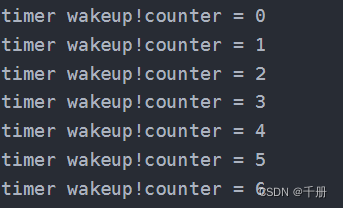
timer wakeup!counter = 0
timer wakeup!counter = 1
timer wakeup!counter = 2
timer wakeup!counter = 3
timer wakeup!counter = 4
timer wakeup!counter = 5
timer wakeup!counter = 6
由下面的截图可知,我们的测试代码开始运行了。
四 命令行编译
gcc main_01.c -o testEvent -I /big/libevent/libevent-2.1.12-stable/_install/include/ -L /big/libevent/libevent-2.1.12-stable/_install/lib/ -levent使用命令行,需要设置环境变量,要不然,找不到库。
小结
本文来自互联网用户投稿,文章观点仅代表作者本人,不代表本站立场,不承担相关法律责任。如若转载,请注明出处。 如若内容造成侵权/违法违规/事实不符,请点击【内容举报】进行投诉反馈!