制作cloudstack镜像
一、上传镜像/模板
cloudstack支持两种基于iso和template创建虚拟机,区别是template不用安装,而基于iso镜像创建虚拟机更像传统的装机,需要走一遍完整的安装流程。
而cloudstack支持本地文件上传和链接下载两种方式上传镜像。
以上传模板举例:
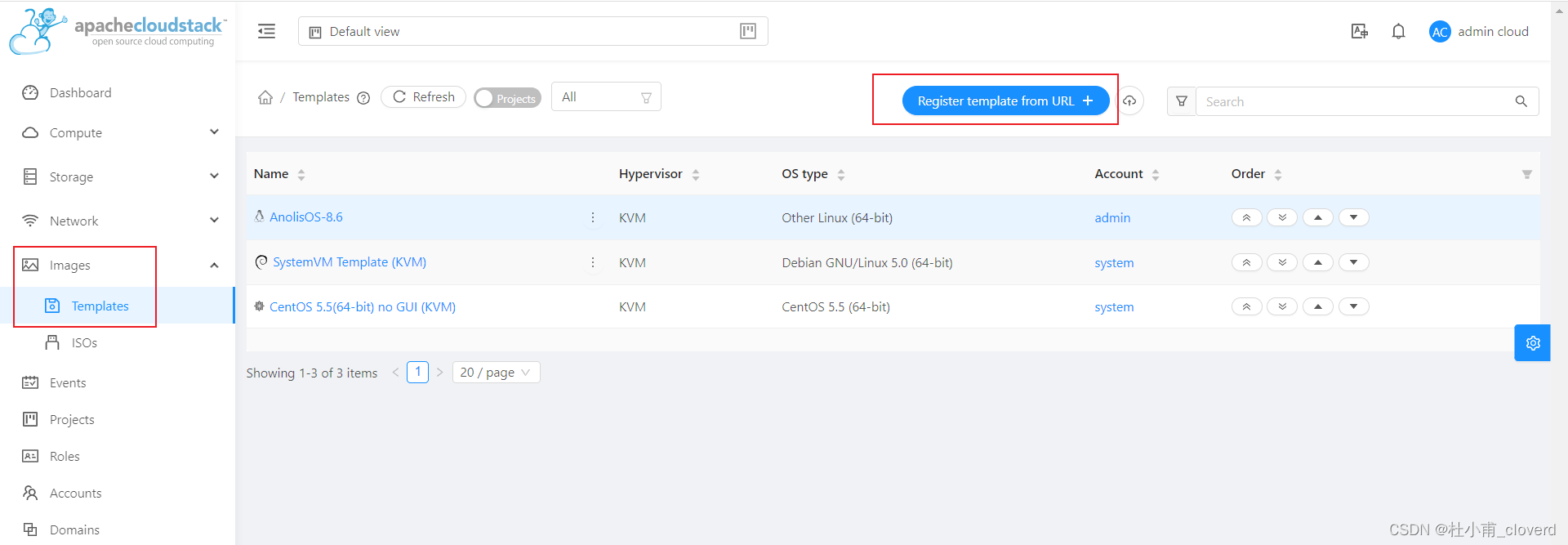
- 左侧功能栏,Images->Template,点击【Register template from URL】。
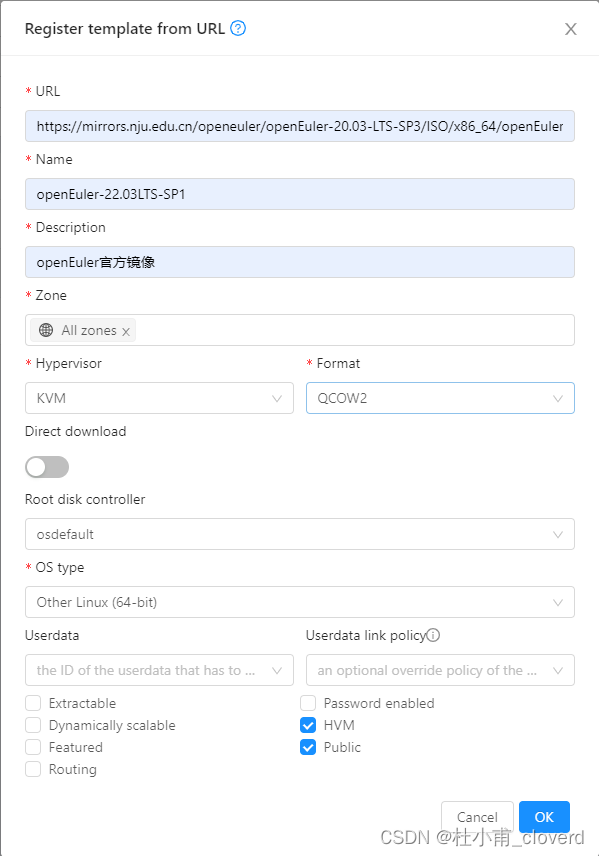
- 填写模板的相关信息:
- URL:镜像的下载链接,cloudstack会根据链接的文件后缀判断是否符合【Format】处指定的类型。
- Name:模板名称,方便管理
- Desctiption:描述
- Zone:指定有效区域
- HYpervisor:支持的虚拟化程序,此处选KVM
- Format:模板格式,选择目前更为流行的qcow2
- Direct download:只注册模板信息,但并不下载到辅助存储。等到创建虚拟机时,直接下载到主存储上。
- Root disk controller:根盘控制系,选择osdefault即可。
- OS type:操作系统类型,此处上传的为openEuler,cloudstack中没有,选择other linux(64)。
- User data:提前配置的用户数据,待后续详细讲解。
- Extractable:用户是否可以下载该模板。
- Dynamically scalable:是否支持自动扩缩容。
- Feature:精选。
- Routing:系统虚拟机镜像。
- Password enabled:支持重置密码。
- HVM:全虚拟化。
- Public:所有cloudstack用户均可以使用。
二、创建虚拟机
基于之前上传的模板创建虚拟机。
三、配置
1)更新系统
dnf update -y
reboot
dnf install qemu-guest-agent -y
systemctl enable qemu-guest-agent
2)配置网络
echo "DEVICE=eth0
TYPE=Ethernet
BOOTPROTO=dhcp
ONBOOT=yes" > /etc/sysconfig/network-scripts/ifcfg-eth0
3)配置ssh(可选)
/etc/ssh/sshd.conf
#允许root远程登录
PermitRootLogin yes
#允许密码登录
PasswordAuthentication yes
4)重置密码功能
#将脚本放至/usr/local/bin/下(脚本放在后面),创建service文件
vim /usr/lib/systemd/system/cloud-set-guest-password.service
[Unit]
Description=cloudstack set password utily
After=network-online.target
Wants=sshd-keygen.target[Service]
Type=notify
ExecStart=/usr/local/bin/cloud-set-guest-password
ExecReload=/bin/kill -HUP $MAINPID
KillMode=process[Install]
WantedBy=multi-user.targetsystemctl daemon-reload
systemctl enable cloud-set-guest-password
脚本大概逻辑如下:
第一步:通过不同的文件,判断网络管理工具,并通过对应的网络管理工具获取默认网络的网关。
若都失败,将尝试通过data-server的域名进行请求(virtual router会提供DNS服务)。
第二步:向第一步获取的服务器地址请求最新密码,并使用passwd命令设置密码。
#!/bin/bash
#
# Init file for Password Download Client
#
# description: Password Download Client# Licensed to the Apache Software Foundation (ASF) under one
# or more contributor license agreements.  See the NOTICE file
# distributed with this work for additional information
# regarding copyright ownership.  The ASF licenses this file
# to you under the Apache License, Version 2.0 (the
# "License"); you may not use this file except in compliance
# with the License.  You may obtain a copy of the License at
#
#   http://www.apache.org/licenses/LICENSE-2.0
#
# Unless required by applicable law or agreed to in writing,
# software distributed under the License is distributed on an
# "AS IS" BASIS, WITHOUT WARRANTIES OR CONDITIONS OF ANY
# KIND, either express or implied.  See the License for the
# specific language governing permissions and limitations
# under the License.# Modify this line to specify the user (default is root)
user=root# Detect main interface name
NETINT=$(ip -o -4 route show to default | awk '{print $5}')# Add network provider variables here (default means that interface for network manager is eth0)
NETPLAN=/etc/netplan
IFUPDOWN=/etc/network/interfaces
NETMAN=/etc/sysconfig/network-scripts# Add dhcp variables
PASSWORD_SERVER_PORT=8080
password_received=0
error_count=0
file_count=0# OS is using netplan
if [ -d "$NETPLAN" ]; thenlogger -t "cloud" "Operating System is using netplan"PASSWORD_SERVER_IP=$(netplan ip leases $NETINT | grep SERVER_ADDRESS | awk '{split($0,a,"="); print a[2]}')if [ -n "$PASSWORD_SERVER_IP" ]; thenlogger -t "cloud" "Found password server IP $PASSWORD_SERVER_IP in netplan config"fi
fi# OS is using ifupdown
if [ -f "$IFUPDOWN" ]; thenlogger -t "cloud" "Operating System is using ifupdown"DHCP_FOLDERS="/var/lib/dhclient/* /var/lib/dhcp3/* /var/lib/dhcp/*"for DHCP_FILE in $DHCP_FOLDERS; doif [ -f $DHCP_FILE ]; thenfile_count=$((file_count+1))PASSWORD_SERVER_IP=$(grep dhcp-server-identifier $DHCP_FILE | tail -1 | awk '{print $NF}' | tr -d '\;')if [ -n "$PASSWORD_SERVER_IP" ]; thenlogger -t "cloud" "Found password server IP $PASSWORD_SERVER_IP in $DHCP_FILE"breakfifidone
fi# OS is using network interfaces
if [ -d "$NETMAN" ]; thenlogger -t "cloud" "Operating System is using network manager"PASSWORD_SERVER_IP=$(nmcli -f IP4.GATEWAY device show $NETINT | sed 's/ //g' | awk '{split($0,a,":"); print a[2]}')if [ -n "$PASSWORD_SERVER_IP" ]; thenlogger -t "cloud" "Found password server IP $PASSWORD_SERVER_IP in nmcli output"fi
fi#start sequence
if [ -z "$PASSWORD_SERVER_IP" ] ; thenlogger -t "cloud" "Unable to determine the password server, falling back to data-server"PASSWORD_SERVER_IP=data-server
filogger -t "cloud" "Sending request to password server at $PASSWORD_SERVER_IP"
password=$(wget -q -t 3 -T 20 -O - --header "DomU_Request: send_my_password" http://$PASSWORD_SERVER_IP:$PASSWORD_SERVER_PORT)
if [ $? -eq 0 ]; thenpassword=$(echo $password | tr -d '\r')logger -t "cloud" "Got response from server at $PASSWORD_SERVER_IP"case $password in"")logger -t "cloud" "Password server at $PASSWORD_SERVER_IP did not have any password for the VM";;"bad_request")logger -t "cloud" "VM sent an invalid request to password server at $PASSWORD_SERVER_IP"error_count=$((error_count+1));;"saved_password")logger -t "cloud" "VM has already saved a password from the password server at $PASSWORD_SERVER_IP";;*)logger -t "cloud" "VM got a valid password from server at $PASSWORD_SERVER_IP"password_received=1;;esac
elselogger -t "cloud" "Failed to send request to password server at $PASSWORD_SERVER_IP"error_count=$((error_count+1))
fiif [ "$password_received" == "0" ]; thenif [ "$error_count" == "$file_count" ]; thenlogger -t "cloud" "Failed to get password from any server"exit 1elselogger -t "cloud" "Did not need to change password."exit 0fi
filogger -t "cloud" "Changing password for user $user"
echo $password | passwd --stdin root#if [ $? -gt 0 ]; then
#        usermod -p `mkpasswd -m SHA-512 $password` $user
#
#       if [ $? -gt 0 ]; then
#               logger -t "cloud" "Failed to change password for user $user"
#               exit 1
#       else
#               logger -t "cloud" "Successfully changed password for user $user"
#       fi
#filogger -t "cloud" "Sending acknowledgment to password server at $PASSWORD_SERVER_IP"
wget -q -t 3 -T 20 -O - --header "DomU_Request: saved_password" $PASSWORD_SERVER_IP:$PASSWORD_SERVER_PORT
exit 0
5)配置密钥功能
#将脚本放至/usr/local/bin/下(脚本放在后面),创建service文件
vim /usr/lib/systemd/system/cloud-set-guest-sshkey.service
[Unit]
Description=cloudstack set sshkey utily
After=network-online.target[Service]
Type=notify
ExecStart=/usr/local/bin/cloud-set-guest-sshkey
ExecReload=/bin/kill -HUP $MAINPID
KillMode=process[Install]
WantedBy=multi-user.targetsystemctl daemon-reload
systemctl enable cloud-set-guest-sshkey
脚本逻辑同修改密码脚本。
#!/bin/bash
#
# Init file for SSH Public Keys Download Client
#
# description: SSH Public Keys Download Client# Modify this line to specify the user (default is root)
user=root# Detect main interface name
NETINT=$(ip -o -4 route show to default | awk '{print $5}')# Add network provider variables here (default means that interface for network manager is eth0)
NETPLAN=/etc/netplan
IFUPDOWN=/etc/network/interfaces
NETMAN=/etc/sysconfig/network-scriptsfile_count=0# OS is using netplan
if [ -d "$NETPLAN" ]; thenlogger -t "cloud" "Operating System is using netplan"SSHKEY_SERVER_IP=$(netplan ip leases $NETINT | grep SERVER_ADDRESS | awk '{split($0,a,"="); print a[2]}')if [ -n "$SSHKEY_SERVER_IP" ]; thenlogger -t "cloud" "Found password server IP $SSHKEY_SERVER_IP in netplan config"fi# OS is using network manager
elif [ -d "$NETMAN" ]; thenlogger -t "cloud" "Operating System is using network manager"SSHKEY_SERVER_IP=$(nmcli -f IP4.GATEWAY device show $NETINT | sed 's/ //g' | awk '{split($0,a,":"); print a[2]}')if [ -n "$SSHKEY_SERVER_IP" ]; thenlogger -t "cloud" "Found password server IP $SSHKEY_SERVER_IP in nmcli output"fi# OS is using ifupdown
elselogger -t "cloud" "Operating System is using ifupdown"DHCP_FOLDERS="/var/lib/dhclient/* /var/lib/dhcp3/* /var/lib/dhcp/*"for DHCP_FILE in $DHCP_FOLDERS; doif [ -f $DHCP_FILE ]; thenfile_count=$((file_count+1))SSHKEY_SERVER_IP=$(grep dhcp-server-identifier $DHCP_FILE | tail -1 | awk '{print $NF}' | tr -d '\;')if [ -n "$SSHKEY_SERVER_IP" ]; thenlogger -t "cloud" "Found password server IP $SSHKEY_SERVER_IP in $DHCP_FILE"breakfifidone
fi#start sequence
if [ -z "$SSHKEY_SERVER_IP" ] ; thenlogger -t "cloud" "Unable to determine the password server, falling back to data-server"SSHKEY_SERVER_IP=data-server
fi# did we find the keys anywhere?
publickey=$(wget -t 3 -T 20 -O - http://$SSHKEY_SERVER_IP/latest/public-keys 2>/dev/null)
if [ $? -ne 0 ]
thenlogger -t "cloud" "Failed to get ssh keys from any server"exit 1
fi# set ssh public key
homedir=$(grep ^$user /etc/passwd|awk -F ":" '{print $6}')
sshdir=$homedir/.ssh
authorized=$sshdir/authorized_keysif [ ! -e $sshdir ]
thenmkdir $sshdir
fiif [ ! -e $authorized ]
thentouch $authorized
ficat $authorized|grep -v "$publickey" > $authorized
echo "$publickey" >> $authorizedexit 0
6)清理
#清理ssh keys
rm -f /etc/ssh/*key*#清理日志
cat /dev/null > /var/log/audit/audit.log 2>/dev/null
cat /dev/null > /var/log/wtmp 2>/dev/null
logrotate -f /etc/logrotate.conf 2>/dev/null
rm -f /var/log/*-* /var/log/*.gz 2>/dev/null#清理history
history -c
unset HISTFILE
7)关机
在UI界面点击【stop】按钮。
否则卷无法出现对应功能的按钮。
四、基于配置好的虚拟机创建模板
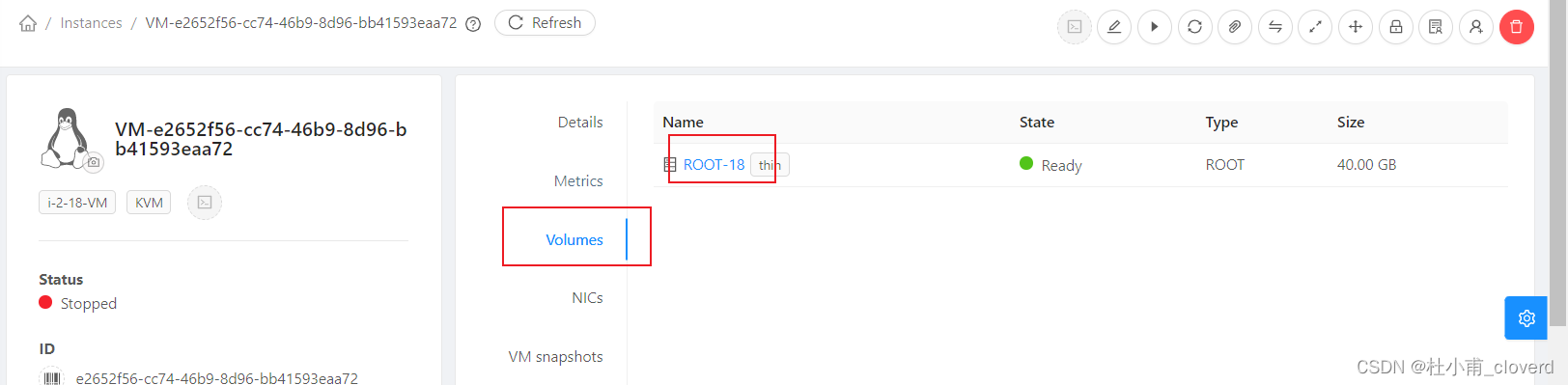
- 进入虚拟机详情,找到其根盘对应的卷
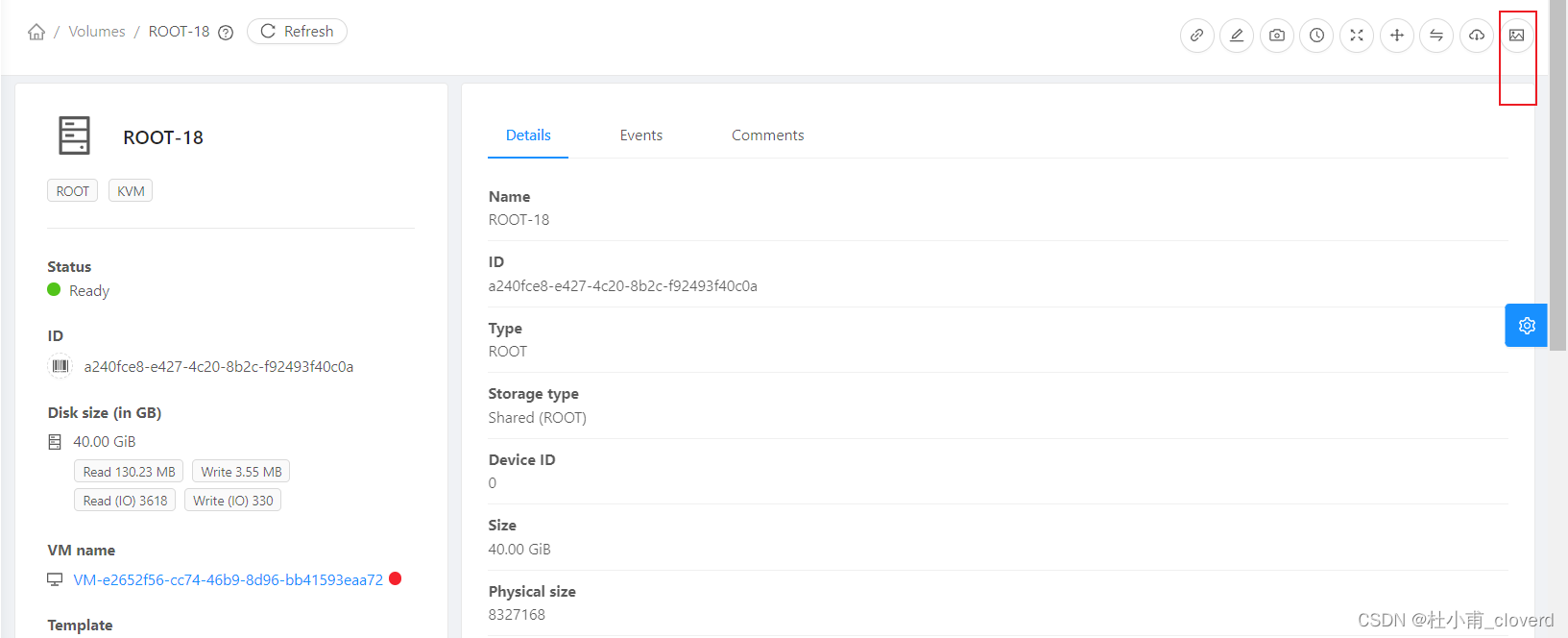
- 进入卷详情,点击右上角按钮【create template from volume】。
- 填写模板信息
如果想要使用重置密码功能,创建镜像时需要勾选Password enabled,否则系统会报错。
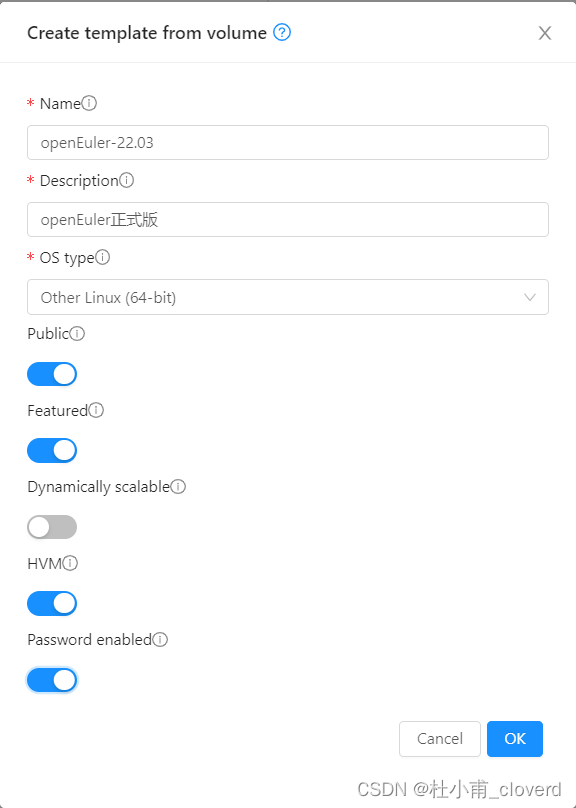
- 点击OK,开始创建。
本文来自互联网用户投稿,文章观点仅代表作者本人,不代表本站立场,不承担相关法律责任。如若转载,请注明出处。 如若内容造成侵权/违法违规/事实不符,请点击【内容举报】进行投诉反馈!