Qt项目网络聊天室设计
效果演示
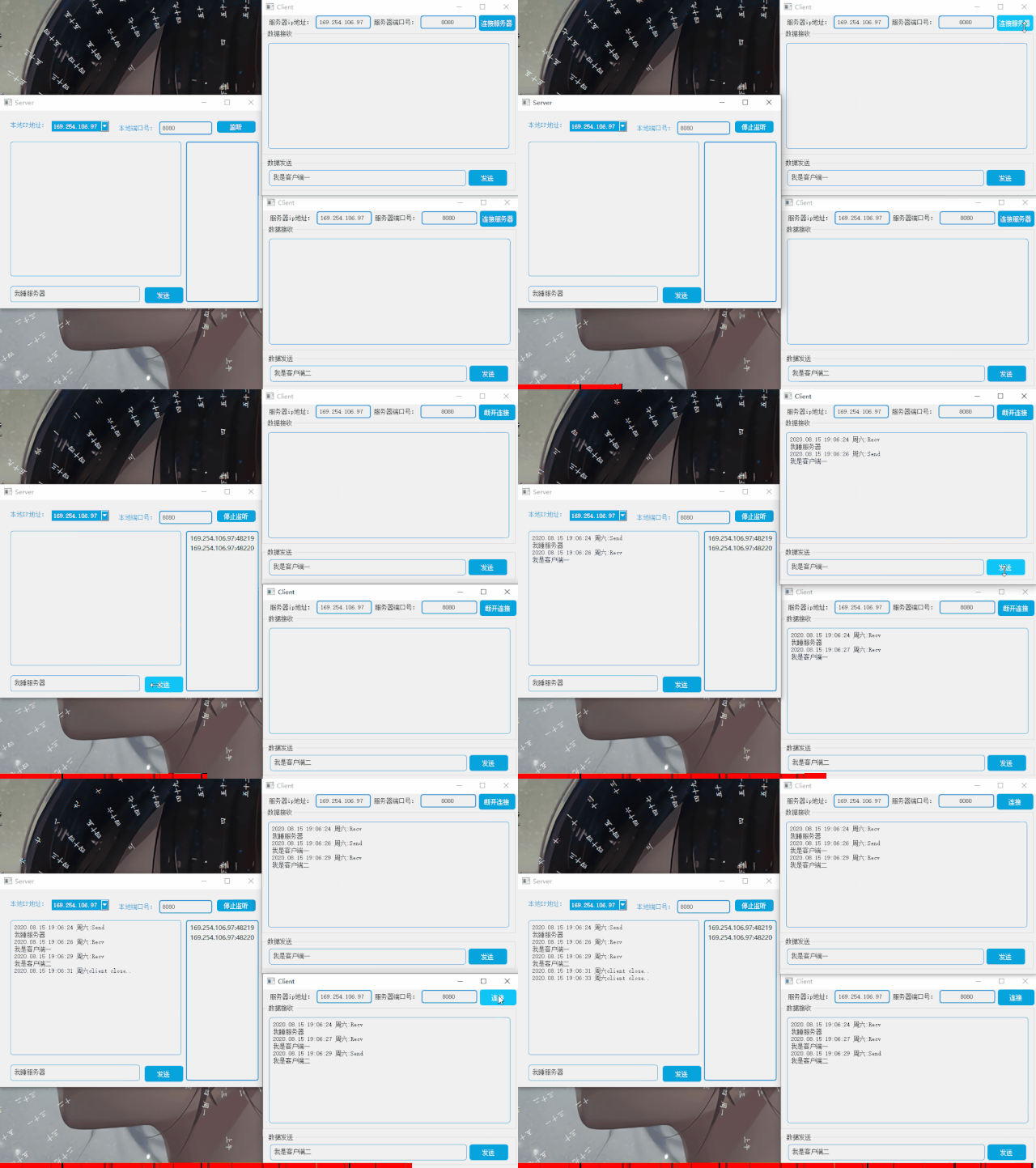
网络聊天室
Qt网络聊天室服务端
网络聊天室程序
-
基于TCP的可靠连接
(QTcpServer、QTcpSocket) -
一个服务器,多个客户端
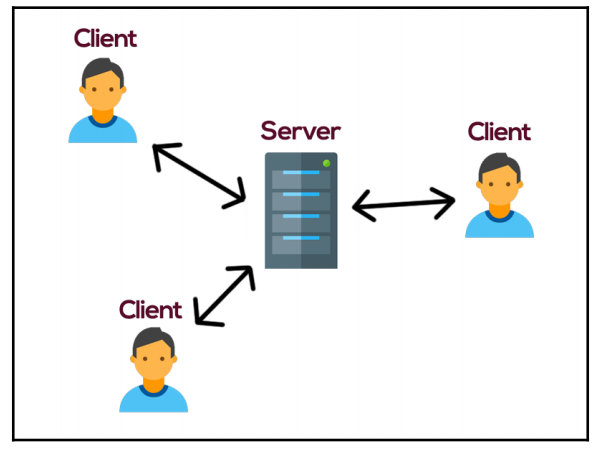
3. 服务器接收到某个客户端的请求以及发送信息,经服务器发给其它客户端 最终实现一个共享聊天内容的聊天室!
QTcpServer
提供一个TCP基础服务类 继承自QObject,这个类用来接收到来的TCP连接,可以指定TCP端口或者用QTcpServer自己挑选一个端口,可以监听一个指定的地址或者所有的机器地址。
QTcpServer的信号:
newConnection()//有新连接连接时触发该信号
配置
pro文件添加
QT += network
获取当前设备所有ip地址
枚举设备所有ip地址
QList ipList = QNetworkInterface::allAddresses();
QStringList addressStrList;
addressStrList.clear();for(int index = 0;indexcomboBox_Address->addItems(addressStrList);
listen() close()
调用
listen()来监听所有的连接 调用close()来关闭套接字,停止对连接的监听。
如果监听有错误,serverError()返回错误的类型。调用errorString()来把错误打印出来
bool isListening() const
当服务端正在监听连接时候返回真,否则返回假
QString serverAddressStr = ui->comboBox_Address->currentText();     //获取服务器ip地址
quint16 port = ui->lineEdit_port->text().toInt();                   //获取服务器端口
QHostAddress serverAddress = QHostAddress(serverAddressStr);        //初始化协议族if(mServer->isListening())
{//在监听状态 取消监听mServer->close();
}
else
{//不在监听状态 开始监听if(mServer->listen(serverAddress, port)){//监听成功qDebug() << "Listen Ok!!";}else{//监听失败QMessageBox::warning(this, "Tcp Server Listen Error", mServer->errorString());}
}
当监听连接时候,可以调用serverAddress()和serverPort()来返回服务端的地址和端口。
newConnection()
每当一个newConnection新的客户端连接到服务端就会
发射信号newConnection()
调用nextPendingConnection()来接受待处理的连接。返回一个连接的QTcpSocket(),我们可以用这个返回的套接字和客户端进行连接
private slots:void newConnectionSlot(); //新连接
//处理新连接客户端
connect(mServer, SIGNAL(newConnection()),this, SLOT(newConnectionSlot()));
void Widget::newConnectionSlot()
{mClient = mServer->nextPendingConnection();connect(mClient, SIGNAL(readyRead()),this, SLOT(readyReadSlot()));//接收消息connect(mClient, SIGNAL(disconnected()),this, SLOT(disconnectedSlot()));//断开连接
}
SINGL
readyRead()
客户端有数据发送至服务端时触发该信号
connect(mClient, SIGNAL(readyRead()),this, SLOT(readyReadSlot())); //接收消息
isReadable
是否可读
readAll
读取客户端发送过来的全部信息
if(mClient->isReadable())
{QByteArray recvArray = mClient->readAll();
}
disconnected()
当客户端断开连接时触发该信号
connect(mClient, SIGNAL(disconnected()),this, SLOT(disconnectedSlot())); //断开连接
UI设计

服务端UI设计
TcpServer项目训练
widget.h
#ifndef WIDGET_H
#define WIDGET_H#include
#include
#include
#include
#include
#include
#include namespace Ui {
class Widget;
}class Widget :public QWidget
{Q_OBJECT
public:explicit Widget(QWidget *parent = nullptr);~Widget();
private slots:void on_pushButton_listen_clicked();//开始监听void newConnectionSlot();           //新连接void disconnectedSlot();            //断开连接void readyReadSlot();               //接收消息的槽函数void on_pushButton_send_clicked();	//发送消息private:void enumIpAddress();				//枚举当前设备所有端口
private:Ui::Widget *ui;QTcpServer *mServer;				//服务器QTcpSocket *mClient = nullptr;		//客户端QListmClientList;		//客户端链表
};#endif // WIDGET_H
widget.cpp
#include "widget.h"
#include "ui_widget.h"Widget::Widget(QWidget *parent) :QWidget(parent),ui(new Ui::Widget)
{ui->setupUi(this);mServer = new QTcpServer;enumIpAddress();//处理新连接客户端connect(mServer, SIGNAL(newConnection()),this, SLOT(newConnectionSlot()));
}Widget::~Widget()
{delete ui;
}
void Widget::enumIpAddress()
{QList ipList = QNetworkInterface::allAddresses();QStringList addressStrList;addressStrList.clear();for(int index = 0;indexcomboBox_Address->addItems(addressStrList);
}void Widget::on_pushButton_listen_clicked()
{QString serverAddressStr = ui->comboBox_Address->currentText();     //获取服务器ip地址quint16 port = ui->lineEdit_port->text().toInt();                   //获取服务器端口QHostAddress serverAddress = QHostAddress(serverAddressStr);        //初始化协议族if(mServer->isListening()){//在监听状态 取消监听mServer->close();ui->pushButton_listen->setText("监听");}else{//不在监听状态 开始监听if(mServer->listen(serverAddress, port)){//监听成功qDebug() << "Listen Ok!!";ui->pushButton_listen->setText("停止监听");}else{//监听失败QMessageBox::warning(this, "Tcp Server Listen Error", mServer->errorString());}}
}void Widget::newConnectionSlot()
{QString clientInfo;mClient = mServer->nextPendingConnection();mClientList.append(mClient);//窥视Client 信息clientInfo = mClient->peerAddress().toString() + ":"+  QString::number(mClient->peerPort());ui->listWidget_client->addItem(clientInfo);connect(mClient, SIGNAL(readyRead()),this, SLOT(readyReadSlot()));          //接收消息connect(mClient, SIGNAL(disconnected()),this, SLOT(disconnectedSlot()));    //断开连接
}void Widget::readyReadSlot()
{QByteArray recvArray;QTcpSocket* current = nullptr;if(!mClientList.isEmpty()){//接收客户端数据for(int index = 0;index < mClientList.count();index ++){current = mClientList.at(index);if(current->isReadable()){recvArray = current->readAll();if(recvArray.isEmpty()) continue;QString str = QString(QDateTime::currentDateTime().toString("yyyy.MM.dd hh:mm:ss ddd")) +":Recv\n" + str.fromLocal8Bit(recvArray.data());    //本地GBK转Unicode 解决乱码ui->textBrowser_recv->append(str);break;}}//转发给其他客户端for(int index = 0;index < mClientList.count();index ++){QTcpSocket* temp = mClientList.at(index);if(current == temp) continue;if(temp->isWritable()){temp->write(recvArray);}}}
}void Widget::disconnectedSlot()
{QMessageBox::information(this, "client close Signal", "client over");
}void Widget::on_pushButton_send_clicked()
{QString sendString = ui->plainTextEdit_send->toPlainText();QByteArray sendArr = sendString.toLocal8Bit();//群发给所有客户端连接if(!mClientList.isEmpty()){for(int index = 0;index < mClientList.count();index ++){QTcpSocket* temp = mClientList.at(index);if(temp->isWritable()){temp->write(sendArr);}}}QString str = QString(QDateTime::currentDateTime().toString("yyyy.MM.dd hh:mm:ss ddd"))+ ":Send\n" + sendString;ui->textBrowser_recv->append(str);          //本地GBK转Unicode 解决乱码
}
本文来自互联网用户投稿,文章观点仅代表作者本人,不代表本站立场,不承担相关法律责任。如若转载,请注明出处。 如若内容造成侵权/违法违规/事实不符,请点击【内容举报】进行投诉反馈!