Dialog中文文档
Dialog原英文版文档查看
部分尚未翻译……恳请各位大佬给予建议和指导,O(∩_∩)O~
继承关系
public class Dialog
extends Object implements DialogInterface, Window.Callback, KeyEvent.Callback, View.OnCreateContextMenuListener - java.lang.Object
- ↳ android.app.Dialog
已知的直接子类
| 类名 | 介绍 |
|---|---|
| AlertDialog | 一个可以展示1~3个按钮的Dialog。 |
| AppCompatDialog | 基于AppCompat主题的Dialog。 |
| CharacterPickerDialog | Dialog for choosing accented characters related to a base character. |
| Presentation | Base class for presentations. |
已知的非直接子类
| 类名 | 介绍 |
|---|---|
| AlertDialog | 一个可以展示1~3个按钮的子类Dialog。 |
| BottomSheetDialog | Base class for Dialogs styled as a bottom sheet. |
| DatePickerDialog | A simple dialog containing an DatePicker. |
| MediaRouteChooserDialog | This class implements the route chooser dialog for MediaRouter. |
| MediaRouteControllerDialog | This class implements the route controller dialog for MediaRouter. |
| ProgressDialog | This class was deprecated in API level 26. ProgressDialog is a modal dialog, which prevents the user from interacting with the app. Instead of using this class, you should use a progress indicator like ProgressBar, which can be embedded in your app’s UI. Alternatively, you can use a notification to inform the user of the task’s progress. |
| TimePickerDialog | A dialog that prompts the user for the time of day using a TimePicker. |
这是Dialog系列中的基类。
注意:在Activity中提供了管理Dialog的创建、保存、恢复的功能。详情请见onCreateDialog(int)、onPrepareDialog(int, Dialog) 、showDialog(int)以及dismissDialog(int)。如果你使用了这些方法,你可以使用getOwnerActivity()这个方法来获取管理这个Dialog的Activity。
大多数时候,你都会希望有一个Dialog可以显示在你的输入法的顶部,因为如果文本输入是在输入法下部的话,输入文本也是挺尴尬的(其实TextView什么的也可以作为文本输入的载体)。你可以使用WindowManager.LayoutParams.FLAG_ALT_FOCUSABLE_IM来设置窗口的标志位(指定你的Dialog获取焦点或者默认不变),比如下面的示例代码:
getWindow().setFlags(WindowManager.LayoutParams.FLAG_ALT_FOCUSABLE_IM,WindowManager.LayoutParams.FLAG_ALT_FOCUSABLE_IM);概要
继承的变量
从android.content.DialogInterface这个接口继承而来。
| 类型 | 说明 |
|---|---|
| int | BUTTON1 这个常量在API3的时候就被弃用了。 请使用BUTTON_POSITIVE |
| int | BUTTON2 这个常量在API3的时候就被弃用了。 请使用BUTTON_NEGATIVE |
| int | BUTTON3 这个常量在API3的时候就被弃用了。 请使用BUTTON_NEUTRAL |
| int | BUTTON_NEGATIVE Negative button的标识符。(一般是取消按钮) |
| int | BUTTON_NEUTRAL Neutral button的标识符。(一般是说明什么的按钮) |
| int | BUTTON_POSITIVE Positive button的标识符。(一般是确认按钮) |
公有构造方法
| 类型 | 说明 |
|---|---|
| Dialog(Context context) | 使用默认的主题创建一个Dialog实例。 |
| Dialog(Context context, int themeResId) | 使用自定义的主题来创建一个Dialog实例。 |
保护构造方法
| 类型 |
|---|
| Dialog(Context context, boolean cancelable, DialogInterface.OnCancelListener cancelListener) |
公有方法
| 类型 | 函数名 | 说明 |
|---|---|---|
| void | addContentView(View view, ViewGroup.LayoutParams params) | 添加一个附加的包含内容的View到屏幕。 |
| void | cancel() | 取消Dialog。这个方法和dismiss()类似,但是它会调用你的DialogInterface.OnCancelListener方法(如果注册(registered)了的话)。从源码上看是,先调用了DialogInterface.OnCancelListener方法之后调用了dismiss()方法。 |
| void | closeOptionsMenu() | 以编程的方式关闭选项菜单。假如选项菜单已经关闭了的话,就不执行任何操作。 |
| void | create() | 强制性立即创建对话框Dialog。 |
| void | dismiss() | 关闭此对话框,将其从屏幕中删除。该方法是线程安全的。 |
| boolean | dispatchGenericMotionEvent(MotionEvent ev) | 当有通用动作事件(generic motion events)执行的的时候触发该方法。 |
| boolean | dispatchKeyEvent(KeyEvent event) | 触发该方法去处理关键的事件。 如果处理了的话就返回true。 其中KeyEvent永不为null。 |
| boolean | dispatchKeyShortcutEvent(KeyEvent event) | 当有快捷按键事件产生的时候触发该方法。 如果处理了的话就返回true。 其中KeyEvent永不为null。 |
| boolean | dispatchPopulateAccessibilityEvent(AccessibilityEvent event) | 触发该方法去分发处理AccessibilityEvents事件。 如果处理了的话就返回true。 其中KeyEvent永不为null。 |
| boolean | dispatchTouchEvent(MotionEvent ev) | 触发该方法去分发处理触屏事件。 |
| boolean | dispatchTrackballEvent(MotionEvent ev) | 当有轨迹球事件产生的时候触发该方法。 |
| T | findViewById(int id) | 找到具有给定ID的第一个后代视图,如果ID无效(< 0),或者层次结构中没有匹配的视图,或者是对话框尚未完全创建(例如,通过show()或create )),这些都返回null。 |
| ActionBar | getActionBar() | 如果ActionBar存在的话,就返回附加到Dialog上的ActionBar。 |
| final Context | getContext() | 返回Dialog运行所在的Context。 |
| View | getCurrentFocus() | 如果需要此Activity返回当前聚焦的视图,请在窗口上调用getCurrentFocus()。 |
| LayoutInflater | getLayoutInflater() | 获取LayoutInflater对象。 这个值始终不为null。 主要用于动态载入View。 |
| final Activity | getOwnerActivity() | 返回管理这个Dialog的Activity。 |
| final SearchEvent | getSearchEvent() | During the onSearchRequested() callbacks, this function will return the SearchEvent that triggered the callback, if it exists. |
| final int | getVolumeControlStream() | |
| Window | getWindow() | 返回当前Activity中的窗口(Window)视图。 |
| void | hide() | 隐藏Dialog,但是并没有关闭(dismiss)Dialog。 |
| void | invalidateOptionsMenu() | |
| boolean | isShowing() | 当前的Dialog的是否显示,如果显示的话就返回true,如果没有显示的话就返回false。 |
| void | onActionModeFinished(ActionMode mode) | Called when an action mode has been finished. Note that if you override this method you should always call through to the superclass implementation by calling super.onActionModeFinished(mode). |
| void | onActionModeStarted(ActionMode mode) | Called when an action mode has been started. Note that if you override this method you should always call through to the superclass implementation by calling super.onActionModeStarted(mode). |
| void | onAttachedToWindow() | 当窗口附加到窗口管理器时调用。 |
| void | onBackPressed() | 当用户点击返回键的时候触发该方法。 |
| void | onContentChanged() | 当屏幕中的内容发生改变时将会触发该方法。 (由于调用了Window.setContentView或者是Window.addContentView)。 |
| boolean | onContextItemSelected(MenuItem item) | |
| void | onContextMenuClosed(Menu menu) | |
| void | onCreateContextMenu(ContextMenu menu, View v, ContextMenu.ContextMenuInfo menuInfo) | Called when the context menu for this view is being built. |
| boolean | onCreateOptionsMenu(Menu menu) | It is usually safe to proxy this call to the owner activity’s onCreateOptionsMenu(Menu) if the client desires the same menu for this Dialog. |
| boolean | onCreatePanelMenu(int featureId, Menu menu) | Initialize the contents of the menu for panel ‘featureId’. |
| View | onCreatePanelView(int featureId) | Instantiate the view to display in the panel for ‘featureId’. |
| void | onDetachedFromWindow() | Called when the window has been attached to the window manager. |
| boolean | onGenericMotionEvent(MotionEvent event) | 当通用事件(包括鼠标滚轮事件)没有被Dialog中任何一个View处理的话,就触发该方法。 |
| boolean | onKeyDown(int keyCode, KeyEvent event) | 当按下键的时候被触发。 |
| boolean | onKeyLongPress(int keyCode, KeyEvent event) | 默认实现是用KeyEvent.Callback.onKeyLongPress(): 始终返回fasle (不处理任何事件)。 |
| boolean | onKeyMultiple(int keyCode, int repeatCount, KeyEvent event) | 默认实现是用KeyEvent.Callback.onKeyMultiple(): 始终返回fasle (不处理任何事件)。 |
| boolean | onKeyShortcut(int keyCode, KeyEvent event) | 当Dialog中没有一个View处理快捷键点击事件的时候将会触发该方法。 |
| boolean | onKeyUp(int keyCode, KeyEvent event) | 当一个按键释放的时候触发该方法。 |
| boolean | onMenuItemSelected(int featureId, MenuItem item) | Called when a panel’s menu item has been selected by the user. |
| boolean | onMenuOpened(int featureId, Menu menu) | Called when a panel’s menu is opened by the user. |
| boolean | onOptionsItemSelected(MenuItem item) | |
| void | onOptionsMenuClosed(Menu menu) | |
| void | onPanelClosed(int featureId, Menu menu) | Called when a panel is being closed. |
| boolean | onPrepareOptionsMenu(Menu menu) | It is usually safe to proxy this call to the owner activity’s onPrepareOptionsMenu(Menu) if the client desires the same menu for this Dialog. |
| boolean | onPreparePanel(int featureId, View view, Menu menu) | Prepare a panel to be displayed. |
| void | onRestoreInstanceState(Bundle savedInstanceState) | Restore the state of the dialog from a previously saved bundle. |
| Bundle onSaveInstanceState() | 保存Dialog的状态到bundle中。 | |
| boolean | onSearchRequested(SearchEvent searchEvent) | This hook is called when the user signals the desire to start a search. |
| boolean | onSearchRequested() | This hook is called when the user signals the desire to start a search. |
| boolean | onTouchEvent(MotionEvent event) | 当Dialog中没有任何一个View处理触屏事件的时候将会触发该方法。 |
| boolean | onTrackballEvent(MotionEvent event) | 当当前Activity中任何一个View都不处理轨迹球移动事件的时候将会触发该方法。 |
| void | onWindowAttributesChanged(WindowManager.LayoutParams params) | 当当前窗口的属性改变的时候将会触发该方法。 |
| void | onWindowFocusChanged(boolean hasFocus) | 当Window窗口的焦点改变的时候,这个hook将会触发该方法。 |
| ActionMode | onWindowStartingActionMode(ActionMode.Callback callback) | 当Window中的一个action模式被启用的时候这个方法将会触发该方法。 |
| ActionMode | onWindowStartingActionMode(ActionMode.Callback callback, int type) | 当Window中的一个action模式被启用的时候这个方法将会触发该方法。 |
| void | openContextMenu(View view) | |
| void | openOptionsMenu() | |
| void | registerForContextMenu(View view) | |
| final boolean | requestWindowFeature(int featureId) | 启用(Enable)继承窗口属性。 |
| void | setCancelMessage(Message msg) | 设置一个message,在Dialog被cancel()的时候发出去。 |
| void | setCancelable(boolean flag) | 设置这个Dialog是否可以通过BACK键取消。 |
| void | setCanceledOnTouchOutside(boolean cancel) | 设置当触摸窗口边界之外是否可以取消此对话框。如果设置为true的话,就表示可通过点击外部来取消Dialog,反之,不可通过点击外部来取消Dialog。 |
| void | setContentView(int layoutResID) | 引入layout resource来设置屏幕的内容。 |
| void | setContentView(View view, ViewGroup.LayoutParams params) | 将屏幕内容设置为显式视图。 |
| void | setContentView(View view) | 将屏幕内容设置为显式视图。 |
| void | setDismissMessage(Message msg) | 设置一个message,当Dialog被dismiss()的时候发送出去。 |
| final void | setFeatureDrawable(int featureId, Drawable drawable) | 方便调用setFeatureDrawable(int,Drawable)。 |
| final void | setFeatureDrawableAlpha(int featureId, int alpha) | 方便调用setFeatureDrawableAlpha(int, int)。 |
| final void | setFeatureDrawableResource(int featureId, int resId) | 方便调用setFeatureDrawableResource(int, int)。 |
| final void | setFeatureDrawableUri(int featureId, Uri uri) | 方便调用setFeatureDrawableUri(int, Uri)。 |
| void | setOnCancelListener(DialogInterface.OnCancelListener listener) | 设置在取消对话框时调用的事件监听。 |
| void | setOnDismissListener(DialogInterface.OnDismissListener listener) | 设置在关闭对话框时调用的事件监听。 |
| void | setOnKeyListener(DialogInterface.OnKeyListener onKeyListener) | 设置如果将一个按键事件分发到Dialog中的回调事件。 |
| void | setOnShowListener(DialogInterface.OnShowListener listener) | 设置一个事件监听,当Dialog显示的时候触发该方法。 |
| final void | setOwnerActivity(Activity activity) | 设置当前Dialog的归哪一个Activity管理。 |
| void | setTitle(CharSequence title) | 设置Dialog窗口的标题。 |
| void | setTitle(int titleId) | 设置Dialog窗口的标题。 |
| final void | setVolumeControlStream(int streamType) | 默认情况下,这将使用所有者Activity的建议的流类型。 |
| void | show() | 启动Dialog并在屏幕上显示。 |
| void | takeKeyEvents(boolean get) | 请求按键事件来到此Dialog。 |
| void | unregisterForContextMenu(View view) |
其他
onGenericMotionEvent简要介绍
jiese1990的专栏 - android 处理鼠标滚轮事件
Android处理鼠标滚轮事件,并不是如下函数:
- public boolean onKeyDown(int keyCode, KeyEvent event)
- public boolean dispatchKeyEvent(KeyEvent event)
- public boolean onTouchEvent(MotionEvent event)
而是如下函数:
public boolean onGenericMotionEvent(MotionEvent event);所有View和Activity都可重写该函数,来自己处理滚轮事件,
/**
* Implement this method to handle generic motion events.
* 实现该方法来处理一般的MotionEvent;
* 一般的motion events 描述,操纵杆的动作,鼠标honver、滚轮等
*
* @param event The generic motion event being processed.
* @return True if the event was handled, false otherwise.
*/  @Override
public boolean onGenericMotionEvent(MotionEvent event) {  //The input source is a pointing device associated with a display.  //输入源为可显示的指针设备,如:mouse pointing device(鼠标指针),stylus pointing device(尖笔设备)  if (0 != (event.getSource() & InputDevice.SOURCE_CLASS_POINTER)) {    switch (event.getAction()) {  // process the scroll wheel movement...处理滚轮事件  case MotionEvent.ACTION_SCROLL:   //获得垂直坐标上的滚动方向,也就是滚轮向下滚  if( event.getAxisValue(MotionEvent.AXIS_VSCROLL) < 0.0f){      Log.i("fortest::onGenericMotionEvent", "down" );  }  //获得垂直坐标上的滚动方向,也就是滚轮向上滚  else{  Log.i("fortest::onGenericMotionEvent", "up" );  }  return true;  }  }  return super.onGenericMotionEvent(event);
}
自定义Dialog实现点击外部事件处理
public interface BaseDialogListener {void outSideEvent();
}
public class BaseDialog extends AlertDialog {private BaseDialogListener baseDialogListener;public BaseDialog(@NonNull Context context) {super(context);}public BaseDialog(@NonNull Context context, @StyleRes int themeResId) {super(context, themeResId);}protected BaseDialog(@NonNull Context context, boolean cancelable, @Nullable OnCancelListener cancelListener) {super(context, cancelable, cancelListener);}public void setBaseDialogListener(BaseDialogListener baseDialogListener) {this.baseDialogListener = baseDialogListener;}private void onTouchOutside(MotionEvent event) {if (this.baseDialogListener != null) {this.baseDialogListener.outSideEvent();}}@Overridepublic boolean onTouchEvent(@NonNull MotionEvent event) {/* 触摸外部弹窗 */if (isOutOfBounds(getContext(), event)) {onTouchOutside(event);}return super.onTouchEvent(event);}private boolean isOutOfBounds(Context context, MotionEvent event) {final int x = (int) event.getX();final int y = (int) event.getY();final int slop = ViewConfiguration.get(context).getScaledWindowTouchSlop();if (getWindow() == null) {return false;}final View decorView = getWindow().getDecorView();return (x < -slop) || (y < -slop) || (x > (decorView.getWidth() + slop))|| (y > (decorView.getHeight() + slop));}}示例中采用了Java 8的语法编写:在Android中使用Java 8特性
public class MainActivity extends AppCompatActivity {private TextView what;@Overrideprotected void onCreate(Bundle savedInstanceState) {super.onCreate(savedInstanceState);setContentView(R.layout.activity_main);what = (TextView) findViewById(R.id.what);Button button = (Button) findViewById(R.id.button);button.setOnClickListener(this::showConfirmDialog);}private void showConfirmDialog(View view) {BaseDialog dialogBase = new BaseDialog(this);View warmView = getLayoutInflater().inflate(R.layout.dialog_warm, null);ViewGroup parent = (ViewGroup) warmView.getParent();if (parent != null) {parent.removeAllViews();}dialogBase.setIcon(R.mipmap.comfirm);dialogBase.setTitle(R.string.complete_inv);TextView tv = warmView.findViewById(R.id.content);tv.setText(R.string.confirm_info);tv.setTextColor(getResources().getColor(R.color.colorPrimary));dialogBase.setView(warmView);dialogBase.setOnKeyListener((dialog, keyCode, event) -> {if (keyCode == KeyEvent.KEYCODE_BACK) {if (dialogBase.isShowing()) {dialog.cancel();stop();return true;}}return false;});dialogBase.setButton(android.app.AlertDialog.BUTTON_NEGATIVE, getString(R.string.cancel),(dialog, which) -> stop());dialogBase.setBaseDialogListener(this::stop);dialogBase.setButton(android.app.AlertDialog.BUTTON_POSITIVE, getString(R.string.confirm),(dialog, which) -> {Toast.makeText(this, "确定", Toast.LENGTH_SHORT).show();stop();});dialogBase.show();start();}private void stop() {what.setText("关闭咯~");}public void start() {what.setText("开始咯~");}} 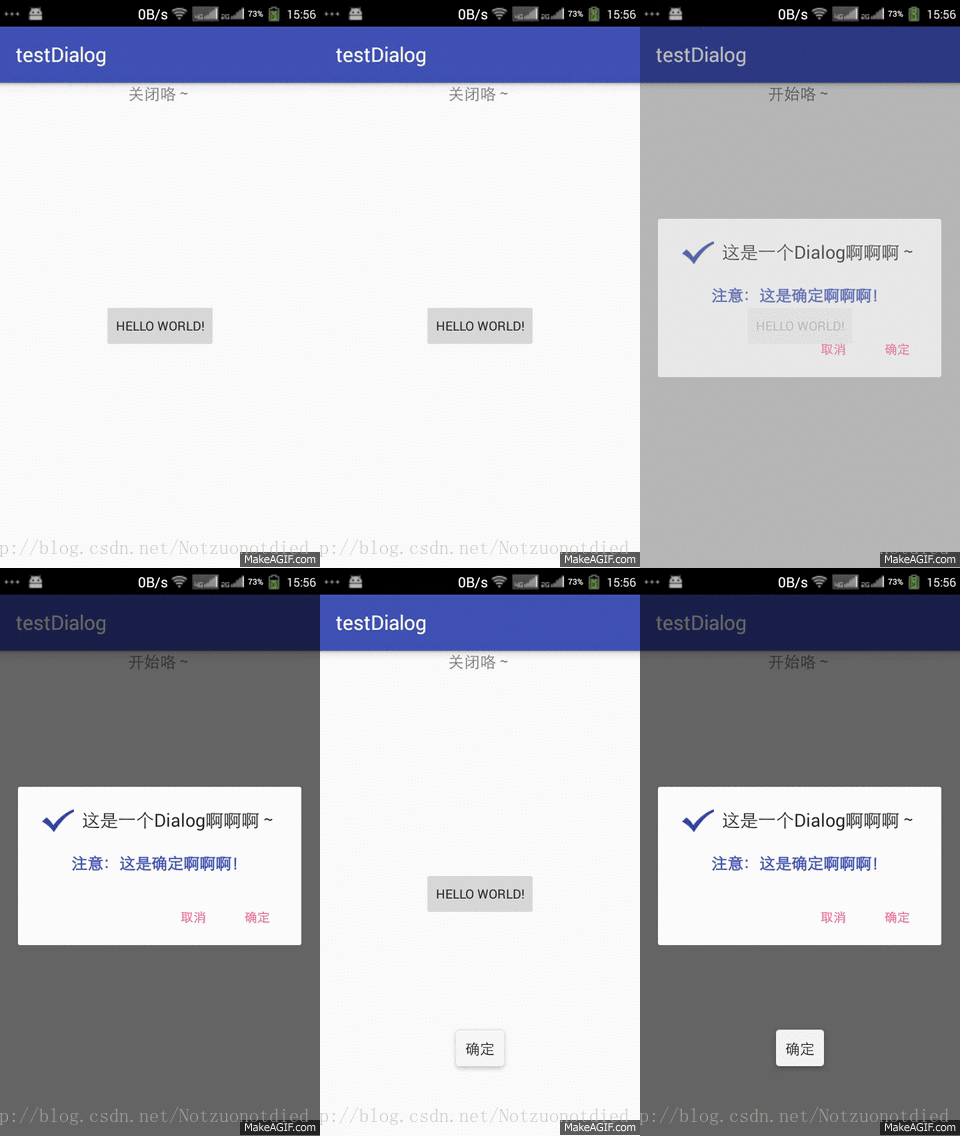
主要包含了四个监听:(具体请自行试用)
- 触摸Dialog外部事件监听
- 确定按钮事件监听
- 取消按钮事件监听
- 返回键按键事件监听
示例下载地址:点我下载
本文来自互联网用户投稿,文章观点仅代表作者本人,不代表本站立场,不承担相关法律责任。如若转载,请注明出处。 如若内容造成侵权/违法违规/事实不符,请点击【内容举报】进行投诉反馈!