android viewflipper根据横竖屏加载不同图片
android studio版本:2021.2.1
例程名称:landscape2portait
完成日期:23.2.5
功能:viewflipper根据横竖屏加载不同图片
关键点:
加载的图片以数组定义:private final int[] images = new int[]{R.drawable.a1, R.drawable.a2, R.drawable.a3,R.drawable.b1,R.drawable.b2,R.drawable.b3};
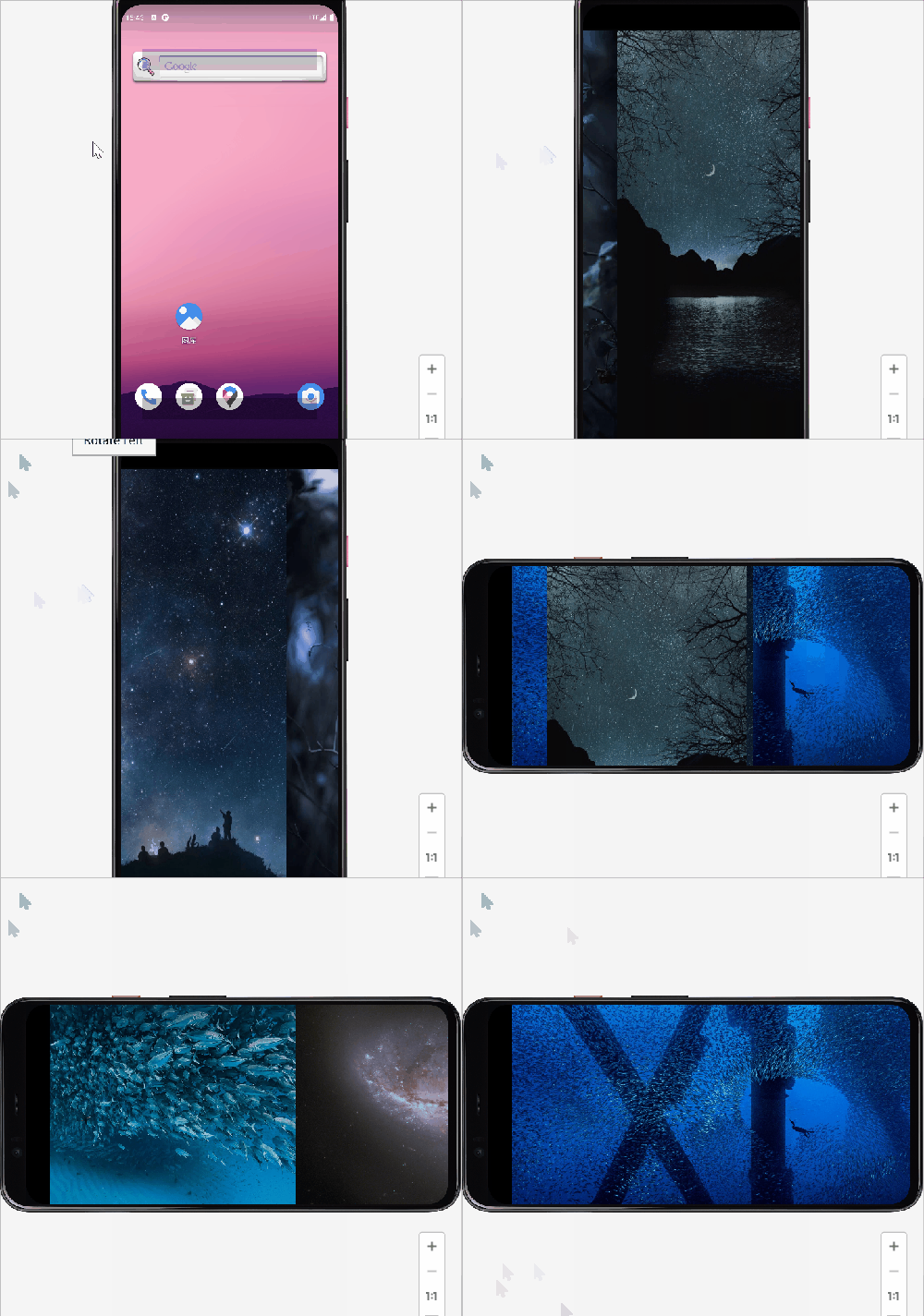
第一次启动时根据当时屏幕方向加载图片(横屏加载横向图片,坚屏加载坚向图片)
当蓝屏旋转的时候,根据方向加载不同图片。加载前要删除原图片。
一个自定义函数,一个重载onConfigrationChanged.
其他关于viewflipper的资料见:
app背景轮换,viewflipper详细实现方法(两种)(食人牙慧,备忘)
特别注意事项:图片不能太大,1080图3张就会oom(内存溢出)我这三张图加一起到不1M。
全部代码(为了效果使用的是全屏布局,原来代码较多,要注意分辨):
FullScreenActivity.java(解释看注释)
/*
完成日期:2023.2.5
功能:viewflipper横坚屏加载不同图片。*/
package com.example.landscape2portait;import android.annotation.SuppressLint;import androidx.appcompat.app.ActionBar;
import androidx.appcompat.app.AppCompatActivity;import android.content.res.Configuration;
import android.os.Build;
import android.os.Bundle;
import android.os.Handler;
import android.os.Looper;
import android.view.MotionEvent;
import android.view.View;
import android.view.WindowInsets;
import android.widget.ImageView;
import android.widget.ViewFlipper;import com.example.landscape2portait.databinding.ActivityFullscreenBinding;/*** An example full-screen activity that shows and hides the system UI (i.e.* status bar and navigation/system bar) with user interaction.*/
public class FullscreenActivity extends AppCompatActivity {private final int[] images = new int[]{R.drawable.a1, R.drawable.a2, R.drawable.a3,R.drawable.b1,R.drawable.b2,R.drawable.b3};/*** Whether or not the system UI should be auto-hidden after* {@link #AUTO_HIDE_DELAY_MILLIS} milliseconds.*/private static final boolean AUTO_HIDE = true;/*** If {@link #AUTO_HIDE} is set, the number of milliseconds to wait after* user interaction before hiding the system UI.*/private static final int AUTO_HIDE_DELAY_MILLIS = 3000;/*** Some older devices needs a small delay between UI widget updates* and a change of the status and navigation bar.*/private static final int UI_ANIMATION_DELAY = 300;private final Handler mHideHandler = new Handler(Looper.myLooper());private View mContentView;private final Runnable mHidePart2Runnable = new Runnable() {@SuppressLint("InlinedApi")@Overridepublic void run() {// Delayed removal of status and navigation barif (Build.VERSION.SDK_INT >= 30) {mContentView.getWindowInsetsController().hide(WindowInsets.Type.statusBars() | WindowInsets.Type.navigationBars());} else {// Note that some of these constants are new as of API 16 (Jelly Bean)// and API 19 (KitKat). It is safe to use them, as they are inlined// at compile-time and do nothing on earlier devices.mContentView.setSystemUiVisibility(View.SYSTEM_UI_FLAG_LOW_PROFILE| View.SYSTEM_UI_FLAG_FULLSCREEN| View.SYSTEM_UI_FLAG_LAYOUT_STABLE| View.SYSTEM_UI_FLAG_IMMERSIVE_STICKY| View.SYSTEM_UI_FLAG_LAYOUT_HIDE_NAVIGATION| View.SYSTEM_UI_FLAG_HIDE_NAVIGATION);}}};private View mControlsView;private final Runnable mShowPart2Runnable = new Runnable() {@Overridepublic void run() {// Delayed display of UI elementsActionBar actionBar = getSupportActionBar();if (actionBar != null) {actionBar.show();}mControlsView.setVisibility(View.VISIBLE);}};private boolean mVisible;private final Runnable mHideRunnable = new Runnable() {@Overridepublic void run() {hide();}};/*** Touch listener to use for in-layout UI controls to delay hiding the* system UI. This is to prevent the jarring behavior of controls going away* while interacting with activity UI.*/private final View.OnTouchListener mDelayHideTouchListener = new View.OnTouchListener() {@Overridepublic boolean onTouch(View view, MotionEvent motionEvent) {switch (motionEvent.getAction()) {case MotionEvent.ACTION_DOWN:if (AUTO_HIDE) {delayedHide(AUTO_HIDE_DELAY_MILLIS);}break;case MotionEvent.ACTION_UP:view.performClick();break;default:break;}return false;}};private ActivityFullscreenBinding binding;@Overrideprotected void onCreate(Bundle savedInstanceState) {super.onCreate(savedInstanceState);binding = ActivityFullscreenBinding.inflate(getLayoutInflater());setContentView(binding.getRoot());mVisible = true;mControlsView = binding.fullscreenContentControls;mContentView = binding.fullscreenContent;// Set up the user interaction to manually show or hide the system UI.mContentView.setOnClickListener(new View.OnClickListener() {@Overridepublic void onClick(View view) {toggle();}});// Upon interacting with UI controls, delay any scheduled hide()// operations to prevent the jarring behavior of controls going away// while interacting with the UI.binding.dummyButton.setOnTouchListener(mDelayHideTouchListener);//根据屏幕横竖状态加载图片screenStatus();}@Overrideprotected void onPostCreate(Bundle savedInstanceState) {super.onPostCreate(savedInstanceState);// Trigger the initial hide() shortly after the activity has been// created, to briefly hint to the user that UI controls// are available.delayedHide(100);}//屏幕横竖屏切换时加载不同图片,onConfigurationChanged为屏幕切换监听@Overridepublic void onConfigurationChanged(Configuration newConfig) {super.onConfigurationChanged(newConfig);//这行很重要。ViewFlipper vflp_help = (ViewFlipper) findViewById(R.id.vflp_help);vflp_help.startFlipping();//切换屏幕if (newConfig.orientation == this.getResources().getConfiguration().ORIENTATION_PORTRAIT) {//如果是坚屏//删除三个图片,index只能为0,估计删除一个后,之前的就变为0//三个图片删除三次。(因系统启动时就加载了图片,所以无论横竖屏,都要删除操作。)vflp_help.removeViewAt(0);vflp_help.removeViewAt(0);vflp_help.removeViewAt(0);//动态加载3个图,因为images里有6张图,前三张是横屏图,后三张是坚屏,所以要从第3张加载。//切换横屏for (int i = 3; i < images.length; i++) {ImageView iv = new ImageView(this);iv.setBackgroundResource(images[i]);//动态加载vflp_help.addView(iv);}vflp_help.setAutoStart(true);vflp_help.setFlipInterval(1000*5);//轮换时间为5秒}//切换为横屏时else if (newConfig.orientation == this.getResources().getConfiguration().ORIENTATION_LANDSCAPE) {vflp_help.removeViewAt(0);vflp_help.removeViewAt(0);vflp_help.removeViewAt(0);for (int i = 0; i < images.length-3; i++) {ImageView iv = new ImageView(this);iv.setBackgroundResource(images[i]);vflp_help.addView(iv);}vflp_help.setAutoStart(true);vflp_help.setFlipInterval(1000*5);}}private void toggle() {if (mVisible) {hide();} else {show();}}private void hide() {// Hide UI firstActionBar actionBar = getSupportActionBar();if (actionBar != null) {actionBar.hide();}mControlsView.setVisibility(View.GONE);mVisible = false;// Schedule a runnable to remove the status and navigation bar after a delaymHideHandler.removeCallbacks(mShowPart2Runnable);mHideHandler.postDelayed(mHidePart2Runnable, UI_ANIMATION_DELAY);}private void show() {// Show the system barif (Build.VERSION.SDK_INT >= 30) {mContentView.getWindowInsetsController().show(WindowInsets.Type.statusBars() | WindowInsets.Type.navigationBars());} else {mContentView.setSystemUiVisibility(View.SYSTEM_UI_FLAG_LAYOUT_FULLSCREEN| View.SYSTEM_UI_FLAG_LAYOUT_HIDE_NAVIGATION);}mVisible = true;// Schedule a runnable to display UI elements after a delaymHideHandler.removeCallbacks(mHidePart2Runnable);mHideHandler.postDelayed(mShowPart2Runnable, UI_ANIMATION_DELAY);}/*** Schedules a call to hide() in delay milliseconds, canceling any* previously scheduled calls.*/private void delayedHide(int delayMillis) {mHideHandler.removeCallbacks(mHideRunnable);mHideHandler.postDelayed(mHideRunnable, delayMillis);}public void screenStatus() {ViewFlipper vflp_help = (ViewFlipper) findViewById(R.id.vflp_help);vflp_help.startFlipping();Configuration mConfiguration = this.getResources().getConfiguration(); //获取配置信息int ori = mConfiguration.orientation; //获取屏幕方向if (ori == mConfiguration.ORIENTATION_LANDSCAPE) {for (int i = 0; i < images.length - 3; i++) {ImageView iv = new ImageView(this);iv.setBackgroundResource(images[i]);vflp_help.addView(iv);}vflp_help.setAutoStart(true);vflp_help.setFlipInterval(1000 * 5);} else  {for (int i = 3; i < images.length; i++) {ImageView iv = new ImageView(this);iv.setBackgroundResource(images[i]);vflp_help.addView(iv);}vflp_help.setAutoStart(true);vflp_help.setFlipInterval(1000 * 5);}}
}
activity_fullscreen.xml
其他代码见:app背景轮换,viewflipper详细实现方法(两种)(食人牙慧,备忘)(第二个方法)
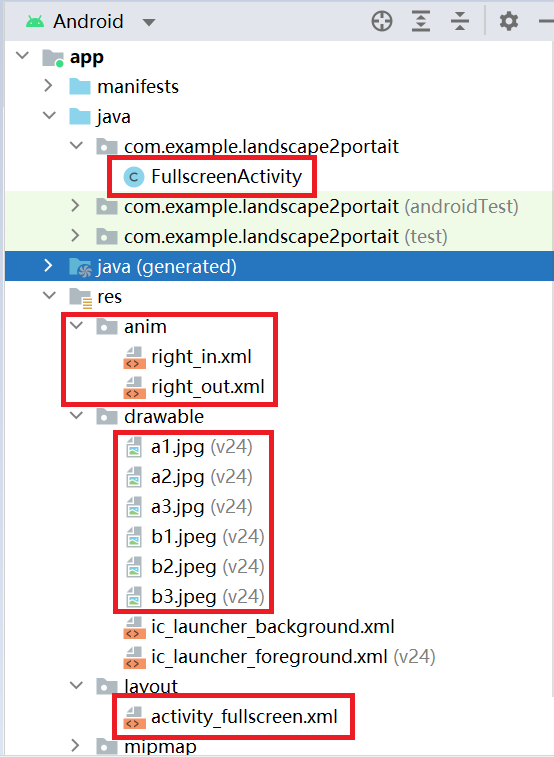
文件位置:
动图展示:(横坚屏切换的时候还有点问题,现在还不知道怎么解决。)
本文来自互联网用户投稿,文章观点仅代表作者本人,不代表本站立场,不承担相关法律责任。如若转载,请注明出处。 如若内容造成侵权/违法违规/事实不符,请点击【内容举报】进行投诉反馈!