Unity中的ComputeShader·GPU计算·百万级粒子
Unity中的ComputeShader·GPU计算·百万级粒子
前言
最近在项目中优化粒子特效,发现Unity的粒子特效消耗非常高就想着能不能优化。
发现用ComputeShader来计算的话效率会非常非常的高,因为粒子的轨迹运算都是在GPU中去进行的,大大降低了drawcall,效率也大大提升了。
本项目参考了B站某UP的文章:https://www.bilibili.com/read/cv3356979?from=search,在这里十分感谢。
项目仓库地址:https://github.com/Kirkice/ComputeShaderDemo
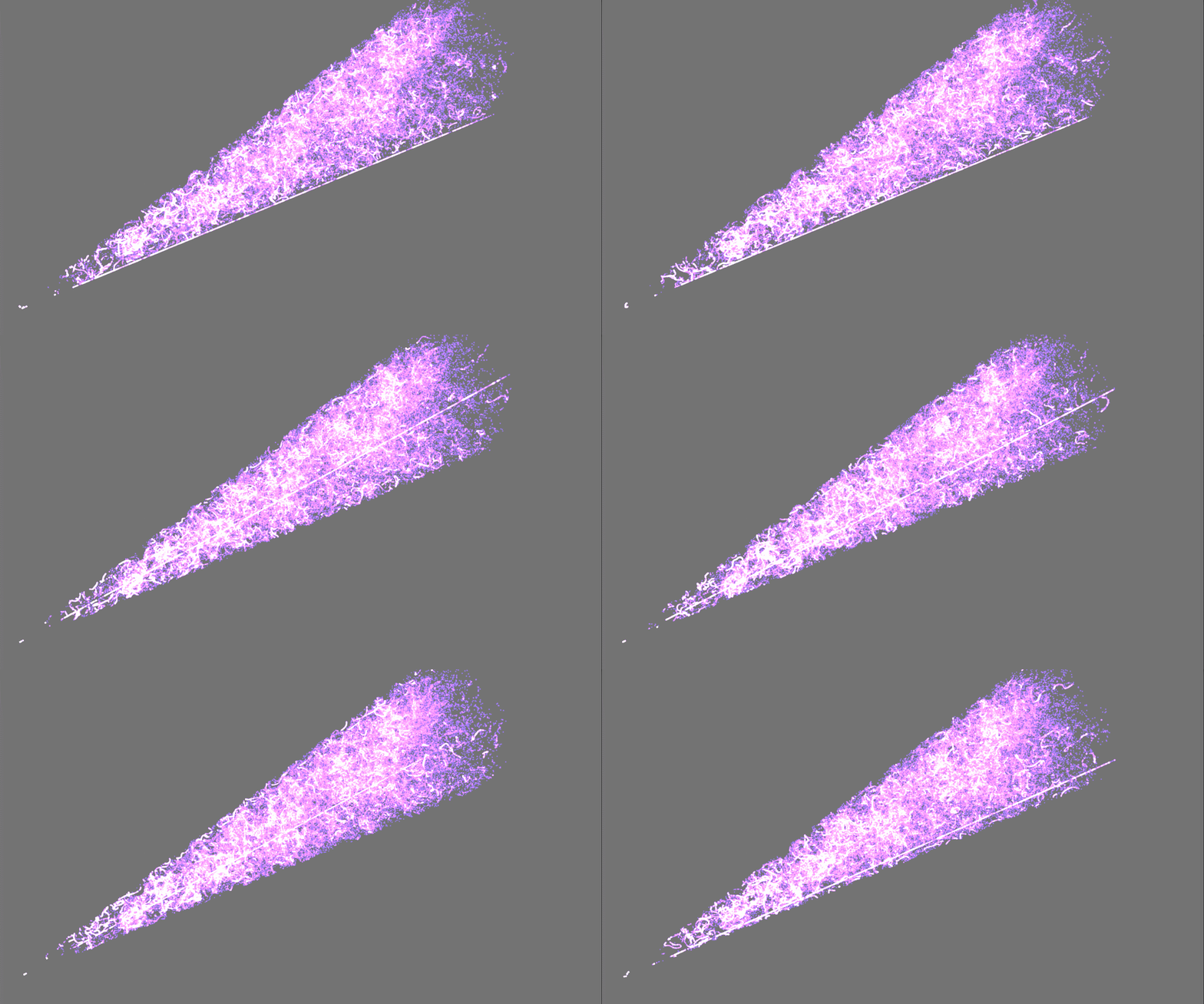
效果截图
这里的粒子总数目达到100万,帧率可以维持在30fps左右,drawcall只有2,不敢想象如果是用普通的粒子特效来做会是什么样的。
ComputeShader概念
ComputeShader可以用做通用计算,也就是gpu负责主要的计算过程,最后再将结果传递给cpu,这类非图形计算被称为GPGPU。ComputeShader虽然位于渲染流水线之外,但它支持读写GPU资源,我们可以将运行结果直接传递到渲染管线,从而来完成一些图形处理的效果,这样就没有了从显存到内存的时间开销(此类过程速度很慢)。
也就是说CPU将需要计算的粒子参数传给GPU来计算,由于GPU是用平行架构处理大量的并行数据,所以大量并行无序数据的少分支逻辑(少if)适合GPGPU,将这些复杂的轨迹运算丢给GPU效率会比CPU大得多得多。
CPU部分实现(C#)
申明部分
粒子的结构体
struct Particle{public Vector3 pos; //起始位置public Vector3 newPos; //更新位置}
一些全局变量
int ThreadBlockSize = 256; //线程组大小int blockPerGrid; //每个组ComputeBuffer ParticleBuffer, argsBuffer;private uint[] _args;private int number; //粒子数目public int width, height; //设置长宽范围public int interval; //间隔距离public float randomDegree; //随机角度public float radius_r, radius_R, length_h; //圆台的小半径、大半径、长度[SerializeField]private Mesh Particle_Mesh; //粒子网格[SerializeField]ComputeShader _computeShader; //computeshader[SerializeField]private Material _material; //粒子材质
关于numthreads
在C#脚本中我们会用到一个 Dispatch 函数,这个函数就是定义线程组的数量。
在二维中,如果图片的解析度是(256*128),那么Dispatch和numthreads的分配可以如下:
- Dispatch (k, 256, 128, 1) [numthreads (1, 1, 1)]
- Dispatch (k, 32, 16, 1) [numthreads (8, 8, 1)]
- Dispatch (k, 32, 16, 1) [numthreads (8, 8, 1)]
- Dispatch (k, 256/8, 128/8, 1) [numthreads (8, 8, 1)]
- Dispatch (k, 8, 4, 1) [numthreads (32, 32, 1)]
从中我们可以发现 Dispatch.x * numthreads.x = 256 ( 图片宽度 ),Dispatch.y * numthreads.y = 128 ( 图片高度 ),只要 Dispatch * numthreads 是图片大小,那么图片就能完全显示,不会少漏一个像素。
(但是numthreads有上限,numthreads.x * numthreads.y * numthreads.z 必须小于等于 1024)
PS:关于Group 与 Thread 的关系如下图
假设有一张 4X4的图像,使用参数 Dispatch(k, 2, 2, 1) 与 [numthreads(2, 2, 1)]
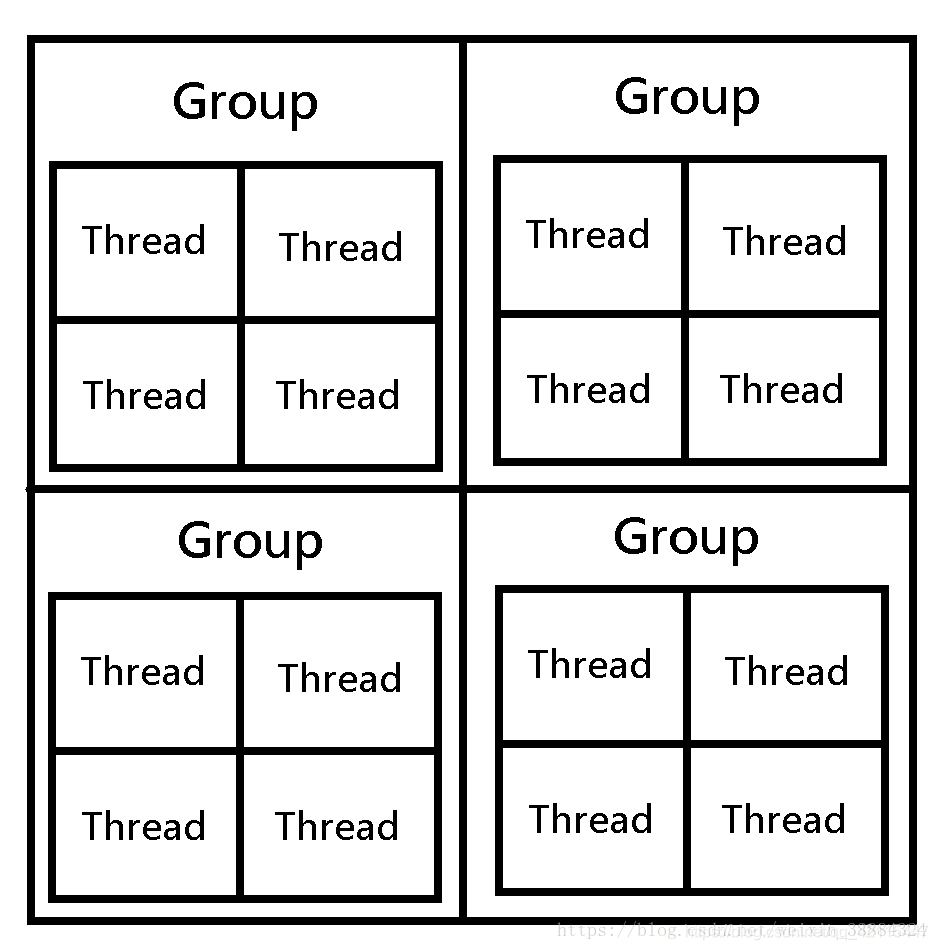
Group 的 长、宽、高 是由 numthreads 所设定的,同理一个Group的大小是不能超过 1024 。
同理 [numthreads(32, 32, 1)] 的 Group 大小就是 32 * 32 * 1 ( 32 * 32 像素 )
然而如果你的 GPU 有 64 核心,而你的 Group 也有 64 个,那么每个核心将能处理一个 Group。
假设 ThreadSize = ( numthreads.x * numthreads.y * numthreads.z )
那么不同的 ThreadSize 在不同硬件厂下分配的资源是不同的
建议:
AMD:ThreadSize 使用 64 的倍数 ( wavefront 架构 )
NVIDIA:ThreadSize 使用 32 的倍数 ( SIMD32 (Warp) 架构 )
Start
在这个阶段,设置ComputeBuffer、设置粒子的位置然后setdata。
private void Start(){number = width * height;randomDegree = Random.Range(1, 359); //随机一个1-359的度数Particle[] particles = new Particle[number]; //创建粒子数组blockPerGrid = (number + ThreadBlockSize - 1) / ThreadBlockSize; ParticleBuffer = new ComputeBuffer(number, 24); //创建第一个ComputeBuffer 6*4 ----> 24_args = new uint[5] { 0, 0, 0, 0, 0 };argsBuffer = new ComputeBuffer(1, _args.Length * sizeof(uint), ComputeBufferType.IndirectArguments);//粒子的开始位置设0for (int i = 0; i < width; ++i) //遍历设置粒子位置{for (int j = 0; j < height; ++j){int id = i * height + j;float x = (float)i / (width - 1);float y = (float)j / (height - 1);particles[id].pos = new Vector3((x * interval), (y * interval), y * interval);particles[id].newPos = new Vector3((x * interval), (y * interval), y * interval);}}//setdataParticleBuffer.SetData(particles);}
Update
在Update中去更新ComputeShader中的传递数据。
private void Update(){randomDegree = Random.Range(1, 359);UpdateComputeShader();argsBuffer.SetData(_args);Graphics.DrawMeshInstancedIndirect(Particle_Mesh, 0, _material, new Bounds(Vector3.zero, new Vector3(100f, 100f, 100f)), argsBuffer);}
C#将需要传递给GPU运算的数据传递给ComputeShader
private void UpdateComputeShader(){int kernelId = _computeShader.FindKernel("CSMain");_computeShader.SetFloat("_deltaTime", Time.deltaTime);_computeShader.SetFloat("_radius_r", radius_r);_computeShader.SetFloat("_radius_R", radius_R);_computeShader.SetFloat("_length_h", length_h);_computeShader.SetFloat("_randomDegree", randomDegree);_computeShader.SetBuffer(kernelId, "_ParticleBuffer", ParticleBuffer);_computeShader.Dispatch(kernelId, blockPerGrid, 1, 1);_args[0] = (uint)Particle_Mesh.GetIndexCount(0);_args[1] = (uint)number;_args[2] = (uint)Particle_Mesh.GetIndexStart(0);_args[3] = (uint)Particle_Mesh.GetBaseVertex(0);_material.SetBuffer("_ParticleBuffer", ParticleBuffer);_material.SetMatrix("_GameobjectMatrix", this.transform.localToWorldMatrix);}
GPU部分实现
对应的一些参数
struct Particle
{float3 pos;     //起始位置float3 newPos;      //更新位置
};RWStructuredBuffer<Particle> _ParticleBuffer;float _deltaTime;
float _radius_r;
float _radius_R;
float _length_h;
float _randomDegree;
CSMain
这一部分是轨迹运算部分,噪点运算是用的网络的噪点算法,在结尾部分回帖出源码。
然后就是计算粒子的运动范围,是一个圆台,大小圆半径以及高度是由C#传过来的,在每一帧会计算当前粒子所在位置的截面圆的半径,粒子超过这个半径就重新计算粒子的位置,我采用随机算法是通过C#传递一个随机1-359的度数值,然后将坐标用参数方程来表现。
计算完位置之后,直接交给shader来渲染粒子。
[numthreads(256, 1, 1)]
void CSMain(uint3 id : SV_DispatchThreadID)
{float3 position = _ParticleBuffer[id.x].pos;_ParticleBuffer[id.x].pos += curlNoise(position) * 0.2;		//随机位置//_ParticleBuffer[id.x].pos.x += _deltaTime * 0.1;		//位移//形状为圆台的范围float posDis = sqrt((_ParticleBuffer[id.x].pos.y * _ParticleBuffer[id.x].pos.y) + (_ParticleBuffer[id.x].pos.z * _ParticleBuffer[id.x].pos.z));float rangeDis = ((_radius_R - _radius_r) / _length_h) * _ParticleBuffer[id.x].pos.x;float multNum = rangeDis - posDis;if (multNum < 0){_ParticleBuffer[id.x].pos = float3(_ParticleBuffer[id.x].pos.x, rangeDis * sin(_randomDegree), rangeDis * cos(_randomDegree));}if (_ParticleBuffer[id.x].pos.x > _length_h){_ParticleBuffer[id.x].pos = float3(1, 0.1 * sin(_randomDegree), 0.1 * cos(_randomDegree));}
}
shader部分
属性部分:
[HDR]_Color("Color",color) = (1,1,1,1)_MainTex("_MainTex", 2D) = "white" {}_Size("Size",float) = 1.6[Enum(UnityEngine.Rendering.CompareFunction)] _ZTest("ZTest", Float) = 4[Enum(UnityEngine.Rendering.CullMode)] _Cull("Cull Mode", Float) = 0
这里用了个矩阵将粒子转到计算出来的坐标位置和大小
float4x4 GetModelToWorldMatrix(float3 pos){float4x4 transformMatrix = float4x4(_Size,0,0,pos.x,0,_Size,0,pos.y,0,0,_Size,pos.z,0,0,0,1);return transformMatrix;}
源码部分
C#:
using System.Collections;
using System.Collections.Generic;
using UnityEngine;public class gpuComputeShader : MonoBehaviour
{struct Particle{public Vector3 pos;     //起始位置public Vector3 newPos;      //更新位置}int ThreadBlockSize = 256;  //线程组大小int blockPerGrid;       //每个组ComputeBuffer ParticleBuffer, argsBuffer;private uint[] _args;private int number;  //粒子数目public int width, height; //设置长宽范围public int interval;        //间隔距离public float randomDegree;      //随机角度public float radius_r, radius_R, length_h;      //圆台的小半径、大半径、长度[SerializeField]private Mesh Particle_Mesh;         //粒子网格[SerializeField]ComputeShader _computeShader;       //申明computeshader[SerializeField]private Material _material;     //粒子材质private void Start(){number = width * height;randomDegree = Random.Range(1, 359);    //随机一个1-359的度数Particle[] particles = new Particle[number];    //创建粒子数组blockPerGrid = (number + ThreadBlockSize - 1) / ThreadBlockSize;    ParticleBuffer = new ComputeBuffer(number, 24); //创建第一个ComputeBuffer 6*4 ----> 24_args = new uint[5] { 0, 0, 0, 0, 0 };argsBuffer = new ComputeBuffer(1, _args.Length * sizeof(uint), ComputeBufferType.IndirectArguments);//粒子的开始位置设0for (int i = 0; i < width; ++i)         //遍历设置粒子位置{for (int j = 0; j < height; ++j){int id = i * height + j;float x = (float)i / (width - 1);float y = (float)j / (height - 1);particles[id].pos = new Vector3((x * interval), (y * interval), y * interval);particles[id].newPos = new Vector3((x * interval), (y * interval), y * interval);}}//setdataParticleBuffer.SetData(particles);}private void Update(){randomDegree = Random.Range(1, 359);UpdateComputeShader();argsBuffer.SetData(_args);Graphics.DrawMeshInstancedIndirect(Particle_Mesh, 0, _material, new Bounds(Vector3.zero, new Vector3(100f, 100f, 100f)), argsBuffer);}private void UpdateComputeShader(){int kernelId = _computeShader.FindKernel("CSMain");_computeShader.SetFloat("_deltaTime", Time.deltaTime);_computeShader.SetFloat("_radius_r", radius_r);_computeShader.SetFloat("_radius_R", radius_R);_computeShader.SetFloat("_length_h", length_h);_computeShader.SetFloat("_randomDegree", randomDegree);_computeShader.SetBuffer(kernelId, "_ParticleBuffer", ParticleBuffer);_computeShader.Dispatch(kernelId, blockPerGrid, 1, 1);_args[0] = (uint)Particle_Mesh.GetIndexCount(0);_args[1] = (uint)number;_args[2] = (uint)Particle_Mesh.GetIndexStart(0);_args[3] = (uint)Particle_Mesh.GetBaseVertex(0);_material.SetBuffer("_ParticleBuffer", ParticleBuffer);_material.SetMatrix("_GameobjectMatrix", this.transform.localToWorldMatrix);}
}
ComputeShader
#pragma kernel CSMain
#include "SimplexNoise3D.cginc"
struct Particle
{float3 pos;     //起始位置float3 newPos;      //更新位置
};RWStructuredBuffer<Particle> _ParticleBuffer;float _deltaTime;
float _radius_r;
float _radius_R;
float _length_h;
float _randomDegree;float nrand(float2 uv)
{return frac(sin(dot(uv, float2(12.9898, 78.233))) * 43758.5453);
}
uint rng_state;uint rand_xorshift()
{rng_state ^= (rng_state << 13);rng_state ^= (rng_state >> 17);rng_state ^= (rng_state << 5);return rng_state;
}float3 snoiseVec3(float3 x) {float s = snoise(x);float s1 = snoise(float3(x.y - 19.1, x.z + 33.4, x.x + 47.2));float s2 = snoise(float3(x.z + 74.2, x.x - 124.5, x.y + 99.4));float3 c = float3(s, s1, s2);return c;
}float3 curlNoise(float3 p) {const float e = .01;float3 dx = float3(e, 0.0, 0.0);float3 dy = float3(0.0, e, 0.0);float3 dz = float3(0.0, 0.0, e);float3 p_x0 = snoiseVec3(p - dx);float3 p_x1 = snoiseVec3(p + dx);float3 p_y0 = snoiseVec3(p - dy);float3 p_y1 = snoiseVec3(p + dy);float3 p_z0 = snoiseVec3(p - dz);float3 p_z1 = snoiseVec3(p + dz);float x = p_y1.z - p_y0.z - p_z1.y + p_z0.y;float y = p_z1.x - p_z0.x - p_x1.z + p_x0.z;float z = p_x1.y - p_x0.y - p_y1.x + p_y0.x;const float divisor = 1.0 / (2.0 * e);return normalize(float3(x, y, z) * divisor);
}[numthreads(256, 1, 1)]
void CSMain(uint3 id : SV_DispatchThreadID)
{float3 position = _ParticleBuffer[id.x].pos;_ParticleBuffer[id.x].pos += curlNoise(position) * 0.2;		//随机位置//_ParticleBuffer[id.x].pos.x += _deltaTime * 0.1;		//位移//形状为圆台的范围float posDis = sqrt((_ParticleBuffer[id.x].pos.y * _ParticleBuffer[id.x].pos.y) + (_ParticleBuffer[id.x].pos.z * _ParticleBuffer[id.x].pos.z));float rangeDis = ((_radius_R - _radius_r) / _length_h) * _ParticleBuffer[id.x].pos.x;float multNum = rangeDis - posDis;if (multNum < 0){_ParticleBuffer[id.x].pos = float3(_ParticleBuffer[id.x].pos.x, rangeDis * sin(_randomDegree), rangeDis * cos(_randomDegree));}if (_ParticleBuffer[id.x].pos.x > _length_h){_ParticleBuffer[id.x].pos = float3(1, 0.1 * sin(_randomDegree), 0.1 * cos(_randomDegree));}
}
Noise计算
//
// Noise Shader Library for Unity - https://github.com/keijiro/NoiseShader
//
// Original work (webgl-noise) Copyright (C) 2011 Ashima Arts.
// Translation and modification was made by Keijiro Takahashi.
//
// This shader is based on the webgl-noise GLSL shader. For further details
// of the original shader, please see the following description from the
// original source code.
////
// Description : Array and textureless GLSL 2D/3D/4D simplex
//               noise functions.
//      Author : Ian McEwan, Ashima Arts.
//  Maintainer : ijm
//     Lastmod : 20110822 (ijm)
//     License : Copyright (C) 2011 Ashima Arts. All rights reserved.
//               Distributed under the MIT License. See LICENSE file.
//               https://github.com/ashima/webgl-noise
//float3 mod289(float3 x)
{return x - floor(x / 289.0) * 289.0;
}float4 mod289(float4 x)
{return x - floor(x / 289.0) * 289.0;
}float4 permute(float4 x)
{return mod289((x * 34.0 + 1.0) * x);
}float4 taylorInvSqrt(float4 r)
{return 1.79284291400159 - r * 0.85373472095314;
}float snoise(float3 v)
{const float2 C = float2(1.0 / 6.0, 1.0 / 3.0);// First cornerfloat3 i  = floor(v + dot(v, C.yyy));float3 x0 = v   - i + dot(i, C.xxx);// Other cornersfloat3 g = step(x0.yzx, x0.xyz);float3 l = 1.0 - g;float3 i1 = min(g.xyz, l.zxy);float3 i2 = max(g.xyz, l.zxy);// x1 = x0 - i1  + 1.0 * C.xxx;// x2 = x0 - i2  + 2.0 * C.xxx;// x3 = x0 - 1.0 + 3.0 * C.xxx;float3 x1 = x0 - i1 + C.xxx;float3 x2 = x0 - i2 + C.yyy;float3 x3 = x0 - 0.5;// Permutationsi = mod289(i); // Avoid truncation effects in permutationfloat4 p =permute(permute(permute(i.z + float4(0.0, i1.z, i2.z, 1.0))+ i.y + float4(0.0, i1.y, i2.y, 1.0))+ i.x + float4(0.0, i1.x, i2.x, 1.0));// Gradients: 7x7 points over a square, mapped onto an octahedron.// The ring size 17*17 = 289 is close to a multiple of 49 (49*6 = 294)float4 j = p - 49.0 * floor(p / 49.0);  // mod(p,7*7)float4 x_ = floor(j / 7.0);float4 y_ = floor(j - 7.0 * x_);  // mod(j,N)float4 x = (x_ * 2.0 + 0.5) / 7.0 - 1.0;float4 y = (y_ * 2.0 + 0.5) / 7.0 - 1.0;float4 h = 1.0 - abs(x) - abs(y);float4 b0 = float4(x.xy, y.xy);float4 b1 = float4(x.zw, y.zw);//float4 s0 = float4(lessThan(b0, 0.0)) * 2.0 - 1.0;//float4 s1 = float4(lessThan(b1, 0.0)) * 2.0 - 1.0;float4 s0 = floor(b0) * 2.0 + 1.0;float4 s1 = floor(b1) * 2.0 + 1.0;float4 sh = -step(h, 0.0);float4 a0 = b0.xzyw + s0.xzyw * sh.xxyy;float4 a1 = b1.xzyw + s1.xzyw * sh.zzww;float3 g0 = float3(a0.xy, h.x);float3 g1 = float3(a0.zw, h.y);float3 g2 = float3(a1.xy, h.z);float3 g3 = float3(a1.zw, h.w);// Normalise gradientsfloat4 norm = taylorInvSqrt(float4(dot(g0, g0), dot(g1, g1), dot(g2, g2), dot(g3, g3)));g0 *= norm.x;g1 *= norm.y;g2 *= norm.z;g3 *= norm.w;// Mix final noise valuefloat4 m = max(0.6 - float4(dot(x0, x0), dot(x1, x1), dot(x2, x2), dot(x3, x3)), 0.0);m = m * m;m = m * m;float4 px = float4(dot(x0, g0), dot(x1, g1), dot(x2, g2), dot(x3, g3));return 42.0 * dot(m, px);
}float3 snoise_grad(float3 v)
{const float2 C = float2(1.0 / 6.0, 1.0 / 3.0);// First cornerfloat3 i  = floor(v + dot(v, C.yyy));float3 x0 = v   - i + dot(i, C.xxx);// Other cornersfloat3 g = step(x0.yzx, x0.xyz);float3 l = 1.0 - g;float3 i1 = min(g.xyz, l.zxy);float3 i2 = max(g.xyz, l.zxy);// x1 = x0 - i1  + 1.0 * C.xxx;// x2 = x0 - i2  + 2.0 * C.xxx;// x3 = x0 - 1.0 + 3.0 * C.xxx;float3 x1 = x0 - i1 + C.xxx;float3 x2 = x0 - i2 + C.yyy;float3 x3 = x0 - 0.5;// Permutationsi = mod289(i); // Avoid truncation effects in permutationfloat4 p =permute(permute(permute(i.z + float4(0.0, i1.z, i2.z, 1.0))+ i.y + float4(0.0, i1.y, i2.y, 1.0))+ i.x + float4(0.0, i1.x, i2.x, 1.0));// Gradients: 7x7 points over a square, mapped onto an octahedron.// The ring size 17*17 = 289 is close to a multiple of 49 (49*6 = 294)float4 j = p - 49.0 * floor(p / 49.0);  // mod(p,7*7)float4 x_ = floor(j / 7.0);float4 y_ = floor(j - 7.0 * x_);  // mod(j,N)float4 x = (x_ * 2.0 + 0.5) / 7.0 - 1.0;float4 y = (y_ * 2.0 + 0.5) / 7.0 - 1.0;float4 h = 1.0 - abs(x) - abs(y);float4 b0 = float4(x.xy, y.xy);float4 b1 = float4(x.zw, y.zw);//float4 s0 = float4(lessThan(b0, 0.0)) * 2.0 - 1.0;//float4 s1 = float4(lessThan(b1, 0.0)) * 2.0 - 1.0;float4 s0 = floor(b0) * 2.0 + 1.0;float4 s1 = floor(b1) * 2.0 + 1.0;float4 sh = -step(h, 0.0);float4 a0 = b0.xzyw + s0.xzyw * sh.xxyy;float4 a1 = b1.xzyw + s1.xzyw * sh.zzww;float3 g0 = float3(a0.xy, h.x);float3 g1 = float3(a0.zw, h.y);float3 g2 = float3(a1.xy, h.z);float3 g3 = float3(a1.zw, h.w);// Normalise gradientsfloat4 norm = taylorInvSqrt(float4(dot(g0, g0), dot(g1, g1), dot(g2, g2), dot(g3, g3)));g0 *= norm.x;g1 *= norm.y;g2 *= norm.z;g3 *= norm.w;// Compute gradient of noise function at Pfloat4 m = max(0.6 - float4(dot(x0, x0), dot(x1, x1), dot(x2, x2), dot(x3, x3)), 0.0);float4 m2 = m * m;float4 m3 = m2 * m;float4 m4 = m2 * m2;float3 grad =-6.0 * m3.x * x0 * dot(x0, g0) + m4.x * g0 +-6.0 * m3.y * x1 * dot(x1, g1) + m4.y * g1 +-6.0 * m3.z * x2 * dot(x2, g2) + m4.z * g2 +-6.0 * m3.w * x3 * dot(x3, g3) + m4.w * g3;return 42.0 * grad;
}
Shader
Shader "shader test/particle"
{Properties{[HDR]_Color("Color",color) = (1,1,1,1)_MainTex("_MainTex", 2D) = "white" {}_Size("Size",float) = 1.6[Enum(UnityEngine.Rendering.CompareFunction)] _ZTest("ZTest", Float) = 4[Enum(UnityEngine.Rendering.CullMode)] _Cull("Cull Mode", Float) = 0}SubShader{Tags { "Queue" = "Transparent+300" "IgnoreProjector" = "True" "RenderType" = "Transparent" "PreviewType" = "Plane" }ZTest[_ZTest]Cull[_Cull]Blend One One, SrcAlpha OneMinusSrcAlphaLighting OffZWrite OffFog{ Mode Off }LOD 200Pass{CGPROGRAM#pragma target 4.5#pragma vertex vert#pragma fragment frag#include "UnityCG.cginc"struct Particle{float3 pos;     //起始位置float3 newPos;      //更新位置};StructuredBuffer<Particle> _ParticleBuffer;sampler2D _MainTex;float4 _MainTex_ST;fixed4 _Color;float _Size;float4x4 _GameobjectMatrix;struct appdata {float4 vertex:POSITION;float4 texcoord:TEXCOORD0;};struct v2f {float4 pos:SV_POSITION;float4 texcoord:TEXCOORD1;};float4x4 GetModelToWorldMatrix(float3 pos){float4x4 transformMatrix = float4x4(_Size,0,0,pos.x,0,_Size,0,pos.y,0,0,_Size,pos.z,0,0,0,1);return transformMatrix;}float3x3 GetRotMatrix_X(float cosQ, float sinQ){float3x3 rotMatrix_X = float3x3(1, 0, 0,0, cosQ, -sinQ,0, sinQ, cosQ);return rotMatrix_X;}float3x3 GetRotMatrix_Y(float cosQ, float sinQ){float3x3 rotMatrix_Y = float3x3(cosQ, 0, sinQ,0, 1, 0,-sinQ, 0, cosQ);return rotMatrix_Y;}float3x3 GetRotMatrix_Z(float cosQ, float sinQ){float3x3 rotMatrix_Z = float3x3(cosQ, -sinQ, 0,sinQ, cosQ, 0,0, 0, 1);return rotMatrix_Z;}v2f vert(appdata v,uint instanceID :SV_INSTANCEID){v2f o;Particle particle = _ParticleBuffer[instanceID];float4x4 WorldMatrix = GetModelToWorldMatrix(particle.pos.xyz);WorldMatrix = mul(_GameobjectMatrix,WorldMatrix);v.vertex = mul(WorldMatrix, v.vertex);o.pos = mul(UNITY_MATRIX_VP,v.vertex);o.texcoord.xy = v.texcoord.xy;o.texcoord.zw = 0;return o;}fixed4 frag(v2f i) :SV_Target{float2 uvMainTex = i.texcoord.xy * _MainTex_ST.xy + _MainTex_ST.zw;fixed3 col = tex2D(_MainTex, uvMainTex).rgb;col = col * _Color;return float4(col.rgb,1);}ENDCG}}FallBack Off
}
本文来自互联网用户投稿,文章观点仅代表作者本人,不代表本站立场,不承担相关法律责任。如若转载,请注明出处。 如若内容造成侵权/违法违规/事实不符,请点击【内容举报】进行投诉反馈!