GraphQL初识
1、GraphQL介绍
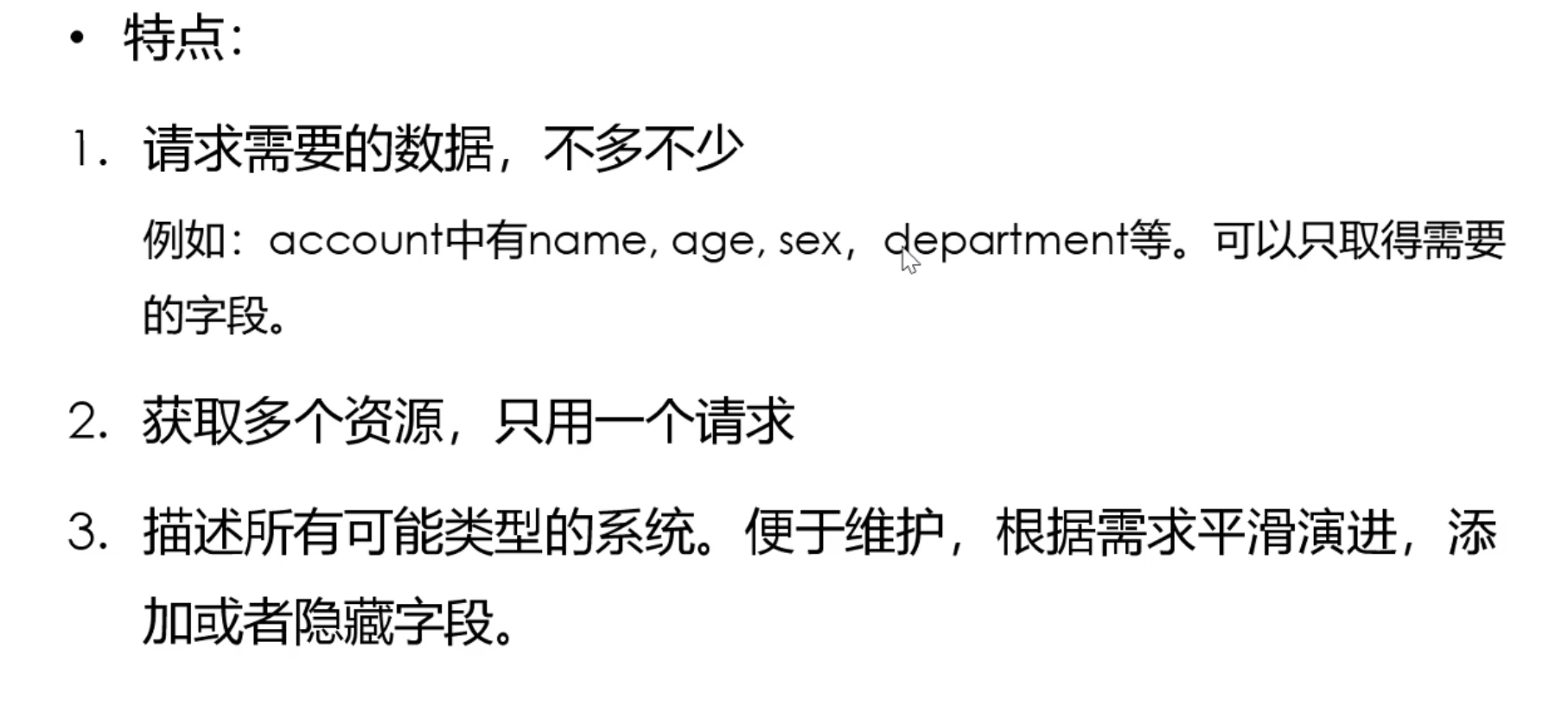
2、graphQL与restful对比

- restful用不同的url区分资源,graphql用类型区分资源
3、示例
GraphQL官网学习示例
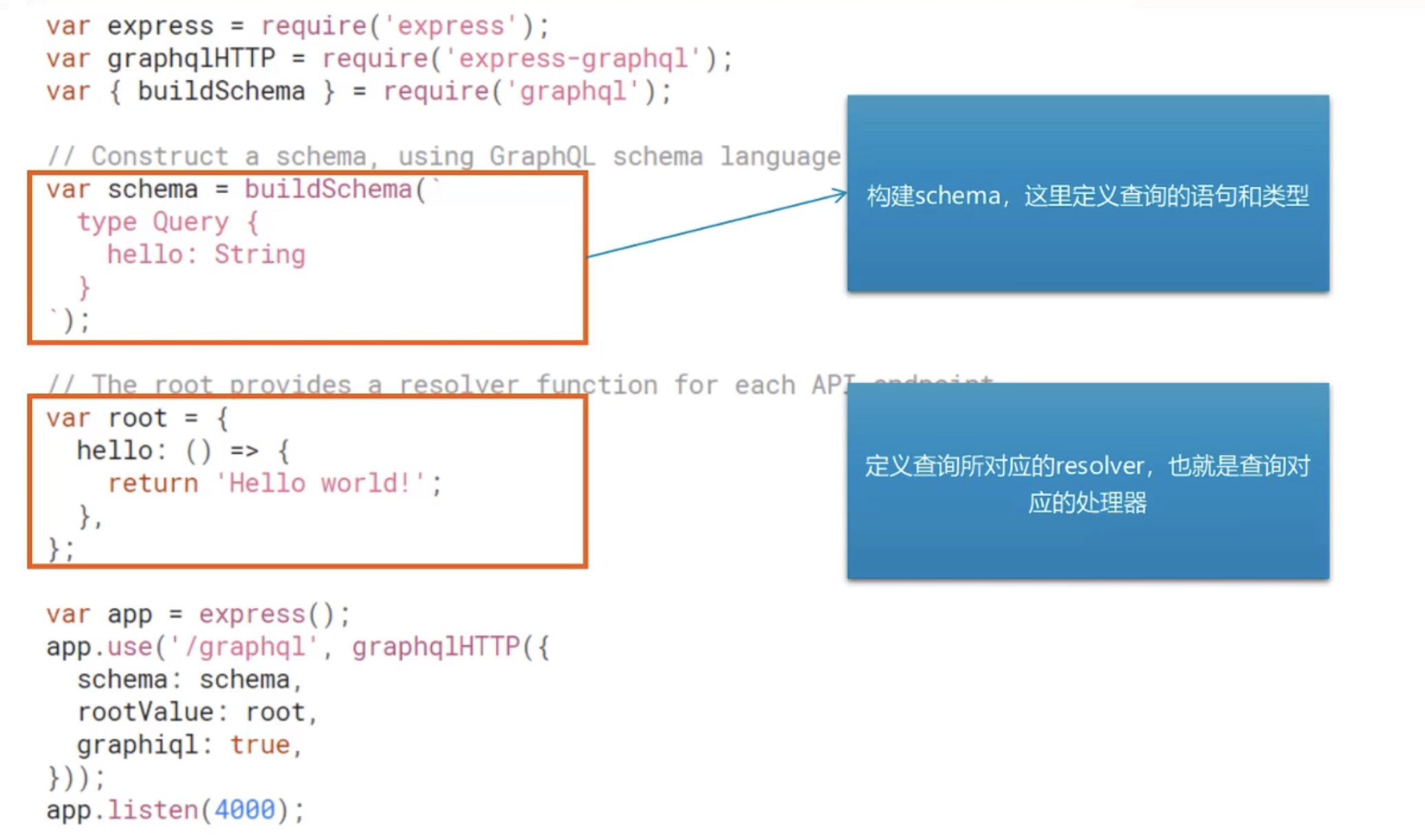
graphiql:是否启用graphiql的调试界面,上线之后要改为false
nodemon自动监视
代码
var express = require('express');
var { graphqlHTTP } = require('express-graphql');
var { buildSchema } = require('graphql');// Construct a schema, using GraphQL schema language
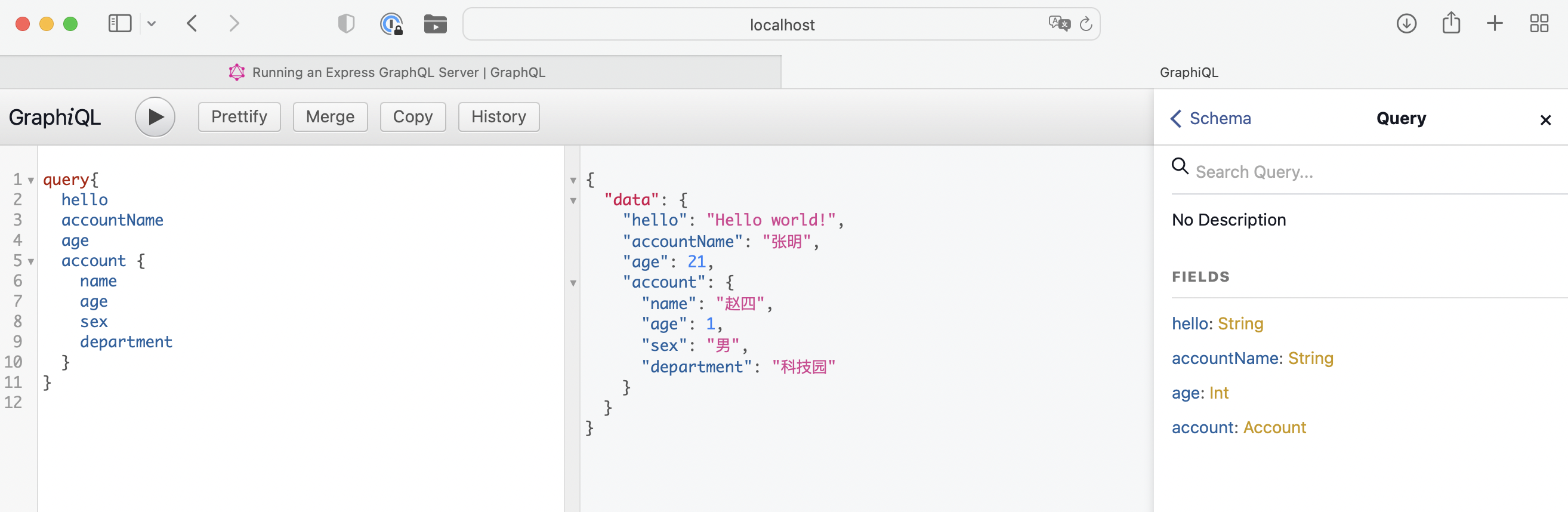
var schema = buildSchema(`type Account{name:Stringage:Intsex:Stringdepartment:String}type Query {hello: StringaccountName:Stringage: Intaccount: Account}`);// The root provides a resolver function for each API endpoint
var root = {hello: () => {return 'Hello world!';},accountName:()=>{return '张明';},age:()=>{return 21;},account:()=>{return {name:'赵四',age:1,sex:'男',department:'科技园'}}
};var app = express();
app.use('/graphql', graphqlHTTP({schema: schema,rootValue: root,graphiql: true,
}));
app.listen(4000);
console.log('Running a GraphQL API server at http://localhost:4000/graphql');
访问http://localhost:4000/graphql
4、参数类型与参数传递
基本参数类型
-
基本类型: String, Int, Float, Boolean和ID。可以在shema声明的时候直接使用。
⚠️ID是字符串类型要求唯一
-
[类型]代表数组,例如: [Int]代表 整型数组
-
和js传递参数一样,小括号内定义形参,但是注意:参数需要定义类型。
-
!(叹号)代表参数不能为空。
type Query [
rollDice(numDice: Int!, numSides: Int): [Int]
]
//返回int类型的数组
代码示例:
var express = require('express');
var { graphqlHTTP } = require('express-graphql');
var { buildSchema } = require('graphql');
// Construct a schema, using GraphQL schema language
var schema = buildSchema(`type Query{getClassMates(classNo:Int!):[String]}`);
// The root provides a resolver function for each API endpoint
var root = {getClassMates({classNo}){const obj={31:['张和','利马','王刘'],61:['张莉丝','很健康','一哦']}return obj[classNo];}};var app = express();app.use('/graphql', graphqlHTTP({schema: schema,rootValue: root,graphiql: true,}));app.listen(4000);console.log('Running a GraphQL API server at http://localhost:4000/graphql');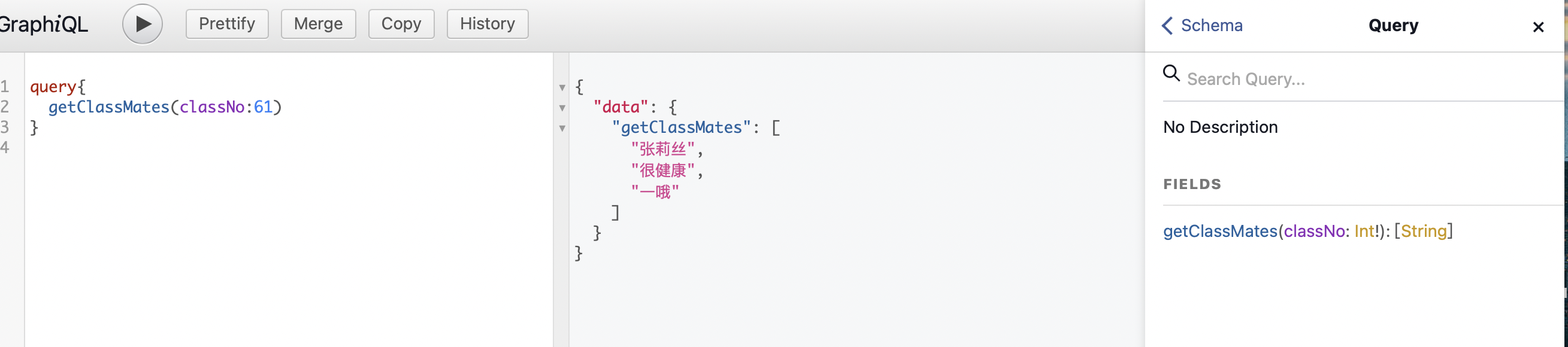
自定义参数类型
GraphQL允许用户自定义参数类型,通常用来描述要获取的资源的属性。
示例
type Account{name:Stringage:Intsex:Stringdepartment:Stringsalary(city:String):Int}
type Query{account(name:String):Account
}
代码
var express = require('express');
var { graphqlHTTP } = require('express-graphql');
var { buildSchema } = require('graphql');
// Construct a schema, using GraphQL schema language
var schema = buildSchema(`type Account{name:Stringage:Intsex:Stringdepartment:Stringsalary(city:String):Int}type Query{getClassMates(classNo:Int!):[String]account(username:String):Account}`);
// The root provides a resolver function for each API endpoint
var root = {getClassMates({classNo}){const obj={31:['张和','利马','王刘'],61:['张莉丝','很健康','一哦']}return obj[classNo];},account({username}){const name=username;const sex='男';const age=9;const department='开发部';const salary=({city})=>{if(city=='北京' || city=='上海'){return 10000;}return 3000;}return {name,sex,age,department,salary}}};var app = express();app.use('/graphql', graphqlHTTP({schema: schema,rootValue: root,graphiql: true,}));app.listen(4000);console.log('Running a GraphQL API server at http://localhost:4000/graphql');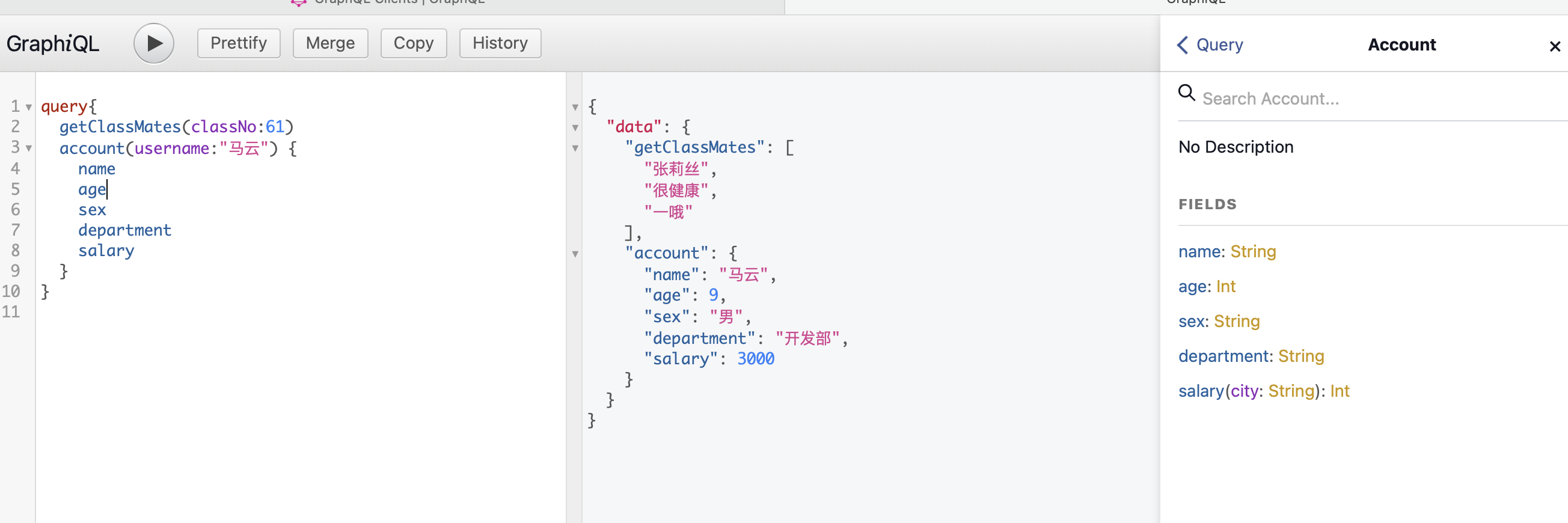
5、GraphQL Clients
如何在客户端访问graphql的接口?
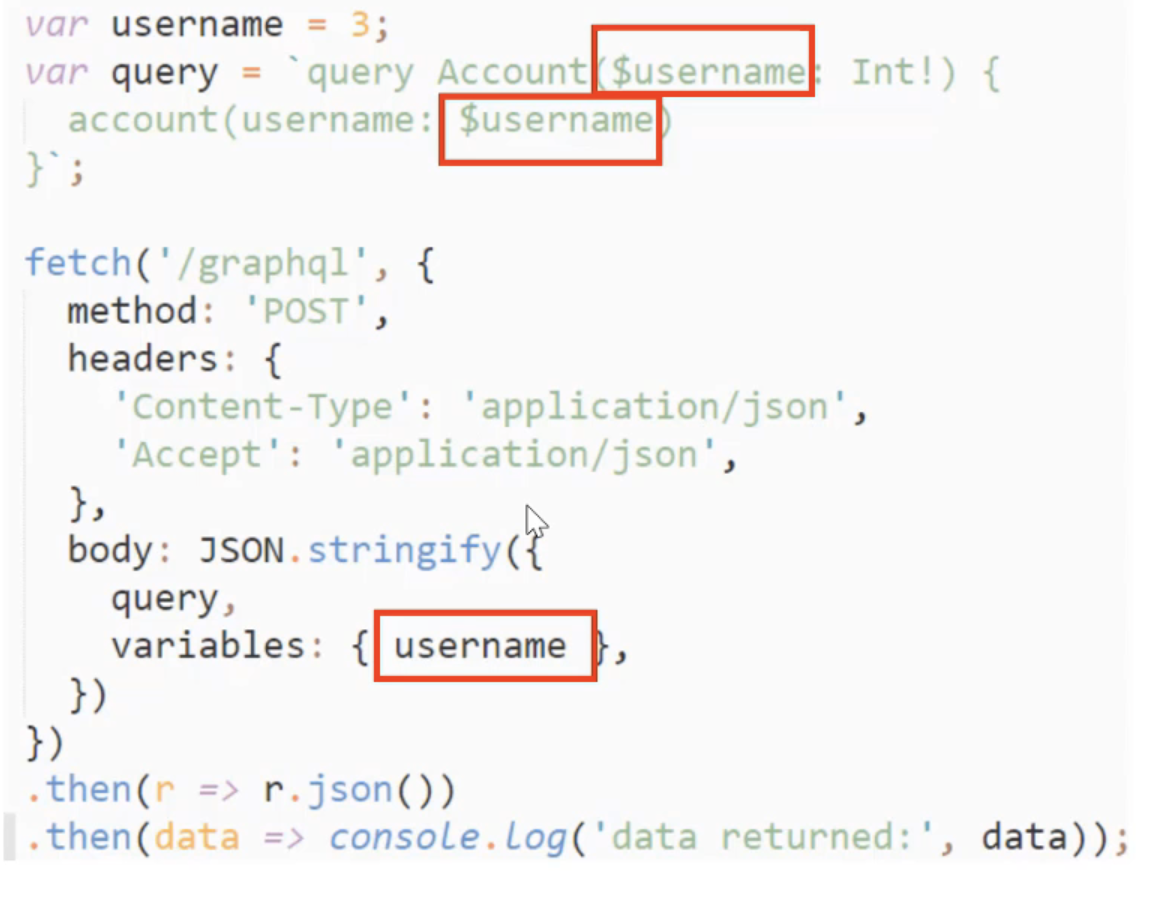
GraphQL Clients
6、使用Mutations修改数据
查询使用query,修改数据使用Mutation
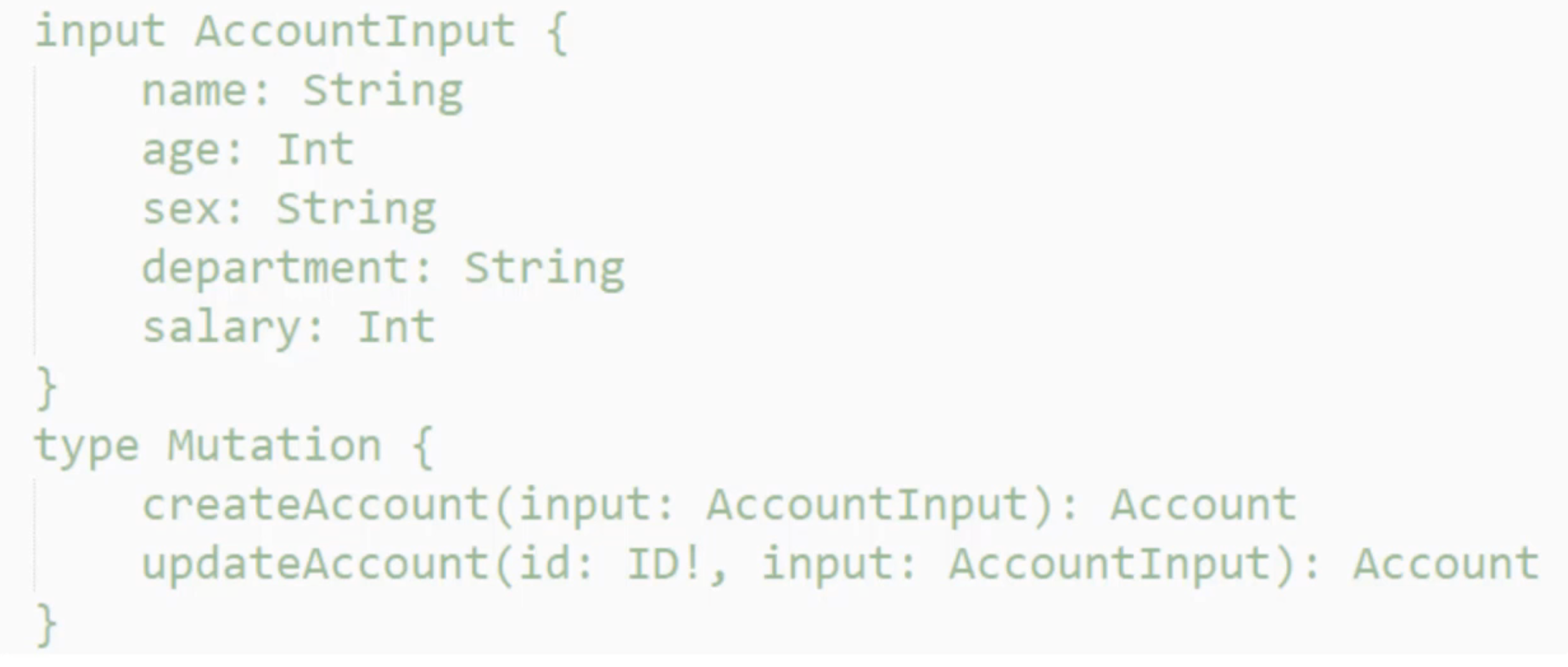
input代表输入类型,type代表查询类型
只需要插入或者更新的时候还是要写Query的,因为GraphQL要求必须有Query
传入参数的类型是input不是type
代码示例:
var express = require('express');
var { graphqlHTTP } = require('express-graphql');
var { buildSchema } = require('graphql');// Construct a schema, using GraphQL schema language
var schema = buildSchema(`input AccountInput{name:Stringage:Intsex:Stringdepartment:String}type Account{name:Stringage:Intsex:Stringdepartment:String}type Mutation{createAccount(input:AccountInput):AccountupdateAccount(id:ID!,input:AccountInput):Account}type Query{accounts:[Account]}`);const fakeDb={};// The root provides a resolver function for each API endpoint
//定义查询对应的处理器
var root = {accounts(){var arr=[];for(const key in fakeDb){arr.push(fakeDb[key]);}return arr;},createAccount({input}){//相当于数据库的更新fakeDb[input.name]=input;//返回保存结果return fakeDb[input.name];},updateAccount({id,input}){//相当于数据库的更新const updateAccount=Object.assign({},fakeDb[id],input);fakeDb[id]=updateAccount;//返回保存的结果return updateAccount;}
};var app = express();
app.use('/graphql', graphqlHTTP({schema: schema,rootValue: root,graphiql: true,
}));
app.listen(4000);
console.log('Running a GraphQL API server at http://localhost:4000/graphql');
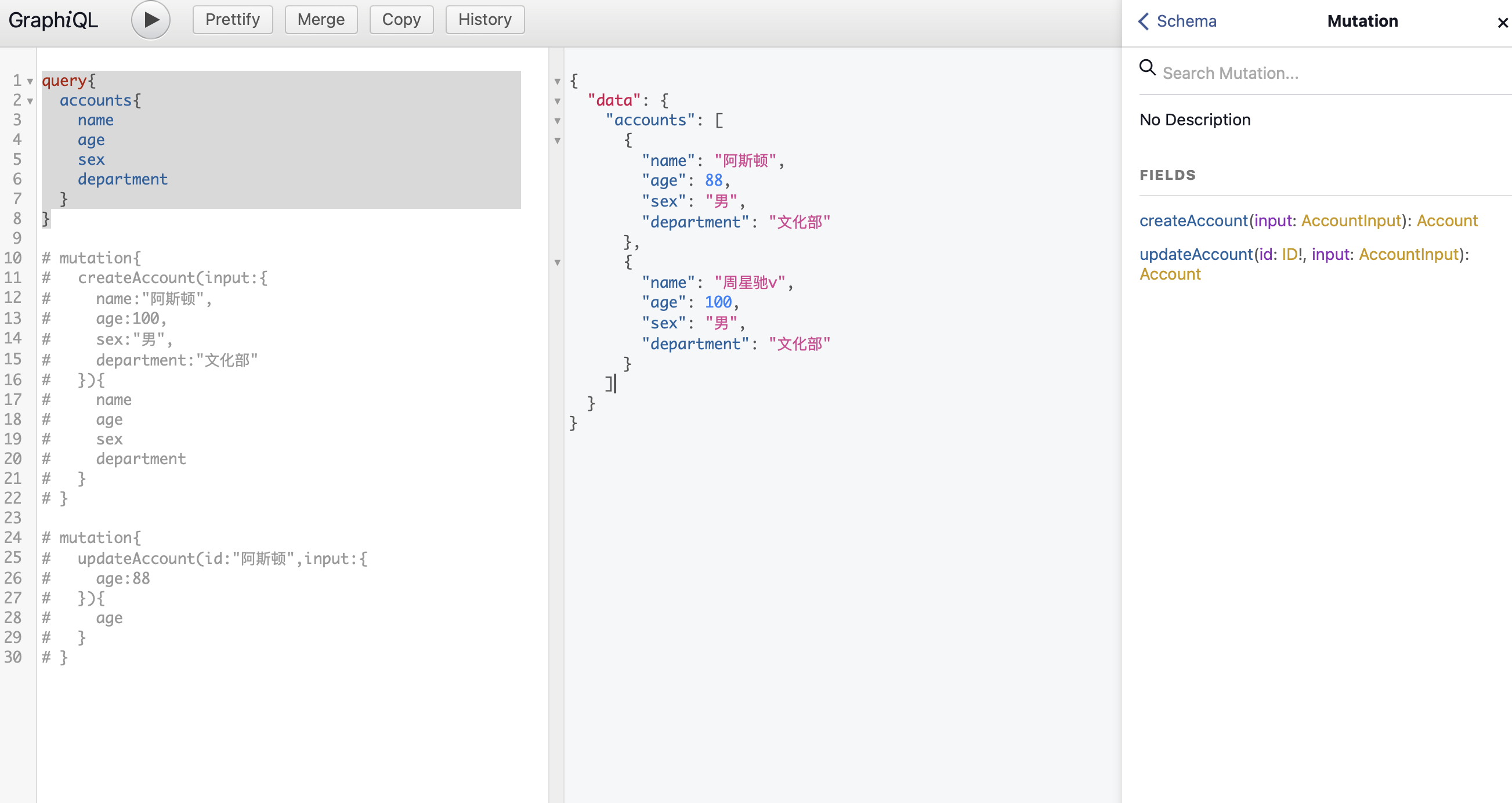
控制台示例
query{accounts{nameagesexdepartment}
}# mutation{
#   createAccount(input:{
#     name:"阿斯顿",
#     age:100,
#     sex:"男",
#     department:"文化部"
#   }){
#     name
#     age
#     sex
#     department
#   }
# }# mutation{
#   updateAccount(id:"阿斯顿",input:{
#     age:88
#   }){
#     age
#   }
# }
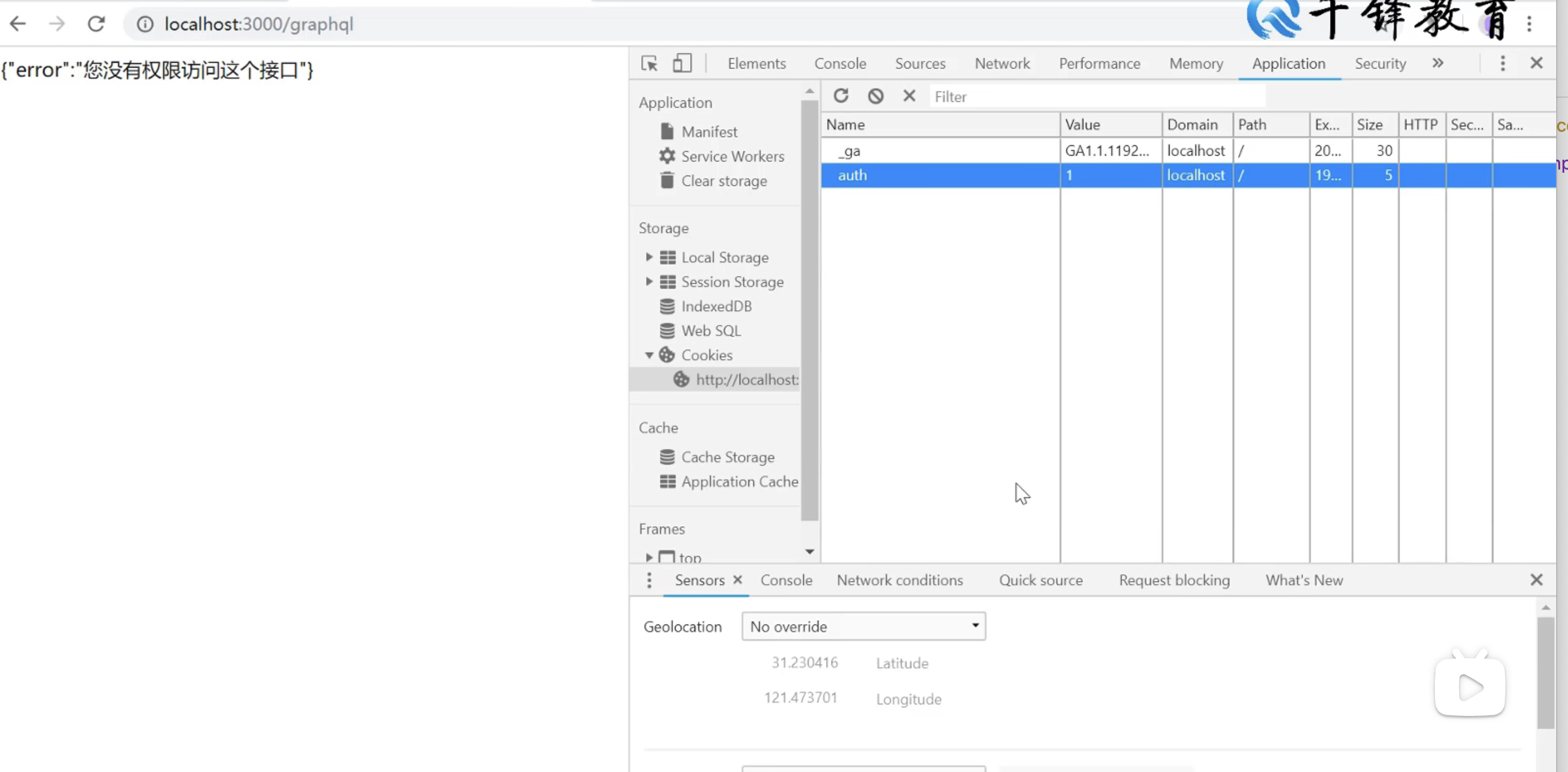
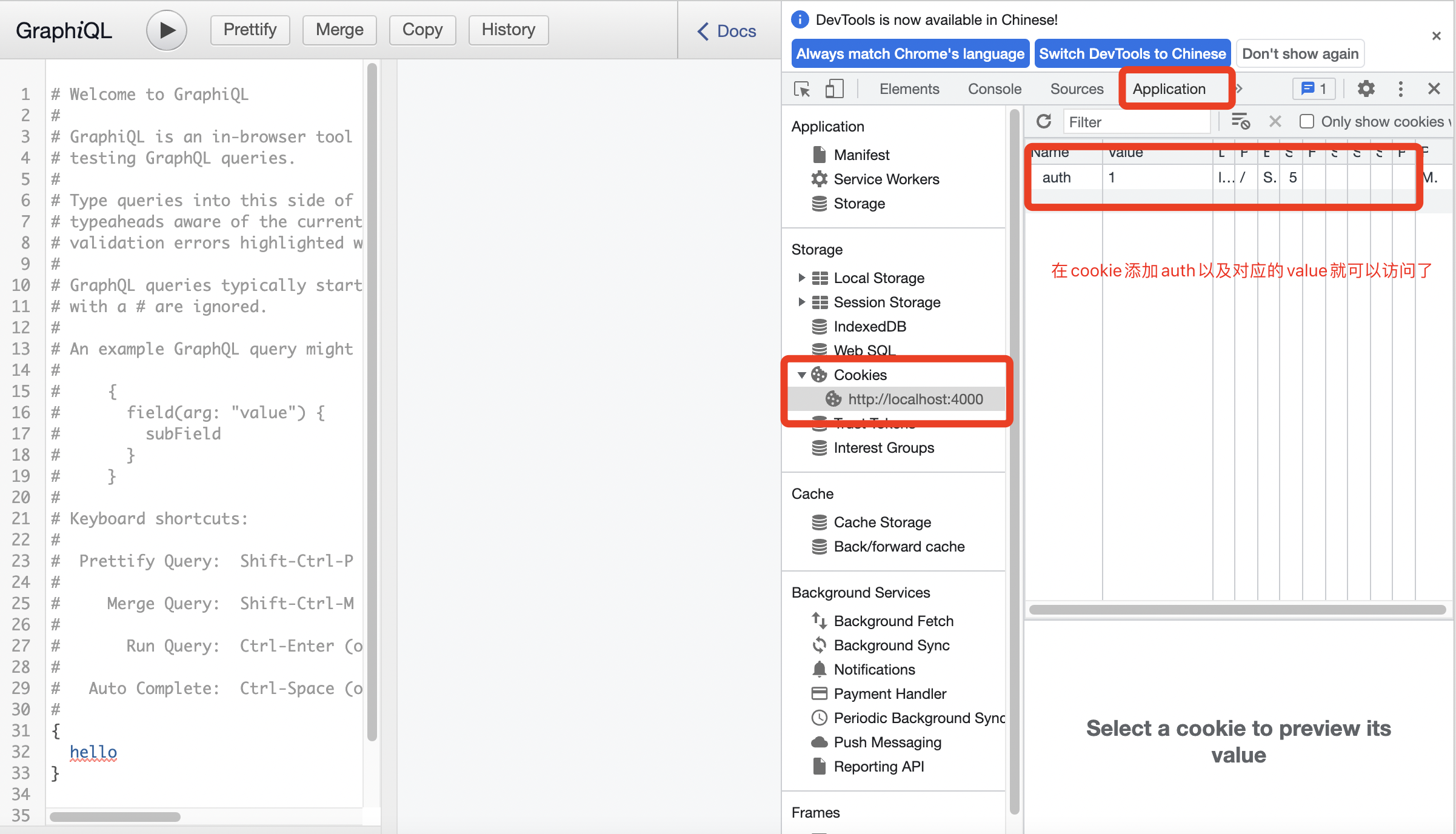
7、认证和中间件
代码示例
const middleware=(req,res,next) => {if(req.url.indexOf('/graphql') !== -1 && req.headers.cookie.indexOf('auth') === -1){res.send(JSON.stringify({error:"您没有权限访问这个接口"}));return;}next();
};app.use(middleware);
8、Constructing Types
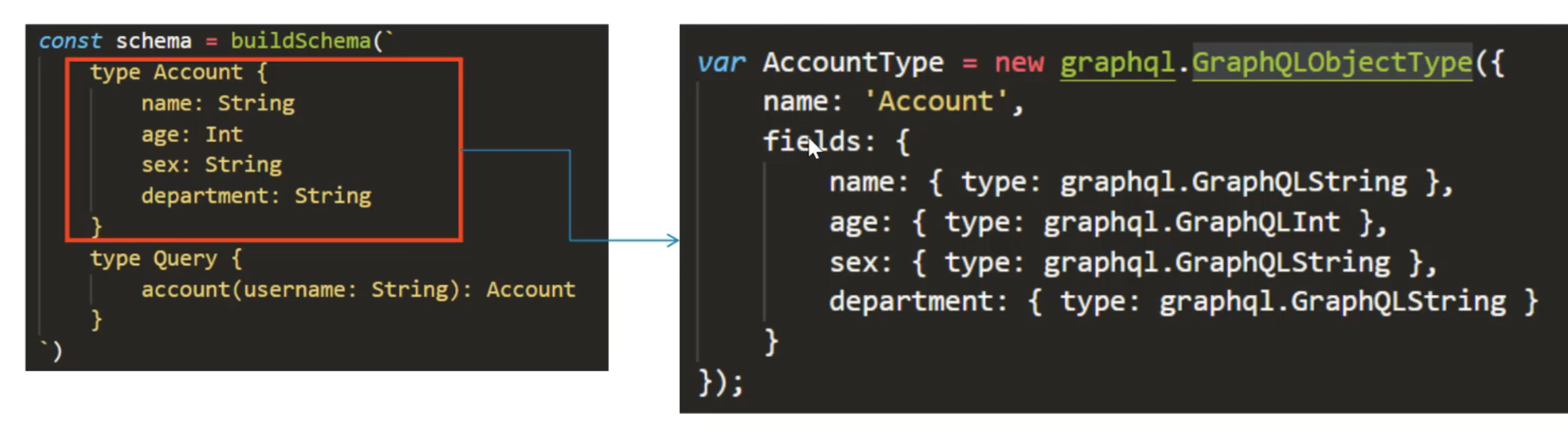
1、使用GraphQLObjectType定义type(类型)
方便以后维护,因为字符串以后出问题不知道问题具体在哪里
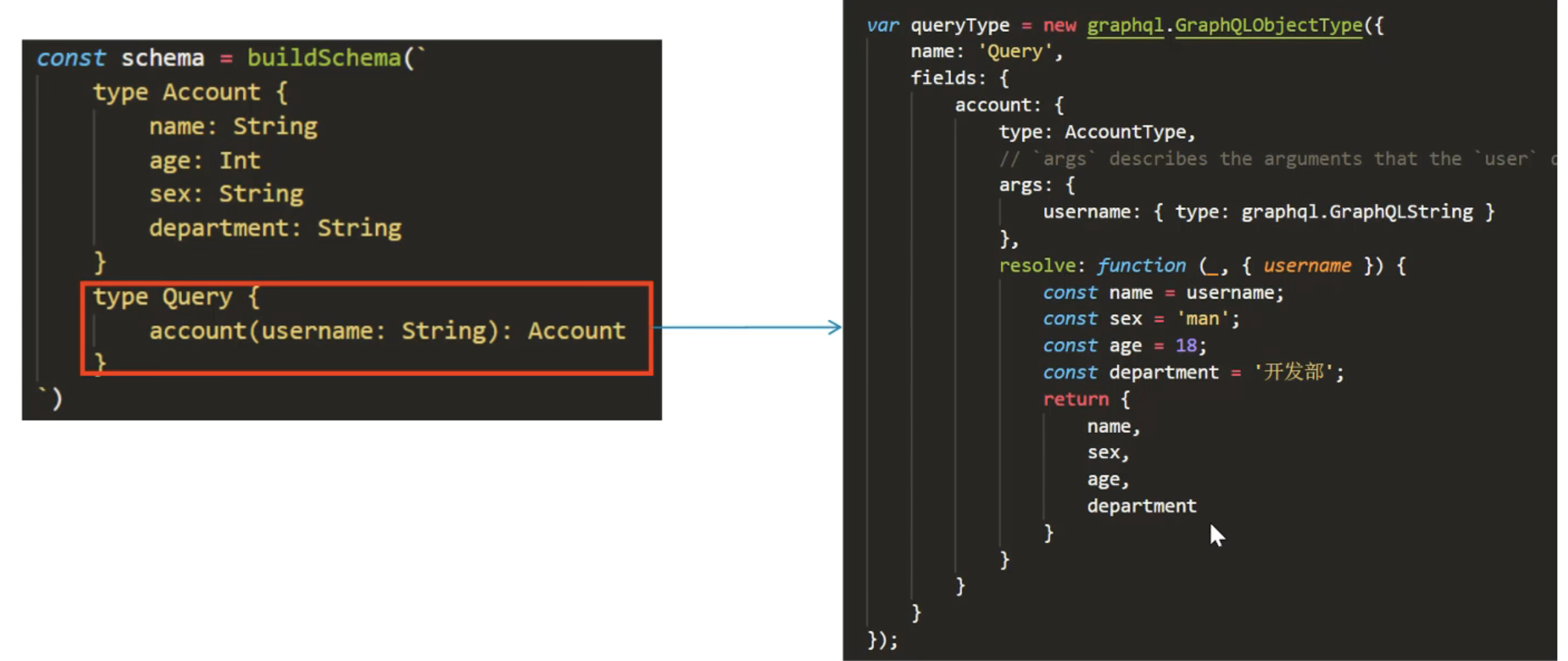
2、使用它GraphQLObjectType定义query(查询)
3、创建shema

代码示例:
原来的
var express = require('express');
var { graphqlHTTP } = require('express-graphql');
var { buildSchema, graphql, GraphQLInt } = require('graphql');
var schema = buildSchema(`type Account{name:Stringage:Intsex:Stringdepartment:String}type Query{account(username:String):Account}`);
// The root provides a resolver function for each API endpoint
var root = {account({username}){const name=username;const sex='男';const age=9;const department='开发部';return {name,sex,age,department,salary}}};var app = express();app.use('/graphql', graphqlHTTP({schema: schema,rootValue: root,graphiql: true,
}));
app.listen(4000);
console.log('Running a GraphQL API server at http://localhost:4000/graphql');
使用ConstructingTypes
var express = require('express');
var { graphqlHTTP } = require('express-graphql');
var graphql = require('graphql');//定义返回值类型
var AccountType=new graphql.GraphQLObjectType({name:'Account',fields:{name:{type:graphql.GraphQLString},age:{type:graphql.GraphQLInt},sex:{type:graphql.GraphQLString},department:{type:graphql.GraphQLString}}
});var queryType=new graphql.GraphQLObjectType({name:'Query',fields:{account:{type:AccountType,args:{username:{type:graphql.GraphQLString}},//方法的实现resolve:function(_,{username}){const name=username;const sex='男';const age=18;const department='开发部';return{name,age,sex,department }}}}
});var schema = new graphql.GraphQLSchema({query: queryType});var app = express();app.use('/graphql', graphqlHTTP({schema: schema,graphiql: true,
}));
app.listen(4000);
console.log('Running a GraphQL API server at localhost:4000/graphql');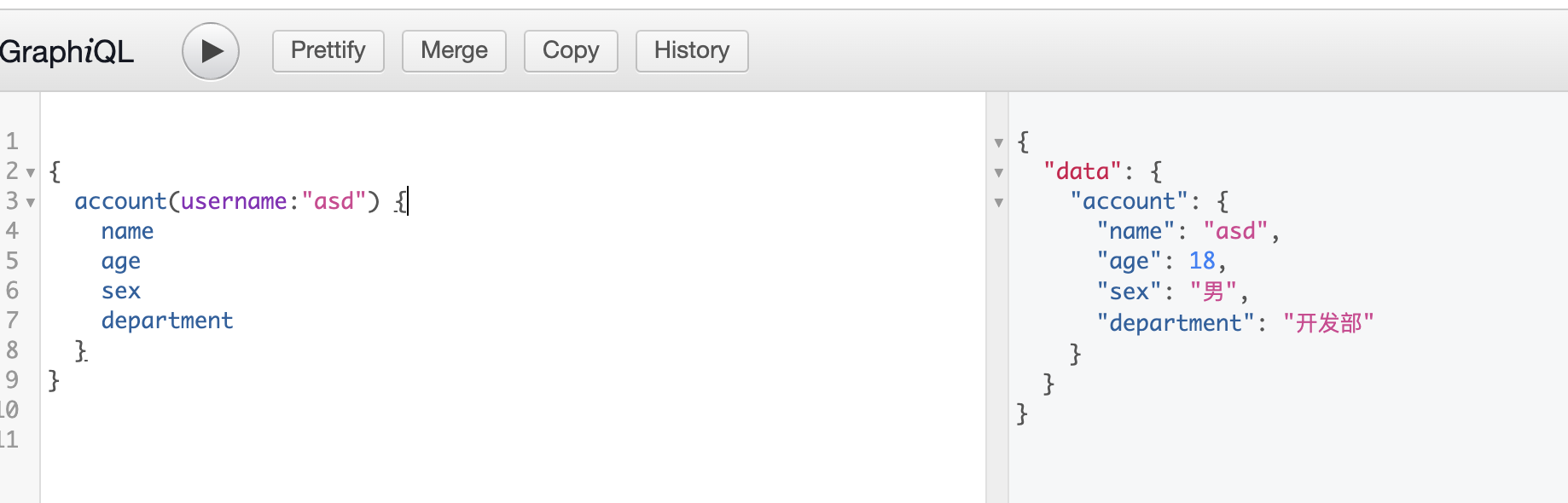
官方示例
本文来自互联网用户投稿,文章观点仅代表作者本人,不代表本站立场,不承担相关法律责任。如若转载,请注明出处。 如若内容造成侵权/违法违规/事实不符,请点击【内容举报】进行投诉反馈!