Java使用Aop实现用户操作日志记录(新手入门)
- 导入打印日志,aop,hutool,的依赖,Hutool是一个Java工具包,里面封装了大量的常用工具类,到时候咱们就通过这个工具包中有一个工具类可以用来获取客户端IP地址。
org.projectlombok lombok org.springframework.boot spring-boot-starter-aop cn.hutool hutool-all 5.6.3 - 自定义操作类型枚举类 因为基本是增删改查四个方法
/*** 操作类型枚举类* @author lichuan*/ public enum OperationTypeEnum {/*** 新增操作*/INSERT("新增"),/*** 修改操作*/UPDATE("修改"),/*** 删除操作*/DELETE("删除"),/*** 查询操作*/QUERY("查询"),/*** 其它*/OTHER("其它");private String operationType;OperationTypeEnum(String operationType) {this.operationType = operationType;}public String getOperationType() {return operationType;} } - 自定义用来记录用户操作日志的注解
@Target(ElementType.METHOD) //注解放置的目标位置,METHOD是可注解在方法级别上 @Retention(RetentionPolicy.RUNTIME) //注解在哪个阶段执行 @Documented public @interface OperationLog {/*** 操作模块* @return*/String operationModule() default "";/*** 操作类型* @return*/OperationTypeEnum operationType() default OperationTypeEnum.OTHER;/*** 操作说明* @return*/String description() default "";} - 写一个方法加上我们自定义的注解
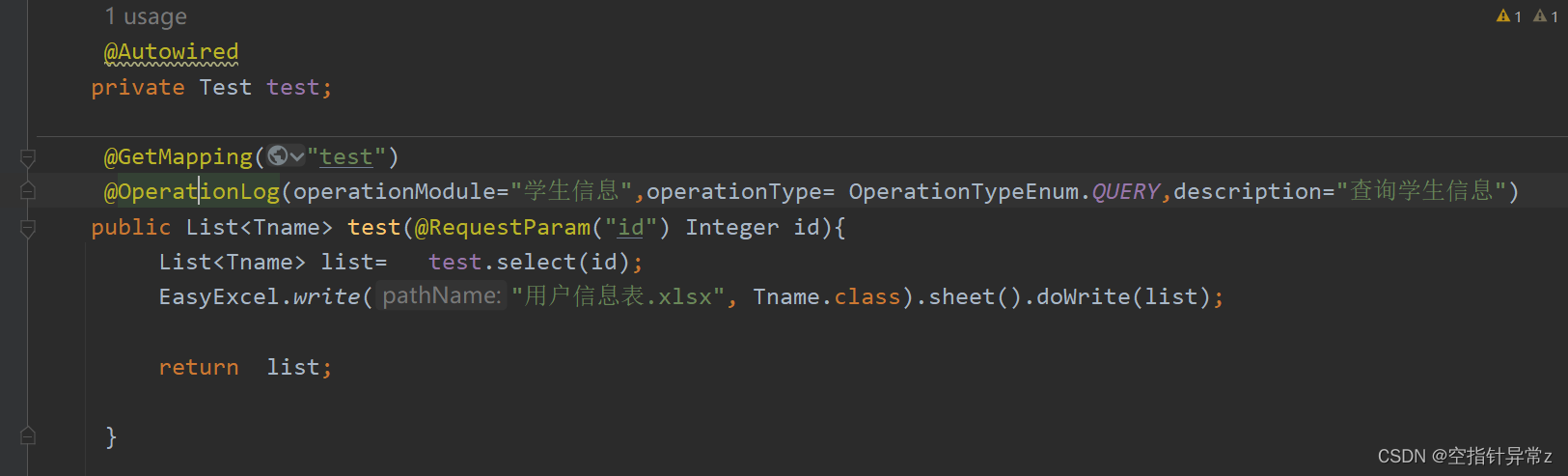
- 定义用来记录用户操作日志的切面类
import cn.hutool.extra.servlet.ServletUtil;
import com.fasterxml.jackson.databind.ObjectMapper;
import lombok.extern.slf4j.Slf4j;
import org.aspectj.lang.ProceedingJoinPoint;
import org.aspectj.lang.annotation.Around;
import org.aspectj.lang.annotation.Aspect;
import org.aspectj.lang.annotation.Pointcut;
import org.aspectj.lang.reflect.MethodSignature;
import org.springframework.stereotype.Component;
import org.springframework.web.context.request.RequestAttributes;
import org.springframework.web.context.request.RequestContextHolder;
import javax.servlet.http.HttpServletRequest;
import java.lang.reflect.Method;
import java.util.HashMap;
import java.util.Map;/*** @author lichuan*/
@Aspect
@Component
@Slf4j
public class OperationLogAspect {/*** 设置操作日志切入点,在注解的位置切入代码*/@Pointcut("execution(public * com.tm.controller..*Controller.*(..))")public void operationLogPointCut() {}/*** 定义环绕通知* 1. 环绕通知需要携带ProceedingJoinPoint类型的参数* 2. 环绕通知类似于动态代理的全过程ProceedingJoinPoint类型的参数可以决定是否执行目标方法* 3. 且环绕通知必须有返回值,返回值即目标方法的返回值*/@Around("operationLogPointCut()")public Object around(ProceedingJoinPoint joinPoint) {Object result = null;//获取系统当前时间毫秒值long beginTime = System.currentTimeMillis();log.info("环绕通知开始");try {//执行目标方法result = joinPoint.proceed();} catch (Throwable e) {e.printStackTrace();}//获取系统当前时间毫秒值long endTime = System.currentTimeMillis();// 获取RequestAttributesRequestAttributes requestAttributes = RequestContextHolder.getRequestAttributes();// 从获取RequestAttributes中获取HttpServletRequest的信息HttpServletRequest request = (HttpServletRequest) requestAttributes.resolveReference(RequestAttributes.REFERENCE_REQUEST);//获取ipString clientIP = ServletUtil.getClientIP(request);log.info(clientIP);//获取目标方法执行时间long usageTime = endTime - beginTime;//  operationLogEntity.setUsageTime(usageTime);try {// 从切面织入点处通过反射机制获取织入点处的方法MethodSignature signature = (MethodSignature) joinPoint.getSignature();// 获取切入点所在的方法Method method = signature.getMethod();//System.out.println(method);// 获取操作OperationLog operationLog = method.getAnnotation(OperationLog.class);if (operationLog != null) {log.info(operationLog.operationModule());log.info(operationLog.description());log.info(operationLog.operationType().getOperationType());}// 获取请求的类名String className = joinPoint.getTarget().getClass().getName();// 获取请求的方法名String methodName = method.getName();methodName = className + "." + methodName;log.info(methodName);// 请求方法//  operationLogEntity.setMethodName(methodName);// 请求的参数Map parameterMap = ServletUtil.getParamMap(request);// 将参数所在的数组转换成jsonString requestParams = new ObjectMapper().writeValueAsString(parameterMap);// 请求参数System.out.println(parameterMap);log.info(requestParams);// 返回结果log.info(new ObjectMapper().writeValueAsString(result));// 请求URLlog.info(request.getRequestURL().toString());// 请求URIlog.info(request.getRequestURI());// 创建时间//  operationLogEntity.setCreateTime(new Date());//   System.out.println(operationLogEntity);log.info("环绕通知结束");} catch (Exception e) {}return result;}/*** 转换request 请求参数* @param parameterMap request获取的参数数组*/public Map convertParameterMap(Map parameterMap) {Map convertParameterMap = new HashMap<>();for (String key : parameterMap.keySet()) {convertParameterMap.put(key, parameterMap.get(key)[0]);}return convertParameterMap;}
}
6.测试
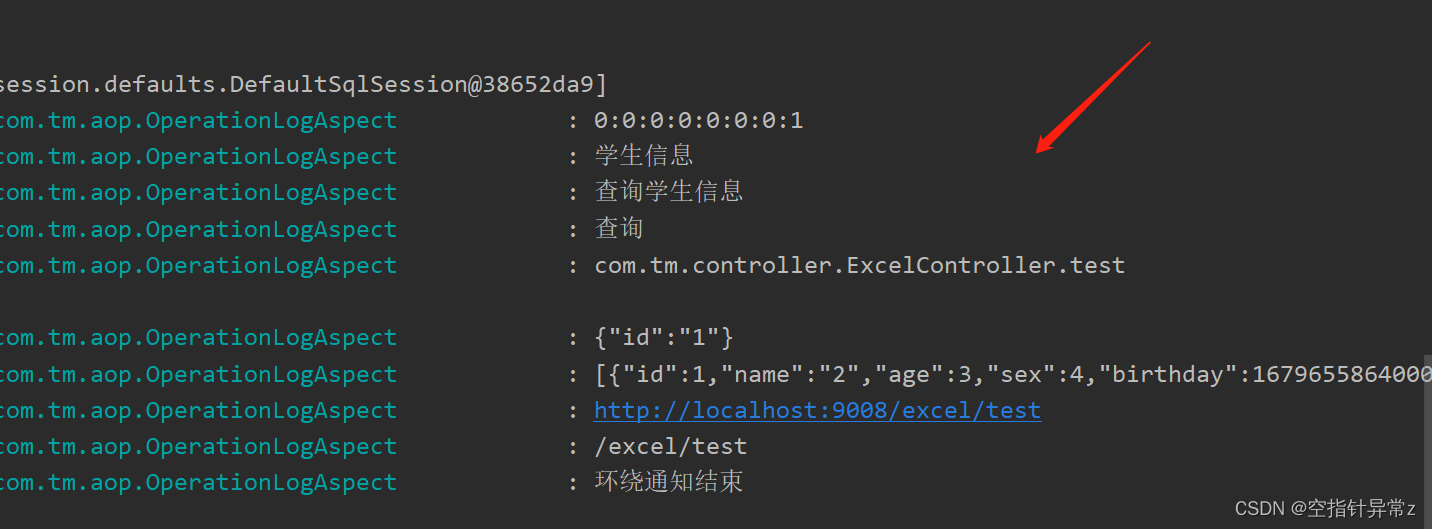
调用test方法,可以看到控制台已经打印出了日志信息,创建表的对象存入即可
本文来自互联网用户投稿,文章观点仅代表作者本人,不代表本站立场,不承担相关法律责任。如若转载,请注明出处。 如若内容造成侵权/违法违规/事实不符,请点击【内容举报】进行投诉反馈!