固件分析工具binwalk的安装
目录
一、binwalk工具运行支持的平台
二、binwalk工具的简单安装
三、binwalk工具的完整安装
四、binwalk IDA plugin插件工具的安装
五、binwalk工具的卸载
一、binwalk工具运行支持的平台
binwalk工具安装支持的平台的官方参考地址:https://github.com/devttys0/binwalk/wiki/Supported-Platforms
| Operating System | Core Support | Optional Feature Support | Ease of Installation |
|---|---|---|---|
| Linux | Excellent | Excellent | Very easy |
| OSX | Excellent | Good | Very easy |
| Cygwin | Excellent | Good | Very easy |
| FreeBSD | Experimental | Unknown | Very easy |
| Windows | Experimental | Poor | Very easy |
二、binwalk工具的简单安装
binwalk工具简单安装的官方参考地址:https://github.com/devttys0/binwalk
Binwalk follows the standard Python installation procedure:
$ sudo python setup.py installIf you're running Python 2.x, you'll also want to install the Python lzma module:
$ sudo apt-get install python-lzma在binwalk工具的简单安装之前,需要在ubuntu系统上安装好python,binwalk工具简单安装的命令过程如下:
# Python2.7
$ sudo python setup.py install# Python3.x
$ sudo python3 setup.py install
NOTE: Older versions of binwalk (e.g., v1.0) are not compatible with the latest version of binwalk. It is strongly recommended that you uninstall any existing binwalk installations before installing the latest version in order to avoid API conflicts.
Besides a Python interpreter, there are no installation dependencies for binwalk. All dependencies are optional run-time dependencies, and unless otherwise specified, are available from most Linux package managers.
Although all binwalk run-time dependencies are optional, the python-lzma module is highly recommended for improving the reliability of signature scans. This module is included by default in Python3, but must be installed separately for Python2.7:
$ sudo apt-get install python-lzmaBinwalk uses the pycrypto library to decrypt some known encrypted firmware images:
# Python2.7
$ sudo apt-get install python-crypto# Python3.x
$ sudo apt-get install python3-crypto
Binwalk uses pyqtgraph to generate graphs and visualizations, which requires the following:
# Python2.7
$ sudo apt-get install libqt4-opengl python-opengl python-qt4 python-qt4-gl python-numpy python-scipy python-pip
$ sudo pip install pyqtgraph# Python3.x
$ sudo apt-get install libqt4-opengl python3-opengl python3-pyqt4 python3-pyqt4.qtopengl python3-numpy python3-scipy python3-pip
$ sudo pip3 install pyqtgraph
Binwalk's --disasm option requires the Capstone disassembly framework and its corresponding Python bindings:
# Python2.7
$ sudo apt-get install python-pip
$ sudo pip install capstone# Python3.x
$ sudo apt-get install python3-pip
$ sudo pip3 install capstone
Binwalk relies on multiple external utilties in order to automatically extract/decompress files and data:
# Install standard extraction utilities
$ sudo apt-get install mtd-utils gzip bzip2 tar arj lhasa p7zip p7zip-full cabextract cramfsprogs cramfsswap squashfs-tools# Install sasquatch to extract non-standard SquashFS images
$ sudo apt-get install zlib1g-dev liblzma-dev liblzo2-dev
$ git clone https://github.com/devttys0/sasquatch
$ (cd sasquatch && ./build.sh)# Install jefferson to extract JFFS2 file systems
$ sudo pip install cstruct
$ git clone https://github.com/sviehb/jefferson
$ (cd jefferson && sudo python setup.py install)# Install ubi_reader to extract UBIFS file systems
$ sudo apt-get install liblzo2-dev python-lzo
$ git clone https://github.com/jrspruitt/ubi_reader
$ (cd ubi_reader && sudo python setup.py install)# Install yaffshiv to extract YAFFS file systems
$ git clone https://github.com/devttys0/yaffshiv
$ (cd yaffshiv && sudo python setup.py install)# Install unstuff (closed source) to extract StuffIt archive files
$ wget -O - http://my.smithmicro.com/downloads/files/stuffit520.611linux-i386.tar.gz | tar -zxv
$ sudo cp bin/unstuff /usr/local/bin/
Note that for Debian/Ubuntu users, all of the above dependencies can be installed automatically using the included deps.shscript:
$ sudo ./deps.shbinwalk工具完整安装方式的整理,以python 2.7的安装为例,python 3.x的安装类似。
1.最懒的方式,自动安装依赖库和组件工具。
$ python setup.py idainstall --idadir=/home/user/idaLikewise, the binwalk IDA plugin can be uninstalled:
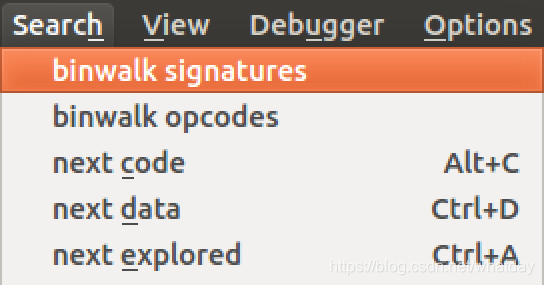
$ python setup.py idauninstall --idadir=/home/user/idaOnce installed, there will be two new menu options in IDA's Search drop-down menu list:
- binwalk signatures - Scans the loaded IDB for file signatures
- binwalk opcodes - Scans the loaded IDB for common opcode signatures
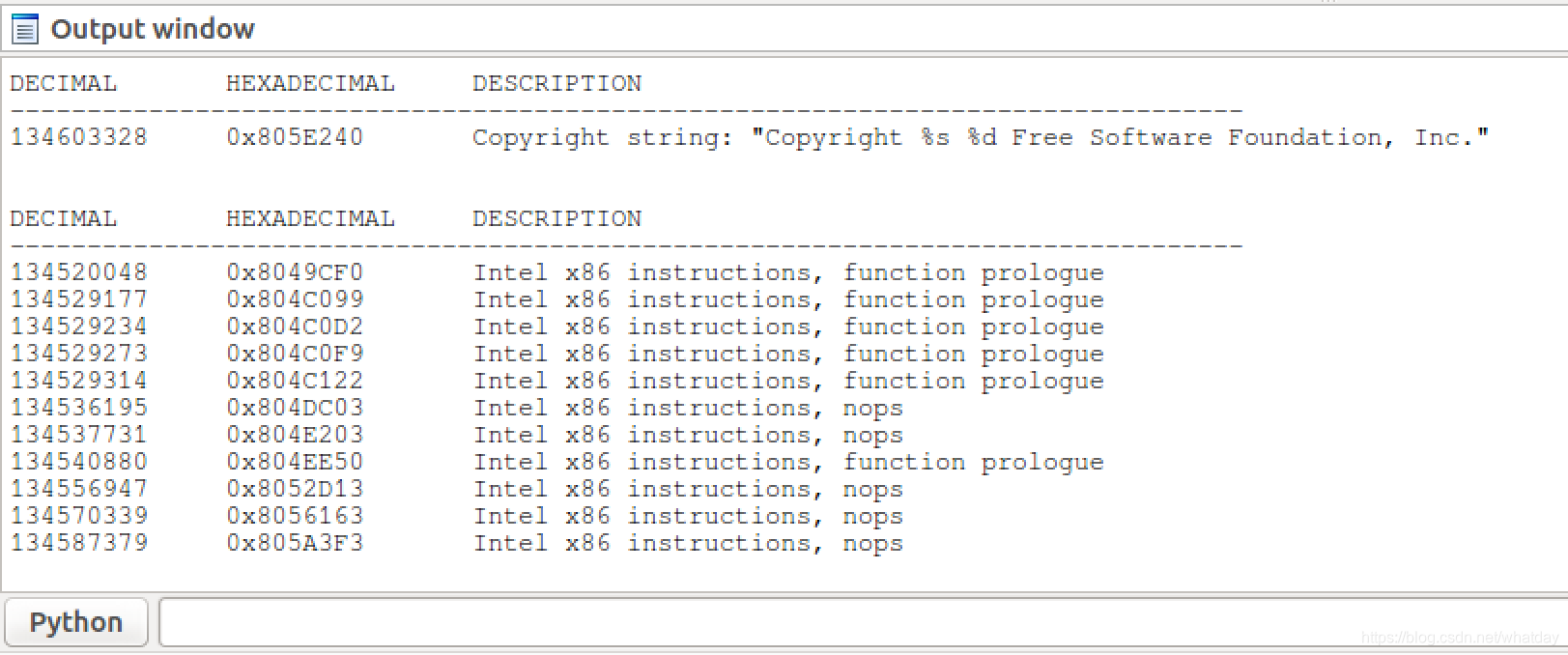
Results are printed to IDA's output window:
五、binwalk工具的卸载
If binwalk has been installed to a standard system location (e.g., via setup.py install), it can be removed by running:
# Python2.7
$ sudo python setup.py uninstall
# Python3
$ sudo python3 setup.py uninstallNote that this does not remove any of the manually installed dependencies.
本文来自互联网用户投稿,文章观点仅代表作者本人,不代表本站立场,不承担相关法律责任。如若转载,请注明出处。 如若内容造成侵权/违法违规/事实不符,请点击【内容举报】进行投诉反馈!