Day97.SpringCloud:概述、Eureka(注册发现)、Ribbon(负载均衡与调用)、OpenFeign(远程调用)
目录
一、微服务、分布式概念
分布式思想与基本概念
二、SpringCloud 概述
三、SpringCloud 微服务环境搭建 (RestTemplate应用)
1、服务提供者 (8001) 复制粘贴即可。
2、服务消费者 (80)
RestTemplate
Hutool工具包
postman 模拟发起请求
热部署Devtools
四、Eureka:服务注册与发现
1、IDEA生成eurekaServer端服务注册中心 (7001)
2、服务提供者8001 注册到7001
3、服务消费者 注册到7001
五、Ribbon:负载均衡服务调用 ★
如何替换策略?
六、OpenFeign:服务接口远程调用 ★
Ribbon 超时设置
OpenFeign 日志打印功能
- 微服务、分布式概念、微服务架构
- 注册中心:Eureka
- 负载均衡:Ribbon
- 声明式调用远程方法:OpenFeign
- 熔断、降级、监控:Hystrix
- 网关:Gateway
- 链路跟踪:Sleuth
- 服务注册和配置中心:Spring Cloud Alibaba Nacos
- 熔断、降级、限流:Spring Cloud Alibaba Sentinel
一、微服务、分布式概念
Day85.Dubbo分布式RPC框架、Zookeeper、provider | consumer 开发、管理控制台、事物问题_焰火青年·的博客-CSDN博客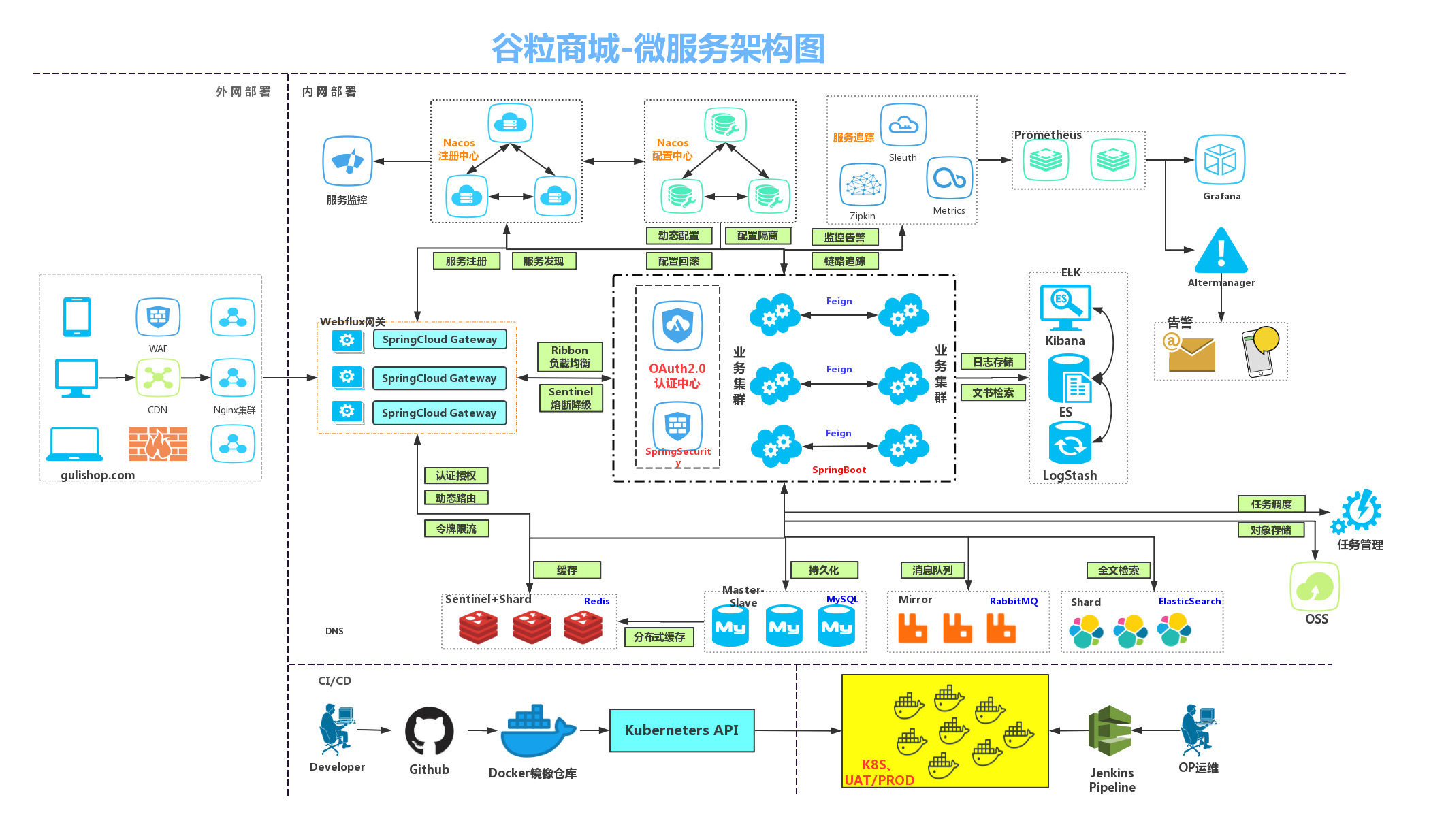
https://www.martinfowler.com/articles/microservices.html 微服务microservices
微服务|YYGCui's blog
什么是微服务?
简单来说,微服务架构风格[1]是一种将一个单一应用程序开发为一组小型服务的方法,每个服务运行在自己的进程中,服务间通信采用轻量级(restful风格)通信机制(通常用HTTP资源API)。这些服务围绕业务能力构建并且可通过全自动部署机制独立部署。这些服务共用一个最小型的集中式的管理,服务可用不同的语言开发,使用不同的数据存储技术。
总结:
1. 微服务需要根据业务模块拆分,做到单一职责,不要重复开发相同
务。2. 微服务可以将业务暴露为接口,供其它微服务使用
3. 不同微服务都应该有自己独立的数据库
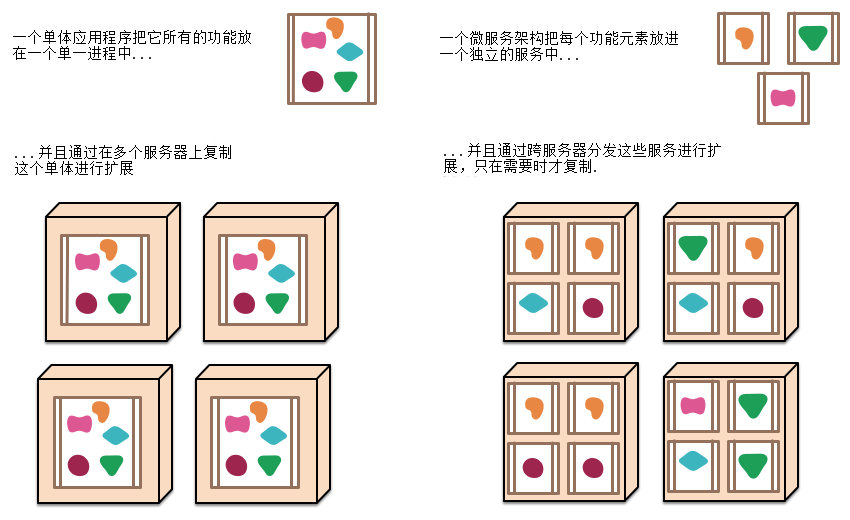
分布式服务架构
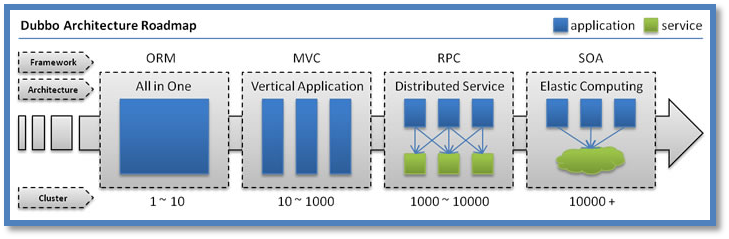
分布式一定是集群的(防止单点故障)。 而集群并不一定就是分布式的。
当垂直应用越来越多,应用之间交互不可避免,将核心业务抽取出来,作为独立的服务,逐渐形成稳定的服务中心,使前端应用能更快速的响应多变的市场需求。此时,用于提高业务复用及整合的分布式服务框架(RPC)是关键。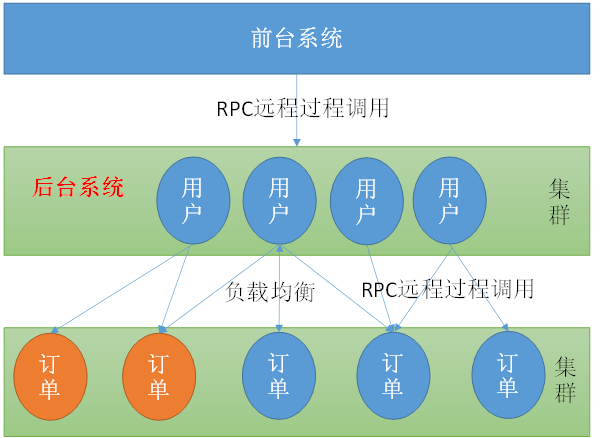
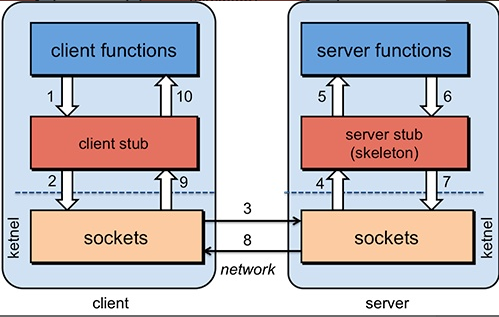
RPC【Remote Procedure Call】是指远程过程调用,是一种进程间通信方式,他是一种技术的思想,而不是规范。
它允许程序调用另一个地址空间(通常是共享网络的另一台机器上)的过程或函数,而不用程序员显式编码这个远程调用的细节。
即程序员无论是调用本地的还是远程的函数,本质上编写的调用代码基本相同。
分布式思想与基本概念
高并发
通过设计保证系统可以并行处理很多请求。应对大量流量与请求
Tomcat最多支持并发多少用户?
Tomcat 默认配置的最大请求数是 150,也就是说同时支持 150 个并发,当然了,也可以将其改大。
当某个应用拥有 250 个以上并发的时候,应考虑应用服务器的集群。
具体能承载多少并发,需要看硬件的配置,CPU 越多性能越高,分配给 JVM 的内存越多性能也就越高,但也会加重 GC 的负担。
操作系统对于进程中的线程数有一定的限制:
Windows 每个进程中的线程数不允许超过 2000
Linux 每个进程中的线程数不允许超过 1000
另外,在 Java 中每开启一个线程需要耗用 1MB 的 JVM 内存空间用于作为线程栈之用。
Tomcat 默认的 HTTP 实现是采用阻塞式的 Socket 通信,每个请求都需要创建一个线程处理。这种模式下的并发量受到线程数的限制,但对于 Tomcat 来说几乎没有 BUG 存在了。
Tomcat 还可以配置 NIO 方式的 Socket 通信,在性能上高于阻塞式的,每个请求也不需要创建一个线程进行处理,并发能力比前者高。但没有阻塞式的成熟。
这个并发能力还与应用的逻辑密切相关,如果逻辑很复杂需要大量的计算,那并发能力势必会下降。如果每个请求都含有很多的数据库操作,那么对于数据库的性能也是非常高的。
对于单台数据库服务器来说,允许客户端的连接数量是有限制的。
并发能力问题涉及整个系统架构和业务逻辑。
系统环境不同,Tomcat版本不同、JDK版本不同、以及修改的设定参数不同。并发量的差异还是满大的。
- maxThreads="1000" 最大并发数 ,默认值为200
- minSpareThreads="100"//初始化时创建的线程数,默认值为10
- acceptCount="700"// 指定当所有可以使用的处理请求的线程数都被使用时,可以放到处理队列中的请求数,超过这个数的请求将不予处理,默认值为100
Apache Tomcat 8 Configuration Reference (8.0.53) - The HTTP Connector
高并发衡量指标
- 响应时间(RT)
- 请求做出响应的时间,即一个http请求返回所用的时间
- 吞吐量
- 系统在单位时间内处理请求的数量
- QPS(Query/Request Per Second)、 TPS(Transaction Per Second)
- 每秒查询(请求)数、每秒事务数
- 专业的测试工具:Load Runner
- Apache ab
- Apache JMeter
- 并发用户数
- 承载的正常使用系统功能的用户的数量
高可用
服务集群部署
数据库主从+双机热备
- 主-备方式(Active-Standby方式)
主-备方式即指的是一台服务器处于某种业务的激活状态(即Active状态),另一台服务器处于该业务的备用状态(即Standby状态)。
- 双主机方式(Active-Active方式)
双主机方式即指两种不同业务分别在两台服务器上互为主备状态(即Active-Standby和Standby-Active状态)
注册中心
保存某个服务所在地址等信息,方便调用者实时获取其他服务信息
提供者和消费者是相对而言的
- 服务注册:服务提供者
- 服务发现:服务消费者
负载均衡
动态将请求派发给比较闲的服务器
策略:
- 轮询(Round Robin)
- 加权轮询(Weighted Round Robin)
- 随机Random
- 哈希Hash
- 最小连接数LC
- 最短响应时间LRT
服务雪崩
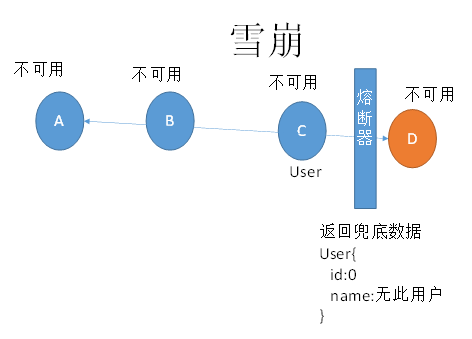
服务之间复杂调用,一个服务不可用,导致整个系统受影响不可用
限流
限制某个服务每秒的调用本服务的频率
API网关
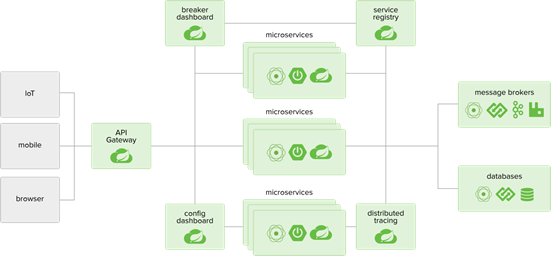
API网关要做很多工作,它作为一个系统的后端总入口,承载着所有服务的组合路由转换等工作,除此之外,我们一般也会把安全,限流,缓存,日志,监控,重试,熔断等放到 API 网关来做。
服务跟踪
追踪服务的调用链,记录整个系统执行请求过程。如:请求响应时间,判断链中的哪些服务属于慢服务(可能存在问题,需要改善)。
弹性云
Elastic Compute Service(ECS)弹性计算服务
动态扩容,压榨服务器闲时能力
例如:双11,618,高峰时多配置些服务器,平时减少多余的服务器配置(用于其他服务应用),避免资源浪费
二、SpringCloud 概述
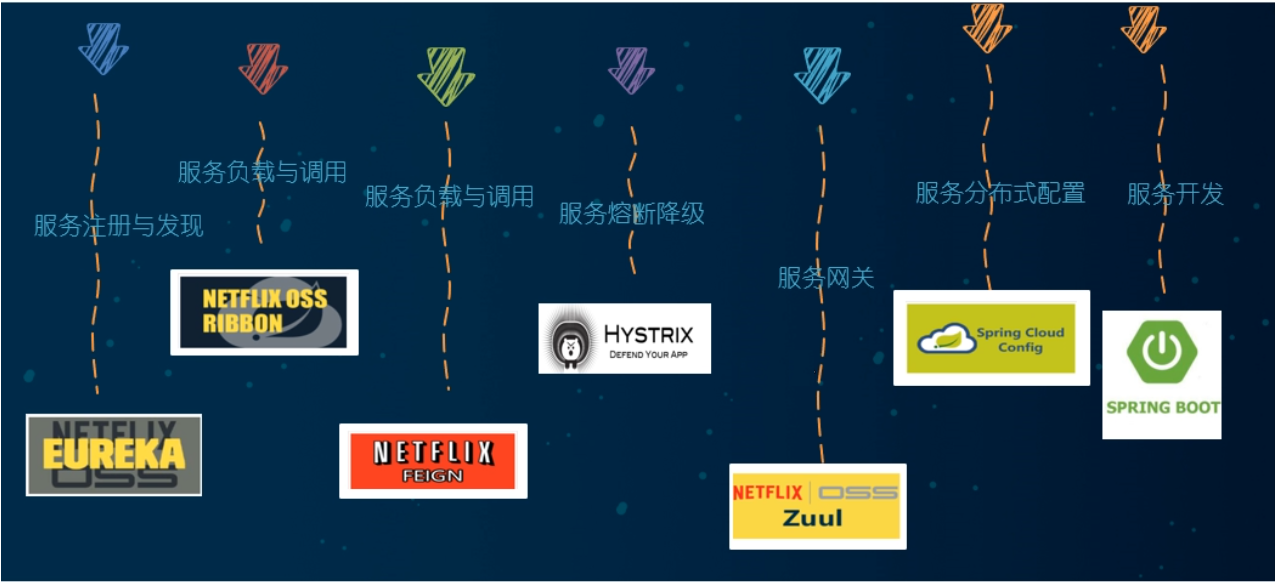
SpringCloud 是微服务一站式服务解决方案,微服务全家桶。它是微服务开发的主流技术栈。它采用了名称,而非数字版本号。
springCloud 和 springCloud Alibaba 目前是最主流的微服务框架组合。
SpringCloud版本选择
选用 springboot 和 springCloud 版本有约束,不按照它的约束会有冲突。
官方版本的对应信息:https://start.spring.io/actuator/info
SpringBoot2.3.6版和SpringCloud Hoxton.SR9版
SpringCloud Alibaba 2.2.6
三、SpringCloud 微服务环境搭建 (RestTemplate应用)
与springboot搭建基本相同 服务提供者(cloud-provider-payment8001)、服务消费者(cloud-consumer-order80)
- 建module
- 改POM 添加依赖
- 写YML
- 主启动
- 业务类 (orm - dao - service - controller)
父工程xml
com.atguigu.springcloud springcloud 1.0-SNAPSHOT pom UTF-8 1.8 1.8 4.12 1.2.17 1.16.18 8.0.26 1.1.16 1.3.0 org.springframework.boot spring-boot-dependencies 2.3.6.RELEASE pom import org.springframework.cloud spring-cloud-dependencies Hoxton.SR9 pom import com.alibaba.cloud spring-cloud-alibaba-dependencies 2.2.6.RELEASE pom import mysql mysql-connector-java ${mysql.version} com.alibaba druid ${druid.version} org.mybatis.spring.boot mybatis-spring-boot-starter ${mybatis.spring.boot.version} junit junit ${junit.version} log4j log4j ${log4j.version} org.projectlombok lombok ${lombok.version} true org.springframework.boot spring-boot-maven-plugin true true 1、服务提供者 (8001) 复制粘贴即可。
1. 创建项目cloud-provider-payment8001,引入依赖
org.springframework.boot spring-boot-starter-web org.springframework.boot spring-boot-starter-actuator org.mybatis.spring.boot mybatis-spring-boot-starter com.alibaba druid-spring-boot-starter 1.1.10 mysql mysql-connector-java org.springframework.boot spring-boot-starter-jdbc org.springframework.boot spring-boot-devtools runtime true org.projectlombok lombok true org.springframework.boot spring-boot-starter-test test 2. YML配置文件
server:port: 8001spring:application:name: cloud-payment-servicedatasource:type: com.alibaba.druid.pool.DruidDataSourcedriver-class-name: com.mysql.cj.jdbc.Driverurl: jdbc:mysql://127.0.0.1:3306/cloud2022?characterEncoding=utf8&serverTimezone=Asia/Shanghai&allowPublicKeyRetrieval=trueusername: rootpassword: *******mybatis:mapperLocations: classpath:/mapper/*.xmltype-aliases-package: com.atguigu.springcloud.entities3. 主启动类
package com.atguigu.springcloud;import org.springframework.boot.SpringApplication;
import org.springframework.boot.autoconfigure.SpringBootApplication;@MapperScan(basePackages = "com.atguigu.springcloud.dao") //扫描dao包,创建代理对象
@SpringBootApplication
public class PaymentMain8001 {public static void main(String[] args) {SpringApplication.run(PaymentMain8001.class,args);}
}
4. 业务类
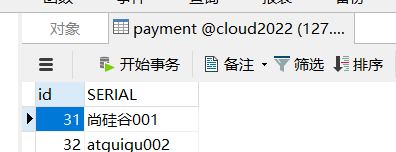
数据库表
主实体Payment
@Data
@AllArgsConstructor
@NoArgsConstructor
public class Payment implements Serializable {private Long id;private String serial;
}
Json封装体CommonResult
@Data
@AllArgsConstructor
@NoArgsConstructor
public class CommonResult  implements Serializable{private Integer code;private String message;private T data;public CommonResult(Integer code,String message){this(code,message,null);//如果这行报错,请安装lombok插件}
}
接口PaymentDao
@Component       //代替@Repository声明bean
@Mapper               //mybatis提供的,等价:@MapperScan("com.atguigu.springcloud.dao")
//@Repository     //spring提供的。在此,只是为了声明bean对象
public interface PaymentDao {public int create(Payment payment);    public Payment getPaymentById(@Param("id") Long id);
}
映射
insert into payment(serial) values(#{serial}); Service 接口与实现
public interface PaymentService {public int create(Payment payment); //写public Payment getPaymentById(Long id);  //读取
}@Service
@Transactional
public class PaymentServiceImpl implements PaymentService {@AutowiredPaymentDao paymentDao;@Overridepublic int create(Payment payment) {return paymentDao.create(payment);}@Overridepublic Payment getPaymentById(Long id) {return paymentDao.getPaymentById(id);}
}
Controller
@RestController
@Slf4j
public class PaymentController {@Resourceprivate PaymentService paymentService;@PostMapping(value = "/payment/create")public CommonResult create(Payment payment){ //埋雷int result = paymentService.create(payment);log.info("*****插入结果:"+result);if (result>0){  //成功return new CommonResult(200,"插入数据库成功",result);}else {return new CommonResult(444,"插入数据库失败",null);}}@GetMapping(value = "/payment/get/{id}")public CommonResult getPaymentById(@PathVariable("id") Long id){Payment payment = paymentService.getPaymentById(id);log.info("*****查询结果:"+payment);if (payment!=null){  //说明有数据,能查询成功return new CommonResult(200,"查询成功",payment);}else {return new CommonResult(444,"没有对应记录,查询ID:"+id,null);}}
}
2、服务消费者 (80)
1. 创建项目cloud-consumer-order80,引入依赖
org.springframework.boot spring-boot-starter-web org.springframework.boot spring-boot-starter-actuator org.mybatis.spring.boot mybatis-spring-boot-starter com.alibaba druid-spring-boot-starter 1.1.10 mysql mysql-connector-java org.springframework.boot spring-boot-starter-jdbc org.springframework.boot spring-boot-devtools runtime true org.projectlombok lombok true org.springframework.boot spring-boot-starter-test test 2. YML文件
server:port: 80
spring:application:name: cloud-consumer-order80
3. 主启动
@SpringBootApplication
//@EnableEurekaClient//声明当前应用80为Eureka(7001)的客户端
//在哪个请求上,采用哪种规则
//@RibbonClient(name = "CLOUD-PAYMENT-SERVICE",configuration = MySelfRule.class)
public class OrderMain80 {public static void main(String[] args) {SpringApplication.run(OrderMain80.class,args);}
}
4. 业务类
创建entities
(将cloud-provider-payment8001工程下的entities包下的两个实体类复制过来)
RestTemplate
由于没有引入OpenFeign,所以暂时使用RestTemplate 类远程调用
RestTemplate提供了多种便捷访问远程Http服务的方法,是一种简单便捷的访问Restful服务模板类,是Spring 提供的用于访问Rest服务的客户端模板工具集
官网地址: RestTemplate (Spring Framework 5.2.2.RELEASE API)
使用RestTemplate访问Restful接口非常的简单粗暴无脑。(url,requestMap,ResponseBean.class)这三个参数分别代表 REST请求地址、请求参数、Http响应转换被转换成的对象类型。
缺点:面向模板类编程,不是面向接口编程
config配置类
@SpringBootConfiguration//声明一个配置类
public class ApplicationContextConfig {//重点 模板类//@RestTemplate 只能进行远程调用@Bean//@LoadBalanced //RestTemplate + Ribbon 实现远程调用和负载均衡(轮询)public RestTemplate restTemplate(){return new RestTemplate();}
}
创建controller
@RestController
public class OrderController {//基于 RestTemplate 模板类进行远程调用@AutowiredRestTemplate restTemplate;public static final String PATH = "http://localhost:8001";@RequestMapping("/consumer/payment/get/{id}")public CommonResult get(@PathVariable("id") Long id){CommonResult commonResult = restTemplate.getForObject(PATH + "/payment/get/" + id, CommonResult.class);System.out.println("commonResult = " + commonResult);return commonResult;}@RequestMapping("/consumer/payment/create")public CommonResult create(@RequestBody Payment payment) {System.out.println("payment = " + payment);CommonResult commonResult = restTemplate.postForObject(PATH + "/payment/create", payment, CommonResult.class);return commonResult;}/*  //面向接口编程:推荐 使用OpenFeign组件@AutowiredPaymentService paymentService; //注入代理对象@RequestMapping("/consumer/payment/get/{id}")public CommonResult get(@PathVariable("id") Long id){Payment payment = paymentService.getPaymentById(id);System.out.println("payment = " + payment);return new CommonResult(200,"操作成功",payment);}@RequestMapping("/consumer/payment/create")public CommonResult create(@RequestBody Payment payment){System.out.println("payment = " + payment);paymentService.create(payment);return new CommonResult(200,"操作成功");}*/}
测试
- 先启动cloud-provider-payment8001
- 再启动cloud-consumer-order80
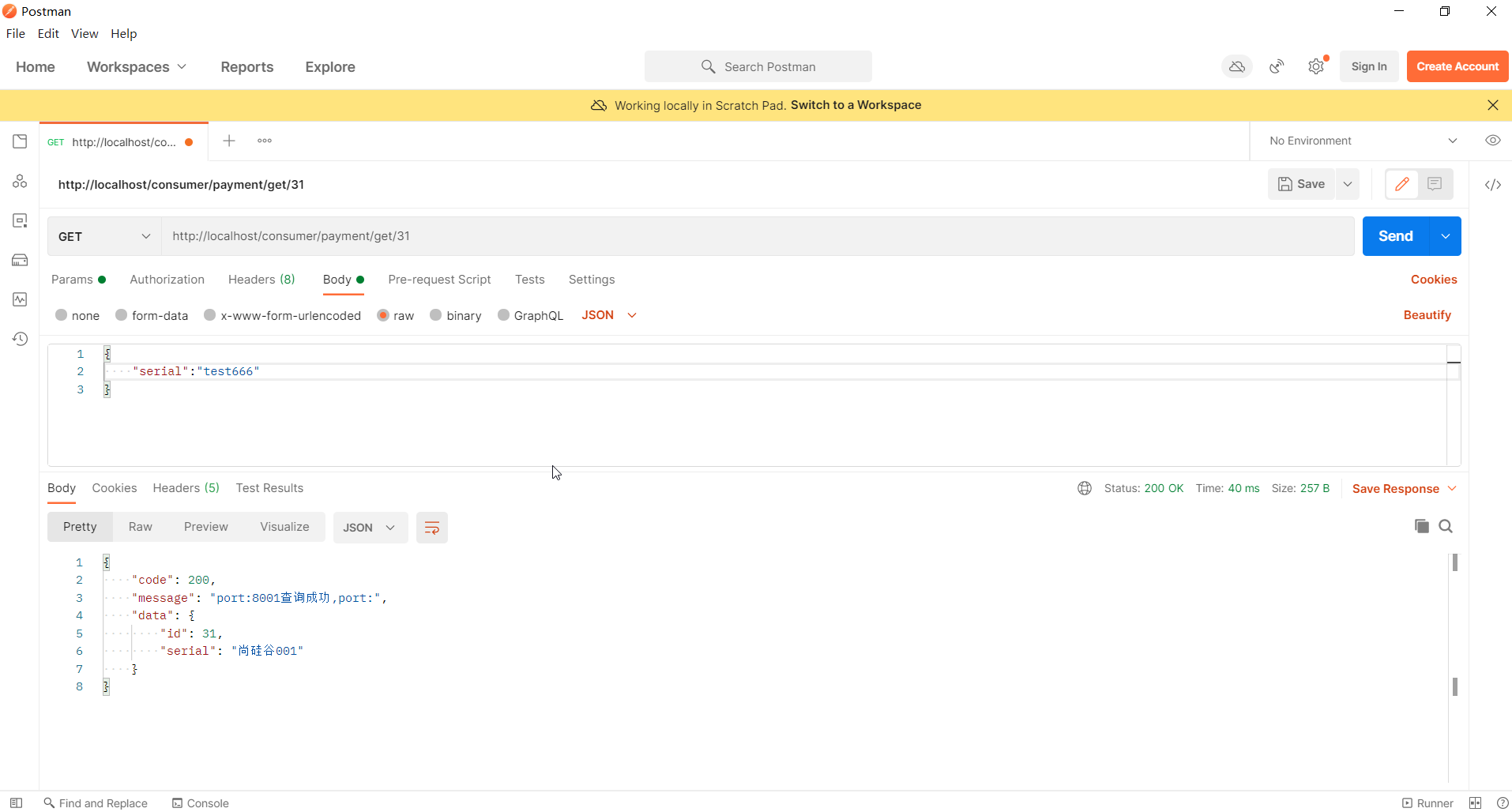
- http://localhost/consumer/payment/get/32
- 不要忘记@RequestBody注解
- 服务提供者接口方法需要增加@RequestBody注解(踩雷or破雷);否则,接收不到数据。
Hutool工具包
封装实体类代码 (在弄一个工具项目,通过Maven继承传递。略)
糊涂工具包:Hutool — 🍬A set of tools that keep Java sweet.

cn.hutool hutool-all 5.1.0 postman 模拟发起请求
热部署Devtools
1. 子工程添加依赖、插件
org.springframework.boot spring-boot-devtools runtime true
2. 父工程添加插件
下一段配置黏贴到父工程当中的pom里
org.springframework.boot spring-boot-maven-plugin true true 3. Enabling automatic build
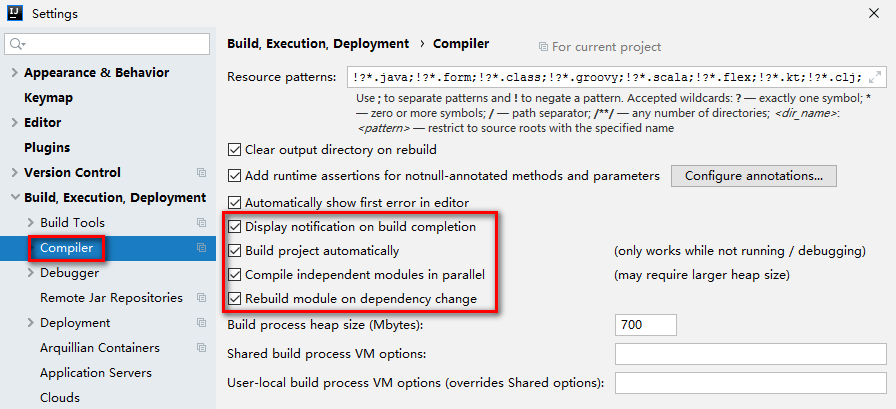
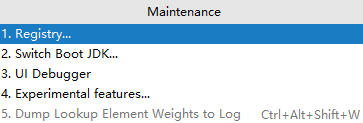
4. Ctrl+Shift+Alt+/选择Registry…,重启idea
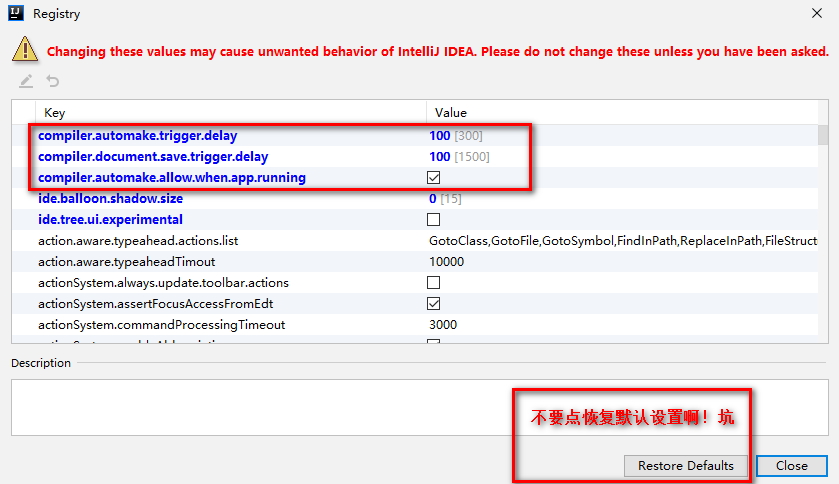
compiler.automake.allow.when.app.running -> 自动编译
compile.document.save.trigger.delay -> 自动更新文件;它主要是针对静态文件如JS CSS的更新,将延迟时间减少后,直接按F5刷新页面就能看到效果!
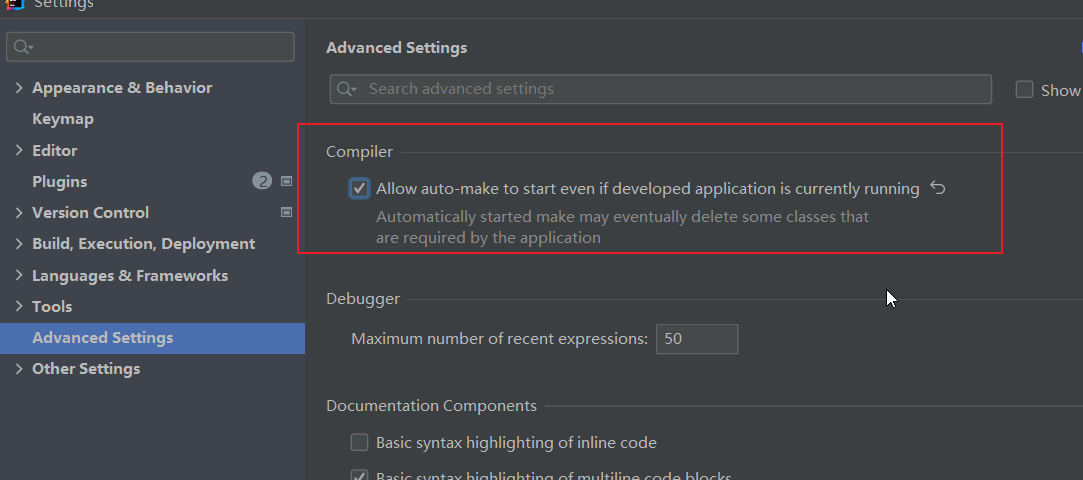
热部署:2021idea找不到 Registry中没有找到compiler.automake.allow.when.app.running选项?
四、Eureka:服务注册与发现
SpringCloud封装了Netflix公司开发的Eureka模块来实现服务治理。
在传统的RPC远程调用框架中,管理每个服务与服务之间依赖关系比较复杂、所以需要进行服务治理,管理服务与服务之间依赖关联,以实现服务调用,负载均衡、容错等,实现服务发现与注册。
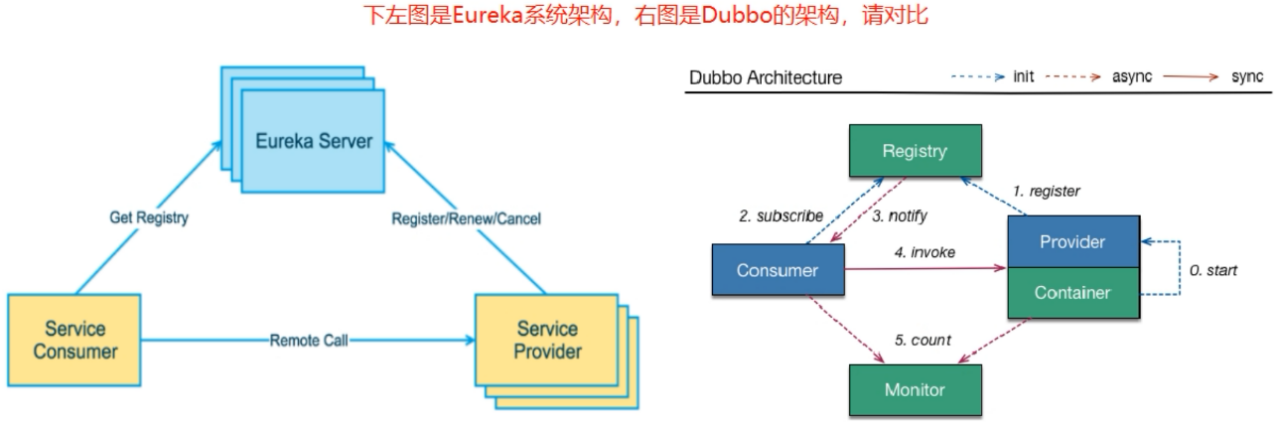
Eureka Client通过注册中心进行访问
是一个Java客户端,用于简化Eureka Server的交互,客户端同时也具备一个内置的、默认使用轮询(round-robin)负载算法的负载均衡器。在应用启动后,将会在Eureka Server发送心跳(默认周期30秒,zookeeper为10秒)。如果Eureka Server在多个心跳周期内没有收到某个节点的心跳,Eureka Server将会从服务注册表中把这个服务节点移出(默认90秒)
Eureka两组件
- Eureka Server提供服务注册服务
各个微服务节点通过配置启动后,会在Eureka Server中进行注册,这样Eureka Server中的服务注册表中将会存储所有可用服务节点的信息,服务节点的信息可以在界面中直观看到。
- Eureka Client通过注册中心进行访问
是一个Java客户端,用于简化Eureka Server的交互,客户端同时也具备一个内置的、使用轮询(round-robin)负载算法的负载均衡器。在应用启动后,将会在Eureka Server发送心跳(默认周期30秒)。如果Eureka Server在多个心跳周期内没有收到某个节点的心跳,Eureka Server将会从服务注册表中把这个服务节点移出(默认90秒)
1、IDEA生成eurekaServer端服务注册中心 (7001)
1.新建项目 cloud-eureka-server7001,导入依赖
org.springframework.cloud spring-cloud-starter-netflix-eureka-server com.atguigu.springcloud cloud-api-commons ${project.version} org.springframework.boot spring-boot-starter-web org.springframework.boot spring-boot-starter-actuator org.springframework.boot spring-boot-devtools runtime true org.projectlombok lombok org.springframework.boot spring-boot-starter-test test junit junit 2. 配置application.yml 文件
server:port: 7001eureka:instance:hostname: localhostclient:register-with-eureka: falsefetchRegistry: falseservice-url:defaultZone: http://localhost:7001/eureka
3. 启动类,添加@EnableEurekaServer注解
@SpringBootApplication
@EnableEurekaServer //声明当前应用为Eureka服务器端
public class App {public static void main(String[] args) {SpringApplication.run(App.class,args);}
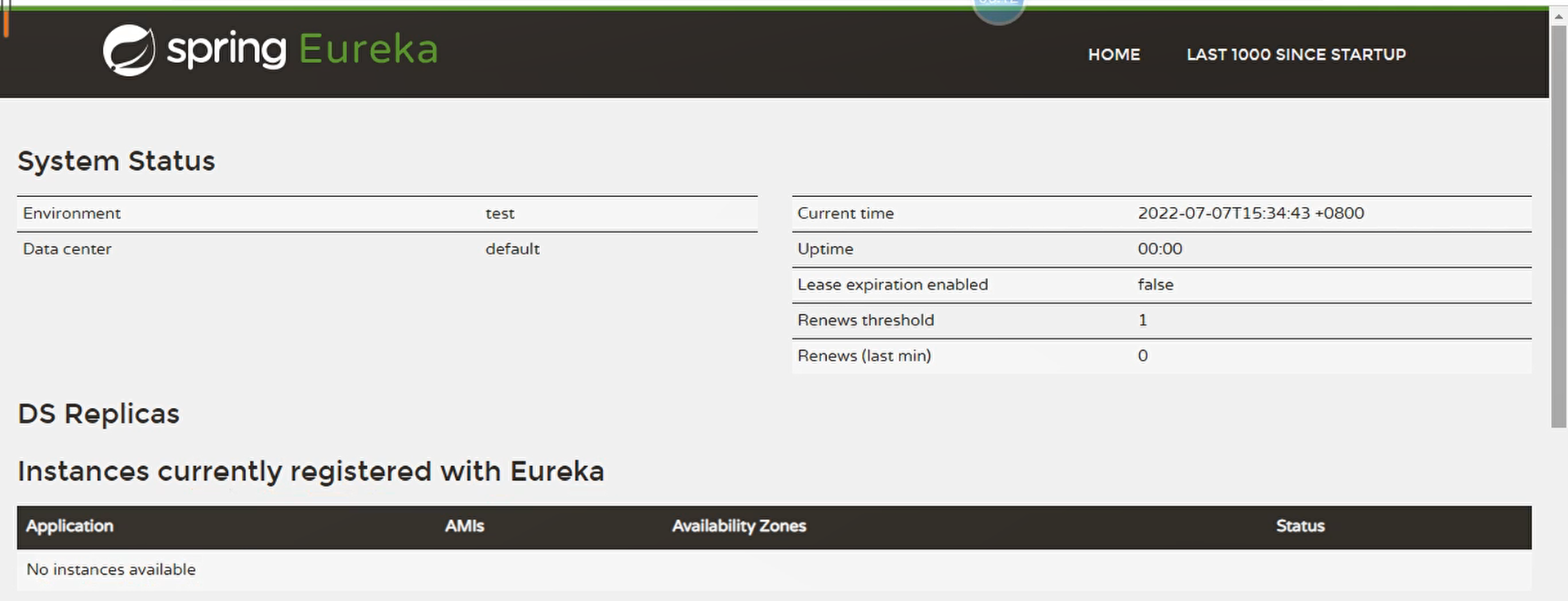
4. 测试访问 http://localhost:7001/
2、服务提供者8001 注册到7001
1. 修改项目 cloud-provider-payment8001,导入依赖
org.springframework.cloud spring-cloud-starter-netflix-eureka-client 2. 修改 YML配置文件
#8001 向 7001进行注册
eureka:client:register-with-eureka: truefetchRegistry: trueservice-url:defaultZone: http://localhost:7001/eureka
3.主启动 加入@EnableEurekaClient注解
@SpringBootApplication
@MapperScan(basePackages = "com.atguigu.springcloud.dao") //扫描dao包,创建代理对象
@EnableEurekaClient //声明当前应用8001为Eureka(7001)的客户端
public class PaymentMain8001 {public static void main(String[] args) {SpringApplication.run(PaymentMain8001.class,args);}
}3、服务消费者 注册到7001
1. 新建Module:cloud-consumer-order80,导入依赖
org.springframework.cloud spring-cloud-starter-netflix-eureka-client 2. 添加YML配置文件
eureka:client:register-with-eureka: truefetchRegistry: trueservice-url:defaultZone: http://localhost:7001/eureka3.主启动类 加入@EnableEurekaClient注解
@SpringBootApplication
@EnableEurekaClient//声明当前应用80为Eureka(7001)的客户端
//在哪个请求上,采用哪种规则(ribbon)
//@RibbonClient(name = "CLOUD-PAYMENT-SERVICE",configuration = MySelfRule.class)
public class OrderMain80 {public static void main(String[] args) {SpringApplication.run(OrderMain80.class,args);}}
测试

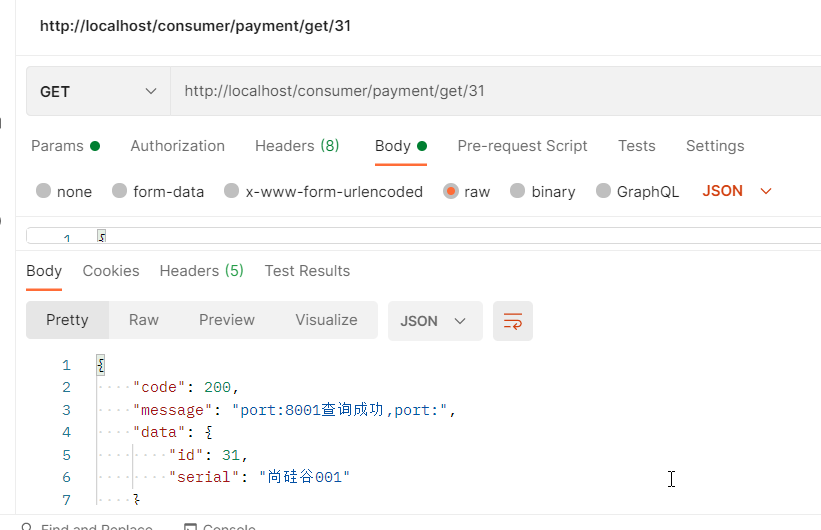
http://localhost/consumer/payment/get/31
测试8001服务和80服务效果一样
五、Ribbon:负载均衡服务调用 ★
Spring Cloud Ribbon是基于Netflix Ribbon实现的一套客户端负载均衡的工具。
简单的说,Ribbon是Netflix发布的开源项目,主要功能是提供客户端的软件负载均衡算法和服务调用。
Ribbon客户端组件提供一系列完善的配置项,如:连接超时,重试等。
简单的说,就是在配置文件中列出Load Balancer(简称LB)后面所有的机器,Ribbon会自动的帮助你基于某种规则(如简单轮询,随机连接等)去连接这些机器。
Ribbon目前也进入维护模式,未来替换方案: Spring Cloud LoadBalancer
注:Feign、Nacos 默认集成了 Ribbon
- Ribbon的本地负载均衡客户端 VS Nginx服务端负载均衡区别:
- Nginx是服务器负载均衡,客户端所有请求都会交给Nginx,然后,由nginx实现转发请求。即负载均衡是由服务器端完成的。
- Ribbon本地负载均衡,在调用微服务接口时候,会在注册中心上获取注册信息服务列表之后缓存到JVM本地,从而在本地实现RPC远程服务调用。
- 集中式LB
- 即在服务的消费方和提供方之间使用独立的LB设施(可以是硬件,如F5,也可以是软件,如Nginx),由该设施负责把访问请求通过某种策略转发至服务的提供方;
- 进程内LB
- 将LB逻辑集成到消费方,消费方从服务注册中心获知有哪些地址可用,然后自己再从这些地址中选择出一个合适的服务器。
- Ribbon就属于进程内LB,它只是一个类库,集成于消费方进程,消费方通过它来获取到服务提供方的地址。
- Ribbon=负载均衡+RestTemplate调用
1. 引入依赖
2. 服务消费者80 配置类中 模板对象加入注解 @LoadBalanced
@SpringBootConfiguration//声明一个配置类
public class ApplicationContextConfig {//重点 模板类//RestTemplate 只能进行远程调用@Bean@LoadBalanced //RestTemplate + Ribbon 实现远程调用和负载均衡(轮询)public RestTemplate restTemplate(){return new RestTemplate();}
}
3. 修改地址
//public static final String PATH = "http://localhost:8001";//修改接收请求地址: 从7001订阅服务,获取三个实例 public static final String PATH = "http://CLOUD-PAYMENT-SERVICE";@RequestMapping("/consumer/payment/get/{id}")public CommonResult get(@PathVariable("id") Long id){CommonResult commonResult = restTemplate.getForObject(PATH + "/payment/get/" + id, CommonResult.class);System.out.println("commonResult = " + commonResult);return commonResult;} 4. 构建支付服务提供者集群环境
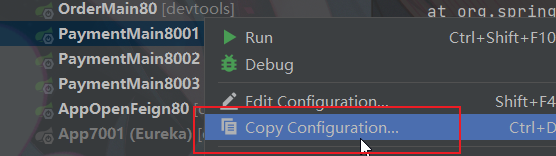
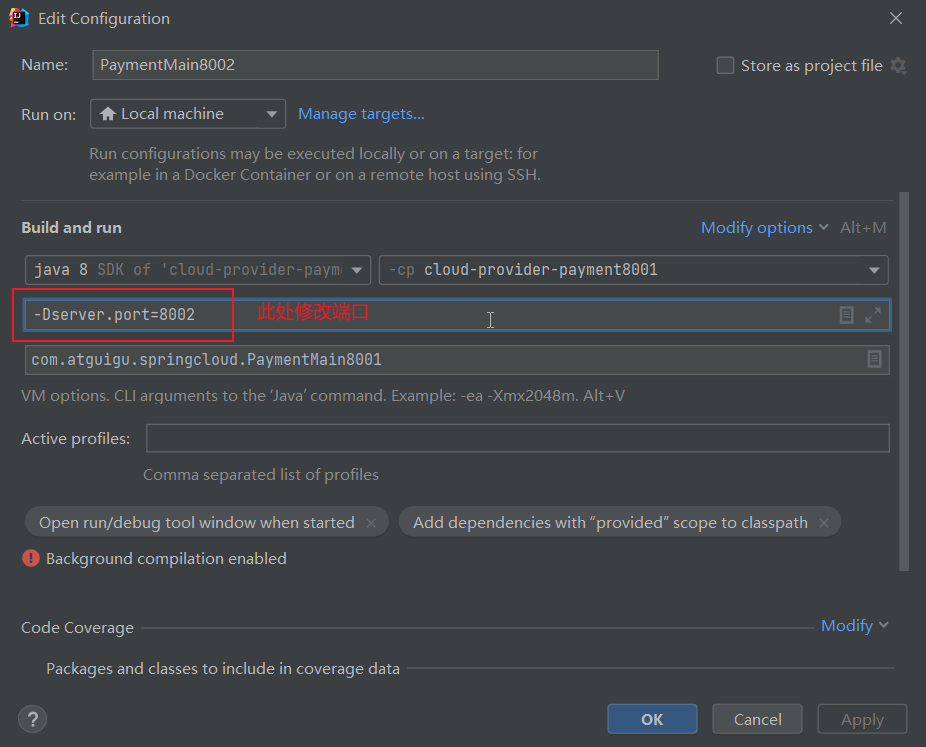
启动三个服务,设置不同端口。测试轮询效果
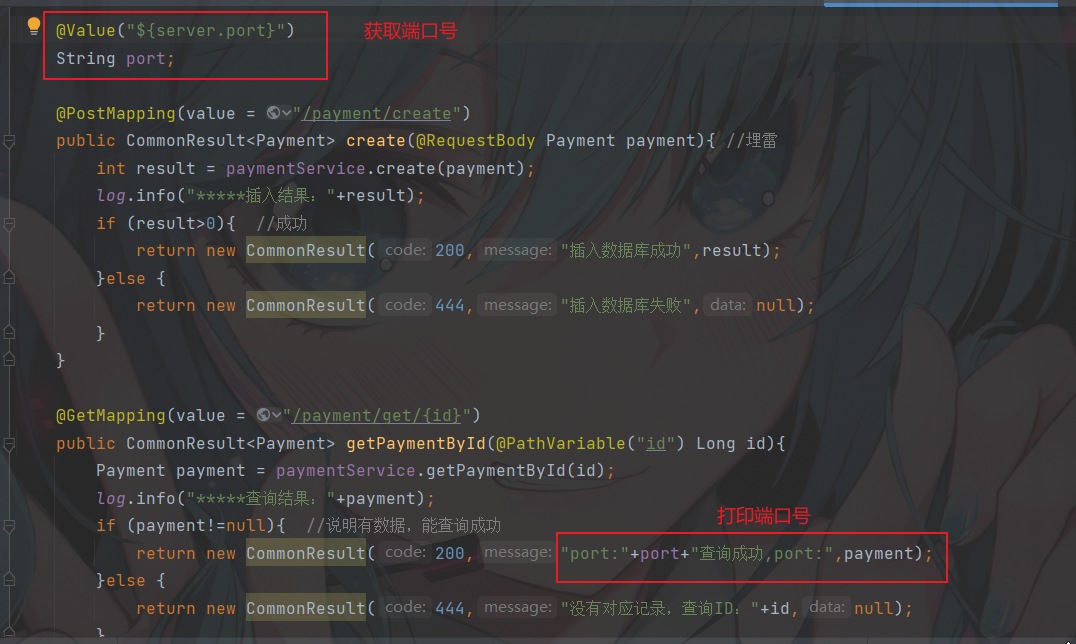
如何替换策略?
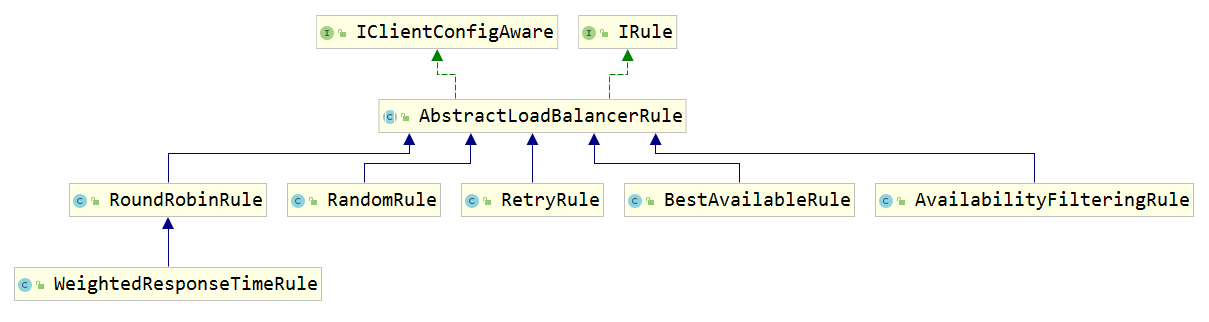
Ribbon 底层使用了 Irule 接口,实现各种负载均衡策略
IRule:根据特定算法从服务列表中选取一个要访问的服务
- com.netflix.loadbalancer.RoundRobinRule 轮询,默认策略。
- com.netflix.loadbalancer.RandomRule 随机
- com.netflix.loadbalancer.RetryRule 先按照RoundRobinRule的策略获取服务,如果获取服务失败则在指定时间内会进行重试,获取可用的服务
- WeightedResponseTimeRule 对RoundRobinRule的扩展,响应速度越快的实例选择权重越大,越容易被选择
- BestAvailableRule 会先过滤掉由于多次访问故障而处于断路器跳闸状态的服务,然后选择一个并发量最小的服务
- AvailabilityFilteringRule 先过滤掉故障实例,再选择并发较小的实例
- ZoneAvoidanceRule 默认规则,复合判断server所在区域的性能和server的可用性选择服务器
自定义配置类不能放在@ComponentScan所扫描的当前包下以及子包下,否则我们自定义的这个配置类就会被所有的Ribbon客户端所共享,达不到特殊化订制的目的了。
1. 在启动类上一级新建MySelfRule规则类
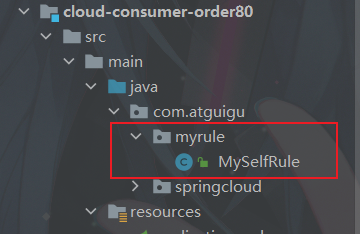
@Configuration
public class MySelfRule {@Beanpublic IRule myRule(){return new RandomRule();//定义为随机}
}
2. 主启动类添加@RibbonClient
@SpringBootApplication
@EnableEurekaClient//声明当前应用80为Eureka(7001)的客户端
//在哪个请求上,采用哪种规则
@RibbonClient(name = "CLOUD-PAYMENT-SERVICE",configuration = MySelfRule.class)
public class OrderMain80 {public static void main(String[] args) {SpringApplication.run(OrderMain80.class,args);}
}
六、OpenFeign:服务接口远程调用 ★
Feign是一个声明式的web服务客户端,让编写web服务客户端变得非常容易,只需创建一个接口并在接口上添加注解即可。(上面的例子使用了RestTemplate)
SpringCloud 对Feign 进行了封装,使其支持了SpringMVC标准注解和HttpMessageConverters。Feign 可以与 Eureka 和 Ribbon 组合使用以支持 负载均衡。
接口定义:狭义:interface声明的类 广义:对外暴露的类、方法也可称为接口
Feign 集成了 Ribbon
利用Ribbon维护了Payment的服务列表信息,并且通过轮询实现了客户端的负载均衡。而与Ribbon不同的是,通过Feign只需要定义服务绑定接口且以声明式的方法,优雅而简单的实现了服务调用。
Feign和OpenFeign两者区别
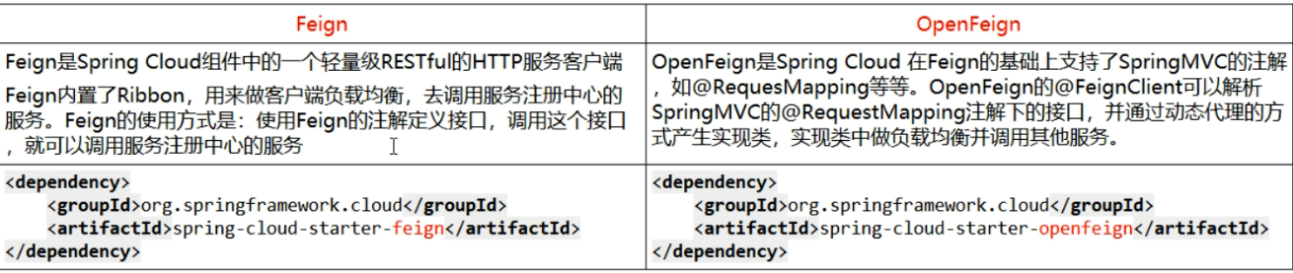
使用方式:微服务调用接口+@FeignClient
1. 新建Module:cloud-consumer-feign-order80,导入依赖
org.springframework.cloud spring-cloud-starter-openfeign org.springframework.cloud spring-cloud-starter-netflix-eureka-client com.atguigu.springcloud cloud-api-commons ${project.version} org.springframework.boot spring-boot-starter-web org.springframework.boot spring-boot-starter-actuator org.springframework.boot spring-boot-devtools runtime true org.projectlombok lombok true org.springframework.boot spring-boot-starter-test test 2. YML文件
server:port: 80
spring:application:name: cloud-consumer-feign-order80
eureka:client:register-with-eureka: truefetch-registry: trueservice-url:defaultZone: http://localhost:7001/eureka
3. 主启动类 添加注解@EnableFeignClients
@SpringBootApplication
@EnableEurekaClient //声明当前应用80为Eureka(7001)的客户端
@EnableFeignClients //启用OpenFeign组件远程调用功能
public class App {public static void main(String[] args) {SpringApplication.run(App.class);}
}
4. 业务层 创建接口并新增注解 @FeignClient
//远程调用接口:
@Component //声明bean对象,创建代理对象,进行远程调用
@FeignClient("CLOUD-PAYMENT-SERVICE") //指定调用微服务的名称
public interface PaymentFeignService {//接口方法声明要求:需要与被调用的服务的controller方法声明保持一致@GetMapping(value = "/payment/get/{id}")public CommonResult getPaymentById(@PathVariable("id") Long id);@PostMapping(value = "/payment/create")public CommonResult create(@RequestBody Payment payment);
}
4. 控制层Controller
@RestController
public class OrderFeignController {//远程调用微服务接口(默认集成Ribbon 轮询),实现原原理: 代理@AutowiredPaymentFeignService paymentFeignService; @RequestMapping("/consumer/payment/get/{id}")public CommonResult getPaymentById(@PathVariable("id") Long id){CommonResult commonResult = paymentFeignService.getPaymentById(id);return commonResult;}}
5. 测试
Ribbon 超时设置
OpenFeign远程调用 默认一秒超时,有时候我们需要设置Feign客户端的超时控制,即Ribbon的超时时间,因为Feign集成了Ribbon进行负载均衡。
如果不配置ribbon的重试次数,默认会重试一次。
注意:
默认情况下,GET方式请求无论是连接异常还是读取异常,都会进行重试
非GET方式请求,只有连接异常时,才会进行重试
如果对增删改进行重试,应通过乐观锁机制,进行幂等处理,防止重复提交
1、修改yml配置文件
ribbon:ReadTimeout:  3000ConnectTimeout: 3000MaxAutoRetries: 1 #同一台实例最大重试次数,不包括首次调用MaxAutoRetriesNextServer: 1 #重试负载均衡其他的实例最大重试次数,不包括首次调用OkToRetryOnAllOperations: false #是否所有操作都重试(false时只对get重试)#hystrix(降级熔断)的超时时间
hystrix:command:default:execution:timeout:enabled: trueisolation:thread:timeoutInMilliseconds: 9000
一般情况下 都是 ribbon 的超时时间(<)hystrix的超时时间(因为涉及到ribbon的重试机制)
OpenFeign 日志打印功能
日志级别
NONE:默认的,不显示任何日志
BASIC:仅记录请求方法、RUL、响应状态码及执行时间
HEADERS:除了BASIC中定义的信息之外,还有请求和响应的头信息
FULL:除了HEADERS中定义的信息之外,还有请求和响应的正文及元数据
1. 配置类,配置日志bean,指定日志级别
@Configuration //用哪个都可以,一个SpringBoot提供,一个spring提供
//@SpringBootConfiguration
public class FeignConfig {@Beanpublic Logger.Level feignLoggerLevel(){return Logger.Level.FULL;}}
级别: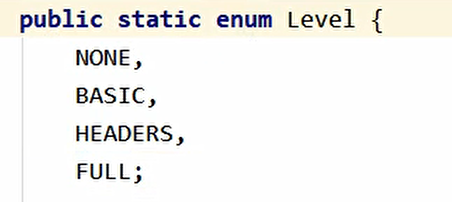
2. YML配置需要开启日志的Feign客户端
logging:level:com.atguigu.springcloud.service.PaymentFeignService: debug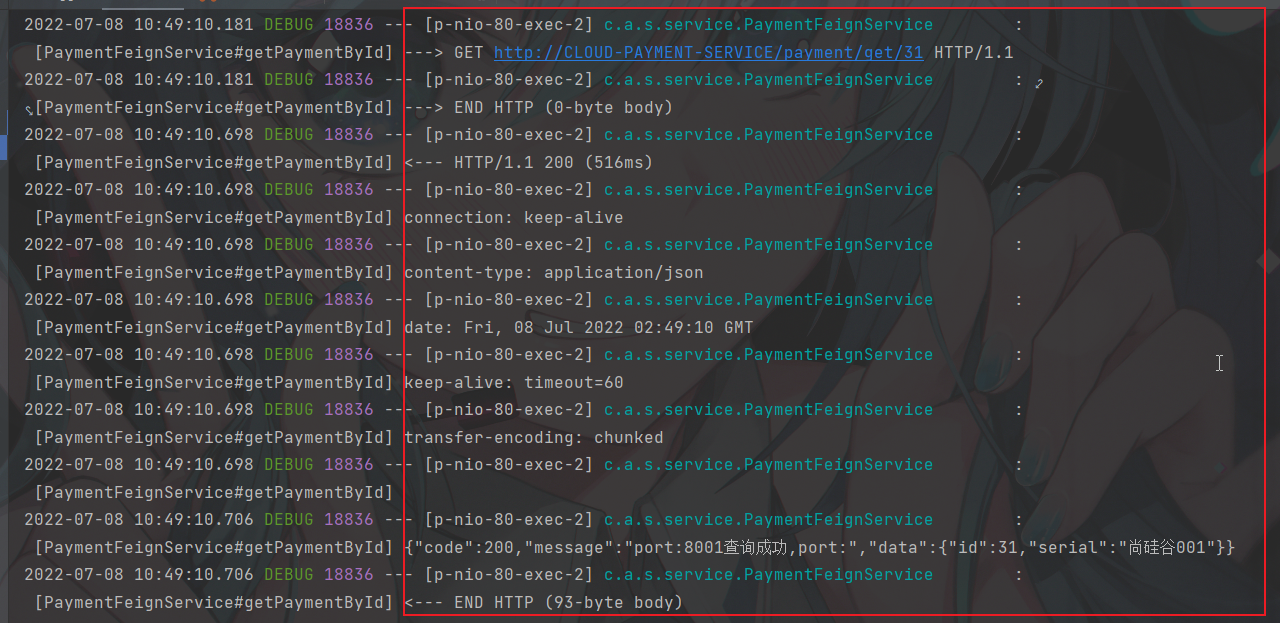
本文来自互联网用户投稿,文章观点仅代表作者本人,不代表本站立场,不承担相关法律责任。如若转载,请注明出处。 如若内容造成侵权/违法违规/事实不符,请点击【内容举报】进行投诉反馈!