react-native-video无法播放远程mp3文件替代方法
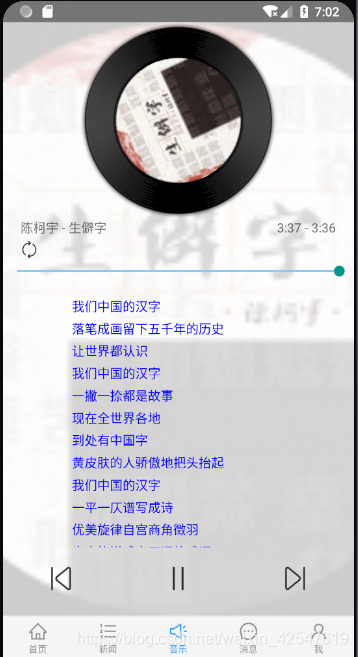
近日在学习react-native的时候想做一个类似音乐播放器的工具,各方百度使用react-native-video 作为音视频播放组件。但是该组件在播放远程mp3文件的时候一直播放不出来,播放mp4文件正常。几经周折选择了使用react-native-sound 组件替代播放,具体代码如下
import React, {Component} from 'react';
import {AppRegistry,StyleSheet,Dimensions,Text,Image,View,Slider,TouchableOpacity,ScrollView,ActivityIndicator,Animated,Easing,Alert
} from 'react-native';// import { Slider } from 'react-native-elements'
import Sound from 'react-native-sound'
import config from "../../config";let lyrObj = [] // 存放歌词
let {width, height} = Dimensions.get('window');
let mp3 = "";
//如果是网络音频,使用 new Sound(mp3,null,error => {})
let whoosh = null;export default class MusicTest extends Component {constructor(props) {super(props);this.spinValue = new Animated.Value(0)this.state = {volume: 0.5,seconds: 0, //秒数totalMin: '', //总分钟totalSec: '', //总分钟秒数nowMin: 0, //当前分钟nowSec: 0, //当前秒钟maximumValue: 0, //滑块最大值,songs: [], //歌曲id数据源playModel: 1, // 播放模式 1:列表循环 2:随机 3:单曲循环btnModel: "http://qiniu.guang.lerzen.com/liebiaoxunhuan.png", //播放模式按钮背景图pic_small: '', //小图pic_big: '', //大图song_id: '', //歌曲idtitle: '', //歌曲名字author: '', //歌曲作者file_link: '', //歌曲播放链接songLyr: [], //当前歌词sliderValue: 0, //Slide的valuepause: false, //歌曲播放/暂停currentTime: 0.0, //当前时间duration: 0.0, //歌曲时间currentIndex: 0, //当前第几首isplayBtn: "http://qiniu.guang.lerzen.com/zhanting.png" //播放/暂停按钮背景图}}// 旋转动画spin = () => {this.spinValue.setValue(0)myAnimate = Animated.timing(this.spinValue,{toValue: 1,duration: 4000,easing: Easing.linear}).start(() => this.spin())}loadSongInfo = (index) => {//加载歌曲let songid = this.state.songs[index]let url = config.serverUrl + "/Music/GetMusicInfo/getMusicInfo?songId=" + songidfetch(url).then((response) => response.json()).then((responseJson) => {let songinfo = responseJson.data.songinfolet bitrate = responseJson.data.bitratethis.setState({pic_small: songinfo.pic_small, //小图pic_big: songinfo.pic_big, //大图title: songinfo.title, //歌曲名author: songinfo.author, //歌手file_link: bitrate.file_link, //播放链接})whoosh = new Sound(bitrate.file_link, null, (error) => {if (error) {return console.log('资源加载失败', error);}})let totalTime = bitrate.file_duration;//歌曲长度let totalMin = parseInt(totalTime / 60); //总分钟数let totalSec = totalTime - totalMin * 60; //秒钟数并判断前缀是否 + '0'totalSec = totalSec > 9 ? totalSec : '0' + totalSec;this.setState({totalMin,totalSec,maximumValue: totalTime,})this.onGetLyric(songid);})}onGetMusicLists = () => {let url = config.serverUrl + "/Music/GetMusicLists/getMusicLists";fetch(url).then((response) => response.json()).then((responseJson) => {let listAry = responseJson.data.song_listlet song_idAry = []; //保存song_id的数组for (let i = 0; i < listAry.length; i++) {let song_id = listAry[i].song_idsong_idAry.push(song_id)}this.setState({songs: song_idAry}, () => {this.loadSongInfo(0)})}).catch((error) => { // 错误处理// Alert.alert(JSON.stringify(error))})}onGetLyric = (songId) => {//加载歌词let url = config.serverUrl + "/Music/GetMusicLyric/getMusicLyric?songId=" + songId;fetch(url).then((response) => response.json()).then((responseJson) => {let lry = responseJson.data.lrcContentlet lryAry = lry.split('\n') //按照换行符切数组lryAry.forEach(function (val, index) {let obj = {} //用于存放时间val = val.replace(/(^\s*)|(\s*$)/g, '') //正则,去除前后空格let indeofLastTime = val.indexOf(']') // ]的下标let timeStr = val.substring(1, indeofLastTime) //把时间切出来 0:04.19let minSec = ''let timeMsIndex = timeStr.indexOf('.') // .的下标if (timeMsIndex !== -1) {//存在毫秒 0:04.19minSec = timeStr.substring(1, val.indexOf('.')) // 0:04.obj.ms = parseInt(timeStr.substring(timeMsIndex + 1, indeofLastTime)) //毫秒值 19} else {//不存在毫秒 0:04minSec = timeStrobj.ms = 0}let curTime = minSec.split(':') // [0,04]obj.min = parseInt(curTime[0]) //分钟 0obj.sec = parseInt(curTime[1]) //秒钟 04obj.txt = val.substring(indeofLastTime + 1, val.length) //歌词文本: 留下唇印的嘴obj.txt = obj.txt.replace(/(^\s*)|(\s*$)/g, '')obj.dis = falseobj.total = obj.min * 60 + obj.sec + obj.ms / 100 //总时间if (obj.txt.length > 0) {lyrObj.push(obj)}})})}componentDidMount() {//先从总列表中获取到song_id保存this.onGetMusicLists();this.spin() // 启动旋转}// 上一曲prevAction = (index) => {this.recover()lyrObj = [];if (index == -1) {index = this.state.songs.length - 1 // 如果是第一首就回到最后一首歌}this.setState({currentIndex: index //更新数据})this.loadSongInfo(index) //加载数据}// 下一曲nextAction = (index) => {this.recover()lyrObj = [];if (index == 10) {index = 0 //如果是最后一首就回到第一首}this.setState({currentIndex: index, //更新数据})this.loadSongInfo(index) //加载数据}// 播放/暂停playAction = () => {let pauseStatus = !this.state.pause;this.setState({pause: !this.state.pause})//判断按钮显示什么(播放)if (pauseStatus == true) {this.setState({isplayBtn: "http://qiniu.guang.lerzen.com/bofang.png"})this.start();} else {// 暂停this.setState({isplayBtn: "http://qiniu.guang.lerzen.com/zhanting.png"})this.pause();}}componentWillUnmount() {this.time && clearTimeout(this.time);}// 歌词renderItem() {// 数组let itemAry = [];for (let i = 0; i < lyrObj.length; i++) {let item = lyrObj[i].txtif (this.state.currentTime.toFixed(2) > lyrObj[i].total) {//正在唱的歌词itemAry.push({color: 'blue'}}> {item} {color: 'red'}}> {item} {flex: 1, alignItems: 'center', justifyContent: 'center'}}size="large"/>)} else {const spin = this.spinValue.interpolate({inputRange: [0, 1],outputRange: ['0deg', '360deg']})return ({/*背景大图*/}{uri: this.state.pic_big}} style={{flex: 1}}/>{/*背景白色透明遮罩*/}{position: 'absolute',width: width,height: height,backgroundColor: 'white',opacity: 0.8}}/>{position: 'absolute', width: width}}>{/*胶片光盘*/}{uri: "http://qiniu.guang.lerzen.com/jianpianpan.png"}} style={{width: 220, height: 220, alignSelf: 'center'}}/>{/*旋转小图*/}{width: 140,height: 140,marginTop: -180,alignSelf: 'center',borderRadius: 140 * 0.5,transform: [{rotate: spin}]}}source={{uri: this.state.pic_small}}/>{/*歌曲信息*/}{/*作者-歌名*/}{this.state.author} - {this.state.title} {/*时间*/}{this.state.nowMin}:{this.state.nowSec} - {this.state.totalMin}:{this.state.totalSec} {/*播放模式*/}{marginTop: 5, marginBottom: 5, marginLeft: 20}}> this.playModel(this.state.playModel)}>{uri: this.state.btnModel}} style={{width: 20, height: 20}}/> {/*进度条*/} { //用户完成更改值时调用的回调(例如,当滑块被释放时)value = parseInt(value);this.onGetNowTime(value)// 设置播放时间whoosh.setCurrentTime(value);}}onValueChange={(value) => {this.onGetNowTime(value)}}/>{/*歌词*/}{height: 280, alignItems: 'center', marginTop: 20}}>{position: 'relative'}}showsVerticalScrollIndicator={false}ref={(scrollView) => {_scrollView = scrollView}}>{this.renderItem()} {/*歌曲按钮*/}{flexDirection: 'row', justifyContent: 'space-around',marginTop:20}}> this.prevAction(this.state.currentIndex - 1)}>{uri: "http://qiniu.guang.lerzen.com/shangyishou.png"}}style={{width: 30, height: 30}}/> this.playAction()}>{uri: this.state.isplayBtn}} style={{width: 30, height: 30}}/> this.nextAction(this.state.currentIndex + 1)}>{uri: "http://qiniu.guang.lerzen.com/xiayishou.png"}}style={{width: 30, height: 30}}/> {/*{time.nowMin}:{time.nowSec}/{time.totalMin}:{time.totalSec} */}{/*当前音量: {this.state.volume} */}{/*声音+ */}{/*声音- */}{/*停止 */} );}}
}const styles = StyleSheet.create({container: {flex: 1,},image: {flex: 1},playingControl: {flexDirection: 'row',alignItems: 'center',paddingTop: 10,paddingLeft: 20,paddingRight: 20,paddingBottom: 20},playingInfo: {flexDirection: 'row',alignItems: 'stretch',justifyContent: 'space-between',paddingTop: 40,paddingLeft: 20,paddingRight: 20,backgroundColor: 'rgba(255,255,255,0.0)'},text: {color: "black",fontSize: 22},modal: {height: 300,borderTopLeftRadius: 5,borderTopRightRadius: 5,paddingTop: 5,paddingBottom: 50},itemStyle: {paddingTop: 20,height: 25,backgroundColor: 'rgba(255,255,255,0.0)'}
}); 可以实现歌词同步,前后音乐切换。部分样式是参照网上大神的哦。
本文来自互联网用户投稿,文章观点仅代表作者本人,不代表本站立场,不承担相关法律责任。如若转载,请注明出处。 如若内容造成侵权/违法违规/事实不符,请点击【内容举报】进行投诉反馈!