Scrapy爬虫几个案例
1、用基础爬虫爬取糗事百科段子
class QsbkSpider(scrapy.Spider):name = 'qsbk'allowed_domains = ['qiushibaike.com']start_urls = ['https://www.qiushibaike.com/text/page/1/']base_url = 'https://www.qiushibaike.com'def parse(self, response):text_divs = response.xpath("//div[@id='content-left']/div")for div in text_divs:author = div.xpath(".//h2/text()").get().strip() #get会解码中文content = div.xpath(".//span/text()").get().strip()duanzhi=DuanzhiItem(author=author,content=content)print(author)yield duanzhinext_url = response.xpath("//ul[@class='pagination']/li[last()]/a/@href").get()if not next_url:returnelse:yield scrapy.Request(self.base_url+next_url,callback=self.parse)
其中yield scrapy.Request(self.base_url+next_url,callback=self.parse) 会拼接下一页的url继续调用parse函数爬取指定内容
下面是爬取作者内容的一部分 总共有13页
十亿精兵总统领
千户小黄人
小萌新初来乍到
爆笑菌boy
一杯清茶!
恨钱不成山
依丽若水
歌歌哒f
…
2、爬取购房网站的每个省的购房信息
class FangSpider(scrapy.Spider):name = 'fang'allowed_domains = ['fang.com']start_urls = ['https://www.fang.com/SoufunFamily.htm']def parse(self, response):trs = response.xpath("//div[@id='c02']//tr")province = Nonefor tr in trs:tds = tr.xpath(".//td[not(@class)]") #寻找没有class的标签provice_td=tds[0]provice_text = provice_td.xpath(".//text()").get().strip()if provice_text!="":province = provice_textif province.strip() == '其它':continuecity_td=tds[1]city_links = city_td.xpath(".//a")for city_link in city_links:city = city_link.xpath(".//text()").get()city_url = city_link.xpath(".//@href").get()url_model = city_url.split(".")domain = url_model[0]if 'bj' in domain:newHome_url='https://newhouse.fang.com/house/s/'else:city_url = domain+'.newhouse.fang.com/'newHome_url =city_url+'house/s/'print("省份:", province, city, city_url,newHome_url)yield scrapy.Request(url=newHome_url,callback=self.parse_newHome,meta={'info':(province,city),'city_url':city_url})def parse_newHome(self,response):city_url = response.meta.get('city_url')province,city = response.meta.get('info')item = HouseItem()houses = response.xpath("//div[@id='newhouse_loupai_list']//li")for house_info in houses:infos = house_info.xpath('.//div[@class="nlc_details"]')for info in infos:name = info.xpath("./div[1]/div[@class='nlcd_name']/a/text()").get().strip()comment_count = info.xpath("./div[1]/div[2]/a/span/text()").get()if comment_count:comment_count = comment_count.strip('(').strip(')')address = info.xpath(".//div[@class='address']/a/@title").get()price = info.xpath(".//div[@class='nhouse_price']/i/text()").get()if price==None:price = info.xpath(".//div[@class='nhouse_price']/span/text()").get()price = price.strip()print(name)
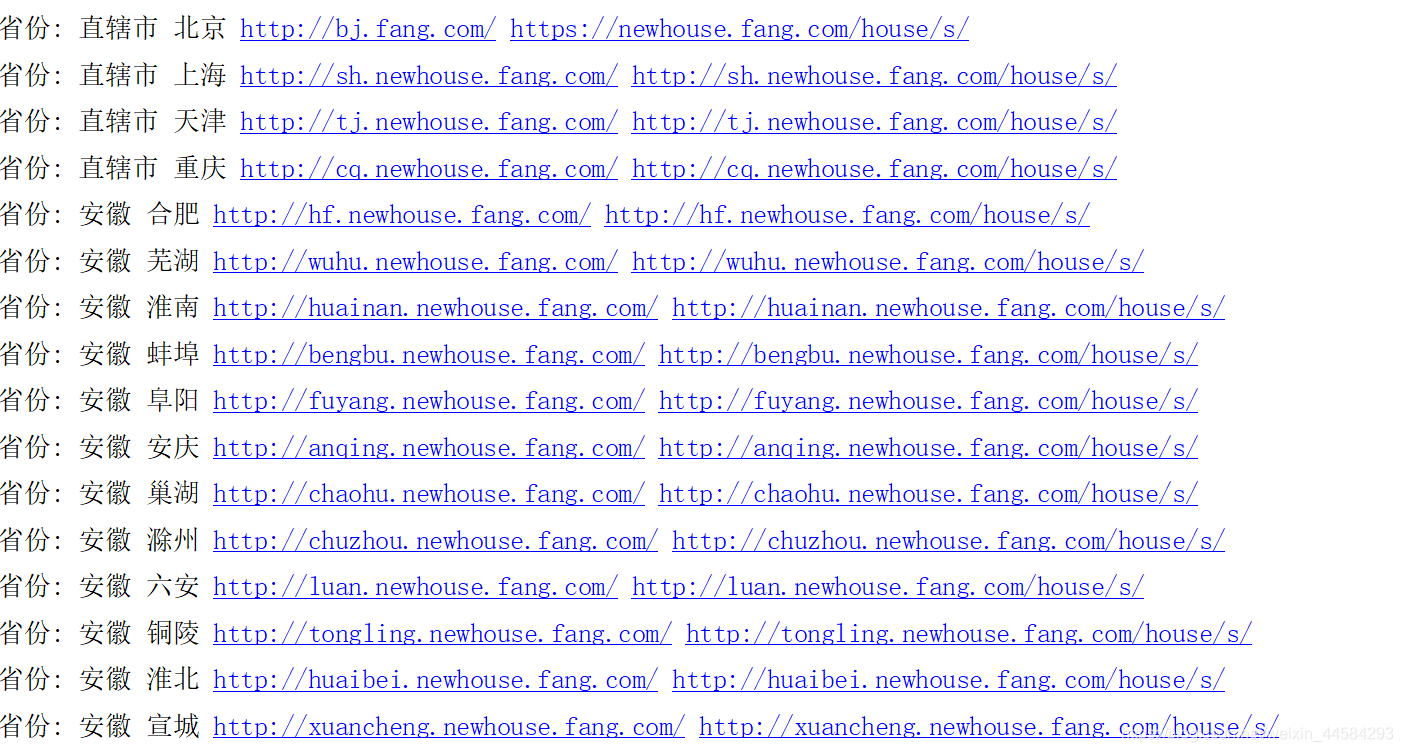
部分截图,仅仅打印了部分url 和省份信息,parse_newHome函数是根据每个省份的url继续提取信息的函数,parse仅仅提取省份内的url
3、管道以及文件下载
Pipeline有四部分
init:初始化,一般用于打开文件等初始化工作
open_spider:爬虫开始之前
process_item:爬取过程中,一般逻辑代码都写这里
close_spider:爬虫结束后,一般用于收尾工作,文件关闭,流的关闭等
下面是一个JSon导出器的管道,用于储存数据
一般都用JsonLinesItemExporter
class MyJsonItem(object): #json导出器def __init__(self):self.file = open("duanzhi.json",'wb')self.exporter = JsonLinesItemExporter(self.file,ensure_ascii=False,encoding='utf-8')# JsonItemExporter 不换行 需要 finish_exporting()提示储存磁盘# JsonLinesItemExporter一个字典一行 来一个存一个 不需要finish_exporting()self.exporter.start_exporting() #注意这个要写def open_spider(self,spider):print("爬虫开始")def process_item(self,item,spider):self.exporter.export_item(item) //一句代码便可完成对象到JSON之间的转换# raise DropItem() 抛出这个异常可以丢弃当前的item数据 爬虫不会停止return itemdef close_spider(self,spider):self.file.close()print("爬虫完成")
管道种类
1. 储存性管道【如上】
2. 过滤性管道,用于数据清洗,过滤,去重等
3. 加工性管道:对数据进行计算或者额外扩展等
4、模拟登录
不知道为什么我没有登录成功
start_requests继承自BaseSpider,可以在请求之前调用改写请求,spider都是get请求,可以改为post来登录或者提交表单
class DoubanSpider(scrapy.Spider):name = 'douban'allowed_domains = ['renren.com']start_urls = ['http://www.renren.com']def start_requests(self):url = 'http://www.renren.com/PLogin.do'data = {'email': '19884605250','password': '19884605250',} # 构造表单数据yield scrapy.FormRequest(url ,formdata=data, callback=self.parse)def parse(self, response):print(response.text)5、爬取二手车网站的图片
这里没有建立item,其实用字典也可以
class CarSpider(scrapy.Spider):name = 'car'allowed_domains = ['car.autohome.com.cn']start_urls = ['https://car.autohome.com.cn/pic/series/2733.html#pvareaid=2042212']def parse(self, response):divs = response.xpath("//div[@class='uibox']")[1:]for uibox in divs:category = uibox.xpath(".//div[@class='uibox-title']/a/text()").get()print(category)urls = uibox.xpath(".//li//img/@src").getall()urls = map(lambda url:response.urljoin(url),urls)urls = list(urls)print(urls)item = {"category":category,"image_urls":urls,"images":None}yield item
item = {"category":category,"image_urls":urls,"images":None}
因为要用到Scrapy提供的ImagesPipeline
所以item属性必须包含
“image_urls”:urls,“images”:None url代表图片地址,images代表储存的图片,这里没有储存,所以先None
Pipeline如下:
class CarImgDownLoad(ImagesPipeline):def get_media_requests(self, item, info):request_objs = super(CarImgDownLoad, self).get_media_requests(item,info)for request_obj in request_objs: //这里循环遍历每个item并给下一个函数处理request_obj.item = item #这里的request_obj 就是下面的requestreturn request_objsdef file_path(self, request, response=None, info=None): //改写父类方法,自己设置下载目录path = super(CarImgDownLoad, self).file_path(request,response)category = request.item.get("category")image_store = settings.IMAGES_STORE category_path = os.path.join(image_store,category)if not os.path.exists(category_path):os.mkdir(category_path)image_name =path.replace("full/","")image_path = os.path.join(category_path,image_name)return image_path
6、 爬取微信网站 CrawlSpider
class WeixinSpider(CrawlSpider):name = 'weixin'allowed_domains = ['wxapp-union.com']start_urls = ['http://www.wxapp-union.com/portal.php?mod=list&catid=2&page=1']rules = (Rule(LinkExtractor(allow=r'.+mod=list&catid=2&page=\d'),follow=True), #只是提取url 则不需要解析函数,这里的作用就是提取每一页的urlRule(LinkExtractor(allow=r'.+article-.+\.html'),callback='parse_detail',follow=False) //提取每一页里url里的文章)def parse_detail(self, response):title = response.xpath("//h1[@class='ph']/text()").get()print(title)content = response.xpath("//td[@id='article_content']//text()").getall()print(content)
这是一个url规则制定的东东
LinkExtractor是链接提取器,里面allow属性就是按一系列规则匹配start_url网页里面的所有符合的url链接来去爬取,follow=true表示跟进
举个例子,如百度百科,从任意一个词条入手,抓取词条中的超链接来跳转,rule会对超链接发起requests请求,如follow为True,scrapy会在返回的response中验证是否还有符合规则的条目,继续跳转发起请求抓取,周而复始
callback表示回调的函数,如果没有设置表示不回调,仅仅提取url
rules = (Rule(LinkExtractor(allow=r'.+mod=list&catid=2&page=\d'),follow=True), #只是提取url 则不需要解析函数Rule(LinkExtractor(allow=r'.+article-.+\.html'),callback='parse_detail',follow=False) //将第一个rule里面的url里匹配规则)
本文来自互联网用户投稿,文章观点仅代表作者本人,不代表本站立场,不承担相关法律责任。如若转载,请注明出处。 如若内容造成侵权/违法违规/事实不符,请点击【内容举报】进行投诉反馈!