PCM音频格式理解
文章目录
- 什么是PCM
- PCM数据排列格式
- PCM音量
- 参考
什么是PCM
PCM(Pulse Code Modulation)是模拟信号以固定的采样频率转换成数字信号后的表现形式。
PCM相关的5个概念:
- 采样率(Sample Rate)
一秒钟内对声音信号的采样次数,单位:Hz,采样频率越高,音频质量越好,占用空间也越大。采样频率一般共分为11025Hz、22050Hz、24000Hz、44100Hz、48000Hz五个等级,11025Hz能达到AM调幅广播的声音品质,而22050Hz和24000HZ能达到FM调频广播的声音品质,44100Hz则是理论上的CD音质界限,48000Hz则更加精确一些。 - 音频数据是否是有符号的
通常情况下音频数据都是有符号的,可以是负值。 - 采样位数(Sample Size)
表示每一个采样数据的大小,有8、16位之分,用来衡量声音波动变化的一个参数,也可以说是声卡的分辨率。它的数值越大,分辨率也就越高,所发出声音的能力越强。 - 字节序
音频数据存储字节序,有little-endian和big-endian,音频通常使用little-endian字节序存储。 - 声道数
标识音频是单声道(mono, 1 channel)还是双声道立体声(stereo, 2 channels)。
PCM数据排列格式
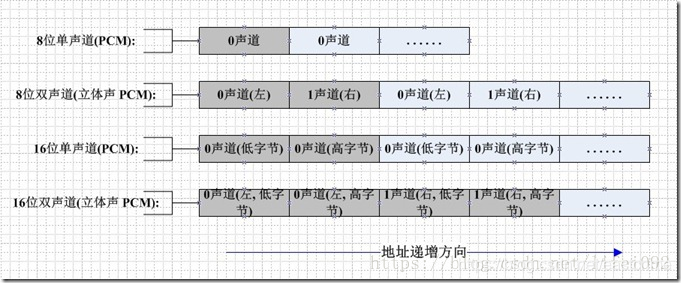
注:该图来自https://blog.csdn.net/lifei092/article/details/80990813
- 16位单声道PCM
各个采样点依次排列,每一个采样点占2个字节(16bit),小端字节序,低字节在低地址,高字节在高地址; - 16位双通道(立体声)PCM
左右声道采样点依次交叉排列,每个采样点占2个字节(16-bit),小端字节序,低字节在低地址,高字节在高地址;
|----------------------------------------------------------------------------------------------------------------------|
| LFrame1 | RFrame1 | LFrame2 | RFrame2 | LFrame3 | RFrame3 | LFrame4 | RFrame4 |
|----------------------------------------------------------------------------------------------------------------------|
PCM音频数据可以使用音频编辑软件导入查看,如:开源的音频编辑软件Audacity。
从pcm16双通道数据中分离左右通道数据
#include
#include
#include /*从pcm16双通道数据中分离左右通道数据pcm16双通道格式中,左右通道采样点数据交叉排列,每个采样点16bit|-------|-------|-------|-------|-------|-------||L1Frame|RlFrame|L2Frame|R2Frame|L3Frame|R3Frame||-------|-------|-------|-------|-------|-------|| 16bit | 16bit | 16bit | 16bit | 16bit | 16bit ||-------|-------|-------|-------|-------|-------|
*/
int pcm16le_split(const char *file_pcm16le, const char *file_pcm16le_l, const char *file_pcm16le_r)
{FILE *fp_pcm16le = fopen(file_pcm16le, "rb+");if (fp_pcm16le == NULL){printf("fopen error: cannot open %s\n", file_pcm16le);return -1;}FILE *fp_pcm16le_l = fopen(file_pcm16le_l, "wb+");if (fp_pcm16le_l == NULL){printf("fopen error: cannot open %s\n", file_pcm16le_l);fclose(fp_pcm16le);return -1;}FILE *fp_pcm16le_r = fopen(file_pcm16le_r, "wb+");if (fp_pcm16le_r == NULL){printf("fopen error: cannot open %s\n", file_pcm16le_r);fclose(fp_pcm16le);fclose(fp_pcm16le_l);return -1;}unsigned sampleSize = 4;  // 左右两个声道,各一个16-bit采样点,16 * 2 = 32bit,4字节unsigned char *sampleBuf = (unsigned char *)malloc(sampleSize);while (!feof(fp_pcm16le)){// 同时读取左右声道各一个采样点值fread(sampleBuf, 1, 4, fp_pcm16le);// 写左声道采样点值fwrite(sampleBuf, 1, 2, fp_pcm16le_l);// 写右声道采样点值fwrite(sampleBuf + 2, 1, 2, fp_pcm16le_r);}free(sampleBuf);fclose(fp_pcm16le);fclose(fp_pcm16le_l);fclose(fp_pcm16le_r);return 0;
}int main(void)
{const char *file_pcm16le = "NocturneNo2inEflat_44.1k_s16le.pcm";const char *file_pcm16le_l = "output_pcm16le_l.pcm";const char *file_pcm16le_r = "output_pcm16le_r.pcm";pcm16le_split(file_pcm16le, file_pcm16le_l, file_pcm16le_r);return 0;
}
PCM音量
使用Audacity工具打开一个PCM文件,将波形放大,音频就是正弦波
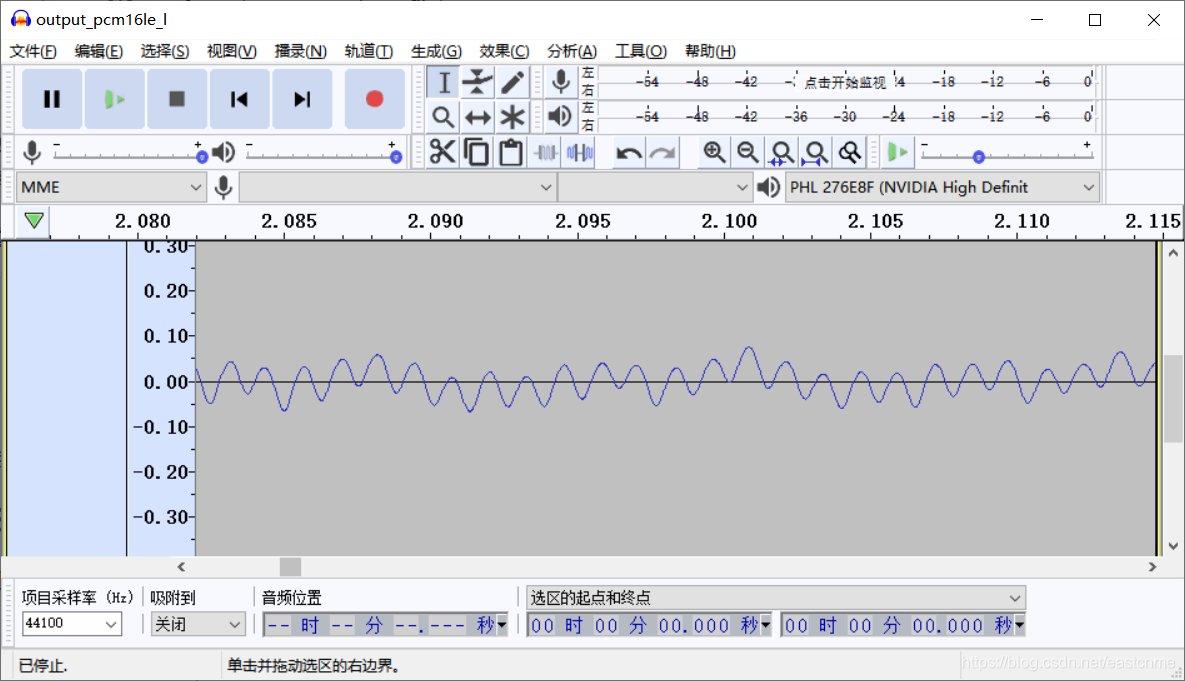 增加每个一个波形的振幅就可以增加音量。
所以如果要增加PCM数据的音量,只需要将每一个采样的数据乘以一个系数,降低PCM数据的音量就除以一个系数。
将pcm16双通道中左通道音量减半
#include
#include
#include /*将pcm16双通道中左通道音量减半pcm16双通道格式中,左右通道采样点数据交叉排列,每个采样点16bit|-------|-------|-------|-------|-------|-------||L1Frame|RlFrame|L2Frame|R2Frame|L3Frame|R3Frame||-------|-------|-------|-------|-------|-------|| 16bit | 16bit | 16bit | 16bit | 16bit | 16bit ||-------|-------|-------|-------|-------|-------|PCM采音频呈现正弦波,增加每个波形的振幅就可以增加音量所以如果要增加PCM数据的音量,只需要将每一个采样的数据乘以一个系数,降低PCM数据的量就除以一个系数。
*/int pcm16le_half_volume_left(const char *file_pcm16le, const char *file_pcm16le_half_left)
{int cnt = 0;short leftFrame = 0;FILE *fp_pcm16e = fopen(file_pcm16le, "rb+");FILE *fp_pcm16le_half_left = fopen(file_pcm16le_half_left, "wb+");unsigned sampleSize = 4; // 左右两个声道,各一个16-bit采样点,16 * 2 = 32bit,4字节unsigned char *sampleBuf = (unsigned char *)malloc(sampleSize);while (!feof(fp_pcm16e)){// 同时读取左右声道各一个采样点值fread(sampleBuf, 1, 4, fp_pcm16e);// 拷贝左声道的采样点memcpy(&leftFrame, sampleBuf, 2);// 左声道采样点值减半leftFrame /= 2;// 写左声道采样点fwrite(&leftFrame, 1, 2, fp_pcm16le_half_left);// 写右声道采样点fwrite(sampleBuf + 2, 1, 2, fp_pcm16le_half_left);cnt++;}printf("sample count: %d\n", cnt);free(sampleBuf);fclose(fp_pcm16e);fclose(fp_pcm16le_half_left);return 0;
}int main(void)
{const char *file_pcm16le = "NocturneNo2inEflat_44.1k_s16le.pcm";const char *file_pcm16le_half_left = "output_half_left.pcm";pcm16le_half_volume_left(file_pcm16le, file_pcm16le_half_left);return 0;
}
参考
https://blog.csdn.net/leixiaohua1020/article/details/50534316
https://blog.csdn.net/lifei092/article/details/80990813
https://blog.csdn.net/ljxt523/article/details/52068241
本文来自互联网用户投稿,文章观点仅代表作者本人,不代表本站立场,不承担相关法律责任。如若转载,请注明出处。 如若内容造成侵权/违法违规/事实不符,请点击【内容举报】进行投诉反馈!