使用多线程往LIST添加数据 线程安全list
我们在日常写代码的过程中,经常会使用多线程提高效率,我们在使用多线程过程中难免会出现往List集合修改数据。
下面我们来尝试一下往ArrayList 添加数据:
public static void main(String[] args) {List list = new ArrayList<>();for (int i = 10000000; i >= 1; i--) {list.add(0);}System.out.println("源集合数量:"+list.size());List newList = new ArrayList<>();long start = System.currentTimeMillis();ExecutorService executor = Executors.newFixedThreadPool(100);for (Integer integer : list) {executor.submit(()->{newList.add(integer+1);});}executor.shutdown();try {executor.awaitTermination(6, TimeUnit.MINUTES);} catch (InterruptedException e) {e.printStackTrace();}long end = System.currentTimeMillis();System.out.println("时间:"+(end-start)+"ms");System.out.println("新集合数量:"+newList.size());
- 1
- 2
- 3
- 4
- 5
- 6
- 7
- 8
- 9
- 10
- 11
- 12
- 13
- 14
- 15
- 16
- 17
- 18
- 19
- 20
- 21
- 22
- 23
- 24
- 25
我们使用线程池给 ArrayList 添加一千万个元素。来看下结果:

会发现新List’的数据会少于一千万,这是为什么呢?
因为 ArrayList 不是线程安全的,在高并发情况下对list进行数据添加会出现数据丢失的情况。
并且一个线程在遍历List,另一个线程修改List,会报ConcurrentModificationException(并发修改异常)错误
那么如果我们确实需要 并发对数据进行操作,并且对结果进行收集处理,应该怎么做呢?
一,使用Vector
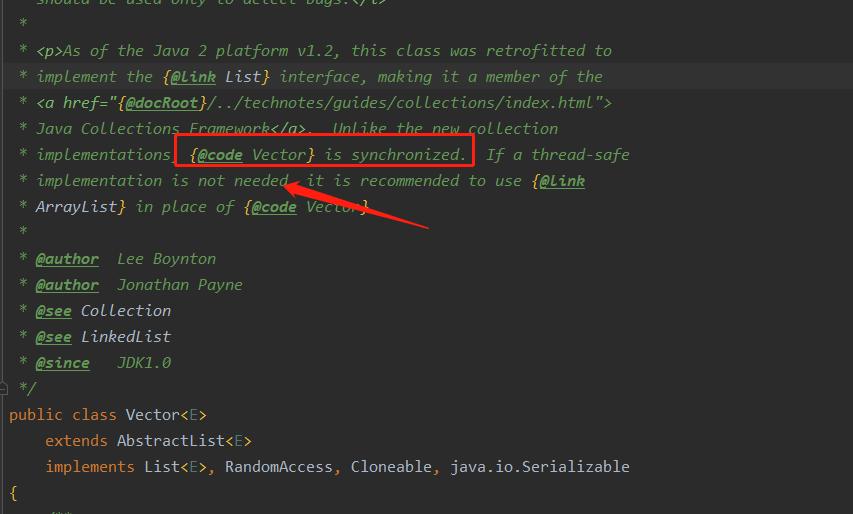
从源码介绍里面我们可以看出 Viector是线程安全的,但后面也说明了,如果对线程安全没有要求,建议使用ArrayList,因为ArrayList单分效率更高。
从源码里面可以看到:
/*** Sets the size of this vector. If the new size is greater than the* current size, new {@code null} items are added to the end of* the vector. If the new size is less than the current size, all* components at index {@code newSize} and greater are discarded.** @param newSize the new size of this vector* @throws ArrayIndexOutOfBoundsException if the new size is negative*/public synchronized void setSize(int newSize) {modCount++;if (newSize > elementCount) {ensureCapacityHelper(newSize);} else {for (int i = newSize ; i < elementCount ; i++) {elementData[i] = null;}}elementCount = newSize;}/*** Returns the current capacity of this vector.** @return the current capacity (the length of its internal* data array, kept in the field {@code elementData}* of this vector)*/public synchronized int capacity() {return elementData.length;}/*** Returns the number of components in this vector.** @return the number of components in this vector*/public synchronized int size() {return elementCount;}/*** Tests if this vector has no components.** @return {@code true} if and only if this vector has* no components, that is, its size is zero;* {@code false} otherwise.*/public synchronized boolean isEmpty() {return elementCount == 0;}
- 1
- 2
- 3
- 4
- 5
- 6
- 7
- 8
- 9
- 10
- 11
- 12
- 13
- 14
- 15
- 16
- 17
- 18
- 19
- 20
- 21
- 22
- 23
- 24
- 25
- 26
- 27
- 28
- 29
- 30
- 31
- 32
- 33
- 34
- 35
- 36
- 37
- 38
- 39
- 40
- 41
- 42
- 43
- 44
- 45
- 46
- 47
- 48
- 49
- 50
- 51
Vector里面的操作方法,都加上了synchronized 关键字。下面来使用Vector走一遍代码:
public static void main(String[] args) {List list = new ArrayList<>();for (int i = 10000000; i >= 1; i--) {list.add(0);}System.out.println("源集合数量:"+list.size());List newVector = new Vector<>();long start = System.currentTimeMillis();ExecutorService executor = Executors.newFixedThreadPool(100);for (Integer integer : list) {executor.submit(()->{newVector.add(integer+1);});}executor.shutdown();try {executor.awaitTermination(6, TimeUnit.MINUTES);} catch (InterruptedException e) {e.printStackTrace();}long end = System.currentTimeMillis();System.out.println("时间:"+(end-start)+"ms");System.out.println("newVector数量:"+newVector.size());}
- 1
- 2
- 3
- 4
- 5
- 6
- 7
- 8
- 9
- 10
- 11
- 12
- 13
- 14
- 15
- 16
- 17
- 18
- 19
- 20
- 21
- 22
- 23
- 24
- 25
- 26
看下结果:

我们可以发现现在,新Vector里面的数量正好是一千万个。但是时间上要长于ArrayList。
二、使用Collections.synchronizedList()进行包装
public static void main(String[] args) {List list = new ArrayList<>();for (int i = 10000000; i >= 1; i--) {list.add(0);}System.out.println("源集合数量:"+list.size());/*** Collections.synchronizedList()包装*/List newCollList = Collections.synchronizedList(new ArrayList<>());long start = System.currentTimeMillis();ExecutorService executor = Executors.newFixedThreadPool(100);for (Integer integer : list) {executor.submit(()->{newCollList.add(integer+1);});}executor.shutdown();try {executor.awaitTermination(6, TimeUnit.MINUTES);} catch (InterruptedException e) {e.printStackTrace();}long end = System.currentTimeMillis();System.out.println("时间:"+(end-start)+"ms");System.out.println("newCollList新集合数量:"+newCollList.size());}
- 1
- 2
- 3
- 4
- 5
- 6
- 7
- 8
- 9
- 10
- 11
- 12
- 13
- 14
- 15
- 16
- 17
- 18
- 19
- 20
- 21
- 22
- 23
- 24
- 25
- 26
- 27
- 28
- 29
结果:

我们可以发现也是一千万条。时间上和Vector差距不大,因给给ArrayList进行了包装以后等于是给ArrayList里面所有的方法都加上了 synchronized,和Vector实现效果差不多。
总结:在并发给List进行修改时,可以使用Vector或者Collections.synchronizedList(),不要直接使用ArrayList,在非并发情况下尽量使用ArrayList;
版权声明:本文为flycp原创文章,遵循 CC 4.0 BY-SA 版权协议,转载请附上原文出处链接和本声明。
本文链接:使用多线程往List添加数据_cpown的博客-CSDN博客_多线程向list添加元素
本文来自互联网用户投稿,文章观点仅代表作者本人,不代表本站立场,不承担相关法律责任。如若转载,请注明出处。 如若内容造成侵权/违法违规/事实不符,请点击【内容举报】进行投诉反馈!