QT_Socket_tcp通信
文章目录
- 一、项目介绍
- 二、程序设计
- 1. Server
- 2. Client
- 三、Ui界面
- 1. Server
- 2. Client
- 四、程序源码
一、项目介绍
本篇为基于QT下的Socket编程,其首要部分为QT基础,不懂的可以返回我主页查看 “ QT分栏 ” 的相关文章,其次为Socket编程和TCP通信,可查看文章 “ TCP传输控制协议 ” 和“ Socket编程基础 ”进行食用。
本篇QT的编程环境为Ubuntu-20.04,在Windows下也可以直接运行,这里笔者再提一下ubuntu与windows文件传输的问题,俩者可设立共享文件夹,实现不同系统下文件共享,详细操作可移步 “ 实现虚拟机下“ Linux与Windows 共享文件夹 ” 。
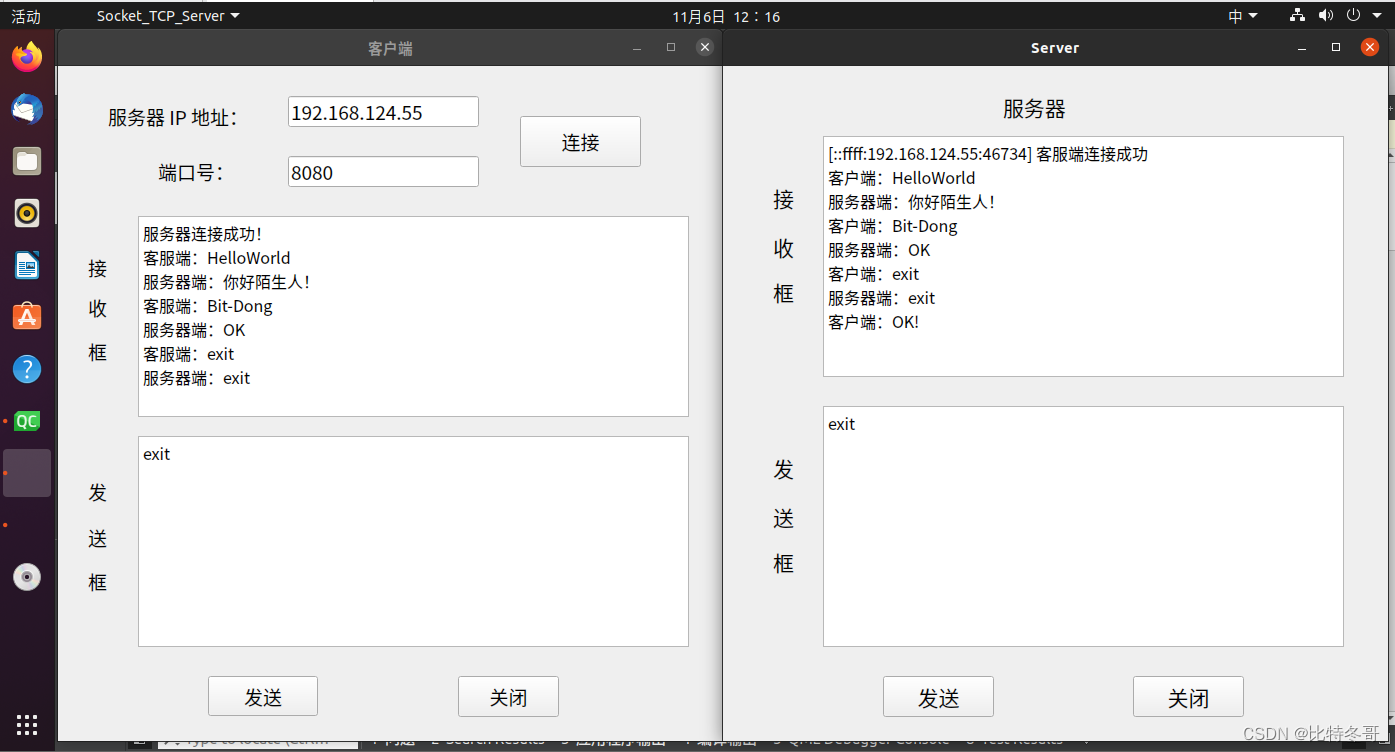
本项目最终实现:客户端在接口处输入服务器IP地址与端口号(Ubuntu下输入ifconfig查看ip信息),连接成功后双方会在界面处显示“客户端/服务器 连接成功”,然后双方就可以在发送区输入数据进行通信,根据接收到的不同数据 进行不同操作。
二、程序设计
1. Server
- 创建套接字
tcpserver=new QTcpServer(this);//指定父对象 回收空间
- 绑定ip与端口,进入监听状态
tcpserver->listen(QHostAddress::Any,8080);//绑定当前网卡所有的ip 绑定端口 也就是设置服务器地址和端口号
- 建立连接
connect(tcpserver,&QTcpServer::newConnection,[=](){};
- 创建通信套接字
tcpsocket=tcpserver->nextPendingConnection();
- 获取通信套接字的控制信息,并显示“客户端连接成功”
QString ip=tcpsocket->peerAddress().toString();//获取连接的 ip地址
quint16 port=tcpsocket->peerPort();//获取连接的 端口号
QString temp=QString("[%1:%2] 客服端连接成功").arg(ip).arg(port);
ui->textEditRead->setText(temp);  //显示连接成功
- 接收客户端消息
connect(tcpsocket,&QTcpSocket::readyRead,[=](){ QString str=tcpsocket->readAll(); //从通信套接字中取出内容});
- 发送消息给客户端
//获取编辑区域的内容QString str=ui->textEditWrite->toPlainText();//写入通信套接字 协议栈自动发送tcpsocket->write(str.toUtf8().data());
- 关闭套接字,断开连接
	//通信套接字主动与服务端断开连接tcpsocket->disconnectFromHost();//结束聊天//关闭 通信套接字tcpsocket->close();tcpsocket=nullptr;
}
2. Client
- 创建通信套接字
tcpsocket=new QTcpSocket(this);
- 获取服务器IP地址和端口号
QString IP=ui->lineEditIP->text();quint16 Port=ui->lineEditPort->text().toInt();
- 向服务器申请连接
tcpsocket->connectToHost(IP,Port);
- 连接服务器并显示“服务器连接成功”
connect(tcpsocket,&QTcpSocket::connected,[=](){ui->textEditRead->setText("服务器连接成功!");});
- 向服务器发送消息
QString str=ui->textEditWrite->toPlainText();//将信息写入到通信套接字tcpsocket->write(str.toUtf8().data());
- 接收服务器消息
connect(tcpsocket,&QTcpSocket::readyRead,[=](){QString str=tcpsocket->readAll();};
- 关闭套接字,断开连接
tcpsocket->disconnectFromHost();//断开与服务器的连接tcpsocket->close();//关闭通信套接字
三、Ui界面
1. Server
<?xml version="1.0" encoding="UTF-8"?>
<ui version="4.0"><class>server</class><widget class="QWidget" name="server"><property name="geometry"><rect><x>0</x><y>0</y><width>665</width><height>675</height></rect></property><property name="windowTitle"><string>Server</string></property><property name="styleSheet"><string notr="true">font: 16pt "Adobe Arabic";</string></property><widget class="QLabel" name="label"><property name="geometry"><rect><x>280</x><y>20</y><width>101</width><height>41</height></rect></property><property name="text"><string>服务器</string></property></widget><widget class="QTextEdit" name="textEditRead"><property name="geometry"><rect><x>100</x><y>70</y><width>521</width><height>241</height></rect></property><property name="styleSheet"><string notr="true">font: 12pt "Adobe Arabic";</string></property></widget><widget class="QLabel" name="label_2"><property name="geometry"><rect><x>50</x><y>116</y><width>31</width><height>31</height></rect></property><property name="text"><string>接</string></property></widget><widget class="QLabel" name="label_3"><property name="geometry"><rect><x>50</x><y>160</y><width>31</width><height>41</height></rect></property><property name="text"><string>收</string></property></widget><widget class="QLabel" name="label_4"><property name="geometry"><rect><x>50</x><y>210</y><width>31</width><height>31</height></rect></property><property name="text"><string>框</string></property></widget><widget class="QTextEdit" name="textEditWrite"><property name="geometry"><rect><x>100</x><y>340</y><width>521</width><height>241</height></rect></property><property name="styleSheet"><string notr="true">font: 12pt "Adobe Arabic";</string></property></widget><widget class="QLabel" name="label_5"><property name="geometry"><rect><x>50</x><y>386</y><width>31</width><height>31</height></rect></property><property name="text"><string>发</string></property></widget><widget class="QLabel" name="label_6"><property name="geometry"><rect><x>50</x><y>430</y><width>31</width><height>41</height></rect></property><property name="text"><string>送</string></property></widget><widget class="QLabel" name="label_7"><property name="geometry"><rect><x>50</x><y>480</y><width>31</width><height>31</height></rect></property><property name="text"><string>框</string></property></widget><widget class="QPushButton" name="buttonsend"><property name="geometry"><rect><x>160</x><y>610</y><width>111</width><height>41</height></rect></property><property name="text"><string>发送</string></property></widget><widget class="QPushButton" name="buttonclose"><property name="geometry"><rect><x>410</x><y>610</y><width>111</width><height>41</height></rect></property><property name="text"><string>关闭</string></property></widget></widget><layoutdefault spacing="6" margin="11"/><resources/><connections/>
</ui>
2. Client
<?xml version="1.0" encoding="UTF-8"?>
<ui version="4.0"><class>client</class><widget class="QWidget" name="client"><property name="geometry"><rect><x>0</x><y>0</y><width>665</width><height>675</height></rect></property><property name="windowTitle"><string>Client</string></property><property name="styleSheet"><string notr="true">font: 14pt "Adobe Arabic";</string></property><widget class="QLabel" name="label"><property name="geometry"><rect><x>50</x><y>30</y><width>171</width><height>41</height></rect></property><property name="text"><string>服务器 IP 地址:</string></property></widget><widget class="QLabel" name="label_2"><property name="geometry"><rect><x>100</x><y>90</y><width>101</width><height>31</height></rect></property><property name="text"><string>端口号:</string></property></widget><widget class="QLineEdit" name="lineEditIP"><property name="geometry"><rect><x>230</x><y>30</y><width>191</width><height>31</height></rect></property><property name="text"><string>192.168.229.1</string></property></widget><widget class="QLineEdit" name="lineEditPort"><property name="geometry"><rect><x>230</x><y>90</y><width>191</width><height>31</height></rect></property><property name="text"><string>8888</string></property></widget><widget class="QPushButton" name="buttonconnect"><property name="geometry"><rect><x>462</x><y>50</y><width>121</width><height>51</height></rect></property><property name="text"><string>连接</string></property></widget><widget class="QTextEdit" name="textEditRead"><property name="geometry"><rect><x>80</x><y>150</y><width>551</width><height>201</height></rect></property><property name="styleSheet"><string notr="true">font: 12pt "Adobe Arabic";</string></property></widget><widget class="QTextEdit" name="textEditWrite"><property name="geometry"><rect><x>80</x><y>370</y><width>551</width><height>211</height></rect></property><property name="styleSheet"><string notr="true">font: 12pt "Adobe Arabic";</string></property></widget><widget class="QLabel" name="label_3"><property name="geometry"><rect><x>30</x><y>186</y><width>31</width><height>31</height></rect></property><property name="text"><string>接</string></property></widget><widget class="QLabel" name="label_4"><property name="geometry"><rect><x>30</x><y>226</y><width>31</width><height>31</height></rect></property><property name="text"><string>收</string></property></widget><widget class="QLabel" name="label_5"><property name="geometry"><rect><x>30</x><y>270</y><width>31</width><height>31</height></rect></property><property name="text"><string>框</string></property></widget><widget class="QLabel" name="label_6"><property name="geometry"><rect><x>30</x><y>410</y><width>31</width><height>31</height></rect></property><property name="text"><string>发</string></property></widget><widget class="QLabel" name="label_7"><property name="geometry"><rect><x>30</x><y>456</y><width>31</width><height>31</height></rect></property><property name="text"><string>送</string></property></widget><widget class="QLabel" name="label_8"><property name="geometry"><rect><x>30</x><y>500</y><width>31</width><height>31</height></rect></property><property name="text"><string>框</string></property></widget><widget class="QPushButton" name="buttonsend"><property name="geometry"><rect><x>150</x><y>610</y><width>110</width><height>40</height></rect></property><property name="text"><string>发送</string></property></widget><widget class="QPushButton" name="buttonclose"><property name="geometry"><rect><x>400</x><y>610</y><width>101</width><height>41</height></rect></property><property name="text"><string>关闭</string></property></widget></widget><layoutdefault spacing="6" margin="11"/><resources/><connections/>
</ui>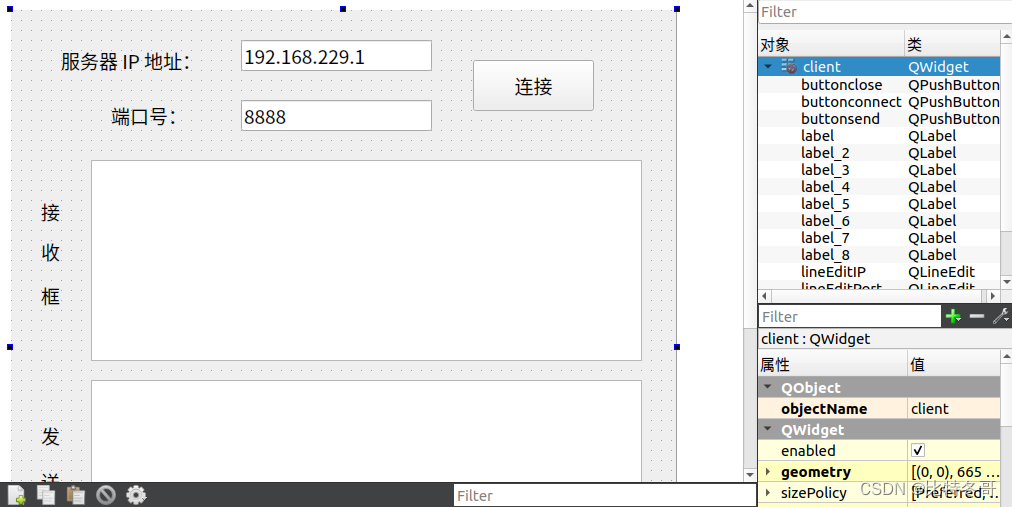
四、程序源码
若需程序源码可在评论区留言QQ邮箱或直接私信即可
本文来自互联网用户投稿,文章观点仅代表作者本人,不代表本站立场,不承担相关法律责任。如若转载,请注明出处。 如若内容造成侵权/违法违规/事实不符,请点击【内容举报】进行投诉反馈!