linux声卡驱动框架ALSA-Linux音频的移植 qt下音频播放
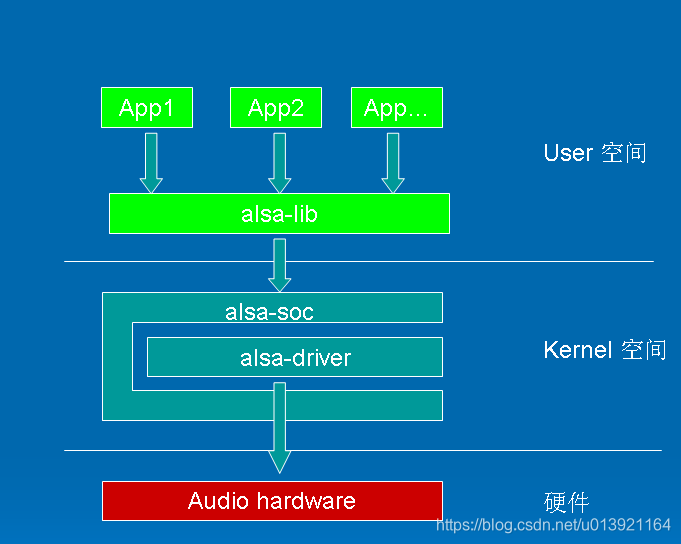
上文介绍了alsaLinux应用框架图。首先需要对硬件的驱动的移植,alsa库的添加,在该基础上可在Linux上调用命令行gplay-1.0 xxx.mp3播放音频。
驱动的移植参考 zlg的文档
https://manual.zlg.cn/web/#/16?page_id=3823
应用笔记(Linux)/音频使用/移植SGTL5000
按照该文档可进行移植;
FSL_GPLAY_01.00_LINUX build on Nov 28 2019 12:29:30[h]display the operation Help[p]Play[s]Stop[e]Seek[a]Pause when playing, play when paused[v]Volume[m]Switch to mute or not[>]Play next file[<]Play previous file[r]Switch to repeated mode or not[u]Select the video track[d]Select the audio track[b]Select the subtitle track[f]Set full screen[z]resize the width and height[t]Rotate[c]Setting play rate[i]Display the metadata[x]eXit
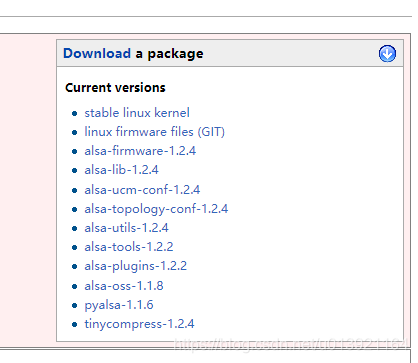
alsa-lib库是用于操作alsa声卡的库,alsa-utils是基于alsa-lib库编写的小工具集合。
首先下载 alsa-lib 和 alsa-utils 源码,下载地址为:
https://www.alsa-project.org/main/index.php/Main_Page
按照zlg的文档可对alsa-lib进行移植
https://manual.zlg.cn/web/#/16?page_id=3840
应用笔记(Linux)/音频使用/基于alsa-lib的wav音频播放器
移植完,查看 alsa库的位置
root@imx6qsabresd:/# pwd
/
root@imx6qsabresd:/# find -name alsa
./usr/share/alsa
./usr/share/sounds/alsa
./usr/include/alsa
./var/lib/alsa
root@imx6qsabresd:/#
如:
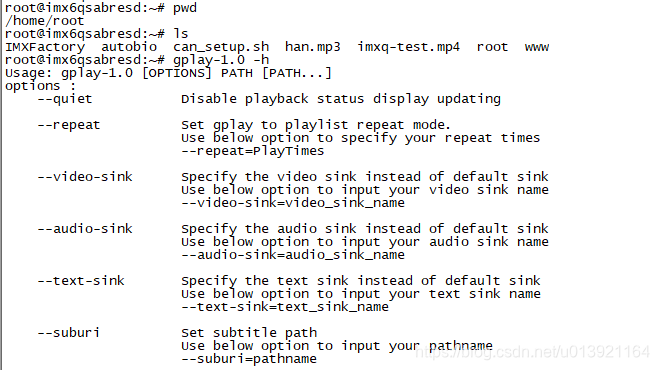
gplay-1.0 --repeat ***.mp3 对该文件重复播放
可输入以下指令进行下一步操作
如:a暂停;在按一次 回复播放
如:s停止;p开始播放;
FSL_GPLAY_01.00_LINUX build on Nov 28 2019 12:29:30[h]display the operation Help[p]Play[s]Stop[e]Seek[a]Pause when playing, play when paused[v]Volume[m]Switch to mute or not[>]Play next file[<]Play previous file[r]Switch to repeated mode or not[u]Select the video track[d]Select the audio track[b]Select the subtitle track[f]Set full screen[z]resize the width and height[c]Setting play rate[i]Display the metadata[x]eXit
本文来自互联网用户投稿,文章观点仅代表作者本人,不代表本站立场,不承担相关法律责任。如若转载,请注明出处。 如若内容造成侵权/违法违规/事实不符,请点击【内容举报】进行投诉反馈!