OA项目之我的会议(查询)02
目录
1.准备工作
2.后台代码
1.MeetingInfoDao:
2.实体类:MeetingInfo
3.MeetingInfoAction
3.前台代码
1.准备工作
进入mysql 查询sql语句,如下:
-- 我的会议SELECT a.*,b.`name` zhuchirenname,c.`name` auditorname from t_oa_meeting_info a,
t_oa_user b,
t_oa_user c
where  a.zhuchiren=b.id and a.auditor = c.id;-- 会议没得审批人也要查询出来   会议信息表作为主表   用户表为从表 用户会议信息表左外链用户表
SELECT a.*,b.`name` zhuchirenname,c.`name` auditorname from t_oa_meeting_info a
inner join  t_oa_user b on a.zhuchiren=b.id
left join  t_oa_user c on a.auditor = c.id;
-- 分析
-- 时间段要格式化,否者页面会显示一串数字
-- 会议状态是数字,前端要显示会议状态描述
-- 状态:0取消会议 1新建 2待审核 3驳回 4待开 5进行中 6开启投票 7结束会议,默认值为1
SELECT a.id,a.title,a.content,a.canyuze,a.liexize,a.zhuchiren,a.location,
DATE_FORMAT(a.startTime,'%Y-%m-%d %H-%m-%s') startTime,
DATE_FORMAT(a.endTime,'%Y-%m-%d %H-%m-%s') endTime,
a.state,(
case a.statewhen 0 then '取消会议'when 1 then '新建'when 2 then '待审核'when 3 then '驳回'when 4 then '待开'when 5 then '进行中'when 6 then '开启投票'when 7 then '结束会议'else '其他' end
) meetingstate,
a.seatPic,a.remark,a.auditor
,b.`name` zhuchirenname,
c.`name` auditorname from t_oa_meeting_info a
inner join  t_oa_user b on a.zhuchiren=b.id
left join t_oa_user c on a.auditor = c.id 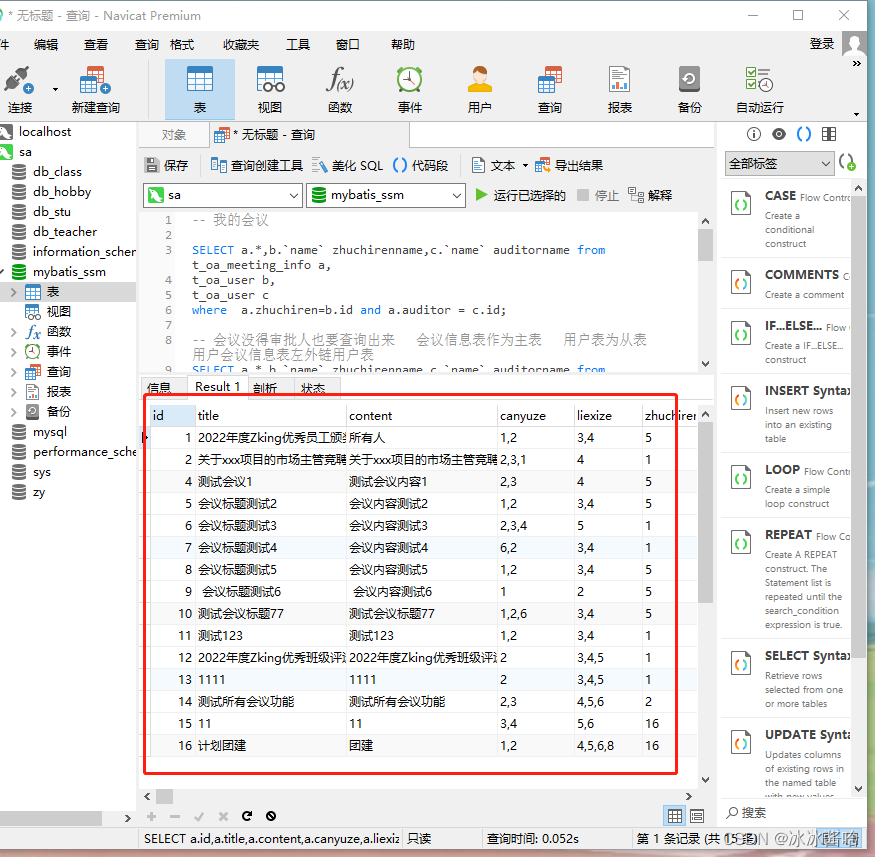
2.后台代码
1.MeetingInfoDao:
package com.zking.dao;import java.sql.SQLException;
import java.util.List;
import java.util.Map;import com.zking.entity.MeetingInfo;
import com.zking.util.BaseDao;
import com.zking.util.PageBean;
import com.zking.util.StringUtils;public class MeetingInfoDao extends BaseDao{//会议信息的新增public int add(MeetingInfo t) throws Exception {String sql = "insert into t_oa_meeting_info(title,content,canyuze,liexize,zhuchiren,location,startTime,endTime,remark) values(?,?,?,?,?,?,?,?,?)";return super.executeUpdate(sql, t, new String[] {"title","content","canyuze","liexize","zhuchiren","location","startTime","endTime","remark"});}private String getSQL() {return "SELECT\r\n" + "	a.id,\r\n" + "	a.title,\r\n" + "	a.content,\r\n" + "	a.liexize,\r\n" + "	a.zhuchiren,\r\n" + "	b.`name` zhuchirenname,\r\n" + "	a.location,\r\n" + "	DATE_FORMAT( a.startTime, '%y-%m-%d %H-%m-%s' ) startTime,\r\n" + "	DATE_FORMAT( a.endTime, '%y-%m-%d %H-%m-%s' ) endTime,\r\n" + "	a.state,\r\n" + "	(\r\n" + "CASE\r\n" + "	a.state \r\n" + "	WHEN 0 THEN\r\n" + "	'取消会议' \r\n" + "	WHEN 1 THEN\r\n" + "	'新建' \r\n" + "	WHEN 2 THEN\r\n" + "	'待审核' \r\n" + "	WHEN 3 THEN\r\n" + "	'驳回' \r\n" + "	WHEN 4 THEN\r\n" + "	'待开' \r\n" + "	WHEN 5 THEN\r\n" + "	'进行中' \r\n" + "	WHEN 6 THEN\r\n" + "	'开启投票' \r\n" + "	WHEN 7 THEN\r\n" + "	'结束会议' ELSE '其他' \r\n" + "END \r\n" + "	) meetingstate,\r\n" + "	a.seatPic,\r\n" + "	a.remark,\r\n" + "	a.auditor,\r\n" + "	c.`name` auditorname \r\n" + "FROM\r\n" + "	t_oa_meeting_info a\r\n" + "	INNER JOIN t_oa_user b ON a.zhuchiren = b.id\r\n" + "	LEFT JOIN t_oa_user c ON a.auditor = c.id and 1=1 ";}//我的会议SQL,后续其他的菜单也会使用public List> myInfos(MeetingInfo info,PageBean pageBean)throws SQLException, InstantiationException, IllegalAccessException {String sql=getSQL();//拿到会议标题String title = info.getTitle();if(StringUtils.isNotBlank(title)) {sql +=" and title like '%"+title+"%' ";}sql +=" and zhuchiren = "+info.getZhuchiren()+" ";return super.executeQuery(sql, pageBean);}}
2.实体类:MeetingInfo
package com.zking.entity;import java.util.Date;
/*** 数据库会议信息表 t-oa_meeting_infoduiyi定义的实体类* @author Administrator**/
public class MeetingInfo {private Long id;private String title;private String content;private String canyuze;private String liexize;private String zhuchiren;private String location;private Date startTime;private Date endTime;private String fujian;private Integer state;private String seatPic;private String remark;private String auditor;public String getAuditor() {return auditor;}public void setAuditor(String auditor) {this.auditor = auditor;}public Long getId() {return id;}public void setId(Long id) {this.id = id;}public String getTitle() {return title;}public void setTitle(String title) {this.title = title;}public String getContent() {return content;}public void setContent(String content) {this.content = content;}public String getCanyuze() {return canyuze;}public void setCanyuze(String canyuze) {this.canyuze = canyuze;}public String getLiexize() {return liexize;}public void setLiexize(String liexize) {this.liexize = liexize;}public String getZhuchiren() {return zhuchiren;}public void setZhuchiren(String zhuchiren) {this.zhuchiren = zhuchiren;}public String getLocation() {return location;}public void setLocation(String location) {this.location = location;}public Date getStartTime() {return startTime;}public void setStartTime(Date startTime) {this.startTime = startTime;}public Date getEndTime() {return endTime;}public void setEndTime(Date endTime) {this.endTime = endTime;}public String getFujian() {return fujian;}public void setFujian(String fujian) {this.fujian = fujian;}public Integer getState() {return state;}public void setState(Integer state) {this.state = state;}public String getSeatPic() {return seatPic;}public void setSeatPic(String seatPic) {this.seatPic = seatPic;}public String getRemark() {return remark;}public void setRemark(String remark) {this.remark = remark;}public MeetingInfo() {super();// TODO Auto-generated constructor stub}@Overridepublic String toString() {return "MeetingInfo [id=" + id + ", title=" + title + ", content=" + content + ", canyuze=" + canyuze+ ", liexize=" + liexize + ", zhuchiren=" + zhuchiren + ", location=" + location + ", startTime="+ startTime + ", endTime=" + endTime + ", fujian=" + fujian + ", state=" + state + ", seatPic=" + seatPic + ", remark=" + remark + "]";}}
注意:实体类必须和数据库的列名保存一致
3.MeetingInfoAction
package com.zking.web;import java.util.Date;
import java.util.List;
import java.util.Map;import javax.servlet.http.HttpServletRequest;
import javax.servlet.http.HttpServletResponse;import org.apache.commons.beanutils.ConvertUtils;import com.zking.dao.MeetingInfoDao;
import com.zking.entity.MeetingInfo;
import com.zking.framework.ActionSupport;
import com.zking.framework.ModelDriver;
import com.zking.util.MyDateConverter;
import com.zking.util.PageBean;
import com.zking.util.R;
import com.zking.util.ResponseUtil;public class MeetingInfoAction extends ActionSupport implements ModelDriver{private MeetingInfo info = new MeetingInfo(); private MeetingInfoDao infoDao = new MeetingInfoDao();@Overridepublic MeetingInfo getModel() {//转换器ConvertUtils.register(new MyDateConverter(), Date.class);return info;}public String add (HttpServletRequest req, HttpServletResponse resp) {try {//rs影响行数int rs = infoDao.add(info);if(rs>0) {ResponseUtil.writeJson(resp, R.ok(200, "会议信息数据新增成功"));}else {ResponseUtil.writeJson(resp, R.error(0, "会议信息数据新增失败"));}} catch (Exception e) {e.printStackTrace();try {ResponseUtil.writeJson(resp, R.ok(0,"会议信息数据新增失败"));} catch (Exception e1) {// TODO Auto-generated catch blocke1.printStackTrace();}}return null;}//我的会议public String myInfos (HttpServletRequest req, HttpServletResponse resp) {try {PageBean pageBean = new PageBean();pageBean.setRequest(req);List> list= infoDao.myInfos(info, pageBean);//注意:layui中的数据表格的格式ResponseUtil.writeJson(resp, R.ok(0, "我的会议 数据查询成功",pageBean.getTotal(), list ));} catch (Exception e) {e.printStackTrace();try {ResponseUtil.writeJson(resp, R.ok(0,"我的会议数据查询失败"));} catch (Exception e1) {// TODO Auto-generated catch blocke1.printStackTrace();}}return null;}}
现在我们的后台查询代码全部完成了接下来看看我们的会议OA的前端代码
3.前台代码
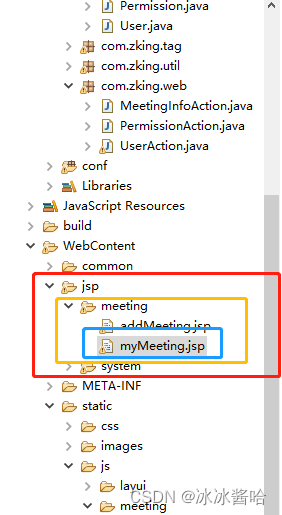
创建myMeeting是要注意路径:
WebContent------->jsp文件------->meeting文件------->myMeeting.jsp
myMeeting代码:
<%@ page language="java" contentType="text/html; charset=UTF-8"pageEncoding="UTF-8"%>
<%@include file="/common/header.jsp"%>
用户管理
myMeeting.js代码:
let layer,$,table;
var row;
layui.use(['jquery', 'layer', 'table'], function(){layer = layui.layer,$ = layui.jquery,table = layui.table;//初始化数据表格initTable();//绑定查询按钮的点击事件$('#btn_search').click(function(){query();});});//1.初始化数据表格
function initTable(){table.render({ //执行渲染elem: '#tb', //指定原始表格元素选择器(推荐id选择器)// url: 'user.action?methodName=list', //请求地址height: 340, //自定义高度loading: false, //是否显示加载条(默认 true)cols: [[ //设置表头{field: 'id', title: '会议编号', width: 120},{field: 'title', title: '会议标题', width: 120},{field: 'location', title: '会议地点', width: 140},{field: 'startTime', title: '开始时间', width: 220},{field: 'endTime', title: '结束时间', width: 120},{field: 'meetingstate', title: '会议状态', width: 120},{field: 'seatPic', title: '会议排座', width: 140 ,templet: function(d){console.log(d);return ' '}
},{field: 'auditor', title: '审批人', width: 220},{field: '', title: '操作', width: 220,toolbar:'#tbar'},]]});//在页面中的
'}
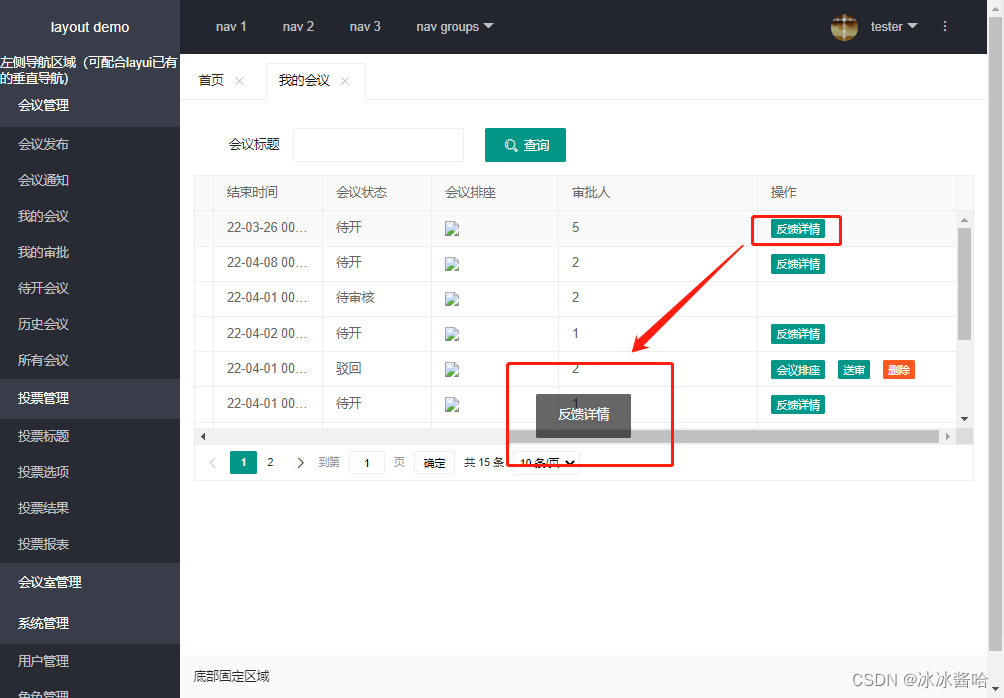
},{field: 'auditor', title: '审批人', width: 220},{field: '', title: '操作', width: 220,toolbar:'#tbar'},]]});//在页面中的中必须配置lay-filter="tb_goods"属性才能触发属性!!!table.on('tool(tb)', function (obj) {row = obj.data;if (obj.event == "seat") {layer.msg("排座");}else if(obj.event == "send"){layer.msg("送审");}else if(obj.event == "del"){layer.msg("取消会议");}else if(obj.event == "back"){layer.msg("反馈详情");}else{}});}
//2.点击查询
function query(){
// console.log($("#ctx").val());table.reload('tb', {url:'info.action', //请求地址method: 'POST', //请求方式,GET或者POSTloading: true, //是否显示加载条(默认 true)page: true, //是否分页where: { //设定异步数据接口的额外参数,任意设'methodName':'myInfos','title':$('#name').val(),'zhuchiren':$("#zhuchiren").val()}, request: { //自定义分页请求参数名pageName: 'page', //页码的参数名称,默认:pagelimitName: 'rows' //每页数据量的参数名,默认:limit}});
}
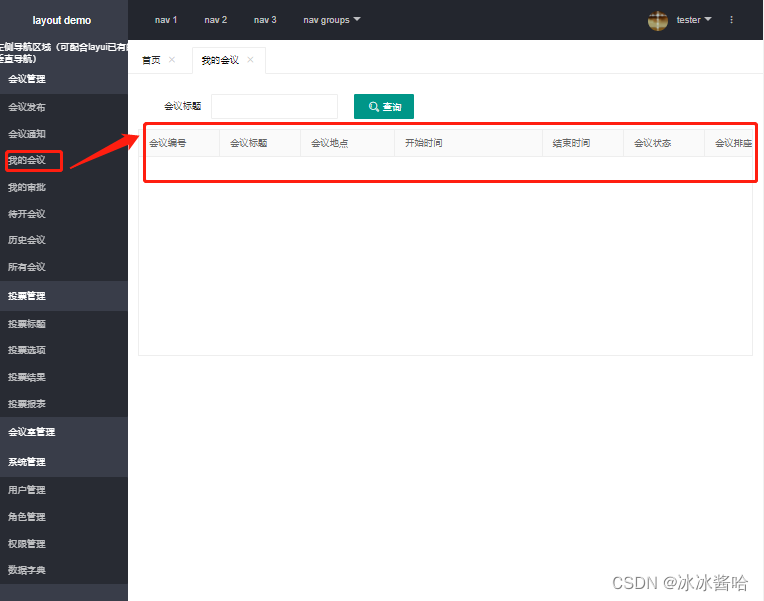
效果展示:
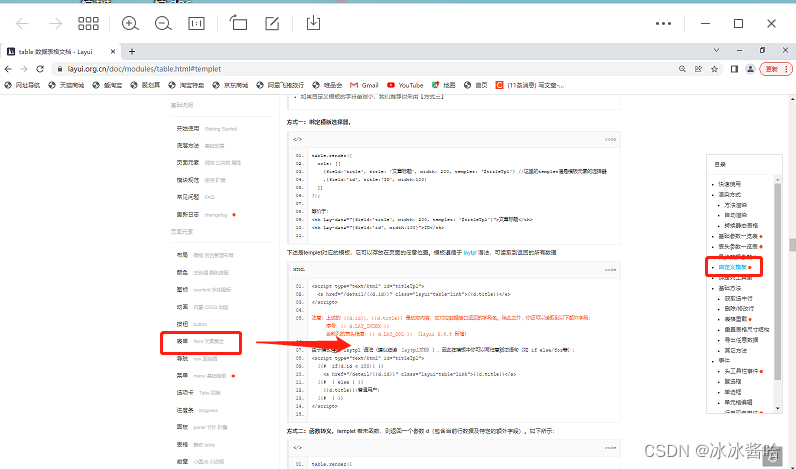
LayUi的入门指南:快快收藏起来吧~
Layui 开发使用文档 - 入门指南 https://layui.org.cn/doc/index.html
查询效果展示:
本文来自互联网用户投稿,文章观点仅代表作者本人,不代表本站立场,不承担相关法律责任。如若转载,请注明出处。 如若内容造成侵权/违法违规/事实不符,请点击【内容举报】进行投诉反馈!
