微信小程序顶部导航栏切换
自己最近也是刚用到微信小程序,发现CSDN里面关于微信小程序顶部导航栏切换部分并没有最新版本的,所以给大家分享一下 供大家开发时参考一下; ^_^
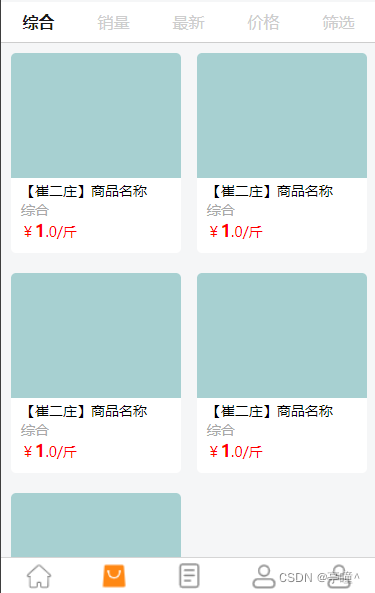
效果图
wxml部分
{{item}}
tab_03
tab_03
tab_04
tab_05 wxss部分
page {display: flex;flex-direction: column;height: 100%;
}.navbar {flex: none;display: flex;background: #fff;border-bottom: 2rpx solid #cdcdcd;
}.navbar .item {color: #cdcdcd;position: relative;flex: auto;text-align: center;line-height: 80rpx;
}.navbar .item.active {color: #1a1a1a;font-weight: bold;
}.navbar .item.active:after {content: "";display: block;position: absolute;bottom: 0;left: 0;right: 0;height: 4rpx;
}.navbarList {width: 100%;display: flex;flex-direction: row;flex-wrap: wrap;background-color: #F5F6F7;
}.productList {width: 45.5%;padding: 20rpx 10rpx 20rpx 20rpx;display: flex;flex-direction: row;flex-wrap: wrap;justify-content: space-between;
}.productList_boxs {display: flex;width: 340rpx;height: 400rpx;align-items: flex-start;flex-direction: column;background-color: #ffffff;border-radius: 10rpx;overflow: hidden;
}.message {display: flex;flex-direction: column;font-size: 28rpx;padding: 6rpx 20rpx;
}.goodsImage {width: 340rpx;height: 250rpx;background-color: rgb(167, 208, 209);
}.level {color: #a8a8a8;
}.price {color: red;font-size: 28rpx;
}.fontred {color: red;font-size: 34rpx;font-weight: bold;
}
js部分
var app = getApp()
Page({data: {navbar: ['综合','销量','最新','价格','筛选'],goods: [{level:'综合'},{level:'综合'},{level:'综合'},{level:'综合'},{level:'综合'}],currentTab: 0},navbarTap: function (e) {this.setData({currentTab: e.currentTarget.dataset.idx})}
})
本文来自互联网用户投稿,文章观点仅代表作者本人,不代表本站立场,不承担相关法律责任。如若转载,请注明出处。 如若内容造成侵权/违法违规/事实不符,请点击【内容举报】进行投诉反馈!