Qt读写配置文件之QSettings的用法
Returns the value for setting key. If the setting doesn't exist, returns defaultValue.
If no default value is specified, a default QVariant is returned.
Note that the Windows registry and INI files use case-insensitive keys, whereas the CFPreferences API on OS X and iOS uses case-sensitive keys. To avoid portability problems, see the Section and Key Syntax rules.
Example:
QSettings settings;
settings.setValue("animal/snake", 58);
settings.value("animal/snake", 1024).toInt(); // returns 58
settings.value("animal/zebra", 1024).toInt(); // returns 1024
settings.value("animal/zebra").toInt(); // returns 0
#ifndef CONFIG_H
#define CONFIG_H#include
#include class Config
{
public:Config(QString qstrfilename = "");virtual ~Config(void);void Set(QString,QString,QVariant);QVariant Get(QString,QString);
private:QString m_qstrFileName;QSettings *m_psetting;
};#endif // CONFIG_H
#include "config.h"
#include
#include Config::Config(QString qstrfilename)
{if (qstrfilename.isEmpty()){m_qstrFileName = QCoreApplication::applicationDirPath() + "/Config.ini";}else{m_qstrFileName = qstrfilename;}m_psetting = new QSettings(m_qstrFileName, QSettings::IniFormat);qDebug() << m_qstrFileName;
}Config::~Config()
{delete m_psetting;m_psetting = 0;
}void Config::Set(QString qstrnodename,QString qstrkeyname,QVariant qvarvalue)
{m_psetting->setValue(QString("/%1/%2").arg(qstrnodename).arg(qstrkeyname), qvarvalue);
}QVariant Config::Get(QString qstrnodename,QString qstrkeyname)
{QVariant qvar = m_psetting->value(QString("/%1/%2").arg(qstrnodename).arg(qstrkeyname));return qvar;
}
widget.cpp
#include "widget.h"
#include "ui_widget.h"
#include "config.h"
#include Widget::Widget(QWidget *parent) :QWidget(parent),ui(new Ui::Widget)
{ui->setupUi(this);QString qstrname = Config().Get("user","name").toString();qDebug() << qstrname;QString qstrpasswd = Config().Get("user","password").toString();qDebug() << qstrpasswd;int nport = Config().Get("test","port").toInt();qDebug() << nport;
}Widget::~Widget()
{delete ui;
}
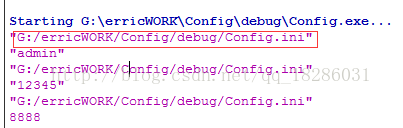
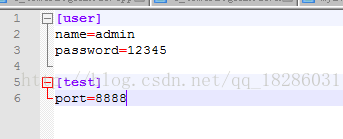
主要,配置文件需要放置在debug目录下,具体可以看debug的输出目录,如下图所示:
本文来自互联网用户投稿,文章观点仅代表作者本人,不代表本站立场,不承担相关法律责任。如若转载,请注明出处。 如若内容造成侵权/违法违规/事实不符,请点击【内容举报】进行投诉反馈!