1.7.Spring Boot核心注解@RunWith的使用
文章目录
- @RunWith作用
- @RunWith(SpringJunit4ClassRunner.class)使用说明
- 测试@ActiveProfiles(“dev”)
@RunWith作用
- @RunWith 就是一个运行器
- @RunWith(JUnit4.class) 就是指用JUnit4来运行
- @RunWith(SpringJUnit4ClassRunner.class),让测试运行于Spring测试环境
- @RunWith(Suite.class) 的话就是一套测试集合,
- @ContextConfiguration Spring整合JUnit4测试时,使用注解引入多个配置文件
单个文件
@ContextConfiguration(Locations=“classpath:applicationContext.xml”)
@ContextConfiguration(classes = SimpleConfiguration.class)
多个文件时,可用{}
@ContextConfiguration(locations = { “classpath:spring1.xml”, “classpath:spring2.xml” })
@RunWith(SpringJunit4ClassRunner.class) 使用说明
今天在看Spring的Demo的时候,看到了如此单元测试的写法
如下:
@RunWIth(SpringJunit4ClassRunner.class)
@ContextConfiguration(locations = {"classpath:applicationContext.xml"}
public  class MyTest
{@Testpublic void hehe(){//.......}
}1234567891011
这种写法是为了让测试在Spring容器环境下执行。
Spring的容器环境是啥呢?
比如常见的 Service Dao Action , 这些个东西,都在Spring容器里,junit需要将他们拿到,并且使用来测试。
好,笔者写一个十分简单的demo让大家有个体会!
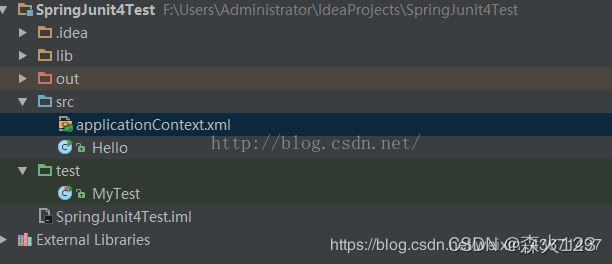
显示demo的项目结构:
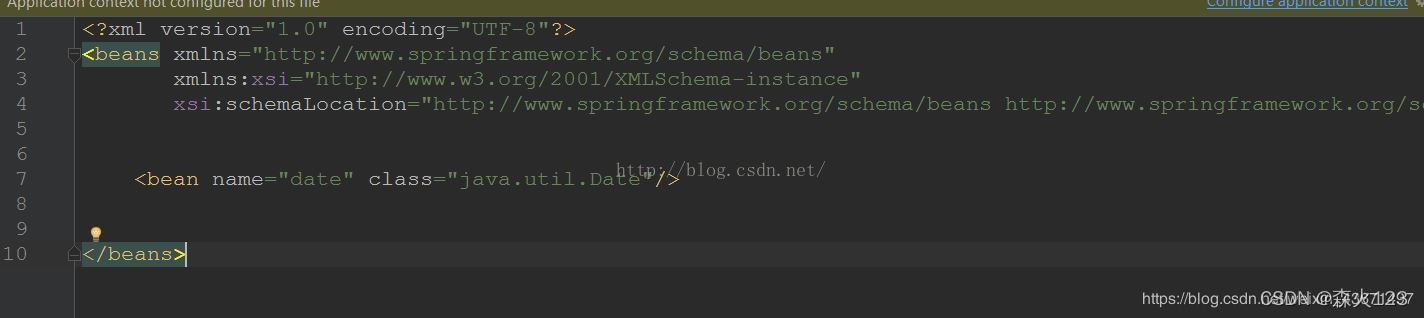
要写的东西就两个 applicationContext.xml 和MyTest.java
applicationContext.xml 中仅仅只定义了一个Date对象。

接下来是MyTest.java的内容:

最后只需要运行就可以了。
最后如图所示,成功拿到了Spring容器里的Date对象。

诸如哪些 Action Service Dao ServiceImpl DaoImpl都是一个道理,可以通过这种方式拿到,然后进行单元测试。。。
测试@ActiveProfiles(“dev”)
package com.ssm.chapter10.test;
import javax.sql.DataSource;
/*******imports******/
@RunWith(SpringJUnit4ClassRunner.class)
@ContextConfiguration(classes=ProfileConfig.class)
@ActiveProfiles("dev")
public class ProfileTest{@Autowiredprivate DataSource dataSource;@Testpublic void test(){System.out.println(dataSource.getClass().getName());}
}123456789101112131415
@RunWith作用 - weixin_41315469的博客 - CSDN博客
https://blog.csdn.net/weixin_41315469/article/details/79675044
@RunWith(SpringJunit4ClassRunner.class) 使用说明 - 码农在路上 - 博客园
https://www.cnblogs.com/lzmrex/articles/9236977.html
本文来自互联网用户投稿,文章观点仅代表作者本人,不代表本站立场,不承担相关法律责任。如若转载,请注明出处。 如若内容造成侵权/违法违规/事实不符,请点击【内容举报】进行投诉反馈!