Java多线程使用案例【附可运行代码】
标题Java多线程使用案例
1、创建线程池,创建任务,将任务提交到线程池中执行
public class Test1 {private static Map<String, String> map = new ConcurrentHashMap<>();private static CountDownLatch countDownLatch = new CountDownLatch(4);public static void main(String[] args) {ExecutorService es = Executors.newFixedThreadPool(4);es.submit(new Task1());es.submit(new Task2());es.submit(new Task3());es.submit(new Task4());es.shutdown();System.out.println(map);}static class Task1 implements Runnable{@Overridepublic void run() {map.put("1", "1");System.out.println("我是任务1");}}static class Task2 implements Runnable{@Overridepublic void run() {map.put("2", "2");System.out.println("我是任务2");}}static class Task3 implements Runnable{@Overridepublic void run() {map.put("3", "3");System.out.println("我是任务3");}}static class Task4 implements Runnable{@Overridepublic void run() {map.put("4", "4");System.out.println("我是任务4");}}
}
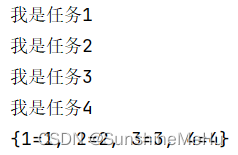
结果:顺序的
2、模拟程序执行耗时–系统睡眠一段时间
public class Test1 {private static Map<String, String> map = new ConcurrentHashMap<>();private static CountDownLatch countDownLatch = new CountDownLatch(4);public static void main(String[] args) {ExecutorService es = Executors.newFixedThreadPool(4);es.submit(new Task1());es.submit(new Task2());es.submit(new Task3());es.submit(new Task4());es.shutdown();System.out.println(map);}static class Task1 implements Runnable{@Overridepublic void run() {try {Thread.sleep(1000);} catch (InterruptedException e) {e.printStackTrace();}map.put("1", "1");System.out.println("我是任务1");}}static class Task2 implements Runnable{@Overridepublic void run() {try {Thread.sleep(1000);} catch (InterruptedException e) {e.printStackTrace();}map.put("2", "2");System.out.println("我是任务2");}}static class Task3 implements Runnable{@Overridepublic void run() {try {Thread.sleep(1000);} catch (InterruptedException e) {e.printStackTrace();}map.put("3", "3");System.out.println("我是任务3");}}static class Task4 implements Runnable{@Overridepublic void run() {try {Thread.sleep(1000);} catch (InterruptedException e) {e.printStackTrace();}map.put("4", "4");System.out.println("我是任务4");}}
}
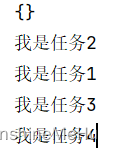
此时的执行顺序,发现主线程没有等待任务执行完就先执行了打印的结果为空
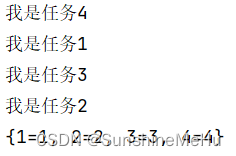
3、增加计数器,等待线程执行完主线程才往下执行
public class Test1 {private static Map<String, String> map = new ConcurrentHashMap<>();private static CountDownLatch countDownLatch = new CountDownLatch(4);public static void main(String[] args) {ExecutorService es = Executors.newFixedThreadPool(4);es.submit(new Task1());es.submit(new Task2());es.submit(new Task3());es.submit(new Task4());es.shutdown();try {countDownLatch.await();} catch (InterruptedException e) {e.printStackTrace();}System.out.println(map);}static class Task1 implements Runnable{@Overridepublic void run() {try {Thread.sleep(1000);} catch (InterruptedException e) {e.printStackTrace();}map.put("1", "1");System.out.println("我是任务1");countDownLatch.countDown();}}static class Task2 implements Runnable{@Overridepublic void run() {try {Thread.sleep(1000);} catch (InterruptedException e) {e.printStackTrace();}map.put("2", "2");System.out.println("我是任务2");countDownLatch.countDown();}}static class Task3 implements Runnable{@Overridepublic void run() {try {Thread.sleep(1000);} catch (InterruptedException e) {e.printStackTrace();}map.put("3", "3");System.out.println("我是任务3");countDownLatch.countDown();}}static class Task4 implements Runnable{@Overridepublic void run() {try {Thread.sleep(1000);} catch (InterruptedException e) {e.printStackTrace();}map.put("4", "4");System.out.println("我是任务4");countDownLatch.countDown();}}
}
注意类的加载机制
实际使用的时候,如果需要成员变量共享,应该在方法里面实例化对象,在类里面初始化对象
否则执行的时候会出现问题,实际访问的对象是上次的。
多线程具有短板效应,最终的效率取决于效率最慢的那一个任务
这里定义4个线程会有4个线程同时处理这四个任务
本文来自互联网用户投稿,文章观点仅代表作者本人,不代表本站立场,不承担相关法律责任。如若转载,请注明出处。 如若内容造成侵权/违法违规/事实不符,请点击【内容举报】进行投诉反馈!