Java 获取远程ftp服务器的文件
背景说明
最近做医疗的项目,涉及远程访问医院的pacs服务器获取医疗影像数据。由于医院厂商只提供了ftp的相关信息。需要用java开发脚本来自动拉取T-1的数据。
程序开发
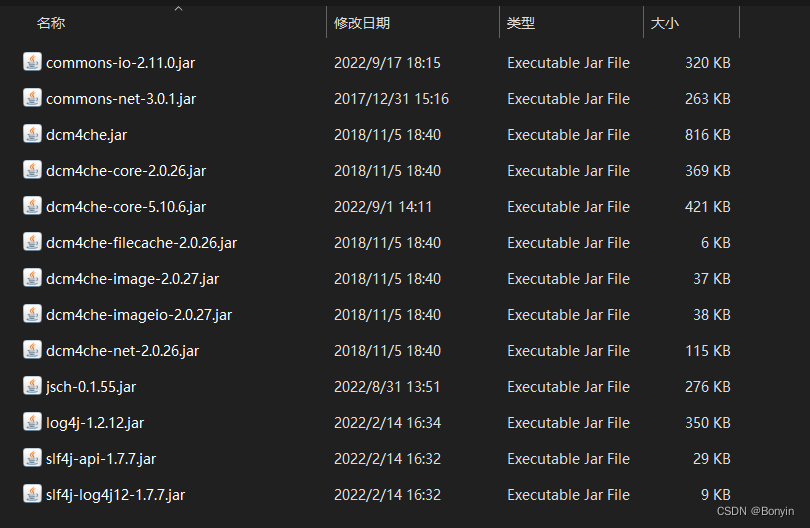
涉及jar包
 ### main函数
public static void main(String[] args) throws IOException {// 和ftp服务器建立连接Ftp_by_apache ftp_by_apache = new Ftp_by_apache(Config.host, Config.username, Config.password);ftp_by_apache.f.setFileType(FTP.BINARY_FILE_TYPE);//指定需要获取的时间段 其实区间作为参数直接传递 达成jar就可以配置定时任务执行 String dayBegin = "2022-01-03";String dayEnd = "2022-01-03";SimpleDateFormat format = new SimpleDateFormat("yyyy-MM-dd");//获取前一天日期Date date = new Date(System.currentTimeMillis() - 24 * 60 * 60 * 1000);String theLastDay = format.format(date);List<String> daysPath = Config.findDayPath(dayBegin, dayEnd);logger.info("查看日期路径是否正确===" + daysPath.get(0));for (String day : daysPath) {FTPFile[] files = ftp_by_apache.f.listFiles(day);for (FTPFile file : files) {if (file.isDirectory() && !file.getName().startsWith(".")) {// 获取当前子目录的路径String subDir = day + file.getName();logger.info("当前子目录:" + subDir);//遍历当前子目录ftp_by_apache.f.changeWorkingDirectory(subDir);FTPFile[] subFtpFiles = ftp_by_apache.f.listFiles(subDir);//获取存储的子目录,并创建该当前子目录String subStorePath = Config.destPath + subDir.substring(4);File storeFilePath = new File(subStorePath);if (!storeFilePath.exists()) {// 创建多级目录storeFilePath.mkdirs();}for (FTPFile ff : subFtpFiles) {//下载文件if (ff.isFile() && !ff.getName().startsWith(".")) {logger.info("\t文件绝对路径: " + subStorePath + "/" + ff.getName());File fileDown = new File(subStorePath + "/" + ff.getName());FileOutputStream out = new FileOutputStream(fileDown);ftp_by_apache.f.enterLocalPassiveMode();ftp_by_apache.f.retrieveFile(new String(ff.getName().getBytes(StandardCharsets.UTF_8), StandardCharsets.ISO_8859_1),out);out.close();}}}}}ftp_by_apache.close_connection();}
其中涉及的配置类
主要是涉及:根据传入的时间段区间,获取这个区间类的所有格式化日期字符串/*** 闭区间的时间段每一天获取** @param cntDateBeg  yyyy-MM-dd* @param cntDateEnd  yyyy-MM-dd* @return */
public static List<String> findDaysStr(String cntDateBeg, String cntDateEnd) {List<String> list = new ArrayList<>();//拆分成数组String[] dateBegs = cntDateBeg.split("-");String[] dateEnds = cntDateEnd.split("-");//开始时间转换成时间戳Calendar start = Calendar.getInstance();start.set(Integer.valueOf(dateBegs[0]), Integer.valueOf(dateBegs[1]) - 1, Integer.valueOf(dateBegs[2]));Long startTIme = start.getTimeInMillis();//结束时间转换成时间戳Calendar end = Calendar.getInstance();end.set(Integer.valueOf(dateEnds[0]), Integer.valueOf(dateEnds[1]) - 1, Integer.valueOf(dateEnds[2]));Long endTime = end.getTimeInMillis();//定义一个一天的时间戳时长Long oneDay = 1000 * 60 * 60 * 24L;Long time = startTIme;//循环得出while (time <= endTime) {list.add(new SimpleDateFormat("yyyyMMdd").format(new Date(time)));time += oneDay;}return list;}
ftp client连接server端
public class Ftp_by_apache {FTPClient f = null;public Logger logger = LoggerFactory.getLogger(Ftp_by_apache.class);//默认构造函数public Ftp_by_apache(String url, String username, String password) {f = new FTPClient();//得到连接this.get_connection(url, username, password);}//连接服务器方法public void get_connection(String url, String username, String password) {try {// 设置连接超时时间f.setConnectTimeout(60 * 60 * 1000);// 设置数据超时时间f.enterLocalPassiveMode();f.setRemoteVerificationEnabled(false);
//            f.setDataTimeout(60 * 60 * 1000);// socket连接,设置socket连接超时时间
//            f.setSoTimeout(60 * 60 * 1000);//连接指定服务器,默认端口为21f.connect(url);logger.info("connect success!");//设置链接编码,windows主机UTF-8会乱码,需要使用GBK或gb2312编码f.setControlEncoding("GBK");//登录boolean login = f.login(username, password);if (login)logger.info("登录成功!");elselogger.info("登录失败!");} catch (IOException e) {logger.error(e.getMessage());}}public void close_connection() {boolean logout = false;try {logout = f.logout();} catch (IOException e1) {// TODO Auto-generated catch blocke1.printStackTrace();}if (logout) {logger.info("注销成功!");} else {logger.info("注销失败!");}if (f.isConnected())try {logger.info("关闭连接!");f.disconnect();} catch (IOException e) {logger.error(e.getMessage());}}
}
通过上面的代码实现自动拉取ftp服务端应用目录下面的文件(也是按照其中的原始子目录路径来获取存储)。
总结
其中遇到的问题;
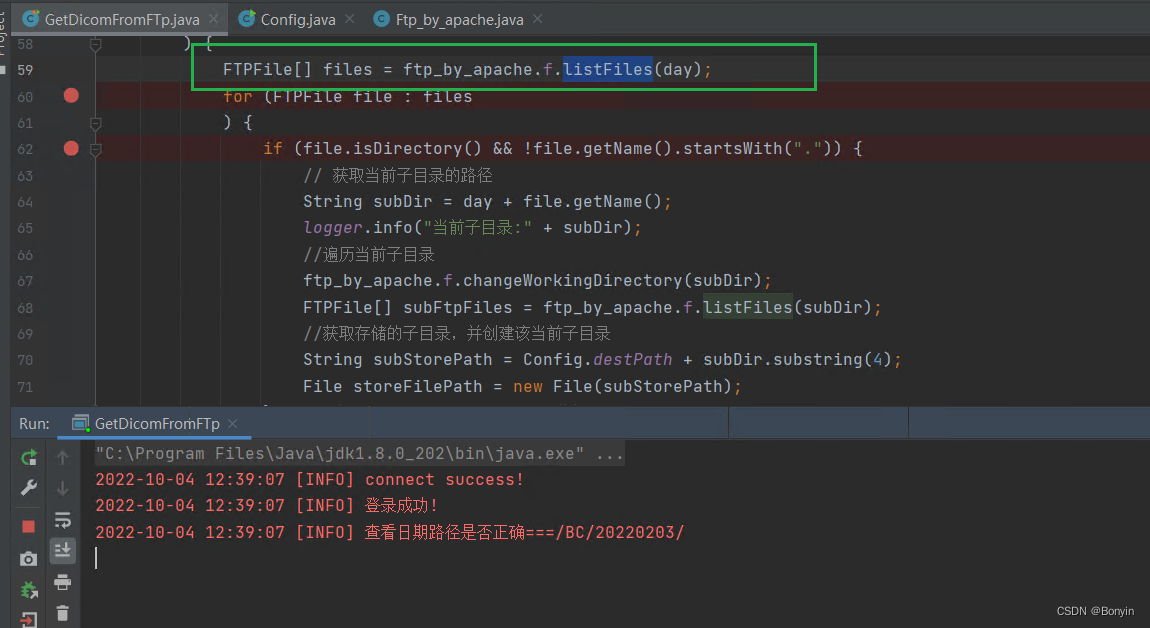 上面的代码在执行f.listFiles(day)程序卡住不动了。但是显示是已经与ftp的server端建立连接成功。
本文来自互联网用户投稿,文章观点仅代表作者本人,不代表本站立场,不承担相关法律责任。如若转载,请注明出处。 如若内容造成侵权/违法违规/事实不符,请点击【内容举报】进行投诉反馈!