curl的安装和使用
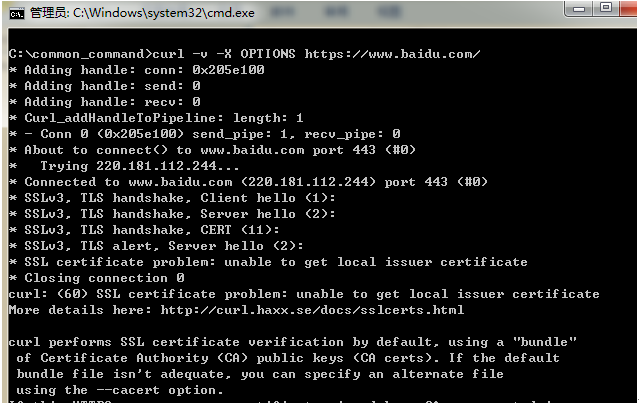
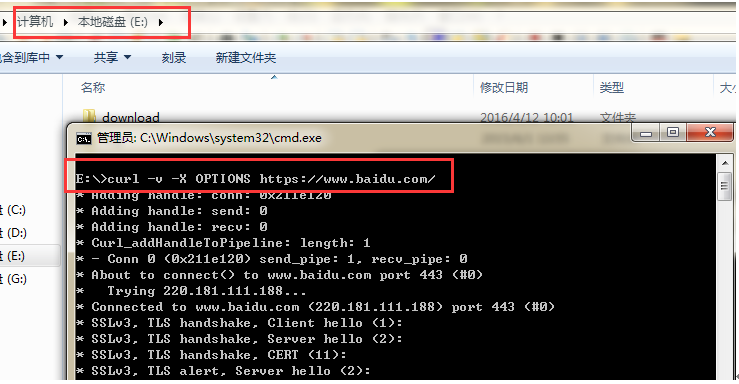
| 1 2 3 4 5 6 7 8 9 10 11 12 13 14 15 16 17 18 19 20 21 22 23 24 25 26 27 28 29 30 | C:\common_command>curl - v -X OPTIONS https: //www .baidu.com/ *Adding handle: conn: 0x205e100 *Adding handle: send: 0 *Adding handle: recv: 0 *Curl_addHandleToPipeline: length: 1 * -Conn 0 (0x205e100) send_pipe: 1, recv_pipe: 0 *About to connect() to www.baidu.com port 443 ( #0) * Trying 220.181.112.244... * Connectedto www.baidu.com (220.181.112.244) port 443 ( #0) *SSLv3, TLS handshake, Client hello (1): *SSLv3, TLS handshake, Server hello (2): *SSLv3, TLS handshake, CERT (11): *SSLv3, TLS alert, Server hello (2): * SSLcertificate problem: unable to get local issuer certificate *Closing connection 0 curl:(60) SSL certificate problem: unable to get local issuer certificate Moredetails here: http: //curl .haxx.se /docs/sslcerts .html curlperforms SSL certificate verification by default, using a "bundle" of Certificate Authority (CA) public keys (CAcerts). If the default bundle file isn't adequate, you can specify analternate file using the --cacert option. Ifthis HTTPS server uses a certificate signed by a CA represented in the bundle, the certificate verificationprobably failed due to a problem with the certificate (it might beexpired, or the name might not match the domain name in the URL). Ifyou 'd like to turn off curl' s verification of the certificate, use the -k (or --insecure) option. C:\common_command> |
| 1 2 3 4 5 6 7 8 9 10 11 12 13 14 15 16 17 18 19 20 21 22 23 24 25 26 27 28 29 30 31 32 33 34 | [zhang@zhang ~]$ curl - v -X OPTIONS https: //www .aliyun.com/ *About to connect() to www.aliyun.com port 443 ( #0) * Trying 42.156.220.114... connected *Connected to www.aliyun.com (42.156.220.114) port 443 ( #0) *Initializing NSS with certpath: sql: /etc/pki/nssdb * CAfile: /etc/pki/tls/certs/ca-bundle .crt CApath: none * SSLconnection using TLS_RSA_WITH_AES_128_CBC_SHA *Server certificate: * subject: CN=*.aliyun.com,O= "Alibaba(China) Technology Co., Ltd." ,L=HangZhou,ST=ZheJiang,C=CN * start date : 12月 14 10:47:07 2015 GMT * expire date : 12月 14 10:39:17 2016 GMT * common name: *.aliyun.com * issuer: CN=GlobalSign OrganizationValidation CA - G2,O=GlobalSign nv-sa,C=BE >OPTIONS / HTTP /1 .1 >User-Agent: curl /7 .19.7 (x86_64-redhat-linux-gnu) libcurl /7 .19.7 NSS /3 .19.1Basic ECC zlib /1 .2.3 libidn /1 .18 libssh2 /1 .4.2 >Host: www.aliyun.com >Accept: */* > |
本文来自互联网用户投稿,文章观点仅代表作者本人,不代表本站立场,不承担相关法律责任。如若转载,请注明出处。 如若内容造成侵权/违法违规/事实不符,请点击【内容举报】进行投诉反馈!