「牛角书」鸿蒙从零开始手把手做聊天小帮手
首先创建一个空项目
然后给项目命名,尽量用英文创建名称
打开项目,分别依次打开entry,src,main,js, MainAability,common,在common中创建一个package命名为component,在component中创建一个package命名为indexCom,在indexCom中再创建三个页面indexCom.css, indexCom.hml, indexCom.js
在MainAability文件中pages文件中创建3个页面index.css, index.hml, index.js
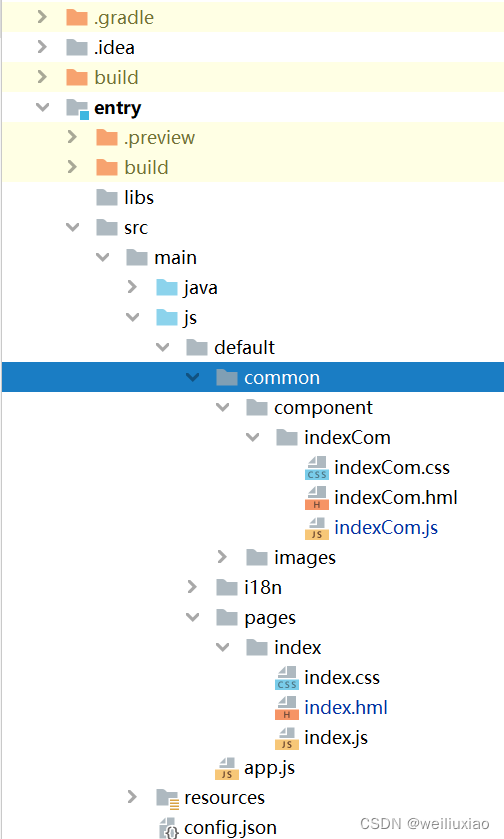
先把整个页面的骨架写出来,再接着写样式,减少开发难度
编辑indexCom.hml页面
/* 编辑一个搜索框 */ /*放button一个按钮 */ /* 这就是一个对话的主框,定义一个类名 */. {{ juzi.content }}
编辑indexCom.css页面
.container
{flex-direction: column; /*  flex-direction属性决定主轴的方向(即项目的排列方向), 主轴为垂直方向,起点在上沿。 */padding: 0px; /*控件内边距为0,即控件内的文字图像等会贴着控件 */ margin: 0px; /*控件外边距为0,即两控件间间距为0 */边排列}/* */@media screen and (device-type: phone) {.title {align-items: flex-start; /* 从上到下*/flex-direction: column; /* 主轴为垂直方向,起点在上沿*/ padding-left: 60px; /* 左内边距*/padding-right: 160px; /* 右内边距*/padding-top: 20px; /* 顶部内边距*/}}.search_box /* 通过类名的方式选择切换,设置搜索框的宽高,边距,背景色*/
{display: flex; /* 搜索框通过flex布局*/padding: 5px; /* 上下内边距为5px*/height: 50px;width: 100%;background-color: #f5f5f5;}.search_input /*设置合适的参数 */
{height: 100%;/* 根据离它最近且有定义高度的父层的高度来定义高*/flex: 1; /* 元素分配剩余空间时按照设置的值进行等比例分配 */margin: 5px; /*给搜索框加个外边距 */
}.search_bt /* 固定按钮大小,设置合适的边距,设置一个喜欢的背景颜色*/
{width: 108px;height: 100%;background-color: #ffc600;margin: 5px; /*加个外边距 */}.concat_main/*设置对话主框参数 */{display: flex;flex-direction: column; /*聊天框竖着排列 */}.concat_item /*定义聊天框参数*/{display: flex;flex-direction: column; /* 垂直排列 */align-items: center; /* 居中对齐 */padding: 10px; /*设置内边距 */margin: 10px; /*加个外边距 */box-shadow: 1px 1px 1px #888888; /*阴影和颜色 */align-items: center;border-radius: 8px; /*设置聊天框为圆角 */}.ic_boy_girl /*定义男女生内容参数 */
{height: 15px;width: 15px;margin: 5px;}.concat_text/*定义聊天文字参数 */{font-size: 15px;width: 90%;}.copy /*定义复制图标参数 */{height: 15px;width: 15px;left: 0px;}
编辑indexCom.js页面
import fetch from '@system.fetch';
import prompt from '@system.prompt';
const ABILITY_TYPE_EXTERNAL = 0;const ABILITY_TYPE_INTERNAL = 1;const ACTION_SYNC = 0;const ACTION_ASYNC = 1;/*** 1001 将内容写入剪切板*/const ACTION_MESSAGE_CODE_PLUS = 1001;export default {data: {/*** sex 整形 性别 (1,男,2女),size 整形 每页数量(非必填,默认为10)page 整形 页码(非必填 从1开始)chatName 字符串 聊天名称(必填 如:“你好”)*/queryObj: {sex: 1,size: 10,page: 1,chatName: "你好",loading: false,canNext: true},
//对话信息
concats: [[{"id": 50,"content": "你好像我的一个朋友","ansSex": 1,"duihuaId": 11}, {"id": 51,"content": "你咋那么老套?","ansSex": 2,"duihuaId": 11}, {"id": 52,"content": "这说明我撩妹技术不太高,没人实验啊","ansSex": 1,"duihuaId": 11}], [{"id": 273,"content": "hi 美女你好,我是来面试的","ansSex": 1,"duihuaId": 74}, {"id": 274,"content": "面什么试 ","ansSex": 2,"duihuaId": 74}, {"id": 275,"content": "我就是来面试男朋友","ansSex": 1,"duihuaId": 74}], [{"id": 1018,"content": "你好","ansSex": 1,"duihuaId": 284}, {"id": 1019,"content": "你是?","ansSex": 2,"duihuaId": 284}, {"id": 1020,"content": "附近最熟悉的陌生人","ansSex": 1,"duihuaId": 284}, {"id": 1021,"content": "但是都不认识你","ansSex": 2,"duihuaId": 284}, {"id": 1022,"content": "很快我就会比八月的西瓜还要熟","ansSex": 1,"duihuaId": 284}, {"id": 1023,"content": "自来熟吗?","ansSex": 2,"duihuaId": 284}, {"id": 1024,"content": "你真是冰雪聪明","ansSex": 1,"duihuaId": 284}], [{"id": 5015,"content": "你好,请问外面的风景好看吗?","ansSex": 1,"duihuaId": 1636}, {"id": 5016,"content": "好看","ansSex": 2,"duihuaId": 1636}, {"id": 5017,"content": "那麻烦你往边上挪点,让我也看看","ansSex": 1,"duihuaId": 1636}], [{"id": 19602,"content": "你好,请问外面的风景好看吗?","ansSex": 1,"duihuaId": 5087}, {"id": 19603,"content": "不好看","ansSex": 2,"duihuaId": 5087}, {"id": 19604,"content": "我也觉得,我觉得看你比看外面好呢,要不你也拿个镜子看看","ansSex": 1,"duihuaId": 5087}]]},
    onInit() {},/*** 获取input框的内容*/getInput(e) {this.queryObj.chatName = e.value;console.log("获取input框的内容:" + this.queryObj.chatName);},/*** 点击搜索按钮*/query() {console.log("点击搜索按钮");this.queryObj.canNext=true;this.queryObj.page=1;this.getData();},/*** 复制句子* @param e* @return*/copy(e) {console.log("copy:复制句子:" + JSON.stringify(e));var val = e.target.attr.data || "";console.log("copy:复制句子:val:" + val);this.sendCopy(val);},/*** 将内容发送到复制服务*/sendCopy: async function(val) {var action = {};//Ability的包名称,需要与PA端匹配,区分大小写。action.bundleName = 'xyz.youtubeyunying.myapplication';//Ability名称,需要与PA端匹配,区分大小写。action.abilityName = 'xyz.youtubeyunying.myapplication.CopyServiceAbility';//Ability操作码(操作码定义PA的业务功能,需要与PA端约定,参见boolean IRemoteObject.onRemoteRequest(int code, MessageParcel data, MessageParcel reply, MessageOption option))action.messageCode = ACTION_MESSAGE_CODE_PLUS;//发送到Ability的数据(根据不同的业务携带相应的业务数据,数据字段名称需要与PA端约定action.data = val;//Ability类型,对应PA端不同的实现方式:////0:Ability,拥有独立的Ability生命周期,FA使用远端进程通信拉起并请求PA服务,适用于提供基本服务供多FA调用或者在后台独立运行的场景,具体Java侧接口定义见Ability模块接口(Java语言,Ability方式)。action.abilityType = ABILITY_TYPE_EXTERNAL;//PA侧请求消息处理同步/异步选项,非必填,默认使用同步方式。当前异步方式仅支持AbilityType为Internal Ability类型。action.syncOption = ACTION_SYNC;var result = await FeatureAbility.callAbility(action);var ret = JSON.parse(result);if (ret.code == 0) {console.info('copy:plus result is:' + JSON.stringify(ret.abilityResult));} else {console.error('copy:plus error code:' + JSON.stringify(ret.code));}},nextPage() {if (!this.queryObj.canNext) {return;}this.queryObj.page++;this.getData()},getData() {if (this.queryObj.loading) {return} else {this.queryObj.loading = true;}var that = this;var params = "";var queryObj = that.queryObj;var index = 0;//key = valuefor (var key in queryObj) {if (index == 0) {params = "?" + key + "=" + queryObj[key]} else {params = params + "&" + key + "=" + queryObj[key]}index++;}var url = "https://hairong.tomweb.xyz/api/hairong/duihua" + params;console.log("fetch url:" + url);fetch.fetch({url: url,success: function (response) /* 接口调用成功的回调函数*/
{console.info("fetch success");console.info("fetch success" + response);console.info("fetch success" + JSON.stringify(response));var data = JSON.parse(response.data) || {};if (data.state != 1) {//todo 请求失败,prompt.showToast({message:data.msg||"请求失败" ,duration: 2000,});return;}var concats = data.data || [];if ((concats).length < 1) {that.queryObj.canNext = false;}console.info("fetch success:concats:" + JSON.stringify(concats));if(that.queryObj.page==1){that.concats = concats;}else{//原来的数据var _concats = that.concats || [];_concats = _concats.concat(concats);that.$set("concats", _concats)}/*         */},complete: function () /* 接口调用结束的回调函数*/
{console.info("fetch complete");that.queryObj.loading = false;},fail: function ()/*接口调用失败的回调函数*/{console.info("fetch fail");prompt.showToast({message: '请求失败,请查看网络连接',duration: 2000,});}});}}
编辑pages文件下Index.hml页面
Second screen /*标签放在操作页面下方*/{item in mens}}">/* 通过循环绑定*/{{item.name}} 编辑pages文件下index.csss页面:
.tab-bar-item{display: flex;flex-direction: column;}.tab-bar-item-img /* 设置图片大小  */
{height: 40px;width: 40px;}.tab-text /* 设置合适的文字大小,加个外边距居中 */
{font-size: 18px;margin: 0px 2px 0px 2px;}
编辑pages文件下index.js页面:
export default  /* 监听页面切换*/
{data: {
/* 定义一个数组*/mens: [{i: 0,src: '/common/images/liaotian.png', /* 未选中时的图片*/srcSelect: '/common/images/liaotian_select.png',
/* 选中时的图片*/name: '聊天',show: true /* 默认选中*/},{i: 1,src: '/common/images/iconset.png',srcSelect: '/common/images/iconset_select.png',name: '彩虹',show: false/* 默认不激活*/}]},change: function (e) /*做一个激活,激活哪个页面,调用相应函数 */
{console.log("Tab index: " + e.index);var mens =  this.mens||[];for (let mensKey in mens) {mens[mensKey].show=false;if ( mens[mensKey].i==e.index) /* 激活状态*/
{mens[mensKey].show=true;}}this.$set("mens",mens) /* 用set使其更新*/}}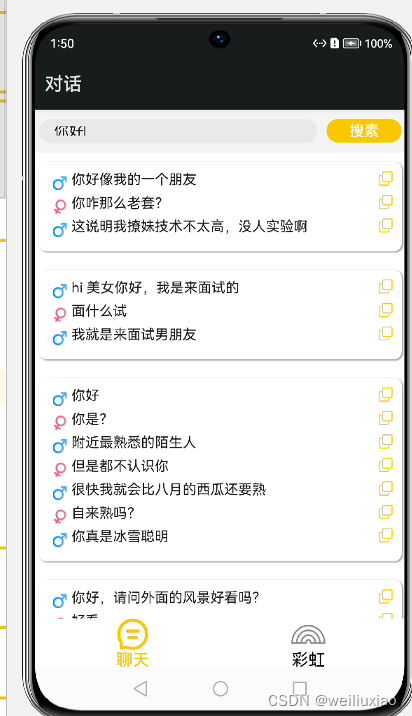
在Java下的myapplication中新建一个Class命名为CopyServiceAbility
package xyz.youtubeyunying.myapplication;import ohos.aafwk.ability.Ability;aimport ohos.aafwk.content.Intent;import ohos.hiviewdfx.HiLog;import ohos.hiviewdfx.HiLogLabel;import ohos.miscservices.pasteboard.PasteData;import ohos.miscservices.pasteboard.SystemPasteboard;import ohos.rpc.*;import ohos.utils.zson.ZSONObject;;import java.util.HashMap;import java.util.Map;import static ohos.miscservices.pasteboard.SystemPasteboard.getSystemPasteboard;
/**  * 复制服务   */
public class CopyServiceAbility extends Ability
{     // 定义日志标签     private static final HiLogLabel LABEL = new HiLogLabel(HiLog.LOG_APP, 0, "MY_TAG");  private MyRemote remote = new MyRemote();    private SystemPasteboard pasteboard = null;    public CopyServiceAbility(){         super();         pasteboard = SystemPasteboard.getSystemPasteboard(getContext()); /*获取系统剪贴板服务的对象实例,用getContent获取上下文 */}public void setPasteData(String val)  /* 读取当前剪贴板中的数据  */
{if (val == null) {return;}if (pasteboard == null) {synchronized (this) {if (pasteboard == null) {pasteboard = SystemPasteboard.getSystemPasteboard(getContext());
/* 获取剪贴板服务的对象实例 */}}}pasteboard.setPasteData(PasteData.creatPlainTextData(val));} /*  将数据写入到剪贴板   */// FA在请求PA服务时会调用Ability.connectAbility连接PA,连接成功后,需要在onConnect返回一个remote对象,供FA向PA发送消息@Overrideprotected IRemoteObject onConnect(Intent intent) {super.onConnect(intent);return remote.asObject();}class MyRemote extends RemoteObject implements IRemoteBroker {private static final int SUCCESS = 0;private static final int ERROR = 1;/*** 1001 将内容写入剪切板*/private static final int COPY = 1001;MyRemote() {super("MyService_MyRemote");}@Overridepublic boolean onRemoteRequest(int code, MessageParcel data, MessageParcel reply, MessageOption option) {switch (code)        /* 根据code判断事件类型  */{case COPY: {String dataStr = data.readString();HiLog.info(LABEL, "copy:onRemoteRequest:" + dataStr);setPasteData(dataStr);// 返回结果当前仅支持String,对于复杂结构可以序列化为ZSON字符串上报Map result = new HashMap();result.put("code", SUCCESS);result.put("abilityResult", 1);reply.writeString(ZSONObject.toZSONString(result));break;}default: {Map result = new HashMap();result.put("abilityError", ERROR);reply.writeString(ZSONObject.toZSONString(result));return false;}}return true;}@Overridepublic IRemoteObject asObject() {return this;}}}
本文来自互联网用户投稿,文章观点仅代表作者本人,不代表本站立场,不承担相关法律责任。如若转载,请注明出处。 如若内容造成侵权/违法违规/事实不符,请点击【内容举报】进行投诉反馈!