Android L 5.0 上紧急电话EmergencyCall与普通电话在MO流程上的区别
转载请注明出处:http://blog.csdn.net/aaa111/article/details/47296721
拨打紧急号码的流程,以112为例。
参考了有SIM卡,无SIM卡,和有SIM卡但开启飞行模式的log,将分析结果简单整理如下。 首先紧急电话的拨打流程也是一个MO流程,至于相对于普通号码在流程细节上有几处区别,那么我们以普通MO流程为参考,着重讲一下不同之处。 下面是一个MO的流程图: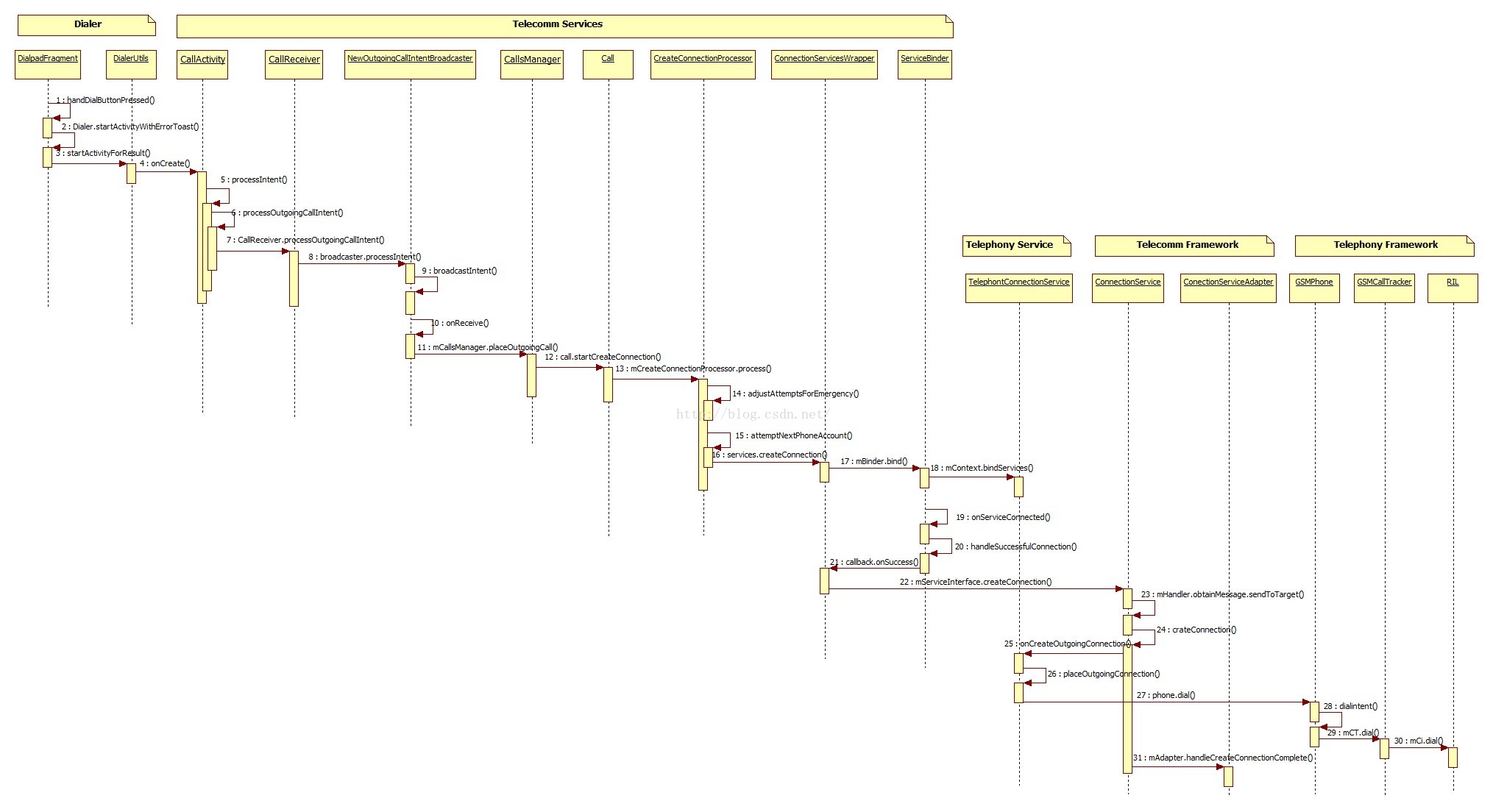
在MO流程中call action有三种,我们先看一下他们分别用在什么时候,在NewOutgoingCallIntentBroadcaster.java中processIntent()方法前的注释中可以看到:
/*** Processes the supplied intent and starts the outgoing call broadcast process relevant to the* intent.** This method will handle three kinds of actions:** - CALL (intent launched by all third party dialers)* - CALL_PRIVILEGED (intent launched by system apps e.g. system Dialer, voice Dialer)* - CALL_EMERGENCY (intent launched by lock screen emergency dialer)** @return {@link CallActivity#OUTGOING_CALL_SUCCEEDED} if the call succeeded, and an* appropriate {@link DisconnectCause} if the call did not, describing why it failed.*/
CALL为第三方的拨号程序,CALL_PRIVILEGED是系统拨号程序,CALL_EMERGENCY是锁屏界面的emergency 拨号程序。
但是在系统拨号程序中拨入号码,系统是如何是辨认emergency number的呢? 往方法里面可以看到,代码中通过isPotentialEmergencyNumber()判断这个是不是Emergency Number (注:是否是Emergency Number 是跟SIM卡以及国家有关的,好像是在PhoneNumberUtil中) ,如果是的话就去重写Intent 的Action值, 8 android/packages/services/Telecomm/src/com/android/server/telecom/NewOutgoingCallIntentBroadcaster.java processIntent()
final boolean isPotentialEmergencyNumber = isPotentialEmergencyNumber(number);Log.v(this, "isPotentialEmergencyNumber = %s", isPotentialEmergencyNumber);rewriteCallIntentAction(intent, isPotentialEmergencyNumber);//紧急号码的话 重写action值为android.intent.action.CALL_EMERGENCY了
在isPotentialEmergencyNumber()方法前的注释中,我们可以看到, “in order to enforce the restriction that only the CALL_PRIVILEGED and CALL_EMERGENCY intents are allowed to make emergency calls.” 那我们是否得出结论第三方的拨号程序是不允许拨打紧急电话的?( five minutes later)试了某第三方拨号程序,拨打112的时候会跳转到系统dialer,不会直接拨出电话。 在 rewriteCallIntentAction()方法中“ updating action from CALL_PRIVILEGED to android.intent.action.CALL_EMERGENCY”
11 android/packages/services/Telecomm/src/com/android/server/telecom/CallsManager.java
void placeOutgoingCall(Call call, Uri handle, GatewayInfo gatewayInfo, boolean speakerphoneOn,int videoState) {if (call == null) {// don't do anything if the call no longer existsLog.i(this, "Canceling unknown call.");return;}final Uri uriHandle = (gatewayInfo == null) ? handle : gatewayInfo.getGatewayAddress();if (gatewayInfo == null) {Log.i(this, "Creating a new outgoing call with handle: %s", Log.piiHandle(uriHandle));} else {Log.i(this, "Creating a new outgoing call with gateway handle: %s, original handle: %s",Log.pii(uriHandle), Log.pii(handle));}call.setHandle(uriHandle);call.setGatewayInfo(gatewayInfo);call.setStartWithSpeakerphoneOn(speakerphoneOn);call.setVideoState(videoState);boolean isEmergencyCall = TelephonyUtil.shouldProcessAsEmergency(mContext,call.getHandle());if (isEmergencyCall) {// Emergency -- CreateConnectionProcessor will choose accounts automaticallycall.setTargetPhoneAccount(null);}if (call.getTargetPhoneAccount() != null || isEmergencyCall) {if (!isEmergencyCall) {updateLchStatus(call.getTargetPhoneAccount().getId());}// If the account has been set, proceed to place the outgoing call.// Otherwise the connection will be initiated when the account is set by the user.call.startCreateConnection(mPhoneAccountRegistrar);}}
13 android/packages/services/Telecomm/src/com/android/server/telecom/CreateConnectionProcessor.java
14 如果是一般的号码那么执行adjustAttemptsForEmergency()并不会对流程有什么影响, 如果是紧急号码的话那么我们进来看看它做了什么。void process() {Log.v(this, "process");mAttemptRecords = new ArrayList<>();if (mCall.getTargetPhoneAccount() != null) {mAttemptRecords.add(new CallAttemptRecord(mCall.getTargetPhoneAccount(), mCall.getTargetPhoneAccount()));}adjustAttemptsForConnectionManager();adjustAttemptsForEmergency();mAttemptRecordIterator = mAttemptRecords.iterator();attemptNextPhoneAccount();}
allAccounts . add ( TelephonyUtil . getDefaultEmergencyPhoneAccount ());如果phone Account是空的(没有SIM/SIP等),那么则返回一个专用的EmergencyPhoneAccount// If we are possibly attempting to call a local emergency number, ensure that the// plain PSTN connection services are listed, and nothing else.private void adjustAttemptsForEmergency() {if (TelephonyUtil.shouldProcessAsEmergency(mContext, mCall.getHandle())) {Log.i(this, "Emergency number detected");mAttemptRecords.clear();List<PhoneAccount> allAccounts = mPhoneAccountRegistrar.getAllPhoneAccounts();//获得所有账户(SIM/SIP/IMS等)if (allAccounts.isEmpty()) {//如果是空的话// If the list of phone accounts is empty at this point, it means Telephony hasn't// registered any phone accounts yet. Add a fallback emergency phone account so// that emergency calls can still go through. We create a new ArrayLists here just// in case the implementation of PhoneAccountRegistrar ever returns an unmodifiable// list.allAccounts = new ArrayList<PhoneAccount>();allAccounts.add(TelephonyUtil.getDefaultEmergencyPhoneAccount());//如果是空的话,那么我么赋予一个默认的紧急拨号账户}// First, add SIM phone accounts which can place emergency calls.for (PhoneAccount phoneAccount : allAccounts) {if (phoneAccount.hasCapabilities(PhoneAccount.CAPABILITY_PLACE_EMERGENCY_CALLS) &&phoneAccount.hasCapabilities(PhoneAccount.CAPABILITY_SIM_SUBSCRIPTION)) {Log.i(this, "Will try PSTN account %s for emergency",//PSTN?phoneAccount.getAccountHandle());mAttemptRecords.add(new CallAttemptRecord(phoneAccount.getAccountHandle(),phoneAccount.getAccountHandle()));}}// Next, add the connection manager account as a backup if it can place emergency calls.PhoneAccountHandle callManagerHandle = mPhoneAccountRegistrar.getSimCallManager();if (callManagerHandle != null) {PhoneAccount callManager = mPhoneAccountRegistrar.getPhoneAccount(callManagerHandle);if (callManager.hasCapabilities(PhoneAccount.CAPABILITY_PLACE_EMERGENCY_CALLS)) {CallAttemptRecord callAttemptRecord = new CallAttemptRecord(callManagerHandle,mPhoneAccountRegistrar.getDefaultOutgoingPhoneAccount(mCall.getHandle().getScheme()));if (!mAttemptRecords.contains(callAttemptRecord)) {Log.i(this, "Will try Connection Manager account %s for emergency",callManager);mAttemptRecords.add(callAttemptRecord);}}}}}
这个CAPABILITY_SIM_SUBSCRIPTION比较奇特啊, a built-in PSTN SIM subscription,一个内置的SIM账户?/*** @return fallback {@link PhoneAccount} to be used by Telecom for emergency calls in the* rare case that Telephony has not registered any phone accounts yet. Details about this* account are not expected to be displayed in the UI, so the description, etc are not* populated.*/static PhoneAccount getDefaultEmergencyPhoneAccount() {return PhoneAccount.builder(DEFAULT_EMERGENCY_PHONE_ACCOUNT_HANDLE, "E").setCapabilities(PhoneAccount.CAPABILITY_SIM_SUBSCRIPTION |PhoneAccount.CAPABILITY_CALL_PROVIDER |PhoneAccount.CAPABILITY_PLACE_EMERGENCY_CALLS).build();}
/*** Flag indicating that this {@code PhoneAccount} represents a built-in PSTN SIM* subscription.** Only the Android framework can register a {@code PhoneAccount} having this capability.** See {@link #getCapabilities}*/public static final int CAPABILITY_SIM_SUBSCRIPTION = 0x4;
下面是几种情况下拨打112 ,phoneAccount.getAccountHandle());打印出来的结果多是不同的,具体后面的 5 E 3 2 代表的什么意思我也不知道。了解的大神,求解释!求补充!
C:\Users\admin\Desktop\MO_Log\112 with simcard.txt (3 hits)07-23 13:04:52.020 4146-4146/com.android.server.telecom I/Telecom﹕ Call: setTargetPhoneAccountComponentInfo{com.android.phone/com.android.services.telephony.TelephonyConnectionService}, 5C:\Users\admin\Desktop\MO_Log\112 with no sim card.txt (4 hits)07-23 13:06:06.409 4146-4146/com.android.server.telecom I/Telecom﹕ Call: setTargetPhoneAccountComponentInfo{com.android.phone/com.android.services.telephony.TelephonyConnectionService}, E (这个稍后会变成-1)C:\Users\admin\Desktop\MO_Log\112 airplane mode.txt (3 hits)07-23 13:08:57.877 4146-4146/com.android.server.telecom I/Telecom﹕ Call: setTargetPhoneAccountComponentInfo{com.android.phone/com.android.services.telephony.TelephonyConnectionService}, 3C:\Users\admin\Desktop\MO_Log\MO.txt (1 hit)04-04 14:25:02.677: I/Telecom(4147): Call: setTargetPhoneAccountComponentInfo{com.android.phone/com.android.services.telephony.TelephonyConnectionService}, 2
15 之后继续 attemptNextPhoneAccount
如果已经开启飞行模式会关闭飞行模式先 log:
具体流程不详述,打开飞行模式的入口代码如下,并且打开radio之后,同样执行了placeOutgoingConnection方法。 25 android/packages/services/Telephony/src/com/android/services/telephony/TelephonyConnectionService.java770: 07-23 13:08:58.351 4171-4171/com.android.phone D/Telephony﹕ EmergencyCallHelper: EmergencyCallHelper constructor.770: 07-23 13:08:58.351 4171-4171/com.android.phone D/Telephony﹕ EmergencyCallHelper: EmergencyCallHelper constructor.772: 07-23 13:08:58.352 4171-4171/com.android.phone D/Telephony﹕ EmergencyCallHelper: startTurnOnRadioSequence788: 07-23 13:08:58.358 4171-4171/com.android.phone D/Telephony﹕ EmergencyCallHelper: startSequenceInternal()790: 07-23 13:08:58.358 4171-4171/com.android.phone D/Telephony﹕ EmergencyCallHelper: cleanup()794: 07-23 13:08:58.358 4171-4171/com.android.phone D/Telephony﹕ EmergencyCallHelper: powerOnRadio().798: 07-23 13:08:58.359 4171-4171/com.android.phone D/Telephony﹕ EmergencyCallHelper: ==> Turning off airplane mode.1720: 07-23 13:08:58.787 4171-4171/com.android.phone D/Telephony﹕ EmergencyCallHelper: onServiceStateChanged(), new state = 1 1 home null null null Unknown Unknown CSS not supported -1 -1 RoamInd=-1 DefRoamInd=-1 EmergOnly=false.1722: 07-23 13:08:58.787 4171-4171/com.android.phone D/Telephony﹕ EmergencyCallHelper: onServiceStateChanged: not ready to call yet, keep waiting.1976: 07-23 13:08:59.019 4171-4171/com.android.phone D/Telephony﹕ EmergencyCallHelper: onServiceStateChanged(), new state = 0 1 home CHN-UNICOM UNICOM 46001 GSM Unknown CSS supported -1 -1 RoamInd=-1 DefRoamInd=-1 EmergOnly=false.1978: 07-23 13:08:59.020 4171-4171/com.android.phone D/Telephony﹕ EmergencyCallHelper: onServiceStateChanged: ok to call!2160: 07-23 13:08:59.092 4171-4171/com.android.phone D/Telephony﹕ EmergencyCallHelper: cleanup()
而紧急号码和非紧急号码之间的区别,在 placeOutgoingConnection()中的第二个参数,Phone@Overridepublic Connection onCreateOutgoingConnection(PhoneAccountHandle connectionManagerPhoneAccount,final ConnectionRequest request) {...boolean useEmergencyCallHelper = false;if (isEmergencyNumber) {mRequest = request;if (state == ServiceState.STATE_POWER_OFF) {//如果radio没有开useEmergencyCallHelper = true;}}...if (useEmergencyCallHelper) {if (mEmergencyCallHelper == null) {mEmergencyCallHelper = new EmergencyCallHelper(this);}mEmergencyCallHelper.startTurnOnRadioSequence(phone,//打开radio,进而如果是开启了飞行模式的话则关闭飞行模式new EmergencyCallHelper.Callback() {@Overridepublic void onComplete(boolean isRadioReady) {if (connection.getState() == Connection.STATE_DISCONNECTED) {// If the connection has already been disconnected, do nothing.} else if (isRadioReady) {connection.setInitialized();placeOutgoingConnection(connection,//打开radio后PhoneFactory.getPhone(getPhoneIdForECall()), request);} else {Log.d(this, "onCreateOutgoingConnection, failed to turn on radio");connection.setDisconnected(DisconnectCauseUtil.toTelecomDisconnectCause(android.telephony.DisconnectCause.POWER_OFF,"Failed to turn on radio."));connection.destroy();}}});}else {placeOutgoingConnection(connection, phone, request);//如果radio本来就可用的话}}
(飞行模式的时候会打印两次?TelephonyConnectionService: Voice phoneId in service = 0 preferred phoneId =0) 26 android/packages/services/Telephony/src/com/android/services/telephony/TelephonyConnectionService.java
private void placeOutgoingConnection(TelephonyConnection connection, Phone phone, ConnectionRequest request) {String number = connection.getAddress().getSchemeSpecificPart();PhoneAccountHandle pHandle = TelecomAccountRegistry.makePstnPhoneAccountHandle(phone);// For ECall handling on MSIM, till the request reaches here(i.e PhoneApp)// we dont know on which phone account ECall can be placed, once after deciding// the phone account for ECall we should inform Telecomm so that// the proper sub information will be displayed on InCallUI.if (!Objects.equals(pHandle, request.getAccountHandle())) {Log.i(this, "setPhoneAccountHandle, account = " + pHandle);connection.setPhoneAccountHandle(pHandle);}Bundle bundle = request.getExtras();boolean isAddParticipant = (bundle != null) && bundle.getBoolean(TelephonyProperties.ADD_PARTICIPANT_KEY, false);Log.d(this, "placeOutgoingConnection isAddParticipant = " + isAddParticipant);com.android.internal.telephony.Connection originalConnection;try {if (isAddParticipant) {phone.addParticipant(number);return;} else {originalConnection = phone.dial(number, request.getVideoState(), bundle);//拨号}} catch (CallStateException e) {Log.e(this, e, "placeOutgoingConnection, phone.dial exception: " + e);connection.setDisconnected(DisconnectCauseUtil.toTelecomDisconnectCause(android.telephony.DisconnectCause.OUTGOING_FAILURE,e.getMessage()));return;}if (originalConnection == null) {int telephonyDisconnectCause = android.telephony.DisconnectCause.OUTGOING_FAILURE;// On GSM phones, null connection means that we dialed an MMI codeif (phone.getPhoneType() == PhoneConstants.PHONE_TYPE_GSM) {Log.d(this, "dialed MMI code");telephonyDisconnectCause = android.telephony.DisconnectCause.DIALED_MMI;final Intent intent = new Intent(this, MMIDialogActivity.class);intent.setFlags(Intent.FLAG_ACTIVITY_NEW_TASK |Intent.FLAG_ACTIVITY_EXCLUDE_FROM_RECENTS);startActivity(intent);}Log.d(this, "placeOutgoingConnection, phone.dial returned null");connection.setDisconnected(DisconnectCauseUtil.toTelecomDisconnectCause(telephonyDisconnectCause, "Connection is null"));} else {connection.setOriginalConnection(originalConnection);}}
本文来自互联网用户投稿,文章观点仅代表作者本人,不代表本站立场,不承担相关法律责任。如若转载,请注明出处。 如若内容造成侵权/违法违规/事实不符,请点击【内容举报】进行投诉反馈!