h5梯形tab实现
在开发过程中,产品提出需要一个梯形tab进行pag的切换,如图所示:
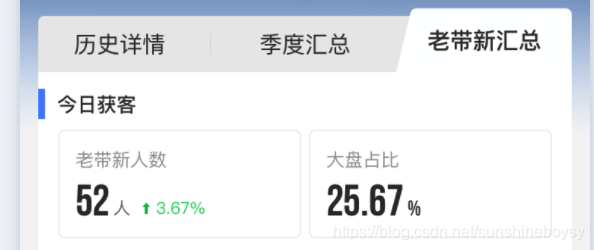
在网上也找了很多梯形方案,最后都不适用,故采用如下方法进行实现:
1.让ui提供三个梯形图片:左直角梯形,右直角梯形,中间等腰梯形
2.通过点击事件切换里面的图形进行显示与隐藏即可
html代码如下:
历史详情历史详情季度汇总季度汇总老带新获客老带新获客 css代码如下:
.yunying_header {height: .79rem;display: flex;justify-content: space-between;box-sizing: content-box;position: relative;padding-right: .24rem;padding-left: .24rem;margin-top: .12rem;
}.header_top_two_tab {/* width: 33.333%; */width: calc(34% + 1px);height: 100%;display: flex;align-items: center;justify-content: center;font-size: 0.32rem;font-family: PingFangSC-Medium, PingFang SC;color: #666;cursor: pointer;position: relative;background: #EAEAEA;
}.activeFontweight {font-weight: bold;color: rgba(51, 51, 51, 1);
}.lefttixing {position: absolute;left: 0;right: 0px;top: -2px;bottom: -1px;background: url(../img/titleleft.png) no-repeat;background-size: 100% 100%;cursor: pointer;
}.midtixing {position: absolute;left: 0;right: 0;top: -2px;bottom: -1px;background: url(../img/titlecenter.png) no-repeat;background-size: 100% 100%;cursor: pointer;
}.righttixing {position: absolute;left: 0;right: 0;top: -2px;bottom: -1px;background: url(../img/titleright.png) no-repeat;background-size: 100% 100%;cursor: pointer;
}.tixing {display: none;border-radius: .08rem .08rem 0 0;z-index: 9999;
}.tixing div {width: 100%;height: 100%;display: flex;align-items: center;justify-content: center;font-size: 0.32rem;font-family: PingFangSC-Medium, PingFang SC;font-weight: bold;color: rgba(51, 51, 51, 1);cursor: pointer;
}
js代码如下:
$('.yunying_header').delegate('.header_top_two_tab', 'click', function (e) {e.stopPropagation();localgoshow = 0;$('.header_top_two_tab').find('.tixing').hide();$(this).find('.tixing').show();var num = $(this).attr('data-num');$('.wrapperone').each(function () {var datatab = $(this).attr('data-tab');if (datatab == num) {$(this).show();} else {$(this).hide();}})
})
通过上述代码可完美实现需求。
本文来自互联网用户投稿,文章观点仅代表作者本人,不代表本站立场,不承担相关法律责任。如若转载,请注明出处。 如若内容造成侵权/违法违规/事实不符,请点击【内容举报】进行投诉反馈!