CSS梯形导航菜单
CSS梯形导航菜单
写个大屏项目,结果没给图片,我真是****,搜了下别人写的梯形,部分不符合我的需求,我都是梯形菜单,并且点击高亮,下面是效果和代码,我用了定位方面,调试的时候花费的时间比较多 具体看个人需求,css基础很一般,写得不好的,大佬们自个调试下了 ,再次做个笔记而已!
vue项目,被我改成业务组件使用了,嫌弃父页面代码太多,看花眼了
补充:介绍直角梯形的写法,直接上代码和图片
.box{position: relative;height: 31px;width: 78px;text-align: center;line-height: 31px;background-color: #050c1f;color: #fff;overflow: hidden;cursor: pointer;border-left: 1px solid blue !important;&::before {content: "";display: block;position: absolute;top: 0;bottom: 0;right: 0;width: 76px;border: 2px solid blue;transform-origin: 0 100%;background-color: #0a2c63;transform: skewX(33deg);z-index: 1;}
}
效果如下:利用左边框和伪元素变形合成。后面的介绍可能有点乱,自己抽着看吧,尴尬了 哈哈

1、介绍下主要的相关css属性
/*
1、第一个:左边的陌生人警告,是通过父盒子border-left
和 伪类元素生成的四边形组成的,通过父盒子的overflow: hidden和子元素的四边
形,组成一个直角梯形
*/.nav_title_left {position: relative;height: 33px;width: 105px;text-align: center;line-height: 33px;background-color: #050c1f;overflow: hidden;cursor: pointer;border-left: 1px solid #0a2c63 !important;&::before {content: "";display: block;position: absolute;top: 0;bottom: 0;right: 0;width: 105px;border: 2px solid #0a2c63;transform-origin: 0 100%;//代表以左下边为原点 变形background-color: #0a2c63;transform: skewX(33deg); // 这个是控制四边形变形的幅度z-index: 1;}
}
/*
2、第二种,如黑名单警告,是直接通过transform: skewX(33deg)属性控制的,
形成变形,像我的需求,是这样的,那么是通过伪类元素生成变形的四边形,通过
子绝父相定位到父盒子里,不然连文字也会跟着变形,不符合需求
*/.nav_title_item {display: flex;align-items: center;justify-content: center;position: relative;padding: 8px 13px;margin: 0px 3px;color: #fff;cursor: pointer;&::after {content: "";position: absolute;left: 0;right: 0;bottom: 0;top: 0;border-radius: 1px;z-index: -1;background: #0a2c63;transform: skewX(33deg);-webkit-transform: skewX(33deg);}}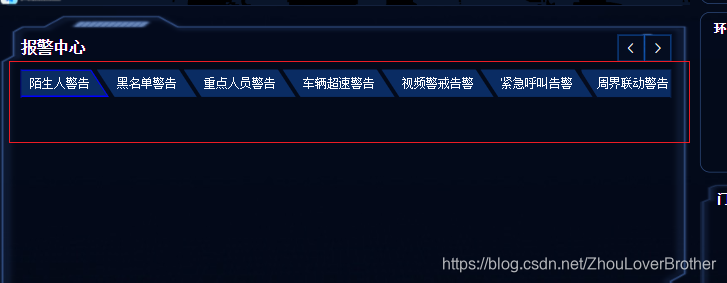
<template><div><div class="nav_title_box"><div class="nav_left_position" @click="changeMonitoringNav(1)"><div :class="monitoringChange === 1 ? 'nav_title_left2' : 'nav_title_left'"><span style="margin-right: 12px; z-index: 100; position: relative">陌生人警告</span></div></div><div class="nav_title_center"><div@click="changeMonitoringNav(2)":class="monitoringChange === 2 ? 'nav_title_item_blue' : 'nav_title_item'">黑名单警告</div><div@click="changeMonitoringNav(3)":class="monitoringChange === 3 ? 'nav_title_item_blue' : 'nav_title_item'">重点人员警告</div><div@click="changeMonitoringNav(4)":class="monitoringChange === 4 ? 'nav_title_item_blue' : 'nav_title_item'">车辆超速警告</div><div@click="changeMonitoringNav(5)":class="monitoringChange === 5 ? 'nav_title_item_blue' : 'nav_title_item'">视频警戒告警</div><div@click="changeMonitoringNav(6)":class="monitoringChange === 6 ? 'nav_title_item_blue' : 'nav_title_item'">紧急呼叫告警</div></div><div class="nav_rgiht_position" @click="changeMonitoringNav(7)"><div :class="monitoringChange === 7 ? 'nav_title_right2' : 'nav_title_right'"><span style="z-index: 100; position: relative; margin-left: 16px">周界联动警告</span></div></div></div></div>
</template><script>
export default {props: {},components: {},data() {return {monitoringChange: 1,}},computed: {},created() {},mounted() {},watch: {},methods: {changeMonitoringNav(value) {this.monitoringChange = valuethis.$emit("policeNavMenu", value)},},
}
</script><style scoped lang="less">
.nav_title_box {position: relative;width: 100%;height: 34px;margin-top: 10px;> div {font-size: 14px;}
}
.nav_left_position {position: absolute;left: 5px;top: 0;
}
.nav_title_left {position: relative;height: 33px;width: 105px;text-align: center;line-height: 33px;background-color: #050c1f;overflow: hidden;cursor: pointer;border-left: 1px solid #0a2c63 !important;&::before {content: "";display: block;position: absolute;top: 0;bottom: 0;right: 0;width: 105px;border: 2px solid #0a2c63;transform-origin: 0 100%;background-color: #0a2c63;transform: skewX(33deg);z-index: 1;}
}
.nav_title_left2 {position: relative;height: 33px;width: 105px;text-align: center;line-height: 33px;background-color: #050c1f;overflow: hidden;cursor: pointer;border-left: 1px solid blue !important;&::before {content: "";display: block;position: absolute;top: 0;bottom: 0;right: 0;width: 105px;border: 2px solid blue;transform-origin: 0 100%;background-color: #0a2c63;transform: skewX(33deg);z-index: 1;}
}
.nav_title_center {display: flex;align-items: center;position: absolute;top: 0;left: 104px;z-index: 10000 !important;.nav_title_item {display: flex;align-items: center;justify-content: center;position: relative;padding: 8px 13px;margin: 0px 3px;color: #fff;cursor: pointer;&::after {content: "";position: absolute;left: 0;right: 0;bottom: 0;top: 0;border-radius: 1px;z-index: -1;background: #0a2c63;transform: skewX(33deg);-webkit-transform: skewX(33deg);}}.nav_title_item_blue {display: flex;align-items: center;justify-content: center;position: relative;padding: 8px 13px;margin: 0px 3px;color: #fff;cursor: pointer;&::after {content: "";position: absolute;left: 0;right: 0;bottom: 0;top: 0;border-radius: 1px;z-index: -1;background: #0a2c63;transform: skewX(33deg);-webkit-transform: skewX(33deg);border: 2px solid blue;}}
}
.nav_rgiht_position {position: absolute;right: 0;top: 0;
}
.nav_title_right {position: relative;height: 33px;width: 106px;border-right: 1px solid #0a2c63;text-align: center;line-height: 33px;background-color: #050c1f;overflow: hidden;cursor: pointer;&::before {content: "";display: block;position: absolute;top: 0;bottom: 0;right: 0;width: 106px;border: 1px solid #0a2c63;transform-origin: 100% 0;background-color: #0a2c63;transform: skewX(32deg);z-index: 1;}
}
.nav_title_right2 {position: relative;height: 33px;width: 106px;border-right: 2px solid blue;text-align: center;line-height: 33px;background-color: #050c1f;overflow: hidden;cursor: pointer;&::before {content: "";display: block;position: absolute;top: 0;bottom: 0;right: 0;width: 104px;border: 2px solid blue;transform-origin: 100% 0;background-color: #0a2c63;transform: skewX(32deg);z-index: 1;}
}
</style>
本文来自互联网用户投稿,文章观点仅代表作者本人,不代表本站立场,不承担相关法律责任。如若转载,请注明出处。 如若内容造成侵权/违法违规/事实不符,请点击【内容举报】进行投诉反馈!