Shell编程之[[ ]]
本文主要对Shell中的[[ ]]进行简单总结,另外本文所使用的Linux环境为CentOS Linux release 8.2.2004,所使用的Shell为bash 5.1.0(1)-release。
[[和]]是Shell保留字:

将[[和]]组合成[[ ]]可以用于检测条件是否成立,[[ ]]的语法如下:
# expression为条件表达式
# [[ ]]和expression之间的两个空格是必须的,否则会导致语法错误
[[ expression ]]
根据对条件表达式的计算返回状态0或1,退出状态为0,表示条件成立(true),退出状态为1,表示条件不成立(false)。
这里的条件表达式主要由关系运算符(
-eq、-ne、-lt、-le、-gt、-ge)、字符串运算符、文件测试运算符组成。如-f这样的运算符必须不被引用(unquoted)才能被识别为主要运算符。可以使用逻辑运算符(&&、||、!)或小括号()组合表达式,这四个运算符优先级从左到右降序排列:()、!、&&、||。对于&&和||,如果左边表达式的值足以确定整个条件表达式的值,则&&和||就不会对右边表达式求值。
在[[和]]之间的单词不会执行单词拆分和文件名扩展,会执行波浪号扩展、参数和变量扩展、算术扩展、命令替换、进程替换以及引用去除(quote removal)。与[[ ]]一起使用时,<和>使用当前区域设置按字典顺序排序。在[[ ]]中使用-eq、-ne、-gt、-lt、-ge、-le时,运算符左右两边的参数将作为算术表达式计算。使用[[ ]]进行整数比较的示例如下:
#!/bin/bash# 输入一个成绩,判断并输出成绩的等级
read -p "输入考试成绩 > " score
# 可以在[[ ]]中使用&&、||,不能在test或[]中使用&&、||,也可以用&&、||将多个[[ ]]、test或[]连接起来
# 不能在[[ ]]中使用-a、-o,只能在test或[]中使用-a、-o
if [[ ${score} -lt 0 || ${score} -gt 100 ]]; thenecho "输入的成绩有误"
elif [[ ${score} -ge 90 && ${score} -le 100 ]]; thenecho "优"
elif [[ ${score} -ge 80 && ${score} -lt 90 ]]; thenecho "好"
elif [[ ${score} -ge 70 && ${score} -lt 80 ]]; thenecho "良"
elif [[ ${score} -ge 60 && ${score} -lt 70 ]]; thenecho "及格"
elseecho "不及格"
fi
执行结果:

使用[[ ]]进行字符串比较的示例如下:
#!/bin/bashread -p "输入第一个字符串 > " str1
read -p "输入第二个字符串 > " str2
# [[ ]]中使用>、<不需要加\转义
# 在[[ ]]中使用变量不需要用双引号引起来,即使变量是空值也不会出错,也不会进行单词拆分
if [[ -z ${str1} || -z ${str2} ]]
thenecho "字符串不能为空"exit 1
fi
if [[ ${str1} == ${str2} ]]
thenecho "两个字符串相等"
elseecho "两个字符串不相等"
fi
if [[ ${str1} != ${str2} ]]
thenecho "两个字符串不相等"
elseecho "两个字符串相等"
fi
if [[ ${str1} > ${str2} ]]
thenecho "str1大于str2"
elseecho "str1不大于str2"
fi
if [[ ${str1} < ${str2} ]]
thenecho "str1小于str2"
elseecho "str1不小于str2"
fi
执行结果:

使用[[ ]]进行文件检测的示例如下:
#!/bin/bashread -p "输入file1的路径 > " file1
read -p "输入file2的路径 > " file2
if [[ -a ${file1} ]]
thenecho "-a ${file1} : file1存在"
elseecho "-a ${file1} : file1不存在"
fi
if [[ -b ${file1} ]]
thenecho "-b ${file1} : file1是块设备文件"
elseecho "-b ${file1} : file1不是块设备文件"
fi
if [[ -c ${file1} ]]
thenecho "-c ${file1} : file1是字符设备文件"
elseecho "-c ${file1} : file1不是字符设备文件"
fi
if [[ -d ${file1} ]]
thenecho "-d ${file1} : file1是目录"
elseecho "-d ${file1} : file1不是目录"
fi
if [[ -e ${file1} ]]
thenecho "-e ${file1} : file1存在"
elseecho "-e ${file1} : file1不存在"
fi
if [[ -f ${file1} ]]
thenecho "-f ${file1} : file1是普通文件"
elseecho "-f ${file1} : file1不是普通文件"
fi
if [[ -h ${file1} ]]
thenecho "-h ${file1} : file1是符号链接"
elseecho "-h ${file1} : file1不是符号链接"
fi
if [[ -L ${file1} ]]
thenecho "-L ${file1} : file1是符号链接"
elseecho "-L ${file1} : file1不是符号链接"
fi
if [[ -r ${file1} ]]
thenecho "-r ${file1} : file1可读"
elseecho "-r ${file1} : file1不可读"
fi
if [[ -s ${file1} ]]
thenecho "-s ${file1} : file1大小大于0"
elseecho "-s ${file1} : file1大小为0"
fi
if [[ -w ${file1} ]]
thenecho "-w ${file1} : file1可写"
elseecho "-w ${file1} : file1不可写"
fi
if [[ -x ${file1} ]]
thenecho "-x ${file1} : file1可执行"
elseecho "-x ${file1} : file1不可执行"
fi
if [[ -G ${file1} ]]
thenecho "-G ${file1} : file1被有效组id所拥有"
elseecho "-G ${file1} : file1没有被有效组id所拥有"
fi
if [[ -O ${file1} ]]
thenecho "-O ${file1} : file1被有效用户id所拥有"
elseecho "-O ${file1} : file1没有被有效用户id所拥有"
fi
if [[ -S ${file1} ]]
thenecho "-S ${file1} : file1是套接字"
elseecho "-S ${file1} : file1不是套接字"
fi
if [[ ${file1} -nt ${file2} ]]
thenecho "${file1} -nt ${file2} : file1比file2新"
elseecho "${file1} -nt ${file2} : file1不比file2新"
fi
if [[ ${file1} -ot ${file2} ]]
thenecho "${file1} -ot ${file2} : file1比file2旧"
elseecho "${file1} -ot ${file2} : file1不比file2旧"
fi
测试用的文件如下:

执行结果:
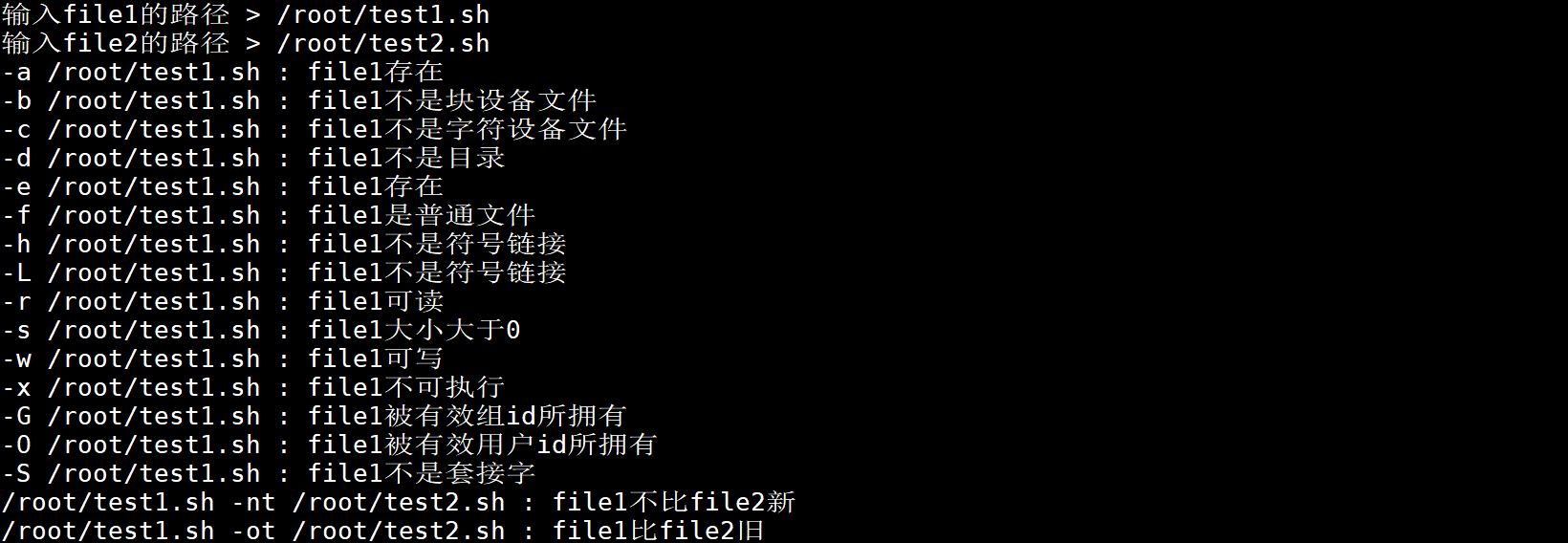
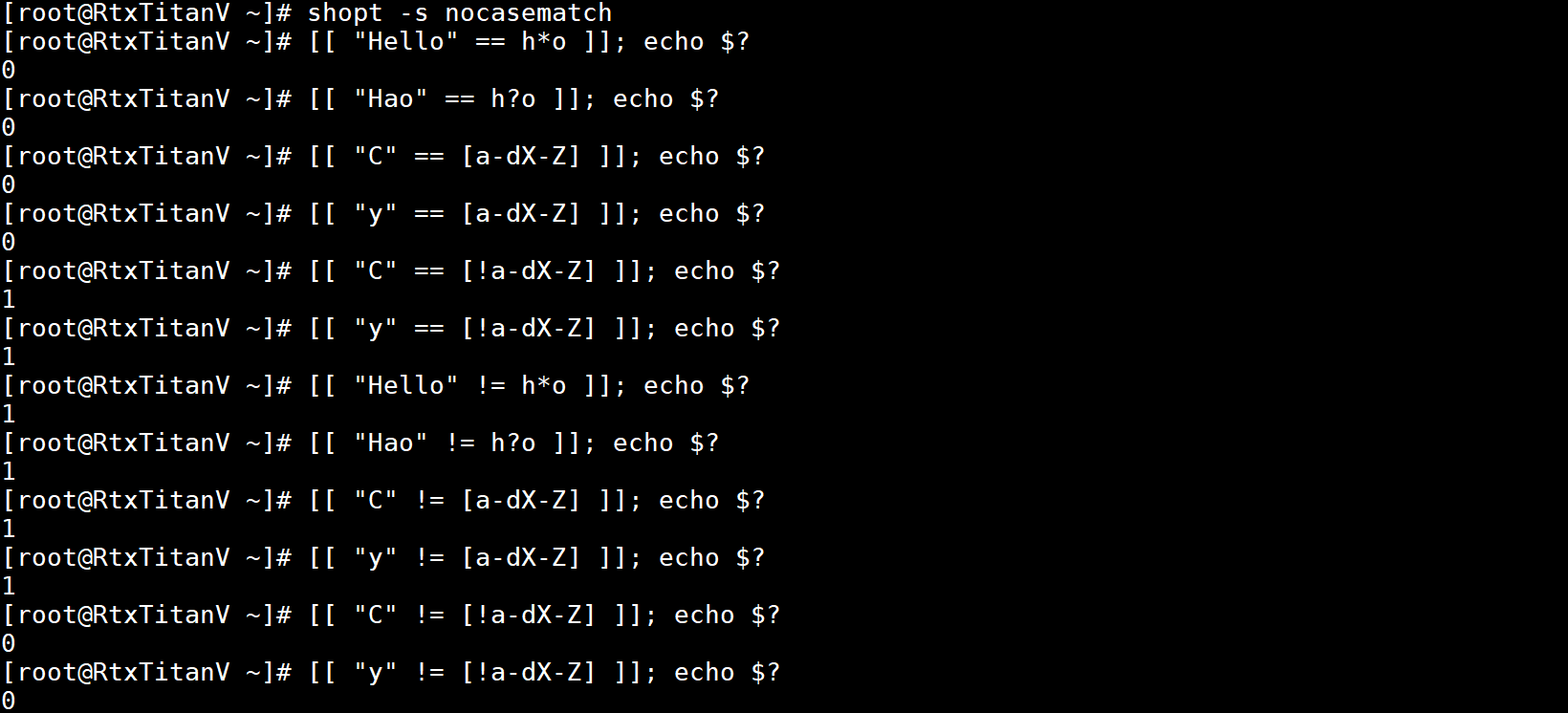
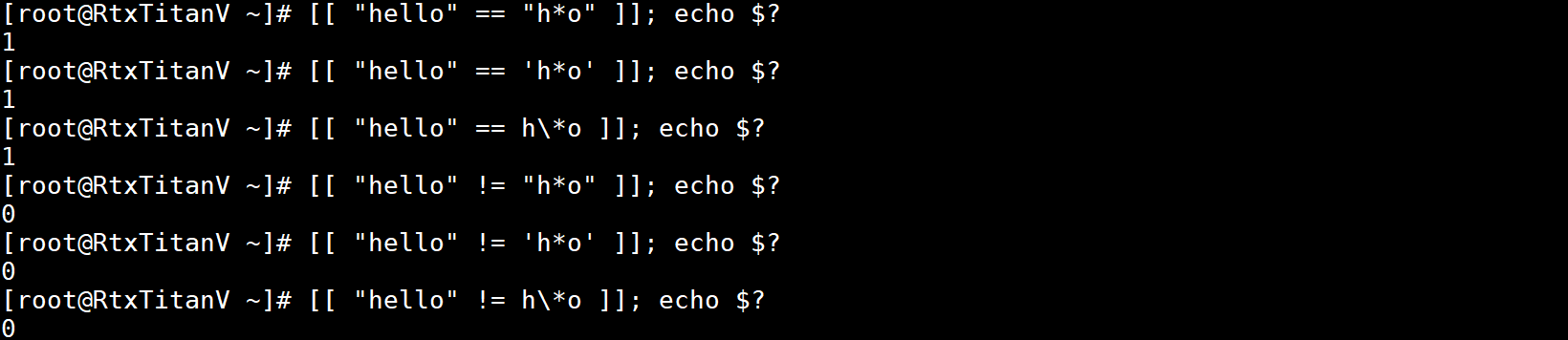
在[[ ]]中使用==和!=时,运算符右边的字符串被看作是一个模式(pattern),按模式匹配(pattern matching)的规则进行匹配,就像shell的extglob选项启用了一样,=和==相同。如果启用了shell的nocasematch选项,则在匹配时不考虑字母的大小写。使用==时字符串与模式相匹配,或使用!=时字符串与模式不相匹配,则返回值是0,否则返回1。模式中的任何部分都可以被引用(quote)以强制引用的部分作为字符串进行匹配。
模式中
*匹配任何字符串,?匹配任意单个字符,[…]匹配方括号中任一字符,由连字符-分隔的一对字符是范围表达式,使用当前语言区域(locale)设置的排序序列和字符集中任何在这两个字符之间(包括这两个字符)的字符都会被匹配。如果在[之后的第一个字符是!或~,则匹配没有出现在方括号中的任一字符,如果要匹配-,可以把它放在方括号第一个或最后一个位置,如果要匹配],可以把它放在方括号第一个位置。
在[[ ]]中使用==进行匹配的示例如下:
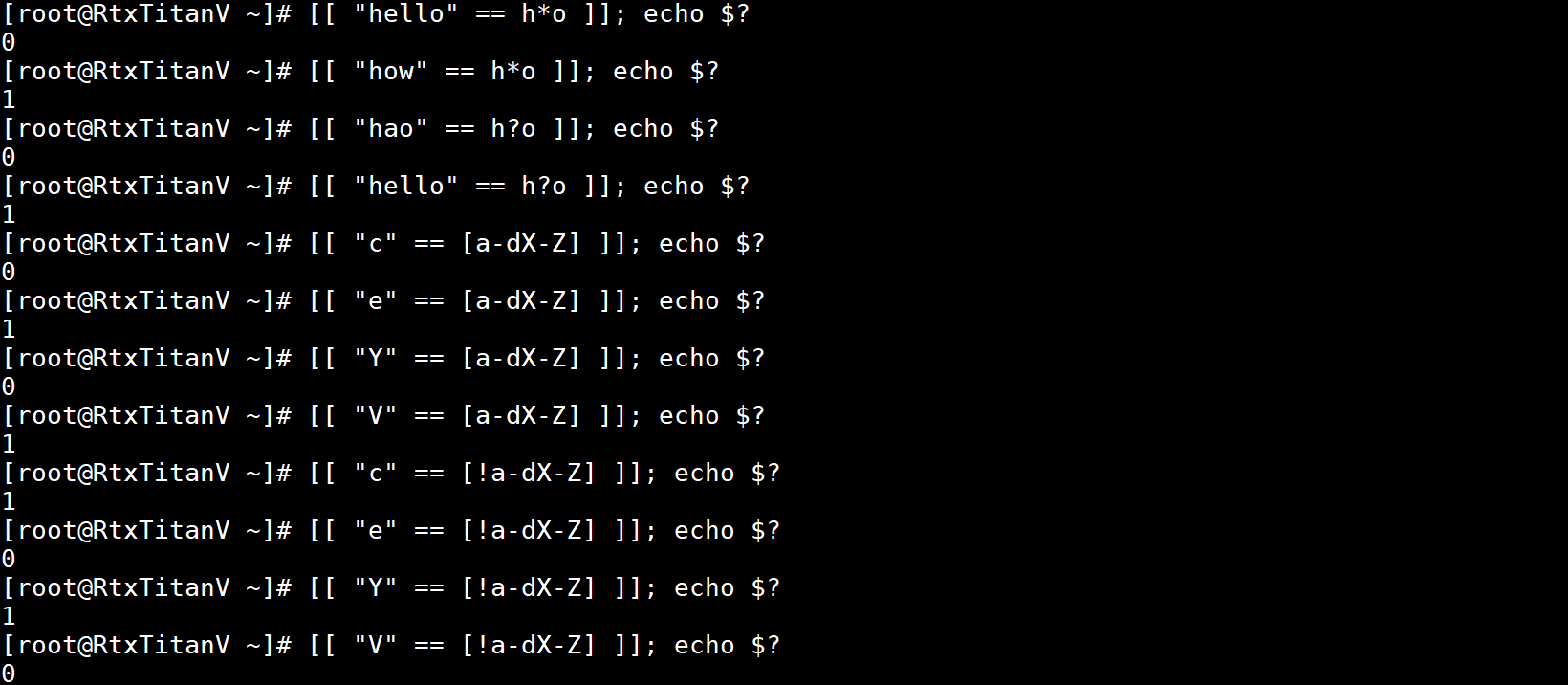
在[[ ]]中使用!=进行匹配的示例如下:
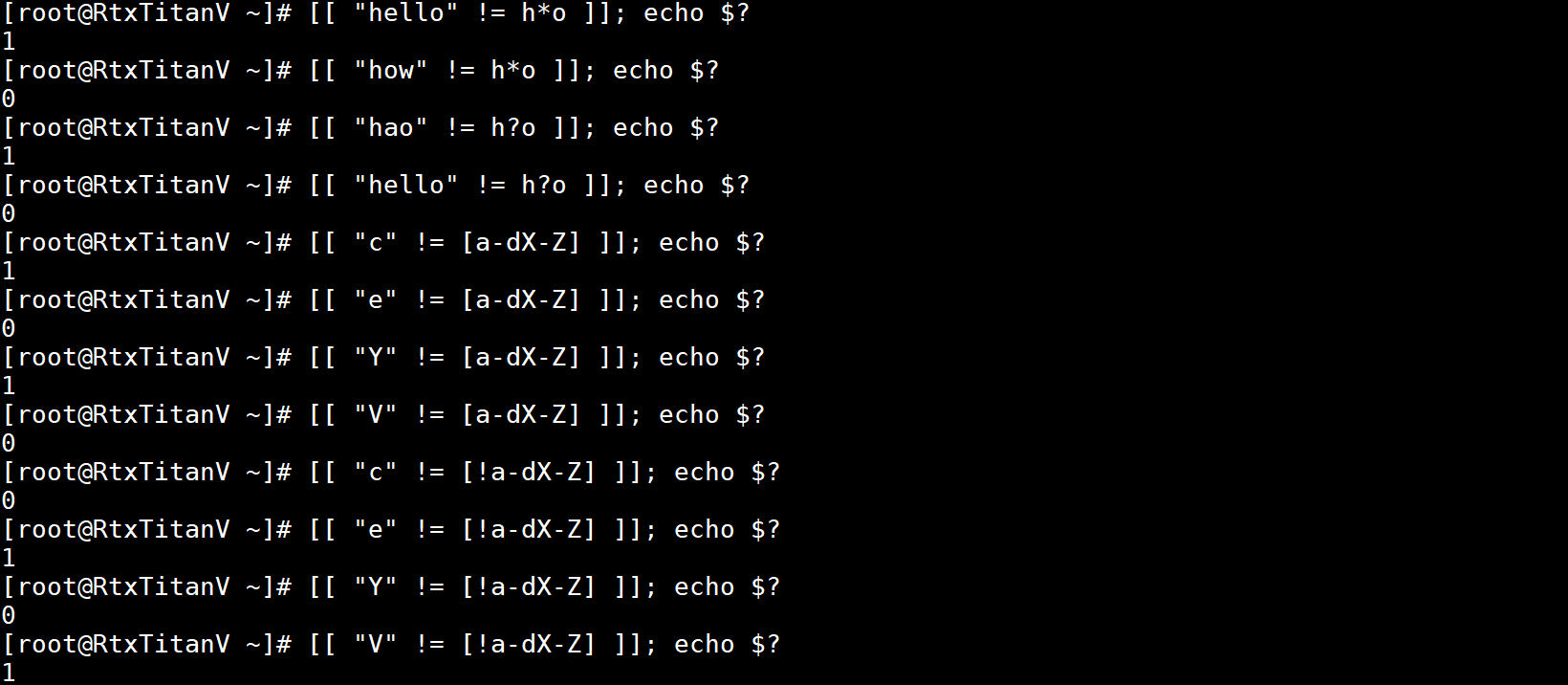
没启用shell的nocasematch选项时,会区分字母大小写:
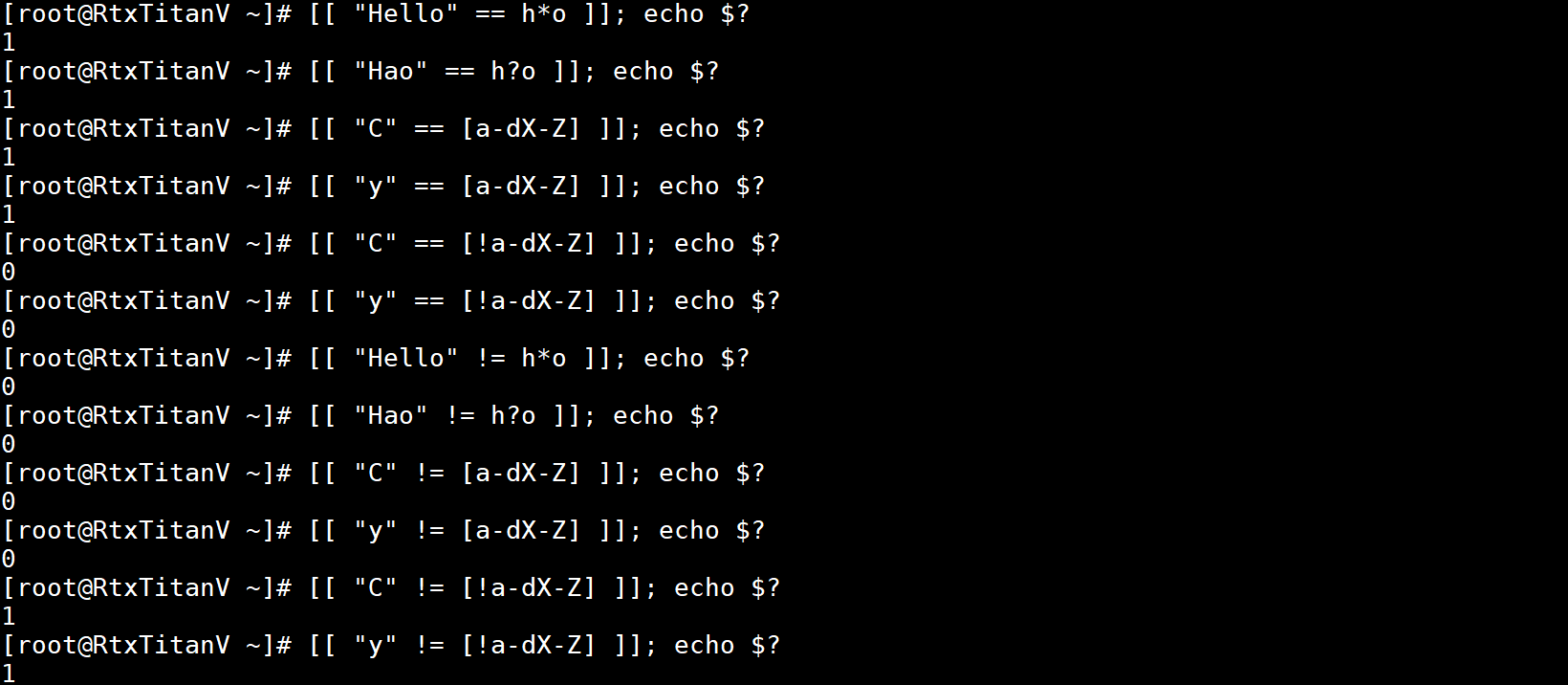
启用了shell的nocasematch选项后,在匹配时不考虑字母的大小写:
模式中被引用的部分会作为字符串匹配,示例如下:
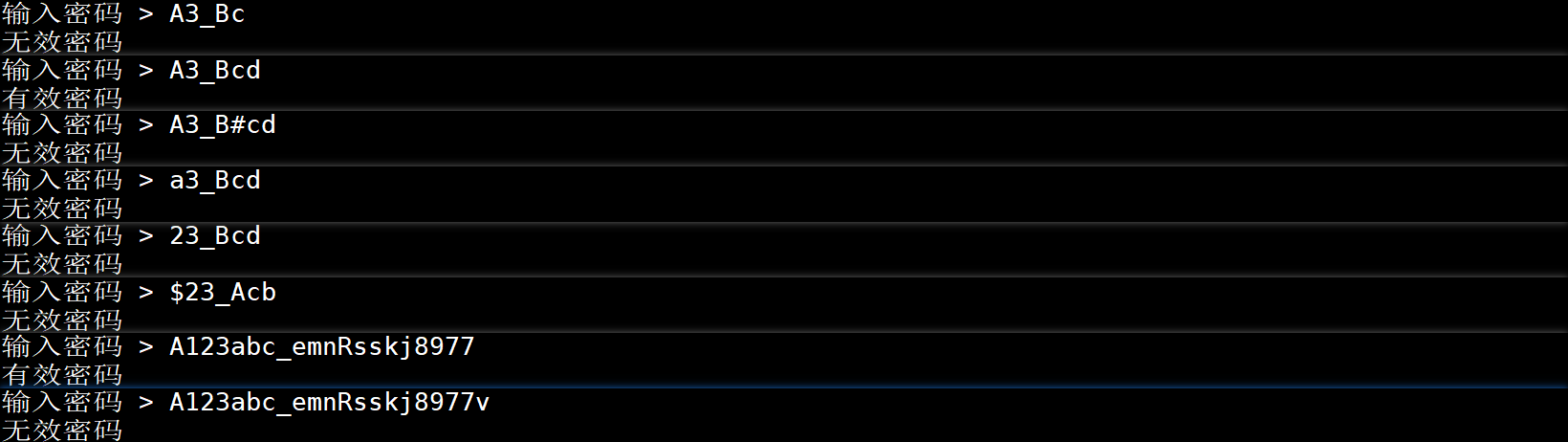
另外在[[ ]]中还可以使用一个双目运算符=~,它和==以及!=具有相同的优先级,=~右边的字符串被认为是一个扩展的正则表达式,并进行相应的匹配。如果匹配,则返回值为0,否则返回1,如果这个正则表达式语法有误,则整个条件表达式返回值为2。如果启用了shell的nocasematch选项,则在匹配时不考虑字母的大小写。一个简单的密码校验的示例如下:
#!/bin/bashread -p "输入密码 > " password
# 以大写英文字母开头,只包含英文字母、数字、下划线,长度在6到20之间
regex="^[A-Z][A-Za-z0-9_]{5,19}$"
if [[ ${password} =~ ${regex} ]]
thenecho "有效密码"
elseecho "无效密码"
fi
对以下几个输入密码校验的结果:
本文来自互联网用户投稿,文章观点仅代表作者本人,不代表本站立场,不承担相关法律责任。如若转载,请注明出处。 如若内容造成侵权/违法违规/事实不符,请点击【内容举报】进行投诉反馈!