spring下载问题总结
3天,整了三天终于可以跑了!
总结一下:
java版本:jdk11
编辑器:2020.3.6(2020版的都可以主要解决kotline的问题版本对应)
spring源码:5.1.x
gradle:6.5.1
步骤:
1、先进入github然后通过spring找到spring project/springframework,复制git地址
2、打开idea从git上把spring源码版本5.1下载下来(经常进不去很烦!!!)
采用git clone -b https://github.com/spring-projects/spring-framework.git的方式GitHub - spring-projects/spring-framework: Spring FrameworkSpring Framework. Contribute to spring-projects/spring-framework development by creating an account on GitHub. https://github.com/spring-projects/spring-framework.git/
3、导入源码很多种方式:我是采用这种方式:
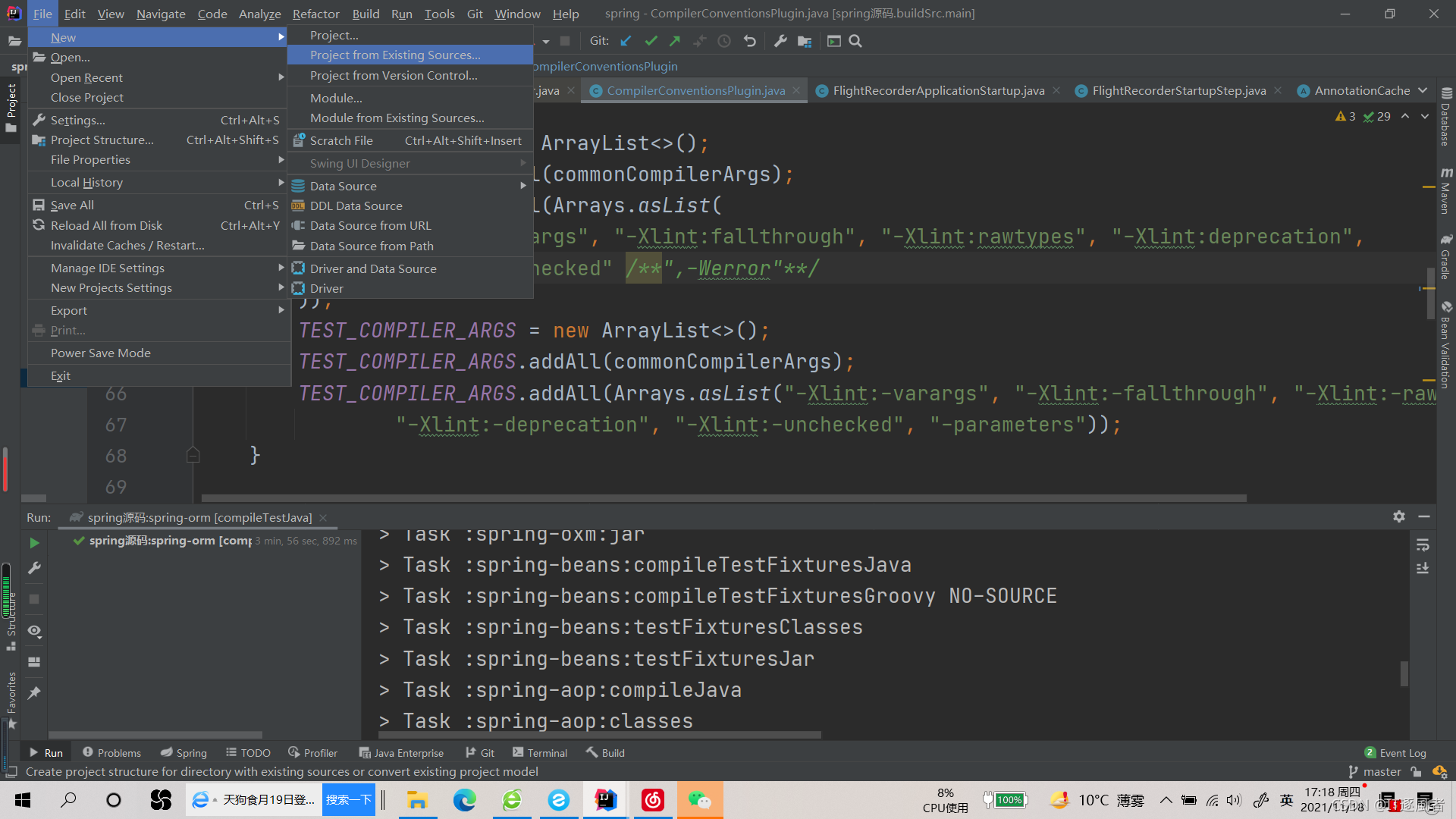
然后选择你下载的路径导入就可以了。
接着就会出现各种问题。。。。
先参考着这篇博客安装:
程序包jdk.jfr.Category不存在,import jdk.jfr.category_Satayia的博客-CSDN博客Spring源码编译一次性通过&遇到的坑解决方法_冰慧的博客-CSDN博客
4、打开build.gradle根据要求下载gradle:我下载的版本是6.5.1(登陆官网就可以,然后找到指定版本),这是地址:Gradle | Releases
5、为什么一定要2020版的idea呢?因为我之前是2019版。。一直报kotlin的错,不能在1.3.3-1.4.0-rc之间选择。。。
排错思路:
1、是kotlin版本设置问题?修改build.gradle中的版本,错误依然存在
2、是maven依赖版本不对?修改版本和1.3.61对应仍然存在错误
3、提高kotlin版本,即安装2020版idea。然后重新导入项目配置其版本为1.4.10解决
下载后安装并添加到环境变量。
6、如果出现reactor和rsocket报401未授权的错误则进行替换(在build.gradle文件中):
//mavenBom "io.rsocket:rsocket-bom:1.1.0-SNAPSHOT"mavenBom "io.rsocket:rsocket-bom:1.1.0"7、至于导包增加maven管理看着上面那篇博客就行,感觉那个博主还是写的很好的。
运行结果:
> Task :buildSrc:compileJava UP-TO-DATE
> Task :buildSrc:compileGroovy NO-SOURCE
> Task :buildSrc:pluginDescriptors UP-TO-DATE
> Task :buildSrc:processResources UP-TO-DATE
> Task :buildSrc:classes UP-TO-DATE
> Task :buildSrc:jar UP-TO-DATE
> Task :buildSrc:assemble UP-TO-DATE
> Task :buildSrc:pluginUnderTestMetadata UP-TO-DATE
> Task :buildSrc:compileTestJava NO-SOURCE
> Task :buildSrc:compileTestGroovy NO-SOURCE
> Task :buildSrc:processTestResources NO-SOURCE
> Task :buildSrc:testClasses UP-TO-DATE
> Task :buildSrc:test NO-SOURCE
> Task :buildSrc:validatePlugins UP-TO-DATE
> Task :buildSrc:check UP-TO-DATE
> Task :buildSrc:build UP-TO-DATEDeprecated Gradle features were used in this build, making it incompatible with Gradle 7.0.
Use '--warning-mode all' to show the individual deprecation warnings.
See https://docs.gradle.org/6.5.1/userguide/command_line_interface.html#sec:command_line_warningsCONFIGURE SUCCESSFUL in 37sDeprecated Gradle features were used in this build, making it incompatible with Gradle 7.0.
Use '--warning-mode all' to show the individual deprecation warnings.
See https://docs.gradle.org/6.5.1/userguide/command_line_interface.html#sec:command_line_warnings
8、如果你的jdk是1.8那么问题来了在你compileTestJava时会发现没有jfr包,解决办法就是升级到jdk11,
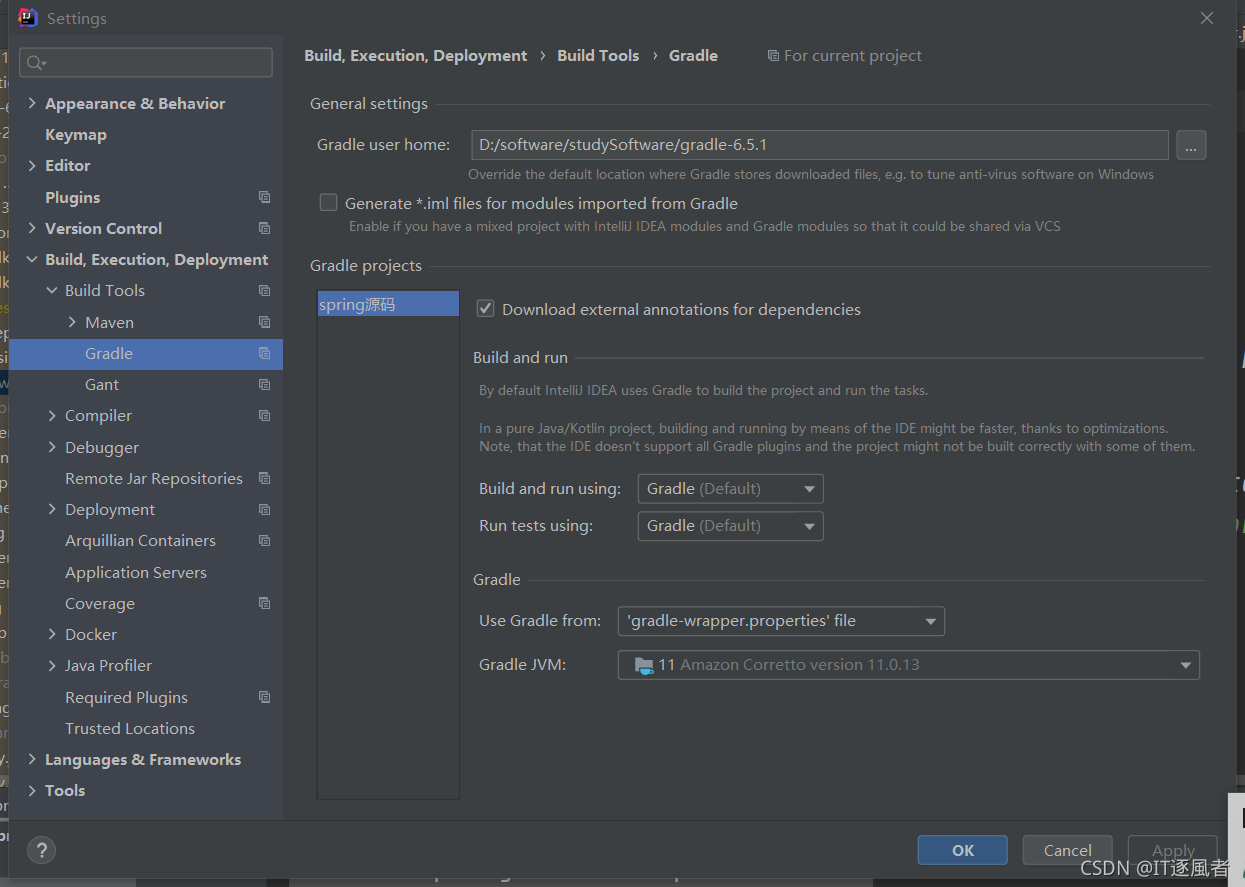
然后在包结构中设置为11
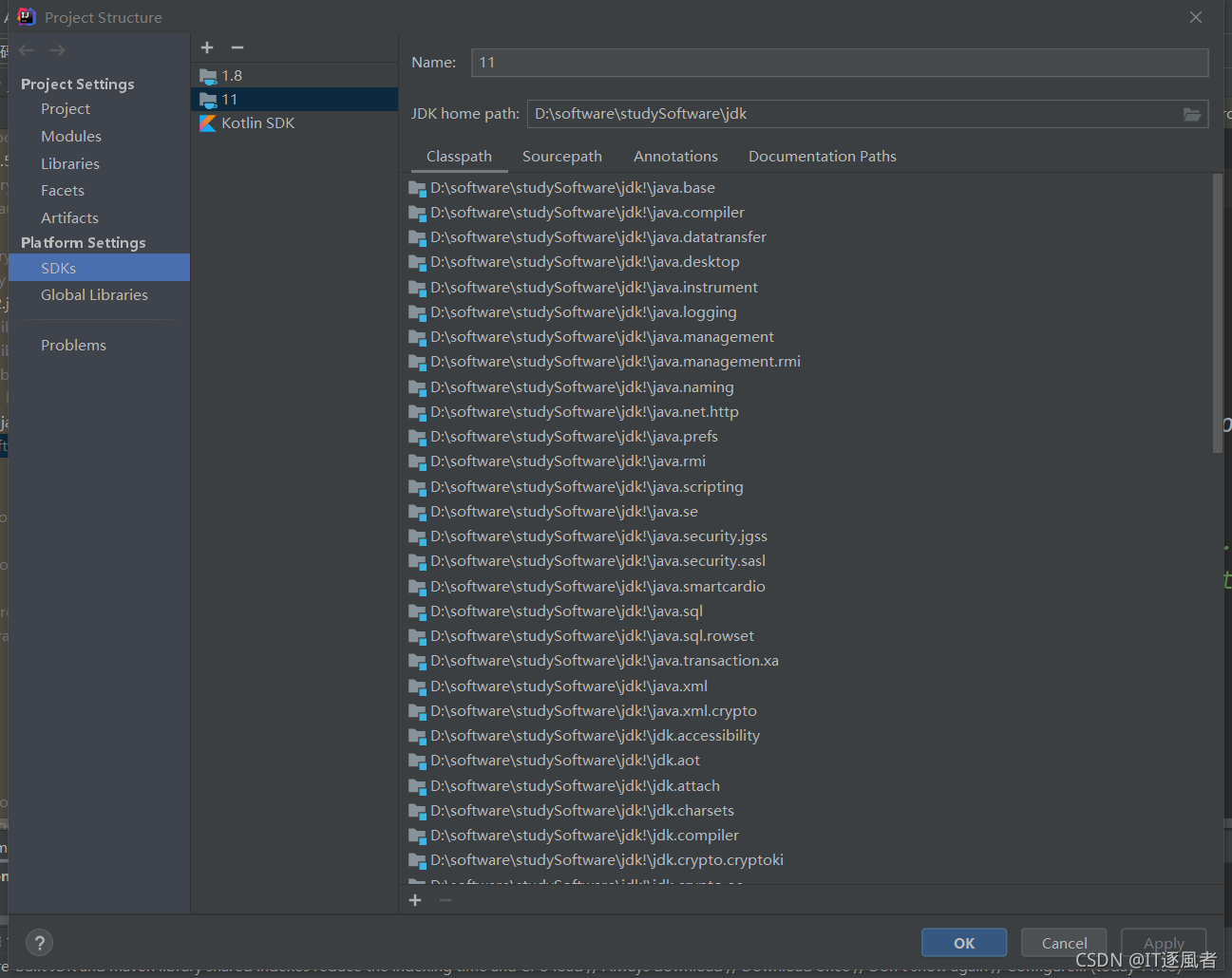
9、继续测试,因为有些包过期了所以测试编译不能通过,就是这个类。
public class MonoToListenableFutureAdapter implements ListenableFuture {private final MonoProcessor processor;private final ListenableFutureCallbackRegistry registry = new ListenableFutureCallbackRegistry<>();public MonoToListenableFutureAdapter(Mono mono) {Assert.notNull(mono, "Mono must not be null");this.processor = mono.doOnSuccess(this.registry::success).doOnError(this.registry::failure).toProcessor();}@Override@Nullablepublic T get() {return this.processor.block();}@Override@Nullablepublic T get(long timeout, TimeUnit unit) {Assert.notNull(unit, "TimeUnit must not be null");Duration duration = Duration.ofMillis(TimeUnit.MILLISECONDS.convert(timeout, unit));return this.processor.block(duration);}@Overridepublic boolean cancel(boolean mayInterruptIfRunning) {if (isCancelled()) {return false;}this.processor.cancel();// isCancelled may still return false, if mono completed before the cancelreturn this.processor.isCancelled();}@Overridepublic boolean isCancelled() {return this.processor.isCancelled();}@Overridepublic boolean isDone() {return this.processor.isTerminated();}@Overridepublic void addCallback(ListenableFutureCallback callback) {this.registry.addCallback(callback);}@Overridepublic void addCallback(SuccessCallback success, FailureCallback failure) {this.registry.addSuccessCallback(success);this.registry.addFailureCallback(failure);}} 解决办法:注释掉,"-Werror",虽然还会报错但是编译能通过
public class CompilerConventionsPlugin implements Plugin {/*** The project property that can be used to switch the Java source* compatibility version for building source and test classes.*/public static final String JAVA_SOURCE_VERSION_PROPERTY = "javaSourceVersion";public static final JavaVersion DEFAULT_COMPILER_VERSION = JavaVersion.VERSION_1_8;private static final List COMPILER_ARGS;private static final List TEST_COMPILER_ARGS;static {List commonCompilerArgs = Arrays.asList("-Xlint:serial", "-Xlint:cast", "-Xlint:classfile", "-Xlint:dep-ann","-Xlint:divzero", "-Xlint:empty", "-Xlint:finally", "-Xlint:overrides","-Xlint:path", "-Xlint:processing", "-Xlint:static", "-Xlint:try", "-Xlint:-options");COMPILER_ARGS = new ArrayList<>();COMPILER_ARGS.addAll(commonCompilerArgs);COMPILER_ARGS.addAll(Arrays.asList("-Xlint:varargs", "-Xlint:fallthrough", "-Xlint:rawtypes", "-Xlint:deprecation","-Xlint:unchecked" /**,"-Werror"**/));TEST_COMPILER_ARGS = new ArrayList<>();TEST_COMPILER_ARGS.addAll(commonCompilerArgs);TEST_COMPILER_ARGS.addAll(Arrays.asList("-Xlint:-varargs", "-Xlint:-fallthrough", "-Xlint:-rawtypes","-Xlint:-deprecation", "-Xlint:-unchecked", "-parameters"));}
...
最后结果:终于over!
> Task :spring-orm:compileJava
> Task :spring-orm:classes
> Task :spring-orm:jar
> Task :spring-orm:compileTestFixturesJava NO-SOURCE
> Task :spring-orm:compileTestJavaDeprecated Gradle features were used in this build, making it incompatible with Gradle 7.0.
Use '--warning-mode all' to show the individual deprecation warnings.
See https://docs.gradle.org/6.5.1/userguide/command_line_interface.html#sec:command_line_warningsBUILD SUCCESSFUL in 3m 56s
63 actionable tasks: 50 executed, 13 up-to-date
16:39:17: Task execution finished 'compileTestJava'.
本文来自互联网用户投稿,文章观点仅代表作者本人,不代表本站立场,不承担相关法律责任。如若转载,请注明出处。 如若内容造成侵权/违法违规/事实不符,请点击【内容举报】进行投诉反馈!