openCV 图像直方图均衡化
openCV 图像直方图均衡化
- 1 概念
- 2 流程
- 3 代码实现
1 概念
图像直方图均衡化是对图像像素重新映射,使得映射后的像素分布更加均匀,图像显示适合人类视觉。
2 流程
(1) 计算原图像像素的频率
(2) 计算原图像像素的累积频率
(3) 归一化
3 代码实现
(1)方法一
### 3 灰度图像进行直方图均衡化
## histeq(im,nbr_bins=256) :img --> imhist,bins  -->.cumsum() --> normalize--> interp
def get_pdf(img):total = img.sizereturn [np.sum(img == i)/total  for i in range(256)]def histeq_01(img):pr = get_pdf(img)img0 = img.copy()y_points = []cum = 0.for i in range(256):cum = cum + pr[i]img0[img==i] = cum * 255.y_points.append(cum * 255.)return img0, y_pointsif __name__ == '__main__':import numpy as npfrom pylab import *from PIL import Imageimg = np.array(Image.open('luna.png').convert('L'))img0, y_points = histeq_01(img)img00 = Image.fromarray(np.uint8(img0))subplot(121)imshow(img, cmap='gray')subplot(122)imshow(img00,cmap='gray')show()
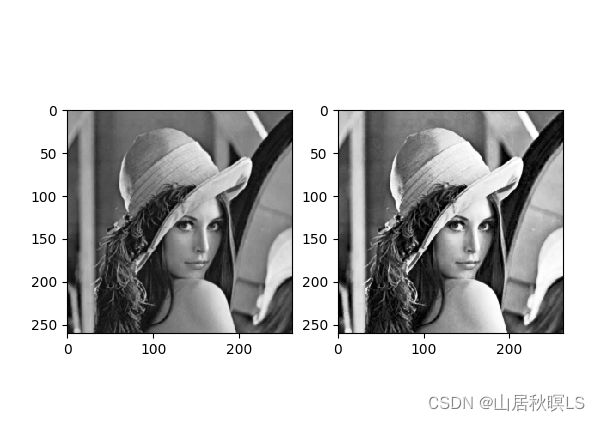
(1)方法二
def histeq_02(img,bins=256):imhist,bins_ = np.histogram(img.flatten(),bins)cdf = imhist.cumsum() # 累积分布函数cdf = cdf/cdf[-1]*255 # 归一化img0 = np.interp(img.flatten(),bins_[:-1],cdf)return img0.reshape(img.shape),cdfif __name__ == '__main__':img = np.array(Image.open('luna.png').convert("L"))img0,cdf = histeq_02(img)plt.subplot(121)plt.imshow(img,cmap='gray')plt.subplot(122)plt.imshow(img0,cmap='gray')plt.show()
本文来自互联网用户投稿,文章观点仅代表作者本人,不代表本站立场,不承担相关法律责任。如若转载,请注明出处。 如若内容造成侵权/违法违规/事实不符,请点击【内容举报】进行投诉反馈!