OffSet家族2-offsetWidth,offsetHeight ,offsetLeft,offsetTop
上一篇文章详细的为大家介绍了
offsetParent,本篇文章将之前没有说完的说完,我们先来看offsetWidth,offsetHeight
offsetWidth,offsetHeight
1.定义
老规矩,首先我们先看一下官方的定义:
- HTMLElement.offsetWidth 是一个只读属性,返回一个元素的布局宽度。一个典型的offsetWidth是测量包含元素的边框(border)、水平线上的内边距(padding)、竖直方向滚动条(scrollbar)(如果存在的话)、以及CSS设置的宽度(width)的值。
- HTMLElement.offsetHeight 是一个只读属性,它返回该元素的像素高度,高度包含该元素的垂直内边距和边框,且是一个整数。
通常,元素的offsetHeight是一种元素CSS高度的衡量标准,包括元素的边框、内边距和元素的水平滚动条(如果存在且渲染的话),不包含:before或:after等伪类元素的高度。
对于文档的body对象,它包括代替元素的CSS高度线性总含量高。浮动元素的向下延伸内容高度是被忽略的。
如果元素被隐藏(例如 元素或者元素的祖先之一的元素的style.display被设置为none),则返回0
上面把比较重要的标记出来了,大家可以着重看一看
美丽的分割线
看完官方定义我们来自己捋一捋
那么什么是 offsetWidth和offsetHeight呢
在一般情况下
offsetWidth=content(内容的宽度,width)+padding(左右)+border(左右)
offsetHeight=content(内容的高度,height)+padding(上下)+border(上下)
3.实例分析
和offsetParent不一样,offsetWidth,offsetHeight与定位没有关系,即使有定位,他们的值也不变
<style>.box {width: 300px;height: 400px;border: 1px solid #234567;padding: 10px;position: fixed;top: 30px;}.lit {position: absolute;background-color: skyblue;width: 200px;height: 300px;border: 1px solid #000;top: 1000px;}.content {width: 300px;height: 400px;padding: 5px;background-color: slategray;border: 1px solid #000;margin-left: 500px;}</style><div class="box"><div class="lit"></div></div><div class="content"></div><script>var box = document.querySelector(".box");var lit = document.querySelector(".lit");var content = document.querySelector(".content");console.log("boxoffsetWidth----" + box.offsetWidth);console.log("boxoffsetHeight----" + box.offsetHeight);console.log("litoffsetWidth----" + lit.offsetWidth);console.log("litoffsetHeight----" + lit.offsetHeight);console.log("contentoffsetWidth----" + content.offsetWidth);console.log("contentoffsetHeight----" + content.offsetHeight);</script>
让我们看一下打印结果
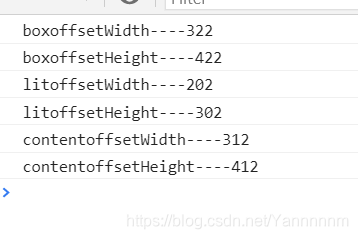
计算
上面看了结果,下面我们看一下对照上面的公式如何计算出来的
- boxoffsetWidth=content(300)+padding(10+10)+border(1+1)=322
boxoffsetHeight= content(400)+padding(10+10)+border(1+1)=422 - litoffsetWidth=content(200)+padding(0)+border(1+1)=202
litoffsetHeight= content(300)+padding(0)+border(1+1)=302 - contentoffsetWidth=content(300)+padding(5+5)+border(1+1)=312
contentoffsetHeight= content(400)+padding(5+5)+border(1+1)=412
注意点
- 虽然这里打印的是字符串,但是要注意这里是隐式转换,这个值打印出来的是数字类型
- offsetWidth,offsetHeight是只读属性,不可以设置
- 对于文档的body对象,它包括代替元素的CSS高度线性总含量高。
来看例子
//css部分* {margin: 0;padding: 0;}.content {width: 300px;height: 400px;padding: 5px;background-color: slategray;border: 1px solid #000;}
//html部分<div class="content"></div>
//js部分var content = document.querySelector(".content");console.log(content.offsetWidth);content.style.offsetWidth = 500;console.log(content.offsetWidth);//由于宽度一般为屏幕宽度,所以这里不做打印,看一下明显一点的offsetHeightconsole.log(document.body.offsetHeight);
看结果
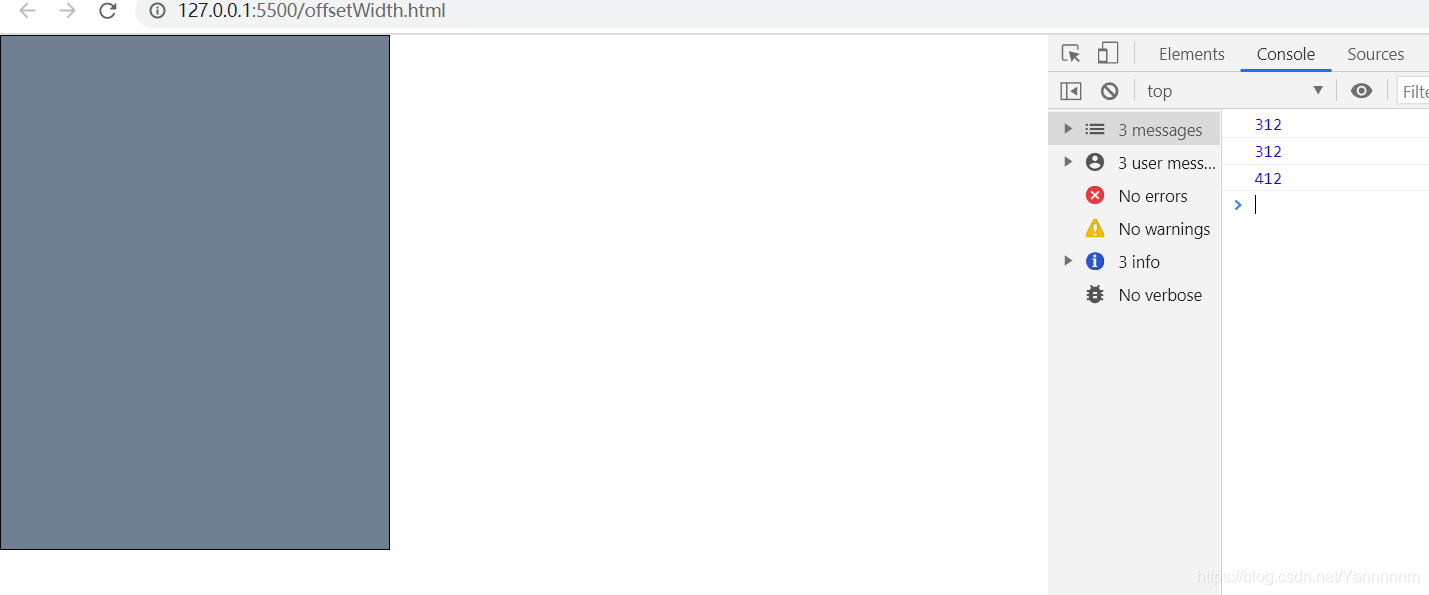
盒子没有变大,说明是只读属性
并且document.body.offsetHeight等于唯一一个盒子的offsetHeight
offsetLeft,offsetTop
我们来看最后一块
1. 定义
官方定义
- HTMLElement.offsetLeft 是一个只读属性,返回当前元素左上角相对于 HTMLElement.offsetParent 节点的左边界偏移的像素值。
- HTMLElement.offsetTop 为只读属性,它返回当前元素相对于其 offsetParent 元素的顶部内边距的距离
个人见解
总结起来:我们要计算offsetLeft,offsetTop的值,我们需要看相对于父级(看最近的父级是否有定位,有定位,以最近的父级为标准,一级一级往上寻找,如果都没有,则以body为准)的内边距,上边距的距离
2.实例分析
//css* {margin: 0;padding: 0;}.big {/* position: relative; */width: 300px;height: 300px;background-color: teal;border: 10px solid #000;margin: 40px;}.lit {width: 100px;height: 100px;background-color: #fff;margin-left: 20px;border: 7px solid #000;}
//html
<div class="big"><div class="lit"></div></div>
//jsvar lit = document.querySelector(".lit");//big没有定位console.log(lit.offsetTop); //50 big的border(10)+big的margintop(40)console.log(lit.offsetLeft); //70  big的border(10)+big的marginleft(40)+自己的 margin-left(20px)//big有定位console.log(lit.offsetTop); //0(与border无关)console.log(lit.offsetLeft); //20( margin-left(20px))
上面放了详细的计算过程这里就不再叙述
3.注意
- 一级一级向上面查找,直到找到有定位的父级元素,没有找所有的爸爸body
- 自己的boder不影响自己,但是父级的boder需要关怀
总结
OffSet家族到这里差不多就结束了,希望大家能有所所获~
本文来自互联网用户投稿,文章观点仅代表作者本人,不代表本站立场,不承担相关法律责任。如若转载,请注明出处。 如若内容造成侵权/违法违规/事实不符,请点击【内容举报】进行投诉反馈!