一个漂亮的js表单验证页面+验证码
一个漂亮的js表单验证页面
见图知其意,
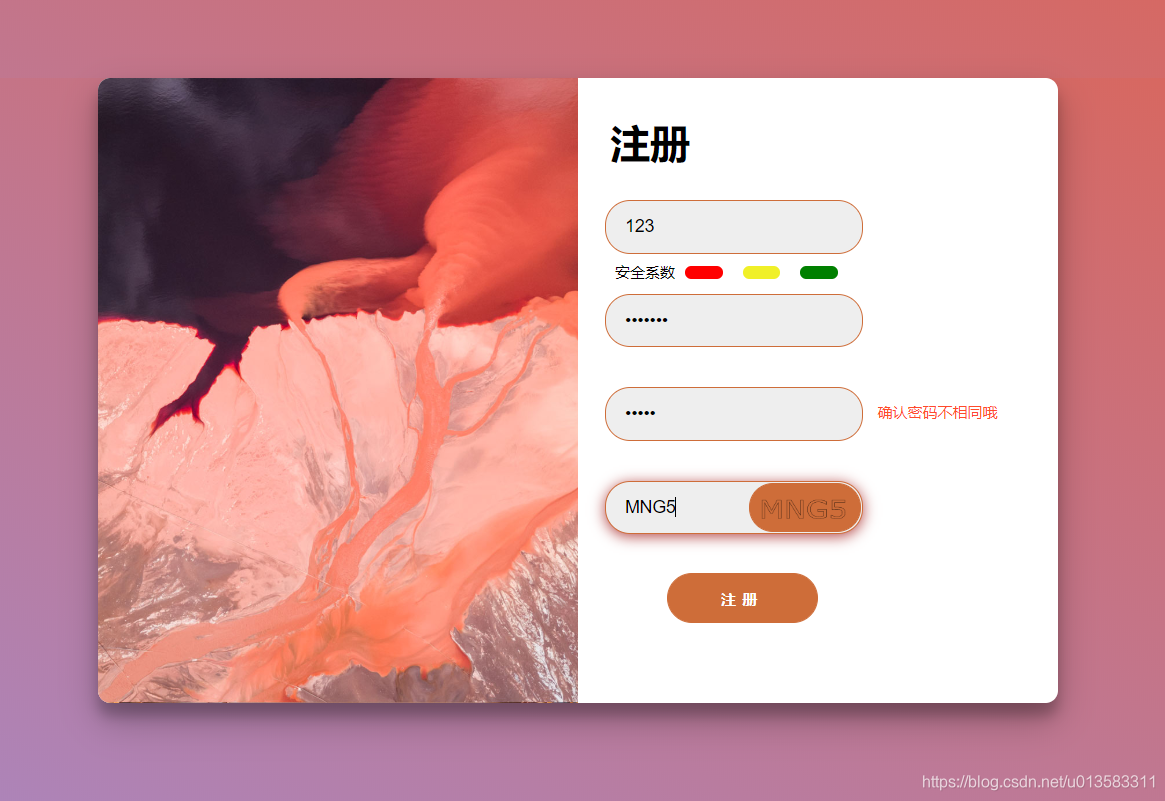
主要特性
- 带密码安全系数的判断
- 其他的就没有啥啦
- 嘿嘿嘿
当然,其代码也在Github上
我也准备了一套可以直接Ctrl + v; Ctrl + c 运行的代码
<html lang="en"><head><meta charset="UTF-8"><title>表单验证title><style>* {padding: 0;margin: 0;box-sizing: border-box;}html,body {background: linear-gradient(to left bottom, #DD6455, #a18cd1);width: 100%;height: 100%;}.form-container{background-color:#fff;width: 768px;margin: 100px auto;height: 500px;border-radius: 10px;box-shadow: 0 14px 28px rgba(0,0,0,0.25), 0 10px 10px rgba(0,0,0,0.22);overflow: hidden;}.left{width: 50%;height: 100%;float: left;background: url(../imgs/AbstractSaltBeds_ZH-CN8351691359_1920x1080.jpg) center center/cover no-repeat;}.right {float: right;width: 50%;height: 100%;}form{padding: 20px;height: 100%;}.passw-div, .verifi-div, .repassw-div{position: relative;}h1 {margin: 10px 6px;}input {background-color: #eee;outline:none; /*不出现蓝色边框*/width: 60%;padding: 12px 15px;margin: 16px 2px;border-radius: 20px;border: 1px solid #CE6D39;transition: 300ms;font-size: 14px;}.register-div span {width: 35%;height: 40px;display: block;border-radius: 20px;line-height: 40px;text-align: center;font-size: 12px;font-weight: bold;letter-spacing: 5px;border: 1px solid #CE6D39;background-color: #CE6D39;color: #FFFFFF;margin: 15px 0 0 15%;margin-left: 15%;transition: 300ms;}.register-div span:hover{background-color: #FF4B2B;box-shadow: 0 2px 11px #B34747}.safety-factor-div {position: absolute;line-height: 10px;top: -6px;left: 0px;}.safety-factor-div div{float: left;width: 30px;height: 10px;border-radius: 5px;margin: 0 8px;visibility: hidden;}.safety-factor-div span{float: left;margin-left: 10px;font-size: 12px;visibility: hidden;}.passw-div p,.repassw-div p{position: absolute;font-size: 12px;color: #FF4B2B;top: 28px;left: 220px;}.verifi-div canvas{position: absolute;top: 18px;left: 117px;width: 90px;height: 39px;border-radius: 20px;border: 1px solid #CE6D39;background-color: #CE6D39;text-align: center;line-height: 40px;transition: 300ms;}input:focus, .verifi-div canvas:hover{box-shadow: 0 2px 11px #B34747}style>
head>
<body>
<div class="form-container"><div class="left">div><div class="right"><form ><div class="header-div"><h1>注册h1>div><div class="username-div"><input id="username" type="text" placeholder="用户名">div><div class="passw-div"><input id="passw" type="password" placeholder="密码"><p id="passw-err">p><div class="safety-factor-div"><span id="safe-head">安全系数span><div id="safe-d1" style="background-color:red;">div><div id="safe-d2" style="background-color:#F0F028;">div><div id="safe-d3" style="background-color:green;">div>div>div><div class="repassw-div"><input id="repassw" type="password" placeholder="确认密码"><p id="repassw-err">p>div><div class="verifi-div"><input id="input-code" type="text" placeholder="请输入验证码"><canvas id="verifi-code">canvas>div><div class="register-div"><span id="register">注册span>div>form>div>
div>
body>
<script>'use strict';var username = document.getElementById('username');var myInput = document.getElementById('passw');var myReinput = document.getElementById('repassw');var inputCode = document.getElementById('input-code');var register = document.getElementById('register');var canvas = document.getElementById('verifi-code');var code, password, repassword;myInput.addEventListener('input',function(e){let safe_head = document.getElementById('safe-head');let safe_d1 = document.getElementById('safe-d1');let safe_d2 = document.getElementById('safe-d2');let safe_d3 = document.getElementById('safe-d3');let input_err = document.getElementById('passw-err');console.log("输入密码: " + myInput.value);password = myInput.value;safe_head.style.visibility = "visible";switch (checkPwd(password)) {case 0:{input_err.innerHTML = "密码不能小于6位";safe_d1.style.visibility = "visible";safe_d2.style.visibility = "hidden";safe_d3.style.visibility = "hidden";break;}case 1:{input_err.innerHTML = "";safe_d1.style.visibility = "visible";safe_d2.style.visibility = "visible";safe_d3.style.visibility = "hidden";break;}case 2:{input_err.innerHTML = "";safe_d1.style.visibility = "visible";safe_d2.style.visibility = "visible";safe_d3.style.visibility = "visible";break;}default:{input_err.innerHTML = "";}}});myReinput.addEventListener('input',function(e){let reinput_err = document.getElementById('repassw-err');console.log("重复密码输入:" + myReinput.value);repassword = myReinput.value;if(repassword != password){reinput_err.innerHTML = "确认密码不相同哦";}else{reinput_err.innerHTML = "";}});register.onclick = function () {if(username.value){if (password) {if(password.length >= 6){if(myReinput.value){if(myReinput.value == password){if(code == inputCode.value.toUpperCase()){alert("登入成功")} else alert("验证码错误");} else alert("重复密码不相同哦")} else alert("请输入重复密码")}else alert("请输入符合规范的密码")} else alert("请输入密码");} else alert("请输入邮箱");}function createCode() {let code = "";var codeLength = 4;var selectChar = new Array(0, 1, 2, 3, 4, 5, 6, 7, 8, 9,'A','B','C','D','E','F','G','H','I','J','K','L','M','N','O','P','Q','R','S','T','U','V','W','X','Y','Z');for (var i = 0; i < codeLength; i++) {var charIndex = Math.floor(Math.random() * 36);code += selectChar[charIndex];}console.log("生成验证码 " + code);return code;}function draw_canvas(code) {if (canvas) {var ctx=canvas.getContext('2d');ctx.clearRect(0,0,canvas.width,canvas.height);ctx.font="80px Verdana";ctx.strokeText(code,25,110);console.log("canvas 绘制完成")}elseconsole.log("没有找到canvas")}function checkPwd(str){var pattern1 = /([0-9]+)/i;var pattern2 = /([a-z]+)/i;if(str.length<6 || str.length>20){return 0;}if(pattern1.exec(str)){if(pattern2.exec(str)){return 2}return 1;}}canvas.onclick = function () {code = createCode();draw_canvas(code);}window.onload = function () {code = createCode();draw_canvas(code);}script>
html>
但是这样图片加载不上去,可以去github取,当然也可以用你自己的图片
本文来自互联网用户投稿,文章观点仅代表作者本人,不代表本站立场,不承担相关法律责任。如若转载,请注明出处。 如若内容造成侵权/违法违规/事实不符,请点击【内容举报】进行投诉反馈!