react+antd4表格添加行 编辑 删除功能

配置表格头部 colums
const columns = [{title: '姓名',dataIndex: 'name',inputType: 'text',},{title: '得分(10)',dataIndex: 'ppt',inputType: 'number',max: 10,},{title: '得分(10)',dataIndex: 'cg',inputType: 'number',max: 10},{title: '得分(10',dataIndex: 'gh',inputType: 'number',max: 10,},{title: '得分(10)',dataIndex: 'bd',inputType: 'number',max: 10,},{title: '得分(10)',dataIndex: 'sw',inputType: 'number',max: 10,},{title: '总得分(50)',dataIndex: 'df',inputType: 'number',max: 50,},{title: '操作',key: 'del',dataIndex: 'cz',isEdit: true,width: '10%',render: (_: any, record: { key: React.Key }) => {return ( handleDelete(record.key)}>删除 )}},];
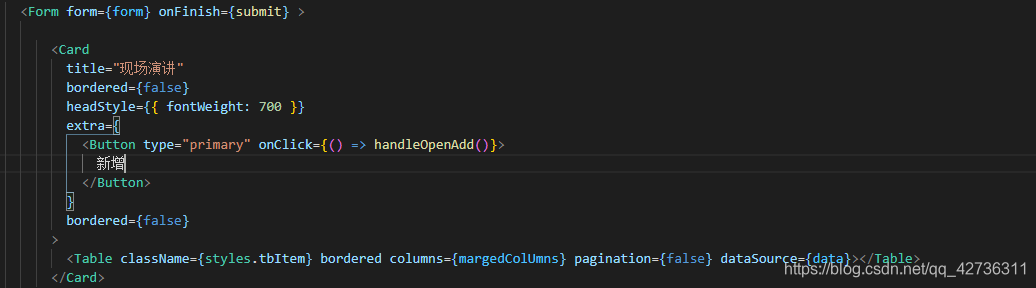 创建table 验证数据 antd4修改了验证的方式,写一个margedColUmns方法,我们遍历columns,根据inputType的不同配置不同的输入框,以及不同的验证方式,render一下

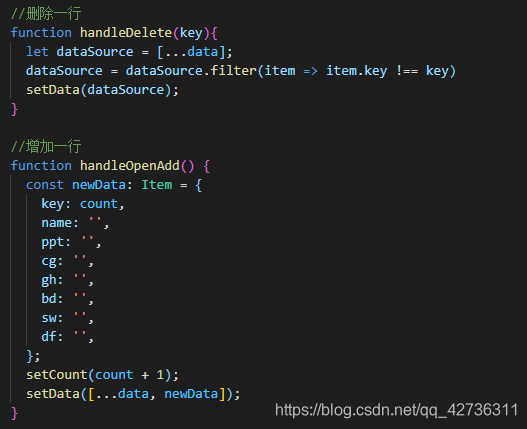
增加与删除的功能
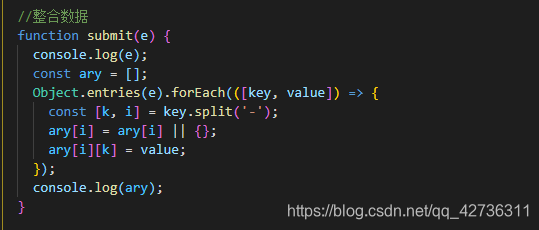
因为formitem的name不同 带着索引,所以最后我们要整合成一样的key 的数组对象提交给后台
本文来自互联网用户投稿,文章观点仅代表作者本人,不代表本站立场,不承担相关法律责任。如若转载,请注明出处。 如若内容造成侵权/违法违规/事实不符,请点击【内容举报】进行投诉反馈!