ionic学习--01
ionic教程
- 一、创建页面
- 二、页面跳转
- 三、新增tabs页面
- 四、自定义公共模块
一、创建页面
ionic g page news(页面名称)
二、页面跳转

跳转到新闻
三、新增tabs页面
- ionic g page tab4
- 在app-routing.module.ts中剪切下面内容

- 在tabs-routing.module.ts中粘贴上面内容

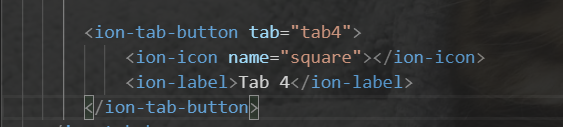
- 在tabs.page.html中写入tab4内容
四、自定义公共模块
在ionic中页面是由模块组成的,多个模块无法共用一个组件,这时候就需要把组件封装成模块,让其他模块引入这个模块
- ionic g module module/slide
- ionic g component module/slide
- 公共模块 slide.module.ts 中暴露对应的组件
import { NgModule } from '@angular/core';
import { CommonModule } from '@angular/common';
import { SlideComponent } from './slide.component';@NgModule({declarations: [SlideComponent],imports: [CommonModule],
exports: [SlideComponent]
})
export class SlideModule { }
- 用到的地方引入自定义模块,并依赖注入自定义模块
import { IonicModule } from '@ionic/angular';
import { NgModule } from '@angular/core';
import { CommonModule } from '@angular/common';
import { FormsModule } from '@angular/forms';
import { Tab1Page } from './tab1.page';
import { ExploreContainerComponentModule } from '../explore-container/explore-container.module';import { Tab1PageRoutingModule } from './tab1-routing.module';
import { SlideModule } from '../module/slide/slide.module';@NgModule({imports: [IonicModule,CommonModule,FormsModule,ExploreContainerComponentModule,SlideModule,Tab1PageRoutingModule,],declarations: [Tab1Page]
})
export class Tab1PageModule { }- 使用自定义模块
本文来自互联网用户投稿,文章观点仅代表作者本人,不代表本站立场,不承担相关法律责任。如若转载,请注明出处。 如若内容造成侵权/违法违规/事实不符,请点击【内容举报】进行投诉反馈!