solr理论
1、 solr基础
因为 Solr 包装并扩展了 Lucene,所以它们使用很多相同的术语。更重要的是,Solr 创建的索引与 Lucene 搜索引擎库完全兼容。通过对 Solr 进行适当的配置,某些情况下可能需要进行编码,Solr 可以阅读和使用构建到其他 Lucene 应用程序中的索引。
在 Solr 和 Lucene 中,使用一个或多个 Document 来构建索引。Document 包括一个或多个 Field。Field 包括名称、内容以及告诉 Solr 如何处理内容的元数据。例如,Field 可以包含字符串、数字、布尔值或者日期,也可以包含你想添加的任何类型,只需用在solr的配置文件中进行相应的配置即可。Field 可以使用大量的选项来描述,这些选项告诉 Solr 在索引和搜索期间如何处理内容。现在,查看一下表 1 中列出的重要属性的子集:
| 属性名称 | 描述 |
| Indexed | Indexed Field 可以进行搜索和排序。你还可以在 indexed Field 上运行 Solr 分析过程,此过程可修改内容以改进或更改结果。 |
| Stored | stored Field 内容保存在索引中。这对于检索和醒目显示内容很有用,但对于实际搜索则不是必需的。例如,很多应用程序存储指向内容位置的指针而不是存储实际的文件内容。 |
2、 solr索引操作
在 Solr 中,通过向部署在 servlet 容器中的 Solr Web 应用程序发送 HTTP 请求来启动索引和搜索。Solr 接受请求,确定要使用的适当 SolrRequestHandler,然后处理请求。通过 HTTP 以同样的方式返回响应。默认配置返回 Solr 的标准 XML 响应。你也可以配置 Solr 的备用响应格式,如json、csv格式的文本。
索引就是接受输入元数据(数据格式在schema.xml中进行配置)并将它们传递给 Solr,从而在 HTTP Post XML 消息中进行索引的过程。你可以向 Solr 索引 servlet 传递四个不同的索引请求:
add/update 允许您向 Solr 添加文档或更新文档。直到提交后才能搜索到这些添加和更新。
commit 告诉 Solr,应该使上次提交以来所做的所有更改都可以搜索到。
optimize 重构 Lucene 的文件以改进搜索性能。索引完成后执行一下优化通常比较好。如果更新比较频繁,则应该在使用率较低的时候安排优化。一个索引无需优化也可以正常地运行。优化是一个耗时较多的过程。
delete 可以通过 id 或查询来指定。按 id 删除将删除具有指定 id 的文档;按查询删除将删除查询返回的所有文档。
Lucene中操作索引也有这几个步骤,但是没有更新。Lucene更新是先删除,然后添加索引。因为更新索引在一定情况下,效率没有先删除后添加的效率好。
3、 搜索
添加文档后,就可以搜索这些文档了。Solr 接受 HTTP GET 和 HTTP POST 查询消息。收到的查询由相应的 SolrRequestHandler 进行处理。
solr查询参数描述:
| 参数 | 描述 | 示例 |
| q | Solr 中用来搜索的查询。有关该语法的完整描述,请参阅 参考资料。可以通过追加一个分号和已索引且未进行断词的字段(下面会进行解释)的名称来包含排序信息。默认的排序是 score desc,指按记分降序排序。 | q=myField:Java AND otherField:developerWorks; date asc 此查询搜索指定的两个字段,并根据一个日期字段对结果进行排序。 |
| start | 将初始偏移量指定到结果集中。可用于对结果进行分页。默认值为 0。 | start=15 返回从第 15 个结果开始的结果。 |
| rows | 返回文档的最大数目。默认值为 10。 | rows=25,返回25个结果集 |
| fq | 提供一个可选的筛选器查询。查询结果被限制为仅搜索筛选器查询返回的结果。筛选过的查询由 Solr 进行缓存。它们对提高复杂查询的速度非常有用。 | 任何可以用 q 参数传递的有效查询,排序信息除外。 |
| hl | 当 hl=true 时,在查询响应中醒目显示片段。默认为 false。参看醒目显示参数(见 参考资料)。 | hl=true |
| fl | 作为逗号分隔的列表指定文档结果中应返回的 Field 集。默认为 “*”,指所有的字段。“score” 指还应返回记分。 | *,score |
| sort | 排序,对查询结果进行排序,参考 | sort=date asc,price desc |
4、 solr模式
上面有提到schema.xml这个配置,这个配置可以在你下载solr包的安装解压目录的apache-solr-3.4.0\example\solr\conf中找到,它就是solr模式关联的文件。打开这个配置文件,你会发现有详细的注释。
模式组织主要分为三个重要配置
types 部分是一些常见的可重用定义,定义了 Solr(和 Lucene)如何处理 Field。也就是添加到索引中的xml文件属性中的类型,如int、text、date等
fileds是你添加到索引文件中出现的属性名称,而声明类型就需要用到上面的types
其他配置有
uniqueKey 唯一键,这里配置的是上面出现的fileds,一般是id、url等不重复的。在更新、删除的时候可以用到。
defaultSearchField默认搜索属性,如q=solr就是默认的搜索那个字段
solrQueryParser查询转换模式,是并且还是或者(and/or)
schema配置类型
<fieldType name="text" class="solr.TextField" positionIncrementGap="100">
<analyzer type="index">
<tokenizer class="solr.WhitespaceTokenizerFactory" />
<filter class="solr.StopFilterFactory" ignoreCase="true"
words="stopwords.txt" />
<filter class="solr.WordDelimiterFilterFactory"
generateWordParts="1" generateNumberParts="1" catenateWords="1"
catenateNumbers="1" catenateAll="0" />
<filter class="solr.LowerCaseFilterFactory" />
<filter class="solr.EnglishPorterFilterFactory" protected="protwords.txt" />
<filter class="solr.RemoveDuplicatesTokenFilterFactory" />
analyzer> <analyzer type="query">
<tokenizer class="solr.WhitespaceTokenizerFactory" />
<filter class="solr.SynonymFilterFactory" synonyms="synonyms.txt"
ignoreCase="true" expand="true" />
<filter class="solr.StopFilterFactory" ignoreCase="true"
words="stopwords.txt" />
<filter class="solr.WordDelimiterFilterFactory"
generateWordParts="1" generateNumberParts="1" catenateWords="0"
catenateNumbers="0" catenateAll="0" />
<filter class="solr.LowerCaseFilterFactory" />
<filter class="solr.EnglishPorterFilterFactory" protected="protwords.txt" />
<filter class="solr.RemoveDuplicatesTokenFilterFactory" />
analyzer> fieldType>
上面就是一个type了,然后你在fields配置field的时候就可以用这个type。
首先,上面的fieldType的配置中有两个analyzer,它是分词器。主要把我们的数据进行分割成一个个的词语。词干提取、停止词删除以及相似的操作都被应用于标记,然后才进行索引和搜索,导致使用相同类型的标记。
上面的应用程序的 Solr 的fieldType配置按以下步骤进行设置:
Ø 根据空白进行断词,然后删除所有的公共词(StopFilterFactory)
Ø 使用破折号处理特殊的大小写、大小写转换等等。(WordDelimiterFilterFactory);将所有条目处理为小写(LowerCaseFilterFactory)
Ø 使用 Porter Stemming 算法进行词干提取(EnglishPorterFilterFactory)
Ø 删除所有的副本(RemoveDuplicatesTokenFilterFactory)
Schema属性、字段
<field name="id" type="string" indexed="true" stored="true"
required="true" />
<field name="sku" type="text_en_splitting_tight" indexed="true"
stored="true" omitNorms="true" />
<field name="name" type="text_general" indexed="true" stored="true" />
<field name="alphaNameSort" type="alphaOnlySort" indexed="true"
stored="false" />
<field name="manu" type="text_general" indexed="true" stored="true"
omitNorms="true" />
<field name="cat" type="string" indexed="true" stored="true"
multiValued="true" />
<field name="features" type="text_general" indexed="true" stored="true"
multiValued="true" />
<field name="includes" type="text_general" indexed="true" stored="true"
termVectors="true" termPositions="true" termOffsets="true" />
属性是在添加索引、查询的时候必须的配置,如果你不加这些配置。是无法完成索引的创建的。
首先id属性是未经分析的字符串类型,是可以索引、存储的,并且是唯一的。
sku是一个经过分词器分析出来的英文切割的类型字符,可以索引、存储、不要存储规范
multiValued 属性是一个特殊的例子,指 Document 可以拥有一个相同名称添加了多次的 Field。
omitNorms 属性告诉 Solr(和 Lucene)不要存储规范。
介绍一下字段声明下方的
5、 索引配置
Solr 性能因素,来了解与各种更改相关的性能权衡。
表 1 概括了可控制 Solr 索引处理的各种因素:
| 因素 | 描述 |
| useCompoundFile | 通过将很多 Lucene 内部文件整合到单一一个文件来减少使用中的文件的数量。这可有助于减少 Solr 使用的文件句柄数目,代价是降低了性能。除非是应用程序用完了文件句柄,否则 false 的默认值应该就已经足够。 |
| mergeFactor | 决定低水平的 Lucene 段被合并的频率。较小的值(最小为 2)使用的内存较少但导致的索引时间也更慢。较大的值可使索引时间变快但会牺牲较多的内存。 |
| maxBufferedDocs | 在合并内存中文档和创建新段之前,定义所需索引的最小文档数。段 是用来存储索引信息的 Lucene 文件。较大的值可使索引时间变快但会牺牲较多的内存。 |
| maxMergeDocs | 控制可由 Solr 合并的 Document 的最大数。较小的值 (< 10,000) 最适合于具有大量更新的应用程序。 |
| maxFieldLength | 对于给定的 Document,控制可添加到 Field 的最大条目数,进而截断该文档。如果文档可能会很大,就需要增加这个数值。然而,若将这个值设置得过高会导致内存不足错误。 |
| unlockOnStartup | unlockOnStartup 告知 Solr 忽略在多线程环境中用来保护索引的锁定机制。在某些情况下,索引可能会由于不正确的关机或其他错误而一直处于锁定,这就妨碍了添加和更新。将其设置为 true 可以禁用启动锁定,进而允许进行添加和更新。 |
6、 查询处理配置
若应用程序预期只会检索 Document 上少数几个 Field,那么可以将
solrconfig.xml 文件的剩余部分,除
7、 监视、记录和统计数据
用于监视、记录和统计数据的 Solr 管理选项
| 菜单名 | URL | 描述 |
| Statistics | http://localhost:8080/solr/admin/stats.jsp | Statistics 管理页提供了与 Solr 性能相关的很多有用的统计数据。这些数据包括: 关于何时加载索引以及索引中有多少文档的信息。 关于用来服务查询的 SolrRequestHandler 的有用信息。 涵盖索引过程的数据,包括添加、删除、提交等的数量。 缓存实现和 hit/miss/eviction 信息 |
| Info | http://localhost:8080/solr/admin/registry.jsp | 有关正在运行的 Solr 的版本以及在当前实现中进行查询、更新和缓存所使用的类的详细信息。此外,还包括文件存于 Solr subversion 存储库的何处的信息以及对该文件功能的一个简要描述。 |
| Distribution | http://localhost:8080/solr/admin/distributiondump.jsp | 显示与索引发布和复制有关的信息。更多信息,请参见 “发布和复制” 一节。 |
| Ping | http://localhost:8080/solr/admin/ping | 向服务器发出 ping 请求,包括在 solrconfig.xml 文件的 admin 部分定义的请求。 |
| Logging | http://localhost:8080/solr/admin/logging.jsp | 让您可以动态更改当前应用程序的日志记录等级。更改日志记录等级对于调试在执行过程中可能出现的问题非常有用。 |
| properties | http: //localhost:8080/solr/admin/get-properties.jsp | 显示当前系统正在使用的所有 Java 系统属性。Solr 支持通过命令行的系统属性替换。有关实现此特性的更多信息,请参见 solrconfig.xml 文件。 |
| Thread dump | http://localhost:8080/solr/admin/threaddump.jsp | thread dump 选项显示了在 JVM 中运行的所有线程的堆栈跟踪信息。 |
8、 智能缓存
智能缓存是让 Solr 得以成为引人瞩目的搜索服务器的一个关键性能特征。Solr 提供了四种不同的缓存类型,所有四种类型都可在 solrconfig.xml 的
| 缓存标记名 | 描述 | 能否自热 |
| filterCache | 通过存储一个匹配给定查询的文档 id 的无序集,过滤器让 Solr 能够有效提高查询的性能。缓存这些过滤器意味着对 Solr 的重复调用可以导致结果集的快速查找。更常见的场景是缓存一个过滤器,然后再发起后续的精炼查询,这种查询能使用过滤器来限制要搜索的文档数。 | 可以 |
| queryResultCache | 为查询、排序条件和所请求文档的数量缓存文档 id 的有序 集合。 | 可以 |
| documentCache | 缓存 Lucene Document,使用内部 Lucene 文档 id(以便不与 Solr 惟一 id 相混淆)。由于 Lucene 的内部 Document id 可以因索引操作而更改,这种缓存不能自热。 | 不可以 |
| Named caches | 命名缓存是用户定义的缓存,可被 Solr 定制插件 所使用。 | 可以, 如果实现了 org.apache.solr.search.CacheRegenerator 的话。 |
每个缓存声明都接受最多四个属性:
class 是缓存实现的 Java 名。
size 是最大的条目数。
initialSize 是缓存的初始大小。
autoWarmCount 是取自旧缓存以预热新缓存的条目数。如果条目很多,就意味着缓存的 hit 会更多,只不过需要花更长的预热时间。
三、利用SolrJ操作solr API,完成index操作
使用SolrJ操作Solr会比利用httpClient来操作Solr要简单。SolrJ是封装了httpClient方法,来操作solr的API的。SolrJ底层还是通过使用httpClient中的方法来完成Solr的操作。
1、 首先,你需要添加如下jar包
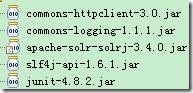
其中apache-solr-solrj-3.4.0.jar、slf4j-api-1.6.1.jar可以在下载的apache-solr-3.4.0的压缩包中的dist中能找到。
2、 其次,建立一个简单的测试类,完成Server对象的相关方法的测试工作,代码如下:
package com.hoo.test; import java.io.IOException; import java.net.MalformedURLException; import java.util.ArrayList; import java.util.Collection; import java.util.List; import org.apache.solr.client.solrj.SolrQuery; import org.apache.solr.client.solrj.SolrServer; import org.apache.solr.client.solrj.SolrServerException; import org.apache.solr.client.solrj.impl.CommonsHttpSolrServer; import org.apache.solr.client.solrj.response.QueryResponse; import org.apache.solr.client.solrj.response.UpdateResponse; import org.apache.solr.common.SolrDocumentList; import org.apache.solr.common.SolrInputDocument; import org.apache.solr.common.params.ModifiableSolrParams; import org.apache.solr.common.params.SolrParams; import org.junit.After; import org.junit.Before; import org.junit.Test; import com.hoo.entity.Index; /** * function: Server TestCase * @author hoojo * @createDate 2011-10-19 下午01:49:07 * @file ServerTest.java * @package com.hoo.test * @project SolrExample * @blog http://blog.csdn.net/IBM_hoojo * @email hoojo_@126.com * @version 1.0 */ public class ServerTest {
private SolrServer server; private CommonsHttpSolrServer httpServer; private static final String DEFAULT_URL = "http://localhost:8983/solr/";
@Before
public void init() {
try { server = new CommonsHttpSolrServer(DEFAULT_URL); httpServer = new CommonsHttpSolrServer(DEFAULT_URL); } catch (MalformedURLException e) { e.printStackTrace();
}
}
@After
public void destory() {
server = null;
httpServer = null;
System.runFinalization();
System.gc();
}
public final void fail(Object o) {
System.out.println(o);
}
/** * function: 测试是否创建server对象成功 * @author hoojo * @createDate 2011-10-21 上午09:48:18 */ @Test
public void server() {
fail(server);
fail(httpServer);
}
/** * function: 根据query参数查询索引 * @author hoojo * @createDate 2011-10-21 上午10:06:39 * @param query */ public void query(String query) {
SolrParams params = new SolrQuery(query); try { QueryResponse response = server.query(params);
SolrDocumentList list = response.getResults();
for (int i = 0; i < list.size(); i++) {
fail(list.get(i));
}
} catch (SolrServerException e) { e.printStackTrace();
}
}
}
测试运行server case方法,如果成功创建对象,那你就成功的链接到。
注意:在运行本方法之前,请启动你的solr官方自动的项目。http://localhost:8983/solr/保证能够成功访问这个工程。因为接下来的所有工作都是围绕这个solr工程完成的。如果你现在还不知道,怎么部署、发布官方solr工程,请参考前面的具体章节。
3、 Server的有关配置选项参数,server是CommonsHttpSolrServer的实例
server.setSoTimeout(1000); // socket read timeout server.setConnectionTimeout(100);
server.setDefaultMaxConnectionsPerHost(100);
server.setMaxTotalConnections(100);
server.setFollowRedirects(false); // defaults to false // allowCompression defaults to false. // Server side must support gzip or deflate for this to have any effect. server.setAllowCompression(true);
server.setMaxRetries(1); // defaults to 0. > 1 not recommended. //sorlr J 目前使用二进制的格式作为默认的格式。对于solr1.2的用户通过显示的设置才能使用XML格式。 server.setParser(new XMLResponseParser()); //二进制流输出格式 //server.setRequestWriter(new BinaryRequestWriter());
4、 利用SolrJ完成Index Document的添加操作
/** * function: 添加doc文档 * @author hoojo * @createDate 2011-10-21 上午09:49:10 */ @Test
public void addDoc() {
//创建doc文档 SolrInputDocument doc = new SolrInputDocument(); doc.addField("id", 1); doc.addField("name", "Solr Input Document");
doc.addField("manu", "this is SolrInputDocument content");
try { //添加一个doc文档 UpdateResponse response = server.add(doc);
fail(server.commit());//commit后才保存到索引库 fail(response);
fail("query time:" + response.getQTime()); fail("Elapsed Time:" + response.getElapsedTime()); fail("status:" + response.getStatus()); } catch (SolrServerException e) { e.printStackTrace();
} catch (IOException e) { e.printStackTrace();
}
query("name:solr"); }
在apache-solr-3.4.0\example\solr\conf目录下的schema.xml中可以找到有关于field属性的配置,schema.xml中的field就和上面Document文档中的field(id、name、manu)对应。如果出现ERROR:unknown field 'xxxx'就表示你设置的这个field在schema.xml中不存在。如果一定要使用这个field,请你在schema.xml中进行filed元素的配置。具体请参考前面的章节。
注意:在schema.xml中配置了uniqueKey为id,就表示id是唯一的。如果在添加Document的时候,id重复添加。那么后面添加的相同id的doc会覆盖前面的doc,类似于update更新操作,而不会出现重复的数据。
5、 利用SolrJ添加多个Document,即添加文档集合
/** * function: 添加docs文档集合 * @author hoojo * @createDate 2011-10-21 上午09:55:01 */ @Test
public void addDocs() {
Collectiondocs = new ArrayList ();
SolrInputDocument doc = new SolrInputDocument(); doc.addField("id", 2); doc.addField("name", "Solr Input Documents 1");
doc.addField("manu", "this is SolrInputDocuments 1 content");
docs.add(doc);
doc = new SolrInputDocument(); doc.addField("id", 3); doc.addField("name", "Solr Input Documents 2");
doc.addField("manu", "this is SolrInputDocuments 3 content");
docs.add(doc);
try { //add docs UpdateResponse response = server.add(docs);
//commit后才保存到索引库 fail(server.commit());
fail(response);
} catch (SolrServerException e) { e.printStackTrace();
} catch (IOException e) { e.printStackTrace();
}
query("solr"); }
就是添加一个List集合
6、 添加JavaEntity Bean,这个需要先创建一个JavaBean,然后来完成添加操作;
JavaBean:Index的代码
package com.hoo.entity; import org.apache.solr.client.solrj.beans.Field; /** * function: JavaEntity Bean;Index需要添加相关的Annotation注解,便于告诉solr哪些属性参与到index中 * @author hoojo * @createDate 2011-10-19 下午05:33:27 * @file Index.java * @package com.hoo.entity * @project SolrExample * @blog http://blog.csdn.net/IBM_hoojo * @email hoojo_@126.com * @version 1.0 */ public class Index {
//@Field setter方法上添加Annotation也是可以的 private String id; @Field
private String name; @Field
private String manu; @Field
private String[] cat; @Field
private String[] features; @Field
private float price;
@Field
private int popularity;
@Field
private boolean inStock;
public String getId() { return id; }
@Field
public void setId(String id) {
this.id = id; }
//getter、setter方法 public String toString() { return this.id + "#" + this.name + "#" + this.manu + "#" + this.cat;
}
}
注意上面的属性是和在apache-solr-3.4.0\example\solr\conf目录下的schema.xml中可以找到有关于field属性的配置对应的。如果你Index JavaBean中出现的属性在schema.xml的field配置无法找到,那么出出现unknown filed错误。
添加Bean完成doc添加操作
/** * function: 添加JavaEntity Bean * @author hoojo * @createDate 2011-10-21 上午09:55:37 */ @Test
public void addBean() {
//Index需要添加相关的Annotation注解,便于告诉solr哪些属性参与到index中 Index index = new Index(); index.setId("4"); index.setName("add bean index"); index.setManu("index bean manu"); index.setCat(new String[] { "a1", "b2" });
try { //添加Index Bean到索引库 UpdateResponse response = server.addBean(index);
fail(server.commit());//commit后才保存到索引库 fail(response);
} catch (SolrServerException e) { e.printStackTrace();
} catch (IOException e) { e.printStackTrace();
}
queryAll();
}
7、 添加Bean集合
/** * function: 添加Entity Bean集合到索引库 * @author hoojo * @createDate 2011-10-21 上午10:00:55 */ @Test
public void addBeans() {
Index index = new Index(); index.setId("6"); index.setName("add beans index 1"); index.setManu("index beans manu 1"); index.setCat(new String[] { "a", "b" });
Listindexs = new ArrayList ();
indexs.add(index);
index = new Index(); index.setId("5"); index.setName("add beans index 2"); index.setManu("index beans manu 2"); index.setCat(new String[] { "aaa", "bbbb" });
indexs.add(index);
try { //添加索引库 UpdateResponse response = server.addBeans(indexs);
fail(server.commit());//commit后才保存到索引库 fail(response);
} catch (SolrServerException e) { e.printStackTrace();
} catch (IOException e) { e.printStackTrace();
}
queryAll();
}
8、 删除索引Document
/** * function: 删除索引操作 * @author hoojo * @createDate 2011-10-21 上午10:04:28 */ @Test
public void remove() {
try { //删除id为1的索引 server.deleteById("1"); server.commit();
query("id:1"); //根据id集合,删除多个索引 Listids = new ArrayList ();
ids.add("2"); ids.add("3"); server.deleteById(ids);
server.commit(true, true);
query("id:3 id:2"); //删除查询到的索引信息 server.deleteByQuery("id:4 id:6"); server.commit(true, true);
queryAll();
} catch (SolrServerException e) { e.printStackTrace();
} catch (IOException e) { e.printStackTrace();
}
}
9、 查询索引
/** * function: 查询所有索引信息 * @author hoojo * @createDate 2011-10-21 上午10:05:38 */ @Test
public void queryAll() {
ModifiableSolrParams params = new ModifiableSolrParams(); // 查询关键词,*:*代表所有属性、所有值,即所有index params.set("q", "*:*");
// 分页,start=0就是从0开始,,rows=5当前返回5条记录,第二页就是变化start这个值为5就可以了。 params.set("start", 0); params.set("rows", Integer.MAX_VALUE); // 排序,,如果按照id 排序,,那么将score desc 改成 id desc(or asc) params.set("sort", "score desc");
// 返回信息 * 为全部 这里是全部加上score,如果不加下面就不能使用score params.set("fl", "*,score");
try { QueryResponse response = server.query(params);
SolrDocumentList list = response.getResults();
for (int i = 0; i < list.size(); i++) {
fail(list.get(i));
}
} catch (SolrServerException e) { e.printStackTrace();
}
}
10、 其他和Server有关方法
/** * function: 其他server相关方法测试 * @author hoojo * @createDate 2011-10-21 上午10:02:03 */ @Test
public void otherMethod() {
fail(server.getBinder());
try { fail(server.optimize());//合并索引文件,可以优化索引、提供性能,但需要一定的时间 fail(server.ping());//ping服务器是否连接成功 Index index = new Index(); index.setId("299"); index.setName("add bean index199"); index.setManu("index bean manu199"); index.setCat(new String[] { "a199", "b199" });
UpdateResponse response = server.addBean(index);
fail("response: " + response); queryAll();
//回滚掉之前的操作,rollback addBean operation fail("rollback: " + server.rollback()); //提交操作,提交后无法回滚之前操作;发现addBean没有成功添加索引 fail("commit: " + server.commit()); queryAll();
} catch (SolrServerException e) { e.printStackTrace();
} catch (IOException e) { e.printStackTrace();
}
}
11、 文档查询
/** * function: query 基本用法测试 * @author hoojo * @createDate 2011-10-20 下午04:44:28 */ @Test
public void queryCase() {
//AND 并且 SolrQuery params = new SolrQuery("name:apple AND manu:inc");
//OR 或者 params.setQuery("name:apple OR manu:apache"); //空格 等同于 OR params.setQuery("name:server manu:dell"); //params.setQuery("name:solr - manu:inc"); //params.setQuery("name:server + manu:dell"); //查询name包含solr apple params.setQuery("name:solr,apple"); //manu不包含inc params.setQuery("name:solr,apple NOT manu:inc"); //50 <= price <= 200 params.setQuery("price:[50 TO 200]"); params.setQuery("popularity:[5 TO 6]"); //params.setQuery("price:[50 TO 200] - popularity:[5 TO 6]"); //params.setQuery("price:[50 TO 200] + popularity:[5 TO 6]"); //50 <= price <= 200 AND 5 <= popularity <= 6 params.setQuery("price:[50 TO 200] AND popularity:[5 TO 6]"); params.setQuery("price:[50 TO 200] OR popularity:[5 TO 6]"); //过滤器查询,可以提高性能 filter 类似多个条件组合,如and //params.addFilterQuery("id:VA902B"); //params.addFilterQuery("price:[50 TO 200]"); //params.addFilterQuery("popularity:[* TO 5]"); //params.addFilterQuery("weight:*"); //0 < popularity < 6 没有等于 //params.addFilterQuery("popularity:{0 TO 6}"); //排序 params.addSortField("id", ORDER.asc); //分页:start开始页,rows每页显示记录条数 //params.add("start", "0"); //params.add("rows", "200"); //params.setStart(0); //params.setRows(200); //设置高亮 params.setHighlight(true); // 开启高亮组件 params.addHighlightField("name");// 高亮字段
params.setHighlightSimplePre("");//标记,高亮关键字前缀
params.setHighlightSimplePost("");//后缀
params.setHighlightSnippets(1);//结果分片数,默认为1 params.setHighlightFragsize(1000);//每个分片的最大长度,默认为100 //分片信息 params.setFacet(true)
.setFacetMinCount(1)
.setFacetLimit(5)//段 .addFacetField("name")//分片字段
.addFacetField("inStock"); //params.setQueryType(""); try { QueryResponse response = server.query(params);
/*List indexs = response.getBeans(Index.class); for (int i = 0; i < indexs.size(); i++) { fail(indexs.get(i)); }*/ //输出查询结果集 SolrDocumentList list = response.getResults();
fail("query result nums: " + list.getNumFound()); for (int i = 0; i < list.size(); i++) {
fail(list.get(i));
}
//输出分片信息 Listfacets = response.getFacetFields();
for (FacetField facet : facets) { fail(facet);
ListfacetCounts = facet.getValues();
for (FacetField.Count count : facetCounts) { System.out.println(count.getName() + ": " + count.getCount()); }
}
} catch (SolrServerException e) { e.printStackTrace();
}
}
12、 分片查询、统计
/** * function: 分片查询, 可以统计关键字及出现的次数、或是做自动补全提示 * @author hoojo * @createDate 2011-10-20 下午04:54:25 */ @Test
public void facetQueryCase() {
SolrQuery params = new SolrQuery("*:*");
//排序 params.addSortField("id", ORDER.asc); params.setStart(0);
params.setRows(200);
//Facet为solr中的层次分类查询 //分片信息 params.setFacet(true)
.setQuery("*:*") .setFacetMinCount(1)
.setFacetLimit(5)//段 //.setFacetPrefix("electronics", "cat") .setFacetPrefix("cor")//查询manu、name中关键字前缀是cor的
.addFacetField("manu") .addFacetField("name");//分片字段
try { QueryResponse response = server.query(params);
//输出查询结果集 SolrDocumentList list = response.getResults();
fail("Query result nums: " + list.getNumFound()); for (int i = 0; i < list.size(); i++) {
fail(list.get(i));
}
fail("All facet filed result: "); //输出分片信息 Listfacets = response.getFacetFields();
for (FacetField facet : facets) { fail(facet);
ListfacetCounts = facet.getValues();
for (FacetField.Count count : facetCounts) { //关键字 - 出现次数 fail(count.getName() + ": " + count.getCount()); }
}
fail("Search facet [name] filed result: "); //输出分片信息 FacetField facetField = response.getFacetField("name"); ListfacetFields = facetField.getValues();
for (Count count : facetFields) { //关键字 - 出现次数 fail(count.getName() + ": " + count.getCount()); }
} catch (SolrServerException e) { e.printStackTrace();
}
}
分片查询在某些统计关键字的时候还是很有用的,可以统计关键字出现的次数,可以通过统计的关键字来搜索相关文档的信息。
四、Document文档和JavaBean相互转换
这里转换的Bean是一个简单的User对象
package com.hoo.entity; import java.io.Serializable; import org.apache.solr.client.solrj.beans.Field; /** * function: User Entity Bean;所有被添加Annotation @Field 注解的属性将参与index操作 * @author hoojo * @createDate 2011-10-19 下午04:16:00 * @file User.java * @package com.hoo.entity * @project SolrExample * @blog http://blog.csdn.net/IBM_hoojo * @email hoojo_@126.com * @version 1.0 */ public class User implements Serializable {
/** * @author Hoojo */ private static final long serialVersionUID = 8606788203814942679L;
//@Field private int id;
@Field
private String name; @Field
private int age;
/** * 可以给某个属性重命名,likes就是solr index的属性;在solrIndex中将显示like为likes */ @Field("likes") private String[] like; @Field
private String address; @Field
private String sex; @Field
private String remark; public int getId() {
return id; }
//setter 方法上面也可以 @Field
public void setId(int id) {
this.id = id; }
public String getName() { return name; }
//getter、setter @Override
public String toString() { return this.id + "#" + this.name + "#" + this.age + "#" + this.like + "#" + this.address + "#" + this.sex + "#" + this.remark;
}
}
测试类代码如下
package com.hoo.test; import org.apache.solr.client.solrj.beans.DocumentObjectBinder; import org.apache.solr.common.SolrDocument; import org.apache.solr.common.SolrDocumentList; import org.apache.solr.common.SolrInputDocument; import org.apache.solr.common.SolrInputField; import org.junit.Test; import com.hoo.entity.User; /** * function:SolrInputDocument implements Map, Iterable * @author hoojo * @createDate 2011-10-19 下午03:54:54 * @file SolrInputDocumentTest.java * @package com.hoo.test * @project SolrExample * @blog http://blog.csdn.net/IBM_hoojo * @email hoojo_@126.com * @version 1.0 */ public class SolrInputDocumentTest {
public final void fail(Object o) {
System.out.println(o);
}
/** * function: 创建SolrInputDocument * @author hoojo * @createDate 2011-10-21 下午03:38:20 */ @Test
public void createDoc() {
SolrInputDocument doc = new SolrInputDocument(); doc.addField("id", System.currentTimeMillis()); doc.addField("name", "SolrInputDocument");
doc.addField("age", 22, 2.0f); doc.addField("like", new String[] { "music", "book", "sport" });
doc.put("address", new SolrInputField("guangzhou"));
doc.setField("sex", "man");
doc.setField("remark", "china people", 2.0f);
fail(doc);
}
/** * function: 利用DocumentObjectBinder对象将SolrInputDocument 和 User对象相互转换 * @author hoojo * @createDate 2011-10-21 下午03:38:40 */ @Test
public void docAndBean4Binder() {
SolrDocument doc = new SolrDocument(); doc.addField("id", 456); doc.addField("name", "SolrInputDocument");
doc.addField("likes", new String[] { "music", "book", "sport" });
doc.put("address", "guangzhou");
doc.setField("sex", "man");
doc.setField("remark", "china people");
DocumentObjectBinder binder = new DocumentObjectBinder(); User user = new User(); user.setId(222);
user.setName("JavaBean"); user.setLike(new String[] { "music", "book", "sport" });
user.setAddress("guangdong"); fail(doc);
// User ->> SolrInputDocument fail(binder.toSolrInputDocument(user));
// SolrDocument ->> User fail(binder.getBean(User.class, doc)); SolrDocumentList list = new SolrDocumentList(); list.add(doc);
list.add(doc);
//SolrDocumentList ->> List fail(binder.getBeans(User.class, list)); }
/** * function: SolrInputDocument的相关方法 * @author hoojo * @createDate 2011-10-21 下午03:44:30 */ @Test
public void docMethod() {
SolrInputDocument doc = new SolrInputDocument(); doc.addField("id", System.currentTimeMillis()); doc.addField("name", "SolrInputDocument");
doc.addField("age", 23, 1.0f); doc.addField("age", 22, 2.0f); doc.addField("age", 24, 0f); fail(doc.entrySet());
fail(doc.get("age")); //排名有用,类似百度竞价排名 doc.setDocumentBoost(2.0f);
fail(doc.getDocumentBoost());
fail(doc.getField("name")); fail(doc.getFieldNames());//keys fail(doc.getFieldValues("age")); fail(doc.getFieldValues("id")); fail(doc.values());
}
}
转载自:http://www.cnblogs.com/hoojo/archive/2011/10/21/2220431.html
本文来自互联网用户投稿,文章观点仅代表作者本人,不代表本站立场,不承担相关法律责任。如若转载,请注明出处。 如若内容造成侵权/违法违规/事实不符,请点击【内容举报】进行投诉反馈!