C# Linq 文档(一)
目录
一、概述
二、Where
三、Select
四、GroupBy
五、First / FirstOrDefault
六、Last / LastOrDefault
C# Linq 文档(一)
1.Where,2.Select,3.GroupBy,4.First / FirstOrDefault,5.Last / LastOrDefault
C# Linq 文档(二)
1.OrderBy, 2.OrderByDescending,3.Skip,4.Take,5.Any,6.All
C# Linq 文档(三)
1.Sum / Min / Max / Average,2.Distinct,3.Concat,4.Join,5.ToList ,6.ToArray,7.ToDictionary
C# Linq 文档(四)
1.SelectMany,2.Aggregate,3.DistinctBy,4.Reverse,5.SequenceEqual,6.Zip,7.SkipWhile ,8.TakeWhile
C# Linq 文档(二)_熊思宇的博客-CSDN博客
C# Linq 文档(三)_熊思宇的博客-CSDN博客
C# Linq 文档(四)_熊思宇的博客-CSDN博客
一、概述
语言集成查询 (LINQ) 是一系列直接将查询功能集成到 C# 语言的技术统称。 数据查询历来都表示为简单的字符串,没有编译时类型检查或 IntelliSense 支持。 此外,需要针对每种类型的数据源了解不同的查询语言:SQL 数据库、XML 文档、各种 Web 服务等。 借助 LINQ,查询成为了最高级的语言构造,就像类、方法和事件一样。
对于编写查询的开发者来说,LINQ 最明显的“语言集成”部分就是查询表达式。 查询表达式采用声明性查询语法编写而成。 使用查询语法,可以用最少的代码对数据源执行筛选、排序和分组操作。 可使用相同的基本查询表达式模式来查询和转换 SQL 数据库、ADO .NET 数据集、XML 文档和流以及 .NET 集合中的数据。
二、Where
Where 是 LINQ 的一个操作符,用于筛选满足指定条件的元素。
说白了就是查找元素,这个在 C# 的开发中也是比较常用的,下面看一个例子
using System;
using System.Collections.Generic;
using System.Linq;namespace LinqTest
{internal class Program{static void Main(string[] args){List numList = new List { 1, 4, 5, 24, 43, 67, 12, 90, 15 };IEnumerable collect = numList.Where(x => x > 20);foreach (int num in collect){Console.WriteLine(num);}Console.ReadKey();}}
}
运行:

在 where 中,x 所代表的就是 numList 中的每一个元素,Where(x => x > 20) 所指的就是遍历 numList 每一个元素,如果它大于20,那么就添加到 IEnumerable
using System;
using System.Collections.Generic;
using System.Linq;namespace LinqTest
{internal class Program{static void Main(string[] args){List numList = new List { 1, 4, 5, 24, 43, 67, 12, 90, 15 };var collect = numList.Where(x => x > 20);foreach (int num in collect){Console.WriteLine(num);}Console.ReadKey();}}
}
另外,在 Where 后面可以继续写其他的条件也是没问题的,因为当前的类型本来就是 IEnumerable 类型,它和 List 等数据结构是一样的,都可以使用 Linq 继续操作,下面就是在 Where 后面又加了一个 Where,这么写也是不会报错的,但是不建议这么写,最好是在后面加其他的查询条件,比如 Select
using System;
using System.Collections.Generic;
using System.Linq;namespace LinqTest
{internal class Program{static void Main(string[] args){List numList = new List { 1, 4, 5, 24, 43, 67, 12, 90, 15 };var collect = numList.Where(x => x > 20).Where(x => x > 30);foreach (int num in collect){Console.WriteLine(num);}Console.ReadKey();}}
}
运行:
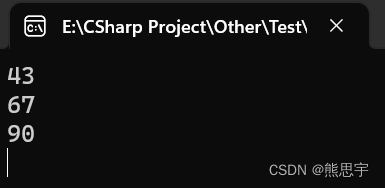
在 Where 的判断条件中,你就当它和 if 中的判断条件一样写,多写几个判断条件也是可以的
using System;
using System.Collections.Generic;
using System.Linq;namespace LinqTest
{internal class Program{static void Main(string[] args){List numList = new List { 1, 4, 5, 24, 43, 67, 12, 90, 15 };var collect = numList.Where(x => x > 10 && x < 90);foreach (int num in collect){Console.WriteLine(num);}Console.ReadKey();}}
}
运行:
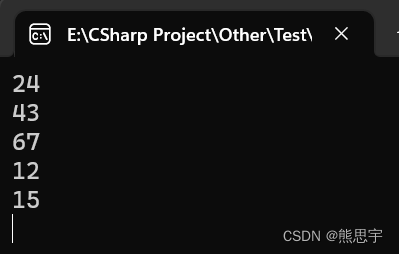
有人可能会问:“不对啊,我在网上查资料中,和你写的不一样,他们写的有 from, in 等关键字,你这为啥没有啊,你这 Linq 是不是搞错了”?没搞错哈,这都是正常的,比如下面的代码,虽然写法不一样,但效果是一样的,我更推荐使用上面的写法,更容易理解,阅读起来也更加方便。
using System;
using System.Collections.Generic;
using System.Linq;namespace LinqTest
{internal class Program{static void Main(string[] args){List numList = new List { 1, 4, 5, 24, 43, 67, 12, 90, 15 };//var collect = numList.Where(x => x > 10 && x < 90);var collect = from x in numList where x > 10 && x < 90 select x;foreach (int num in collect){Console.WriteLine(num);}Console.ReadKey();}}
}
运行:

三、Select
Select 是 LINQ 的一个操作符,用于对序列中的每个元素进行转换或投影操作,并返回一个新的序列。
使用 Select 可以对数组中的每个元素进行转换,或者计算,下面用一个简单的例子,将数组中每个元素 + 1
using System;
using System.Collections.Generic;
using System.Linq;namespace LinqTest
{internal class Program{static void Main(string[] args){List numList = new List { 1, 4, 5, 24, 43, 67, 12, 90, 15 };var collect = numList.Select(x => x + 1);foreach (var x in collect){Console.WriteLine(x);}Console.ReadKey();}}
}
运行:

同样的,在 Select 执行结束后,依然可以添加其他的 Linq 操作,这个在 Linq 查询中基本都是一样的,后面就不再赘述了。
四、GroupBy
Linq GroupBy 方法用于按照指定的键对集合进行分组,它返回一个根据指定键进行分组的结果集。
先看一段代码,演示 GroupBy 方法 是如何进行分组的
using System;
using System.Collections.Generic;
using System.Linq;namespace LinqTest
{internal class Program{static void Main(string[] args){List peopleList = new List(){new People(){Name="张三", Age=12, Career="学生" },new People(){Name="柱子", Age=25, Career="农民" },new People(){Name="铁蛋", Age=23, Career="农民" },new People(){Name="狗剩", Age=34, Career="职员" },new People(){Name="二狗", Age=28, Career="职员" },};var collect = peopleList.GroupBy(x=> x.Career == "职员");foreach (var group in collect){Console.WriteLine("Grade {0}:", group.Key);foreach (var people in group){Console.WriteLine(people.Name);}}Console.ReadKey();}}class People{public string Name { get; set; }public int Age { get; set; }public string Career { get; set; }}
}
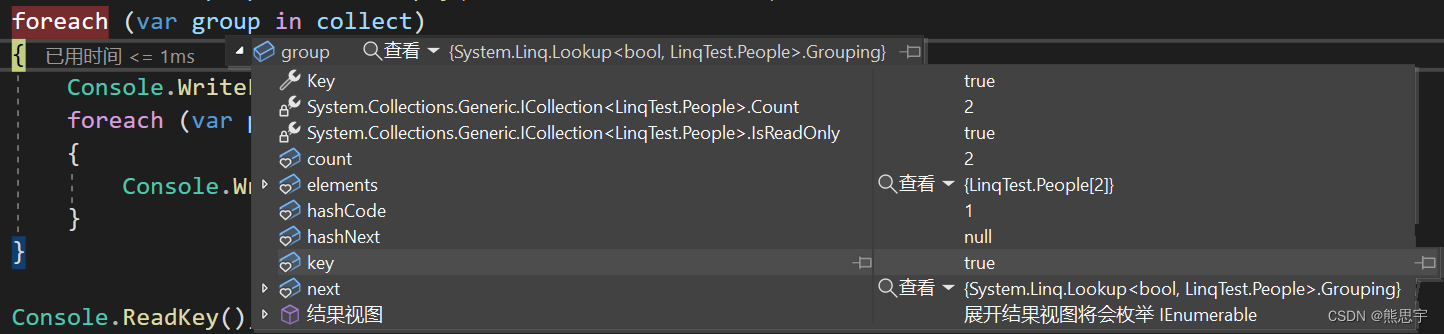
结果:
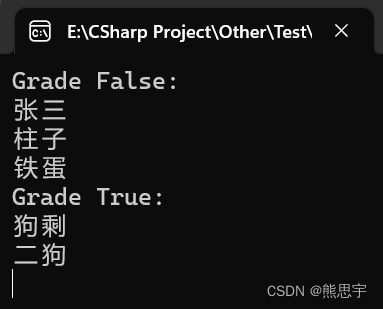
运行后可以看到,返回的是两组数据,grade 等于 false 是不满足条件的数据,也一并返回了
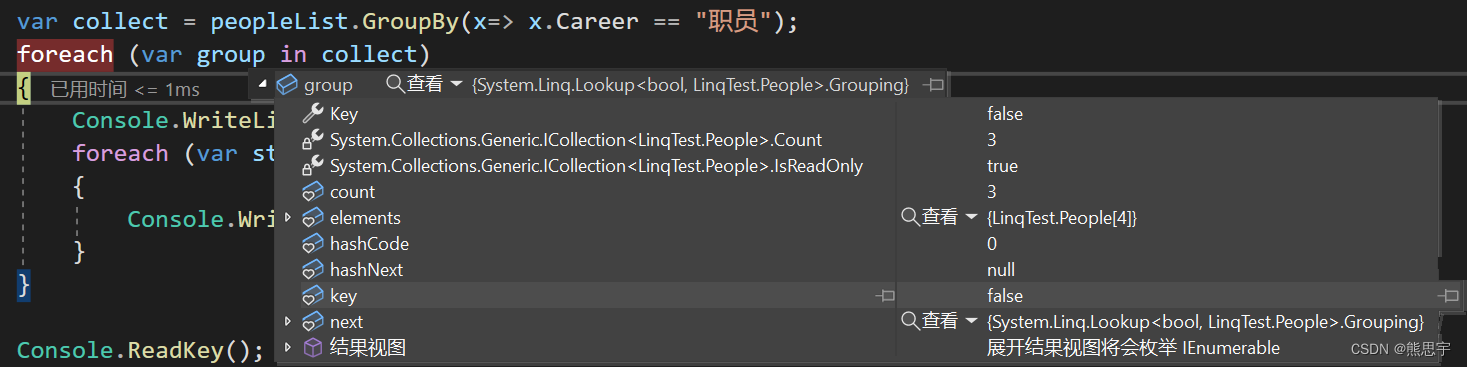
grade 等于 true 的正是我们想要的数据
五、First / FirstOrDefault
First 方法用于返回集合中的第一个元素。如果集合为空,则会引发一个异常。如果你想要安全地获取第一个元素,可以使用 FirstOrDefault 方法,它会返回默认值(null或0,具体取决于元素类型)而不是引发异常。
using System;
using System.Collections.Generic;
using System.Linq;namespace LinqTest
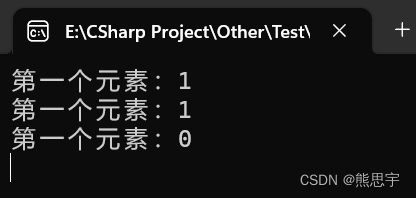
{internal class Program{static void Main(string[] args){List numList = new List { 1, 4, 5, 24, 43, 67, 12, 90, 15 };int firstNumber = numList.First();Console.WriteLine("第一个元素:{0}", firstNumber);int defaultNumber = numList.FirstOrDefault();Console.WriteLine("第一个元素:{0}", defaultNumber);int[] emptyNumbers = { };int firstOrDefaultNumber = emptyNumbers.FirstOrDefault();Console.WriteLine("第一个元素:{0}", firstOrDefaultNumber);Console.ReadKey();}}
}
运行:
六、Last / LastOrDefault
Last 方法用于返回集合中的最后一个元素。如果集合为空,则会引发一个异常。如果你想要安全地获取最后一个元素,可以使用 LastOrDefault 方法,它会返回默认值(null或0,具体取决于元素类型)而不是引发异常。
using System;
using System.Collections.Generic;
using System.Linq;namespace LinqTest
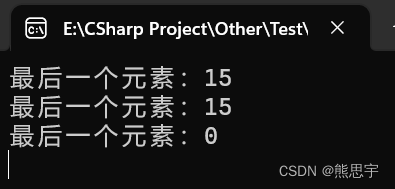
{internal class Program{static void Main(string[] args){List numList = new List { 1, 4, 5, 24, 43, 67, 12, 90, 15 };int firstNumber = numList.Last();Console.WriteLine("最后一个元素:{0}", firstNumber);int defaultNumber = numList.LastOrDefault();Console.WriteLine("最后一个元素:{0}", defaultNumber);int[] emptyNumbers = { };int firstOrDefaultNumber = emptyNumbers.LastOrDefault();Console.WriteLine("最后一个元素:{0}", firstOrDefaultNumber);Console.ReadKey();}}
}
运行:
end
本文来自互联网用户投稿,文章观点仅代表作者本人,不代表本站立场,不承担相关法律责任。如若转载,请注明出处。 如若内容造成侵权/违法违规/事实不符,请点击【内容举报】进行投诉反馈!