wxPython和pycairo练习记录8
wxPython和pycairo练习记录8
经过障碍物的编写,发现需要停止前进并重新梳理一下。
1.新的检测项加入时,已经在向混乱发展。是时候用上封装变化的编程工具,用策略模式或状态模式重写。
2.显示,在基类引入层级和优先级,按层级绘制所有 Sprite 对象。
3.范围的碰撞和本身的碰撞的作用顺序。还有像已经实现的碉堡,只有一个外层碰撞区域,如果要多加几层呢,最外层出现坦克,射速为1,再近一层射速为5,最近一层射速达到20。
4.计时,因为 wxPython 的时间事件 wx.EVT_TIMER,产生了错误的认识,觉得必须要靠 FPS 来计时。
5.pycairo 移动原点的作用,原点在左上角,移动原点相当于移动了可视区,旋转是以原点作圆心旋转,翻转是以过原点的 x 轴 和 y 轴为对称轴。
6.相邻障碍物远程作用叠加在一起,需要排除其他障碍物所在区域。
7.把全局类独立到一个模块文件,配置项、素材。
8.垃圾绘制对象的清除,destroyed 属性为 True 的。超出边界的子弹,需要设置 destroyed 。
9.键盘控制方向处理方式。
8.1 层级管理
关于显示层级,如果能碰撞到,说明处在同一层;如果不能碰到,则要么在上层,要么在下层。就像科幻里,高维生物与低维生物,视觉上是在同一个地方,但属于不同维度,无法被攻击到。
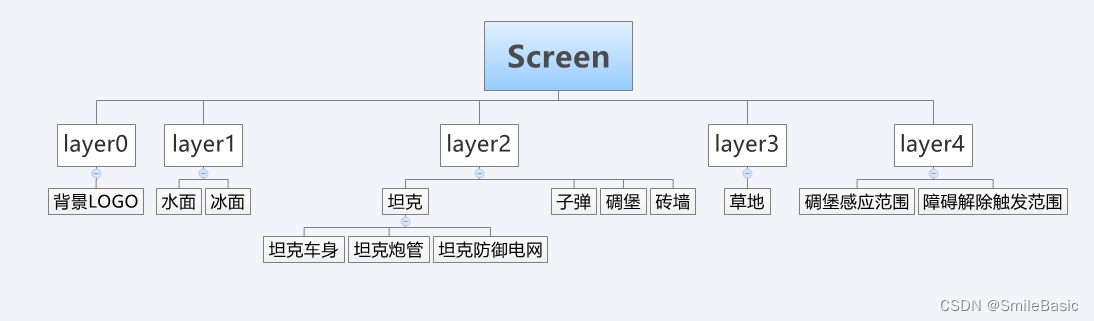
绘制是后绘制先显示,栈是后进先出。用栈管理层级?不方便调整显示顺序啊。层级,还是树形结构比较符合。分层,把屏幕作为根节点,创建不同的层作为子节点,子节点组成父节点,例如坦克作为父节点,它的组成部件作为子节点,那么就只需要绘制组成部件。优先级,先绘制为优先,从上向下,从左向右,优先级递减。定好规则后,只需要进行先根序遍历,逐一绘制就行了。
Sprite 对象默认都加入全局变量指定的 layer 层。
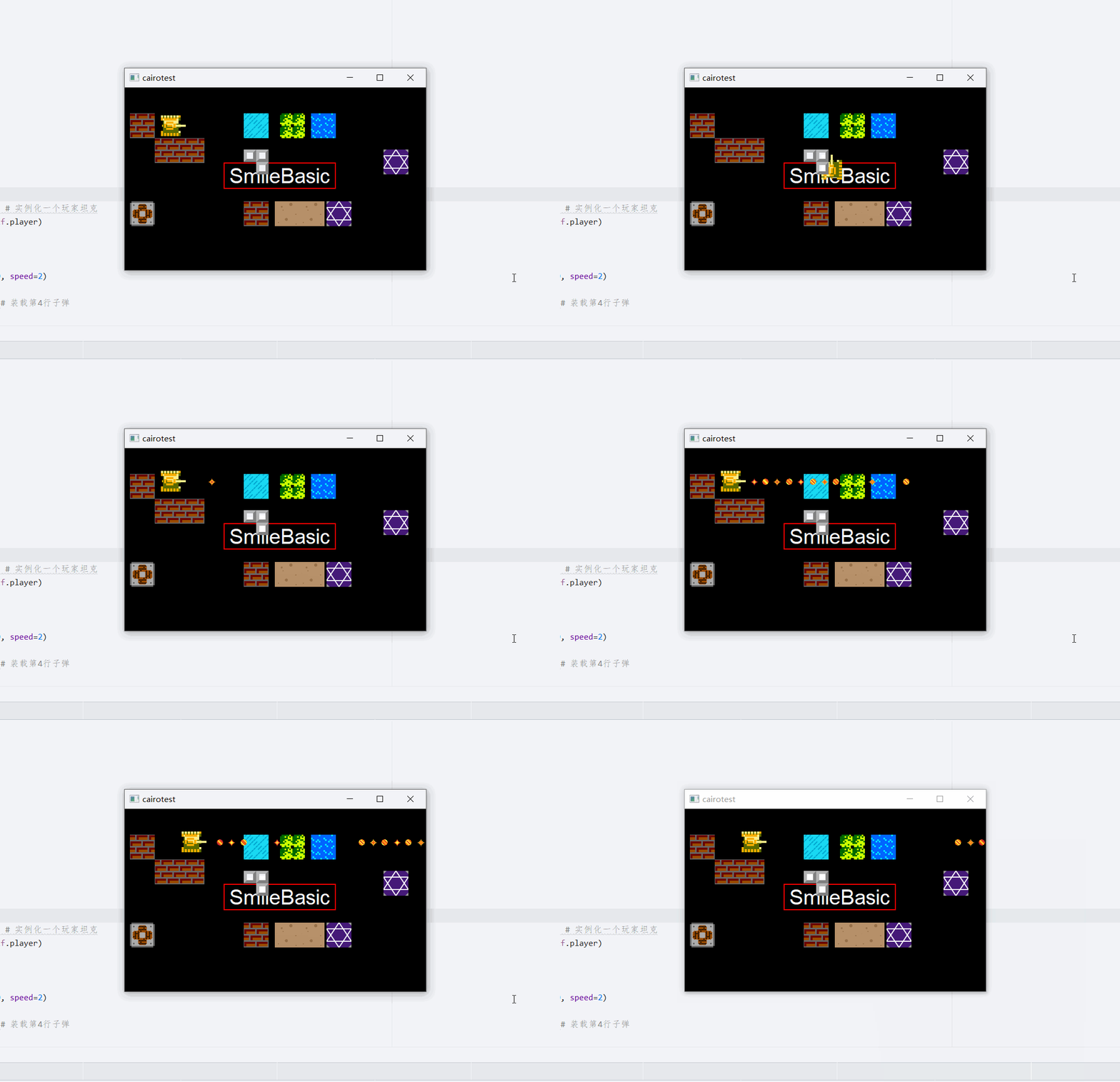
引入层级管理,上下图层效果演示。看起来是跟之前差不多的,但逻辑更清楚一些。
# -*- coding: utf-8 -*-
# layer.pyclass Layer:def __init__(self, data="Screen"):self.data = dataself.parent = Noneself.left = Noneself.right = Noneself.firstChild = Noneself.lastChild = Nonedef Append(self, tree):# 向最右添加子节点tree.parent = selfif self.lastChild:self.lastChild.right = treetree.left = self.lastChildself.lastChild = treeelse:self.lastChild = self.firstChild = treereturn selfdef PreAppend(self, tree):# 向最左添加子节点tree.parent = selfif self.firstChild:self.firstChild.left = treetree.right = self.firstChildself.firstChild = treeelse:self.firstChild = self.lastChild = treereturn selfdef Insert(self, tree, left):# 在指定节点右插入节点tree.parent = selftree.left = lefttree.right = left.rightif left is self.lastChild:self.lastChild = treeelse:left.right.left = treeleft.right = treereturn selfdef PreInsert(self, tree, right):# 在指定节点左插入节点tree.parent = selftree.right = righttree.left = right.leftif right is self.firstChild:self.firstChild = treeelse:right.left.right = treeright.left = treereturn selfdef Delete(self, tree):# 删除指定节点if tree.parent is not self:returnif tree.left:tree.left.right = tree.rightif tree is self.lastChild:self.lastChild = tree.leftif tree.right:tree.right.left = tree.leftif tree is self.firstChild:self.firstChild = tree.rightif tree is self.firstChild and tree is self.lastChild:self.firstChild = Noneself.lastChild = Nonetree.parent = Nonetree.left = Nonetree.right = Nonereturn selfdef Exchange(self, tree1, tree2):# 交换位置if (tree1.parent is not self) or (tree2.parent is not self) or (not self.firstChild) or (tree1 is tree2):return# 逻辑有点混乱,直接暴力交换tmp = Layer("tmp")self.Insert(tmp, tree1)self.Delete(tree1)self.Insert(tree1, tree2)self.Delete(tree2)self.Insert(tree2, tmp)self.Delete(tmp)del tmpdef Clear(self):self.parent = Noneself.left = Noneself.right = Noneself.firstChild = Noneself.lastChild = Nonereturn selfdef SetParent(self, parent):# 设置父节点,移动,没解决parent首尾相连构成循环的问题self.parent.Delete(self)parent.Append(self)return selfdef __Draw(self, node, ctx):# 绘制if hasattr(node.data, "GetSurface"):sprite = node.datactx.set_source_surface(sprite.GetSurface(), sprite.GetX(), sprite.GetY())ctx.paint()def Display(self, ctx):# 显示全部 Sprite 对象if (not self.parent) and self.data == "Screen" and self.firstChild:self.Traverse(self, self.__Draw, ctx)@classmethoddef Traverse(cls, root, func, *args):# 遍历子节点node = root.firstChildwhile node:# 只对没有子节点的节点执行操作if not node.firstChild:func(node, *args)cls.Traverse(node, func, *args)node = node.right
8.2 修改配置文件
主要是把素材和图层配置放到公共文件。
# -*- coding: utf-8 -*-
# const.pyimport os
import glob
from cairo import ImageSurface
from layer import Layerclass cv:"""常量,用类属性避免使用全局变量"""# 刷新定时器 idTIMER_ID = 1# 刷新次数times = 0# 刷新间隔时间 毫秒, FPS (frames per second) 就是 1000 // SPEEDSPEED = 10# 面板尺寸BOARD_WIDTH = 600BOARD_HEIGHT = 400# 全局图层,管理对象显示screen = Layer()layer0 = Layer("layer0") # 背景layer1 = Layer("layer1") # 水面、冰面、传送阵layer2 = Layer("layer2") # 坦克、子弹、碉堡、砖墙layer3 = Layer("layer3") # 草地layer4 = Layer("layer4") # 碉堡感应范围、障碍作用解除触发范围screen.Append(layer0).Append(layer1).Append(layer2).Append(layer3).Append(layer4)layer = layer2 # 默认图层# 素材文件路径img_path = "./resource/img/"# 图片直接加载为 pycairo 的 surfacesurfaces = {}for path in glob.glob(img_path + "*.png"):surfaceName = os.path.basename(path).split(".")[0]surfaces[surfaceName] = ImageSurface.create_from_png(path)
8.3 修改图像容器
引入图层属性,值为 Layer 对象,可通过它修改显示的层级。
# -*- coding: utf-8 -*-
# display.pyimport wx
import cairo
from const import cv
from layer import Layerclass Sprite:def __init__(self, x, y, surface, parentLayer=cv.layer):self._x = xself._y = yself._destroyed = False # 销毁状态# 创建 surface 副本, 没找到简单一点的方法self._width = surface.get_width()self._height = surface.get_height()self._surface = cairo.ImageSurface(cairo.FORMAT_ARGB32, self._width, self._height)ctx = cairo.Context(self._surface)ctx.set_source_surface(surface, 0, 0)ctx.paint()# 默认加入默认图层self._layer = Layer(self)parentLayer.Append(self._layer)def GetX(self):return self._xdef SetX(self, x):self._x = xdef GetY(self):return self._ydef SetY(self, y):self._y = ydef GetWidth(self):return self._widthdef SetWidth(self, width):self._width = widthdef GetHeight(self):return self._heightdef SetHeight(self, height):self._height = heightdef GetSurface(self):return self._surfacedef SetSurface(self, surface):self._surface = surfacedef GetRect(self):# 获取边框矩形对象,可用于碰撞检测等return wx.Rect(self._x, self._y, self._width, self._height)def IsDestroyed(self):return self._destroyeddef Destroy(self):self._destroyed = Truedef GetLayer(self):return self._layerdef SetParentLayer(self, layer):cv.layer.SetParent(layer)class MovieClip(Sprite):def __init__(self, x, y, surface, rect, fps):super(MovieClip, self).__init__(x, y, surface)self._scenes = [] # 保存所有场景,每个场景保存当前场景所有帧self._frames = [] # 保存当前场景所有帧self._currentScene = 0 # 当前场景索引self._totalScenes = 0 # 总场景数self._currentFrame = 0 # 当前帧索引self._totalFrames = 0 # 当前场景总帧数self._isPlaying = False # 播放状态self._fps = fps  # 动画可能需要不同于主程序的FPSself.LoadFrames(rect)def LoadFrames(self, rect):# 按显示区域载入场景和帧x, y, width, height = rect# 每行表示一个场景scene,scene中每列表示一个frametry:for j in range(self._height // height):frames = []for i in range(self._width // width):frame = self._surface.create_for_rectangle(x + width * i, y + height * j, width, height)frames.append(frame)self._scenes.append(frames)except Exception as e:print(str(e))# 更新初始化变量self._surface = self._scenes[self._currentScene][self._currentFrame]self._totalScenes = len(self._scenes)self._totalFrames = len(self._scenes[self._currentScene])# create_for_rectangle 得到的 surface 获取到的宽高为0,这里直接使用矩形宽高self._width = widthself._height = heightdef Play(self):self._isPlaying = Truedef Stop(self):self._isPlaying = Falsedef PrevScene(self):self._currentScene -= 1self._isPlaying = Falsedef NextScene(self):self._currentScene += 1self._isPlaying = Falsedef PrevFrame(self):self._currentFrame -= 1self._isPlaying = Falsedef NextFrame(self):self._currentFrame += 1self._isPlaying = Falsedef GotoAndPlay(self, frame, scene):self._currentScene = sceneself._currentFrame = frameself._isPlaying = Truedef GotoAndStop(self, frame, scene):self._currentScene = sceneself._currentFrame = frameself._isPlaying = Falsedef Update(self, times, speed):# 交给主程序执行,用于刷新 MovieClip 对象数据,主程序需要增加 times 用于记录主程序刷新次数# 主程序刷新速度要比 MovieClip 对象刷新快# print("刷新次数:", times, "当前场景索引:", self._currentScene,  "当前帧索引:", self._currentFrame)if times % (1000 // self._fps // speed) == 0 and self._isPlaying:self._currentFrame += 1def __setattr__(self, name, value):# 更新 _currentFrame 和 _currentScene 时,同时更新相应变量self.__dict__[name] = valueif self.__dict__.get("_scenes"):if self.__dict__.get("_frames") and name == "_currentFrame":self._surface = self._frames[self._currentFrame % self._totalFrames]elif name == "_currentScene":self._frames = self._scenes[self._currentScene % self._totalScenes]self._totalFrames = len(self._frames)
8.4 一系列修改
显示部分暂时没问题,像碰撞检测之类还没有修改。
# -*- coding: utf-8 -*-
# main.pyimport wx
from const import cv
from example import Boardclass MyFrame(wx.Frame):def __init__(self, *args, **kwargs):super(MyFrame, self).__init__(*args, **kwargs)Board(parent=self)self.Center() # 窗口在屏幕居中def main():app = wx.App()frame = MyFrame(parent=None, title="cairotest", size=(cv.BOARD_WIDTH, cv.BOARD_HEIGHT))frame.Show()app.MainLoop()if __name__ == "__main__":main()
# -*- coding: utf-8 -*-
# board.pyimport wx
import wx.lib.wxcairo
from const import cvclass Board(wx.Panel):def __init__(self, parent):super(Board, self).__init__(parent=parent, style=wx.WANTS_CHARS) # wx.WANTS_CHARS 可接收键盘事件self.SetDoubleBuffered(True) # 双缓冲,防止闪烁self.InitVariables()self.BindEvent()def InitVariables(self):# 初始化变量self.InitSceneObjects()# 设置定时器self.timer = wx.Timer(owner=self, id=cv.TIMER_ID)self.timer.Start(cv.SPEED)def InitSceneObjects(self):# 初始化场景中对象变量,如坦克实例、计分栏初始分数等self.sceneObjects = []def BindEvent(self):# 绑定事件self.Bind(wx.EVT_TIMER, self.OnTimer, id=cv.TIMER_ID)self.Bind(wx.EVT_PAINT, self.OnPaint)self.Bind(wx.EVT_KEY_DOWN, self.OnKeyDown)self.Bind(wx.EVT_KEY_UP, self.OnKeyUp)def OnTimer(self, e):# 处理更新事件,定时更新变量,刷新重绘cv.times += 1for so in self.sceneObjects:so.Update(cv.times, cv.SPEED)self.CheckStrategies()self.Refresh() # 重绘,执行OnPaint,强制刷新用 Updatedef CheckStrategies(self):# 碰撞检测等passdef OnPaint(self, e):# 处理重绘事件dc = wx.PaintDC(window=self) # device context,设备上下文,相当于画布或虚拟的屏幕,ctx = wx.lib.wxcairo.ContextFromDC(dc) # 获取 cairo.Context 对象,同上self.DrawBackground(ctx)self.DrawSceneObjects(ctx)def DrawBackground(self, ctx):# 绘制背景ctx.set_source_rgb(0, 0, 0)ctx.paint()text = "SmileBasic"ctx.set_font_size(40)_, _, w, h, _, _ = ctx.text_extents(text)x = (cv.BOARD_WIDTH - w) // 2y = (cv.BOARD_HEIGHT - h) // 2ctx.rectangle(x - 10, y - 10 - h, w + 20, h + 20)ctx.set_source_rgb(1, 0, 0)ctx.stroke()ctx.move_to(x, y)ctx.set_source_rgb(1, 1, 1)ctx.show_text(text)def DrawSceneObjects(self, ctx):# 绘制要显示的对象,如坦克、计分栏等,通过图层管理cv.screen.Display(ctx)def OnKeyDown(self, e):# 处理键盘按下事件passdef OnKeyUp(self, e):# 处理键盘弹起事件pass# -*- coding: utf-8 -*-
# example.pyimport random
import wx
import wx.lib.wxcairo
import cairo
from tank import Player, Enemy
from weapon import Weapon, Bullet
from obstacle import *
import board
from const import cvclass Board(board.Board):def InitSceneObjects(self):super().InitSceneObjects()self.player = Player(60, 50) # 实例化一个玩家坦克self.sceneObjects.append(self.player)# 初始武器系统,并装弹self.bullets = []weapon = Weapon(capacity=100, speed=2)for i in range(50):bullet = Bullet(type=3) # 装载第4行子弹weapon.AddBullet(bullet)self.bullets.append(bullet)self.sceneObjects.append(bullet)bullet = Bullet(type=6) # 装载第7行子弹weapon.AddBullet(bullet)self.bullets.append(bullet)self.sceneObjects.append(bullet)self.player.LoadWeapon(weapon) # 玩家坦克加载武器系统self.obstacles = []# 生成4个砖墙brick1 = Brick(10, 50)brick2 = Brick(58, 98)brick3 = Brick(106, 98)brick4 = Brick(230, 220)# 生成1个草地grass = Grass(300, 50)# 生成1个水面water = Water(360, 50)# 生成1个冰面ice = Ice(230, 50)# 生成3个小铁块iron1 = Iron(230, 120)iron2 = Iron(254, 120)iron3 = Iron(254, 144)# 生成碉堡blockhouse = Blockhouse(10, 220)# 需要把碉堡子弹也加入对象列表进行绘制和碰撞检测self.bullets += blockhouse.GetWeapon().GetClip()self.sceneObjects += blockhouse.GetWeapon().GetClip()# 生成两个泥坑mud1 = Mud(290, 220)mud2 = Mud(338, 220)# 生成两个传送阵transmission1 = Transmission(390, 220)transmission2 = Transmission(500, 120)transmission1.Bind(transmission2)self.obstacles += [brick1, brick2, brick3, brick4, grass, water,ice, iron1, iron2, iron3, blockhouse, mud1, mud2, transmission1, transmission2]self.sceneObjects += [brick1, brick2, brick3, brick4, grass, water,ice, iron1, iron2, iron3, blockhouse, mud1, mud2, transmission1, transmission2]def OnKeyDown(self, e):self.player.OnKeyDown(e)def OnKeyUp(self, e):self.player.OnKeyUp(e)# -*- coding: utf-8 -*-
# tank.pyimport random
import wx
import wx.lib.wxcairo
import cairo
from display import MovieClip
from const import cvclass Tank(MovieClip):def __init__(self, *args, **kwargs):super(Tank, self).__init__(*args, **kwargs)self._speed = 10 # 移动速度self._dx = 0 # x 轴方向self._dy = 0 # y 轴方向self._weapon = None # 武器self._originSpeed = 10 # 原始速度,用于恢复self._transTime = 0 # 等待法阵传送时间def Up(self):self._dy = -1self._dx = 0# 同一方向时需要需要排除,不然动画一直停留在第1帧if self._currentScene != 0:self.GotoAndPlay(0, 0)def Down(self):self._dy = 1self._dx = 0if self._currentScene != 1:self.GotoAndPlay(0, 1)def Left(self):self._dx = -1self._dy = 0if self._currentScene != 2:self.GotoAndPlay(0, 2)def Right(self):self._dx = 1self._dy = 0if self._currentScene != 3:self.GotoAndPlay(0, 3)def LoadWeapon(self, weapon):weapon.Loaded(self)self._weapon = weapondef GetWeapon(self):return self._weapondef GetSpeed(self):return self._speeddef SetSpeed(self, speed):self._speed = speeddef ResetSpeed(self):self._speed = self._originSpeeddef GetTransTime(self):return self._transTimedef SetTransTime(self, time):self._transTime = timeclass Player(Tank):def __init__(self, x, y, surface=cv.surfaces["player"], rect=(0, 0, 48, 48), fps=100):super(Player, self).__init__(x, y, surface, rect, fps)self._direction = wx.WXK_UPdef OnKeyDown(self, e):key = e.GetKeyCode()if key == wx.WXK_UP:self.Up()self._direction = wx.WXK_UPif key == wx.WXK_DOWN:self.Down()self._direction = wx.WXK_DOWNif key == wx.WXK_LEFT:self.Left()self._direction = wx.WXK_LEFTif key == wx.WXK_RIGHT:self.Right()self._direction = wx.WXK_RIGHTself._x += self._dx * self._speedself._y += self._dy * self._speed# 开火if key == wx.WXK_SPACE and self._weapon:self._weapon.Fire(True)def OnKeyUp(self, e):key = e.GetKeyCode()if key == wx.WXK_UP or key == wx.WXK_DOWN:self._dy = 0if key == wx.WXK_LEFT or key == wx.WXK_RIGHT:self._dx = 0if self._dx == 0 and self._dy == 0:self.Stop()# 停火if key == wx.WXK_SPACE and self._weapon:self._weapon.Fire(False)def GetDirection(self):return self._directionclass Enemy(Tank):def __init__(self, x, y, surface=cv.surfaces["player"], rect=(0, 0, 48, 48), fps=100, mixColor=(0, 1, 1, 0.8)):self._mixColor = mixColor # 自定义混合颜色super(Enemy, self).__init__(x, y, surface, rect, fps)# 初始随机方向self._direction = random.choice([wx.WXK_UP, wx.WXK_DOWN, wx.WXK_LEFT, wx.WXK_RIGHT])self._speed = 1self._originSpeed = 1self._isPlaying = Truedef LoadFrames(self, rect):# 将图像载为帧前,先改变图像的色相surface = self._surfacesw = surface.get_width()sh = surface.get_height()# 创建只显示坦克的 surface 作为混合层surface2 = cairo.ImageSurface(cairo.FORMAT_ARGB32, sw, sh)ctx = cairo.Context(surface2)ctx.set_source_rgba(*self._mixColor)ctx.mask_surface(surface)# 与目标图像混合ctx = cairo.Context(surface)ctx.set_source_surface(surface2)ctx.set_operator(cairo.Operator.HSL_HUE) # 将色相和目标图像色相混合ctx.paint()self._surface = surfacesuper().LoadFrames(rect)def GetDirection(self):return self._directiondef SetDirection(self, direction):self._direction = directiondef ChangeDirection(self, direction):# 方向转换为除指定方向以外的方向,总觉得这样写不太好 加个# TODOdirections = [wx.WXK_UP, wx.WXK_DOWN, wx.WXK_LEFT, wx.WXK_RIGHT]directions.remove(direction)self._direction = random.choice(directions)def AutoWalk(self):if self._direction == wx.WXK_UP:self.Up()elif self._direction == wx.WXK_DOWN:self.Down()elif self._direction == wx.WXK_LEFT:self.Left()elif self._direction == wx.WXK_RIGHT:self.Right()# 遇边界转向,坦克宽高明明是48,可是按48处理显示不对# TODOif self._x < 0:self._x = 0self.ChangeDirection(wx.WXK_LEFT)elif self._x > cv.BOARD_WIDTH - 68:self._x = cv.BOARD_WIDTH - 68self.ChangeDirection(wx.WXK_RIGHT)else:self._x += self._dx * self._speedif self._y < 0:self._y = 0self.ChangeDirection(wx.WXK_UP)elif self._y > cv.BOARD_HEIGHT - 96:self._y = cv.BOARD_HEIGHT - 96self.ChangeDirection(wx.WXK_DOWN)else:self._y += self._dy * self._speeddef Update(self, times, speed):# 由主程序刷新时更新self.AutoWalk()super().Update(times, speed)# -*- coding: utf-8 -*-
# weapon.pyimport wx
import wx.lib.wxcairo
import cairo
from display import MovieClip
from const import cvclass Weapon:def __init__(self, capacity=10, speed=20, interval=100):self._clip = [] # 弹夹self._capacity = capacity # 弹夹容量self._speed = speed # 发射出的子弹速度self._isFire = False # 开火状态self._tank = None # 被装载对象self._currentBullet = None # 当前要发射的子弹self._fireTime = -interval - 1 # 上次开火时间,首次开火时间必然满足self._fireInterval = interval # 默认开火间隔时间0.1秒def GetCapacity(self):return self._capacitydef GetSpeed(self):return self._speeddef GetBulletNum(self):return len(self._clip)def GetClip(self):return self._clipdef isFire(self):return self._isFiredef Loaded(self, tank):# 被装载self._tank = tankdef AddBullet(self, bullet):# 装弹并返回装弹结果if len(self._clip) < self._capacity:self._clip.append(bullet)return Trueelse:return Falsedef Fire(self, state=True):# 开火或停火self._isFire = state# 判断状态及开火间隔时间是否大于武器限定间隔时间if state and (self._fireTime + self._fireInterval) < cv.times * cv.SPEED and len(self._clip) > 0:# 记录开火时间self._fireTime = cv.times * cv.SPEEDself._currentBullet = self._clip.pop()# 根据坦克坐标和尺寸计算子弹起始位置direction = self._tank.GetDirection()x, y, w, h = self._tank.GetRect()_, _, bw, bh = self._currentBullet.GetRect()if direction == wx.WXK_UP:bx = x + w / 2 - bw / 2by = y - bhelif direction == wx.WXK_DOWN:bx = x + w / 2 - bw / 2by = y + helif direction == wx.WXK_LEFT:bx = x - bwby = y + h / 2 - bh / 2elif direction == wx.WXK_RIGHT:bx = x + wby = y + h / 2 - bh / 2# 设置子弹方向self._currentBullet.SetDirection(direction)# 设置发射初始坐标self._currentBullet.SetX(bx)self._currentBullet.SetY(by)# 设置子弹速度self._currentBullet.SetSpeed(self._speed)# 发射self._currentBullet.Fired()class Bullet(MovieClip):def __init__(self, x=-100, y=0, surface=cv.surfaces["bullets"], rect=(0, 0, 16, 16), fps=100, type=0):super(Bullet, self).__init__(x, y, surface, rect, fps)self._speed = 0 # 子弹初始速度self._type = typeself._direction = Nonedef SetDirection(self, direction):self._direction = directiondef SetSpeed(self, speed):self._speed = speeddef Fired(self):# 尽量只用中心对称的子弹,避免换方向发射还要做旋转处理self.GotoAndPlay(0, self._type)def Fly(self):if not self._destroyed and self._speed > 0:if self._direction == wx.WXK_UP:self._y -= self._speedelif self._direction == wx.WXK_DOWN:self._y += self._speedelif self._direction == wx.WXK_LEFT:self._x -= self._speedelif self._direction == wx.WXK_RIGHT:self._x += self._speeddef Update(self, times, speed):self.Fly()super().Update(times, speed)# -*- coding: utf-8 -*-
# obstacle.pyimport math
import wx
import cairo
from display import Sprite
from weapon import Weapon, Bullet
from const import cvclass Obstacle(Sprite):def __init__(self, x, y, surface, parentLayer=cv.layer):super(Obstacle, self).__init__(x, y, surface, parentLayer=parentLayer)self._canCross = False # 是否可穿行self._canDestroy = False # 是否可打破self._canBulletCross = False # 是否子弹可穿行self._buff = False # 是否有为有特殊效果的self._isRemote = False # 可远程作用def CanCross(self):return self._canCrossdef CanDestroy(self):return self._canDestroydef GetLayer(self):return self._layerdef CanBulletCross(self):return self._canBulletCrossdef HasBuff(self):return self._buffdef IsRemote(self):return self._isRemotedef Act(self, tank=None):# 与坦克的交互行为,比如加滑行 _buff,比如碉堡直接开火passdef Update(self, times, speed):# 用于被定时器处理函数调用刷新,静态障碍不需要重写passclass Brick(Obstacle):# 砖墙def __init__(self, x, y, parentLayer=cv.layer):surface = self.Draw() # 直接绘制砖墙super(Brick, self).__init__(x, y, surface, parentLayer)self._canCross = False # 不可穿行self._canDestroy = True # 可打破self._canBulletCross = False # 子弹不可穿行self._buff = False # 没有特殊效果def Draw(self):# 绘制砖墙# 按坦克尺寸48创建图像,颜色不需要透明surface = cairo.ImageSurface(cairo.FORMAT_RGB24, 48, 48)# 砖块是错落砌在一起的,先建一个2倍障碍宽度的矩形,作为一行砖块rect1 = cairo.ImageSurface(cairo.FORMAT_RGB24, 96, 12)# 画一个小24*12的矩形砖块,然后重复平铺rect2 = cairo.ImageSurface(cairo.FORMAT_RGB24, 24, 12)ctx = cairo.Context(rect2)# 填充灰色作底,水泥ctx.set_source_rgb(0.4, 0.4, 0.4)ctx.paint()# 画矩形,填充砖红色,砖ctx.set_source_rgb(0.6, 0.3, 0)ctx.rectangle(2, 2, 20, 8)ctx.fill()# 画线,更深的砖色,阴影ctx.set_source_rgb(0.42, 0.02, 0)ctx.set_line_width(4)ctx.move_to(3, 10)ctx.line_to(3, 3)ctx.line_to(22, 3)ctx.stroke()# 以 rect2 重复填充 rect1ctx = cairo.Context(rect1)pattern = cairo.SurfacePattern(rect2)pattern.set_extend(cairo.Extend.REPEAT)ctx.set_source(pattern)ctx.paint()# 把 rect1 错位绘制到 surfacectx = cairo.Context(surface)ctx.set_source_surface(rect1, -12, 0)ctx.paint()ctx.set_source_surface(rect1, 0, 12)ctx.paint()ctx.set_source_surface(rect1, -12, 24)ctx.paint()ctx.set_source_surface(rect1, 0, 36)ctx.paint()return surfaceclass Grass(Obstacle):# 草地def __init__(self, x, y, surface=cv.surfaces["wall_grass"], parentLayer=cv.layer3):super(Grass, self).__init__(x, y, surface, parentLayer)self._canCross = True # 可穿行self._canDestroy = False # 不可打破self._canBulletCross = True # 子弹可穿行self._buff = False # 没有特殊效果class Water(Obstacle):# 水面def __init__(self, x, y, surface=cv.surfaces["wall_water"], parentLayer=cv.layer1):super(Water, self).__init__(x, y, surface, parentLayer)self._canCross = False # 不可穿行self._canDestroy = False # 不可打破self._canBulletCross = True # 子弹可穿行self._buff = False # 没有特殊效果class Ice(Obstacle):# 冰面def __init__(self, x, y, parentLayer=cv.layer1):surface = self.Draw()super(Ice, self).__init__(x, y, surface, parentLayer)self._canCross = True # 可穿行self._canDestroy = False # 不可打破self._canBulletCross = True # 子弹可穿行self._buff = True # 有特殊效果self._distance = 20 # 滑行距离def Draw(self):surface = cairo.ImageSurface(cairo.FORMAT_RGB24, 48, 48)ctx = cairo.Context(surface)# 填充底色ctx.set_source_rgb(0.1, 0.85, 0.95)ctx.paint()# 以中心逆向旋转45度ctx.translate(24, 24)ctx.rotate(math.pi * 3 / 4)ctx.translate(-24, -24)# 画几条表示冰面纹理的线ctx.set_source_rgb(0, 0.64, 0.8)for i in range(10):if i % 2 == 0:ctx.set_dash([5, 1])else:ctx.set_dash([10, 15])ctx.move_to(-10, 6 * i)ctx.line_to(70, 6 * i)ctx.stroke()return surfacedef Act(self, tank=None):# 与坦克的交互行为,比如加滑行 _buff,比如碉堡直接开火direction = tank.GetDirection()x = tank.GetX()y = tank.GetY()if direction == wx.WXK_UP:tank.SetY(y - self._distance)elif direction == wx.WXK_DOWN:tank.SetY(y + self._distance)elif direction == wx.WXK_LEFT:tank.SetX(x - self._distance)elif direction == wx.WXK_RIGHT:tank.SetX(x + self._distance)class Iron(Obstacle):# 铁块def __init__(self, x, y, parentLayer=cv.layer):surface = self.Draw()super(Iron, self).__init__(x, y, surface, parentLayer)self._canCross = False # 不可穿行self._canDestroy = False # 不可打破self._layer = 0 # 层级,0 和坦克同一层self._canBulletCross = False # 子弹不可穿行self._buff = False # 没有特殊效果def Draw(self):# 尺寸24*24surface = cairo.ImageSurface(cairo.FORMAT_RGB24, 24, 24)ctx = cairo.Context(surface)# 底色ctx.set_source_rgb(0.7, 0.7, 0.7)ctx.paint()# 阴影ctx.move_to(0, 24)ctx.line_to(24, 24)ctx.line_to(24, 0)ctx.close_path()ctx.set_source_rgb(0.5, 0.5, 0.5)ctx.fill()# 高光ctx.rectangle(6, 6, 12, 12)ctx.set_source_rgb(1, 1, 1)ctx.fill()return surfaceclass Blockhouse(Obstacle):# 碉堡def __init__(self, x, y, surface=cv.surfaces["wall_blockhouse"], parentLayer=cv.layer, radius=150):super(Blockhouse, self).__init__(x, y, surface, parentLayer)self._canCross = False # 不可穿行self._canDestroy = True # 可打破self._canBulletCross = False # 子弹不可穿行self._buff = True # 有特殊效果self._isRemote = True # 有远程作用self._radius = radius # 火力覆盖半径self._direction = wx.WXK_UP # 射击方向# 加载武器和子弹self._weapon = Weapon(capacity=50, speed=1, interval=500)self._weapon.Loaded(self)for i in range(50):self._weapon.AddBullet(Bullet(type=3))def LoadWeapon(self, weapon):weapon.Loaded(self)self._weapon = weapondef GetWeapon(self):return self._weapondef GetRadius(self):return self._radiusdef GetDirection(self):return self._directiondef Act(self, tank=None):# 向坦克调整射击方向并射击direction = tank.GetDirection()tx, ty, tw, th = tank.GetRect()x, y, w, h = self.GetRect()if tx > x - tw and tx < x + w:if ty < y:# print("up")self._direction = wx.WXK_UPelse:# print("down")self._direction = wx.WXK_DOWNself._weapon.Fire()if ty > y - th and ty < y + h:if tx < x:# print("left")self._direction = wx.WXK_LEFTelse:# print("right")self._direction = wx.WXK_RIGHTself._weapon.Fire()class Mud(Obstacle):# 泥坑def __init__(self, x, y, surface=cv.surfaces["wall_mud"], parentLayer=cv.layer1):super(Mud, self).__init__(x, y, surface, parentLayer)self._canCross = True # 可穿行self._canDestroy = False # 不可打破self._canBulletCross = True # 子弹可穿行self._buff = True # 有特殊效果self._isRemote = True # 有远程作用self._radius = self._width * 1.5 # 作用半径def GetRadius(self):return self._radiusdef Act(self, tank=None):# 离开范围tx, ty, tw, th = tank.GetRect()x, y, w, h = self.GetRect()if tank.GetSpeed() == 1 and (tx < x - tw or tx > x + w or ty < y - th or ty > y + h):tank.ResetSpeed()def SecondAct(self, tank=None):# 进入范围if tank.GetSpeed() > 1:tank.SetSpeed(1)class Transmission(Obstacle):# 传送阵def __init__(self, x, y, parentLayer=cv.layer1):surface = self.Draw()super(Transmission, self).__init__(x, y, surface, parentLayer)self._canCross = True # 可穿行self._canDestroy = False # 不可打破self._layer = -1 # 层级,0 和坦克同一层self._canBulletCross = True # 子弹可穿行self._buff = True # 没有特殊效果self._isRemote = True # 有远程作用self._radius = self._width * 1.5 # 作用半径self._waitTime = 3000 # 等待时间3秒self._dest = None # 传送目的法阵def GetRadius(self):return self._radiusdef Draw(self):# 画个六芒星surface = cairo.ImageSurface(cairo.FORMAT_RGB24, 48, 48)ctx = cairo.Context(surface)# 填充紫色底色ctx.set_source_rgb(0.27, 0.1, 0.47)ctx.paint()ctx.save()ctx.set_source_rgb(1, 1, 1)for i in range(2):if i == 1:# 对称翻转ctx.scale(1, -1) # (x * dx, y * dy)ctx.translate(0, -48) # 设置坐标轴原点# 画三角形ctx.move_to(0, 12)ctx.line_to(48, 12)ctx.line_to(24, 48)ctx.close_path()ctx.stroke()ctx.restore()# 紫色底不太明显,画四个角,标识下边缘ctx.set_source_rgb(0.6, 0.6, 0.6)for i in range(2):if i == 1:# 关于 x 轴对称ctx.scale(1, -1)ctx.translate(0, -48)for j in range(2):if j == 1:# 关于 y 轴对称ctx.scale(-1, 1)ctx.translate(-48, 0)ctx.move_to(0, 6)ctx.line_to(0, 0)ctx.line_to(6, 0)ctx.close_path()ctx.fill()return surfacedef Act(self, tank=None):# 离开范围,等待时间归零tx, ty, tw, th = tank.GetRect()x, y, w, h = self.GetRect()if tx < x - tw or tx > x + w or ty < y - th or ty > y + h:tank.SetTransTime(0)def SecondAct(self, tank=None):# 进入法阵范围# 新进入,设置进入时间if tank.GetTransTime() == 0:tank.SetTransTime(cv.times * cv.SPEED)# 符合时间,开始传送if tank.GetTransTime() + self._waitTime <= cv.times * cv.SPEED:tank.SetX(self._dest.GetX())tank.SetY(self._dest.GetY())tank.SetTransTime(0)def Bind(self, transmission):# 法阵双向绑定self._dest = transmissiontransmission.SetDest(self)def GetDest(self):return self._destdef SetDest(self, dest):self._dest = dest本文来自互联网用户投稿,文章观点仅代表作者本人,不代表本站立场,不承担相关法律责任。如若转载,请注明出处。 如若内容造成侵权/违法违规/事实不符,请点击【内容举报】进行投诉反馈!