【全志T113-S3_100ask】5-编写按键驱动(input子系统+内核按键驱动)
【全志T113-S3_100ask】5-编写按键驱动(input子系统+内核按键驱动)
- 前言
- (一)input子系统
- (二)使能内核按键驱动
- (三)修改设备树
- 1、参考文档 gpio-keys.txt
- 2、修改根节点
- 3、测试
- (四)编写应用程序
- (五)测试
- (六)input_event 解析
- 附:其他事件类型
前言
在 第四讲 的时候我们自己添加key节点,并且通过编写驱动和应用程序成功读取按键值,但是对于强大linux来说,按键的驱动早就写进了内核,而且实际的开发中我们是使用input子系统进行开发的,下面我们使用 input子系统+内核按键驱动 来实现。
(一)input子系统
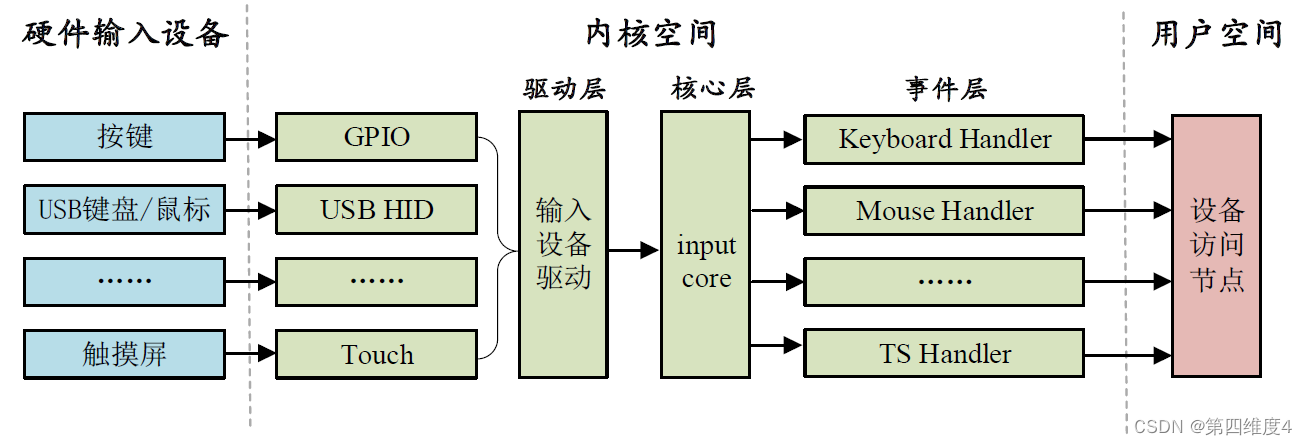
input 就是输入的意思,因此 input 子系统就是管理输入的子系统,和 pinctrl、gpio 子系统一样,都是 Linux 内核针对某一类设备而创建的框架。比如按键输入、键盘、鼠标、触摸屏等等这些都属于输入设备,不同的输入设备所代表的含义不同,按键和键盘就是代表按键信息,鼠标和触摸屏代表坐标信息,因此在应用层的处理就不同,对于驱动编写者而言不需要去关心应用层的事情,我们只需要按照要求上报这些输入事件即可。为此input 子系统分为 input 驱动层、input 核心层、input 事件处理层,最终给用户空间提供可访问的设备节点,input 子系统框架如图所示:
(二)使能内核按键驱动
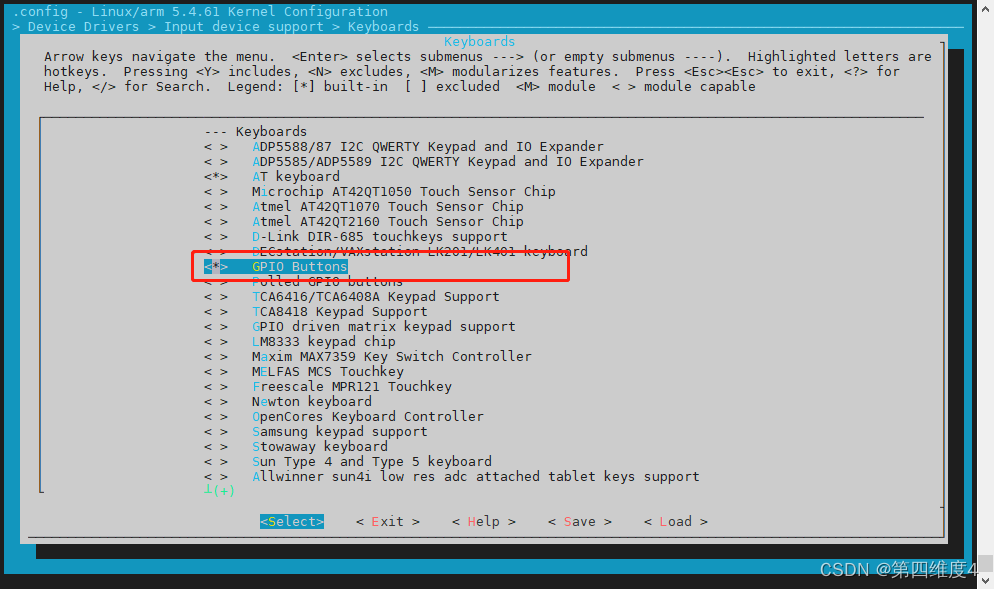
在内核通过 make menuconfig 进入菜单
-> Device Drivers -> Input device support -> Generic input layer (needed for keyboard, mouse, ...) (INPUT [=y]) -> Keyboards (INPUT_KEYBOARD [=y]) ->GPIO Buttons
(三)修改设备树
1、参考文档 gpio-keys.txt
./Documentation/devicetree/bindings/input/gpio-keys.txt
Device-Tree bindings for input/keyboard/gpio_keys.c keyboard driverRequired properties:- compatible = "gpio-keys";Optional properties:- autorepeat: Boolean, Enable auto repeat feature of Linux inputsubsystem.- label: String, name of the input device.Each button (key) is represented as a sub-node of "gpio-keys":
Subnode properties:- gpios: OF device-tree gpio specification.- interrupts: the interrupt line for that input.- label: Descriptive name of the key.- linux,code: Keycode to emit.Note that either "interrupts" or "gpios" properties can be omitted, but not
both at the same time. Specifying both properties is allowed.Optional subnode-properties:- linux,input-type: Specify event type this button/key generates.If not specified defaults to <1> == EV_KEY.- debounce-interval: Debouncing interval time in milliseconds.If not specified defaults to 5.- wakeup-source: Boolean, button can wake-up the system.(Legacy property supported: "gpio-key,wakeup")- wakeup-event-action: Specifies whether the key should wake thesystem when asserted, when deasserted, or both. This property isonly valid for keys that wake up the system (e.g., when the"wakeup-source" property is also provided).Supported values are defined in linux-event-codes.h:EV_ACT_ASSERTED		- assertedEV_ACT_DEASSERTED	- deassertedEV_ACT_ANY		- both asserted and deasserted- linux,can-disable: Boolean, indicates that button is connectedto dedicated (not shared) interrupt which can be disabled tosuppress events from the button.Example nodes:gpio-keys {compatible = "gpio-keys";autorepeat;up {label = "GPIO Key UP";linux,code = <103>;gpios = <&gpio1 0 1>;};down {label = "GPIO Key DOWN";linux,code = <108>;interrupts = <1 IRQ_TYPE_LEVEL_HIGH 7>;};...
2、修改根节点
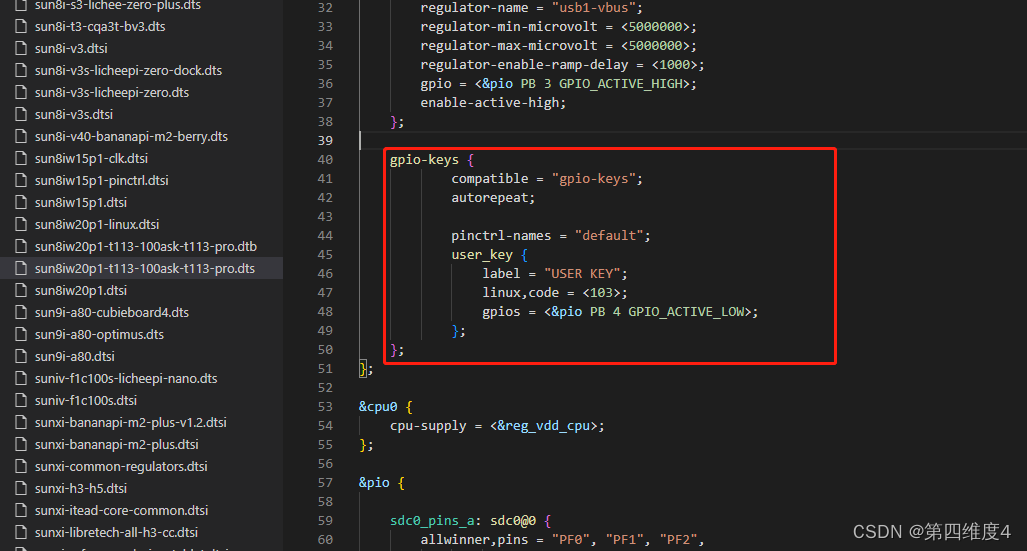
在根节点下添加:
gpio-keys {compatible = "gpio-keys";autorepeat;pinctrl-names = "default";user_key {label = "USER KEY";linux,code = <103>;gpios = <&pio PB 4 GPIO_ACTIVE_LOW>;};
};
3、测试
编译系统等操作略
启动开发板:
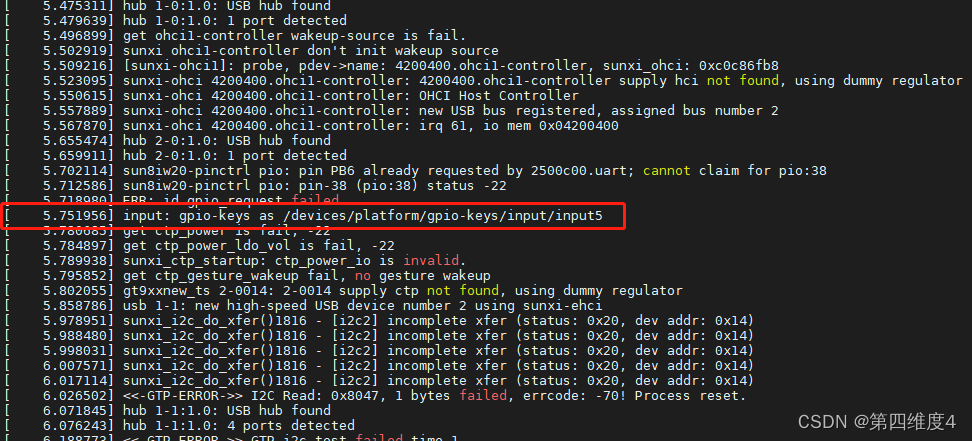
识别到按键驱动,确认一下:
$ ls /dev/input/
by-path  event0   event1   event2   event3   event4   event5
通过 hexdump 简单测试驱动
# hexdump /dev/input/event5
0000000 00b4 0000 821d 000b 0001 0067 0001 0000
0000010 00b4 0000 821d 000b 0000 0000 0000 0000
0000020 00b4 0000 dd66 000e 0001 0067 0000 0000
0000030 00b4 0000 dd66 000e 0000 0000 0000 0000
(如果一直输出,检查按键是低电平有效还是高电平有效,修改设备树)
(四)编写应用程序
参考正点原子
#include \n" , argv[0]);exit(-1);}/* 打开文件 */if (0 > (fd = open(argv[1], O_RDONLY))) {perror("open error");exit(-1);}for ( ; ; ) {/* 循环读取数据 */if (sizeof(struct input_event) !=read(fd, &in_ev, sizeof(struct input_event))) {perror("read error");exit(-1);}if (EV_KEY == in_ev.type) { //按键事件switch (in_ev.value) {case 0:printf("code<%d>: 松开\n", in_ev.code);break;case 1:printf("code<%d>: 按下\n", in_ev.code);break;case 2:printf("code<%d>: 长按\n", in_ev.code);break;}}}
}
(五)测试
编译后拷贝到开发板
# ./key_drv_test /dev/input/event5
code<103>: 按下
code<103>: 松开
code<103>: 按下
code<103>: 长按
code<103>: 长按
code<103>: 长按
code<103>: 长按
code<103>: 长按
code<103>: 长按
code<103>: 长按
code<103>: 长按
code<103>: 长按
code<103>: 松开
测试完成
(六)input_event 解析
# hexdump /dev/input/event5
/* 编号 *//* tv_sec */ /* tv_usec */ /* type */ /* code */  /* value */
0000000	   00b4 0000    821d 000b      0001       0067      0001 0000
0000010    00b4 0000    821d 000b      0000       0000      0000 0000
0000020    00b4 0000    dd66 000e      0001       0067      0000 0000
0000030    00b4 0000    dd66 000e      0000       0000      0000 0000
type 为事件类型,EV_KEY 事件值为 1,EV_SYN 事件值为0。
code 为事件编码,也就是按键值,0x67 就是我们在设备树设置的 linux,code =
value 就是按键值,为1 表示按下,为0 的话表示松开。
所以:
第1 行,按键(KEY_0)按下事件。
第2 行,EV_SYN 同步事件(每次上报按键事件都要同步)。
第3 行,按键(KEY_0)松开事件。
第4 行,EV_SYN 同步事件,和第2 行一样。
附:其他事件类型
#define EV_SYN 0x00 /* 同步事件 */
#define EV_KEY 0x01 /* 按键事件 */
#define EV_REL 0x02 /* 相对坐标事件 */
#define EV_ABS 0x03 /* 绝对坐标事件 */
#define EV_MSC 0x04 /* 杂项(其他)事件 */
#define EV_SW 0x05 /* 开关事件 */
#define EV_LED 0x11 /* LED */
#define EV_SND 0x12 /* sound(声音) */
#define EV_REP 0x14 /* 重复事件 */
#define EV_FF 0x15 /* 压力事件 */
#define EV_PWR 0x16 /* 电源事件 */
#define EV_FF_STATUS 0x17 /* 压力状态事件 */
本文来自互联网用户投稿,文章观点仅代表作者本人,不代表本站立场,不承担相关法律责任。如若转载,请注明出处。 如若内容造成侵权/违法违规/事实不符,请点击【内容举报】进行投诉反馈!